
explainer
MB vs GB Explained: Why a 1 TB Drive Shows Only 931 GB
By Uttam Regmi · Published 2026-07-04 · Updated 2026-07-04 · 8 min read · Fact-checked, sources cited
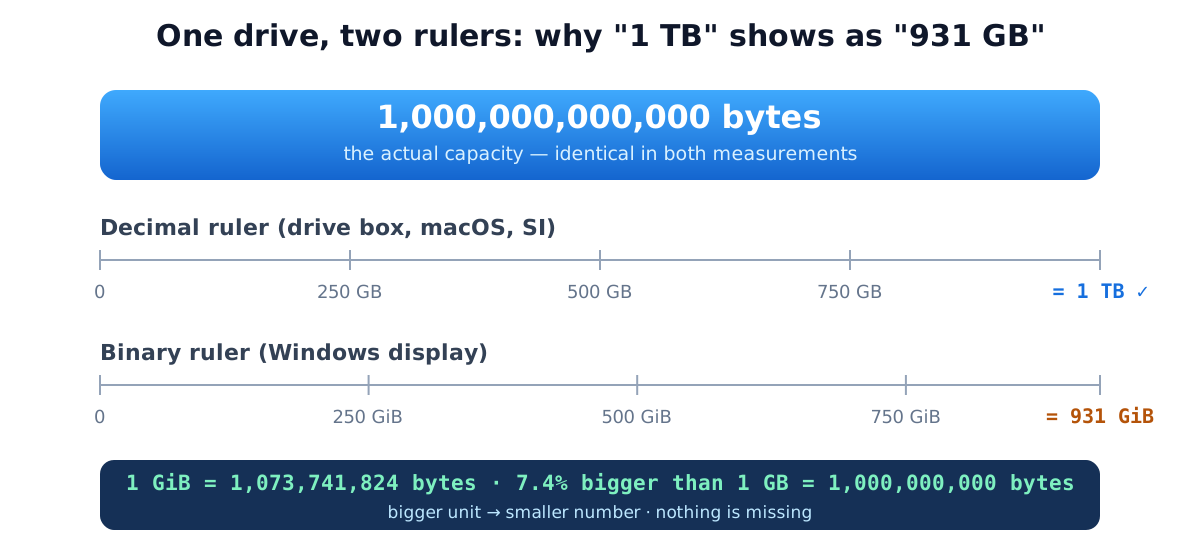
Your drive isn’t missing space, it’s being measured with two different rulers. Storage makers count 1 GB as exactly 1,000,000,000 bytes (the decimal SI standard). Windows counts in binary units where each step is 1,024, then labels them “GB” anyway. A “1 TB” drive genuinely contains one trillion bytes; in binary units that’s 931 GiB, which Windows displays as “931 GB.” Convert any value both ways with the MB to GB converter or the GB to GiB converter.
The two standards, side by side
| Unit | Bytes | Standard | Used by |
|---|---|---|---|
| 1 KB | 1,000 | decimal | storage, networking, SI |
| 1 KiB | 1,024 | binary | RAM, operating systems |
| 1 MB | 1,000,000 | decimal | web file sizes, media bitrates |
| 1 MiB | 1,048,576 | binary | Windows file properties |
| 1 GB | 10⁹ | decimal | drives, phones, data plans |
| 1 GiB | 1,073,741,824 | binary | cloud RAM, Windows drive sizes |
| 1 TB | 10¹² | decimal | drive marketing |
| 1 TiB | 2⁴⁰ ≈ 1.0995 × 10¹² | binary | enterprise storage, ZFS |
The complete unit ladder, bit to quettabyte
The decimal ladder, with what each magnitude actually holds:
| Unit | Power | Real-world scale |
|---|---|---|
| bit (b) | , | one 0 or 1 |
| byte (B) | 8 bits | one text character |
| kilobyte (KB) | 10³ | a short email |
| megabyte (MB) | 10⁶ | a minute of MP3 |
| gigabyte (GB) | 10⁹ | an hour of streaming |
| terabyte (TB) | 10¹² | a laptop drive; ~250,000 photos |
| petabyte (PB) | 10¹⁵ | ~11 years of 4K video; large-company data warehouse |
| exabyte (EB) | 10¹⁸ | months of global internet traffic |
| zettabyte (ZB) | 10²¹ | global annual data creation is ~180+ ZB (IDC estimate, mid-2020s) |
| yottabyte (YB) | 10²⁴ | , |
| ronnabyte (RB) | 10²⁷ | added to the SI in 2022 |
| quettabyte (QB) | 10³⁰ | the current largest named unit |
The binary ladder mirrors it with 1,024 steps: KiB, MiB, GiB, TiB, PiB (pebibyte), EiB (exbibyte), ZiB, YiB. The -bi- names (“kibibyte”) come from IEC 60027-2 (1998), later folded into ISO/IEC 80000-13 (NIST’s binary-prefix reference documents them), created specifically to end the two-meanings-of-kilobyte ambiguity.
Where did 1,024 come from?
Computers address memory in powers of two, and 2¹⁰ = 1,024 sits temptingly close to 1,000. Early computing borrowed the metric prefix, calling 1,024 bytes a “kilobyte”, accepting 2.4% imprecision for convenience. The shortcut compounded at every prefix until, at terabyte scale, the two meanings diverge by nearly 10%.
Three standards bodies now coexist: SI/IEC (decimal prefixes mean powers of ten; binary gets Ki/Mi/Gi), JEDEC (the memory-industry convention where “KB/MB/GB” on RAM labels still mean binary values), and legacy software conventions like Windows Explorer. That’s why an “8 GB” RAM stick really is 8 GiB (8.59 decimal GB) while an “8 GB” USB stick is 8 decimal GB (7.45 GiB), same label, opposite meanings, both “standard."
📌 Citable fact The binary prefixes kibi/mebi/gibi (1 KiB = 1,024 bytes; 1 GiB = 1,073,741,824 bytes) were standardized by IEC in 1998 and adopted into ISO/IEC 80000-13. A decimal terabyte equals 0.9095 binary tebibytes, the source of the "1 TB shows as 931 GB" effect.
"Missing” space by drive size
The percentage is fixed, so the apparent loss scales with capacity:
| Advertised (decimal) | What Windows shows | Apparent “loss” |
|---|---|---|
| 128 GB | 119.2 GB | 8.8 GB |
| 256 GB | 238.4 GB | 17.6 GB |
| 500 GB | 465.7 GB | 34.3 GB |
| 1 TB | 931.3 GB | 68.7 GB |
| 2 TB | 1,862.6 GB | 137.4 GB |
| 4 TB | 3,725.3 GB | 274.7 GB |
| 8 TB | 7,450.6 GB | 549.4 GB |
| 20 TB | 18,626.5 GB | ~1.37 “TB” |
If the displayed number is ~93.1% of the advertised one, you’re seeing the unit gap, not lost storage. On top of it, real deductions exist: file-system structures (NTFS/APFS metadata), recovery partitions (typically 500 MB-15 GB on laptops), and on SSDs a slice of over-provisioning. Check any size with the GB to GiB converter.
Windows vs macOS vs Linux: same bytes, three answers
- Windows divides by 1,024 at every step but prints KB/MB/GB/TB → a 1 TB drive reads “931 GB.”
- macOS (since Snow Leopard, 2009) uses true decimal → the same drive reads “1 TB.”
- Linux varies by tool and flags:
df -hreports binary (properly labeled GiB);df -Hreports decimal; GNOME’s file manager uses decimal.
None disagree about the bytes, only about the display unit.
The legal history is worth knowing because it settles the “was I cheated?” question: US class actions , Cho v. Seagate (settled 2006) and Safier v. Western Digital (2006), ended with settlements and clearer labeling (“1 GB = 1 billion bytes” footnotes), not findings of false capacity. Decimal GB is the standards-compliant meaning of the unit.
Scenario: internet speeds, Mbps is not MB/s
Network speeds are measured in bits per second; files in bytes. Eight bits per byte, divide advertised speed by 8:
| Plan speed | Max download rate | 1 GB file | 50 GB game | 4K movie (~20 GB) |
|---|---|---|---|---|
| 50 Mbps | 6.25 MB/s | ~2.7 min | ~2.2 h | ~53 min |
| 100 Mbps | 12.5 MB/s | ~1.3 min | ~1.1 h | ~27 min |
| 300 Mbps | 37.5 MB/s | ~27 s | ~22 min | ~9 min |
| 1 Gbps | 125 MB/s | ~8 s | ~6.7 min | ~2.7 min |
The lowercase/uppercase b is the entire difference: Mb = megabit, MB = megabyte. ISPs advertise the bigger-looking bits figure; your download manager shows bytes; real-world speeds also lose ~5-10% to protocol overhead. Convert cleanly with bits to bytes.
Scenario: what files and media actually weigh
Anchors for judging any storage decision (typical mid-2020s values):
| Item | Size |
|---|---|
| Plain email | 20-100 KB |
| Ebook (EPUB) | 1-3 MB |
| Smartphone photo (12-48 MP HEIC/JPEG) | 2-5 MB |
| MP3 song (320 kbps) | ~2.4 MB per minute |
| RAW photo (mirrorless camera) | 25-80 MB |
| 1 h HD Netflix stream | ~3 GB |
| 1 h 4K stream | ~7 GB |
| Modern AAA game install | 70-150 GB |
| 1 min of 4K/60 phone video | ~400 MB |
And how the media we carried evolved, a useful mental timeline of the units themselves: floppy disk 1.44 MB (1987) → CD-ROM 700 MB (1990s) → DVD 4.7 GB (2000s) → Blu-ray 25-100 GB → today’s fingernail-sized 1 TB microSD. Each generation crossed into the next unit up roughly once a decade.
Scenario: phone and laptop storage buying
A “256 GB” phone holds 256 decimal GB of flash, but you can’t use it all: the OS plus preinstalled apps consume 12-35 GB depending on platform, leaving roughly 220-230 GB usable. That deduction is real consumption (unlike the GB/GiB display difference). What fits in the remainder: on the order of 60,000 photos, or ~75 hours of downloaded 4K video, or one to three AAA games, games are now the fastest way to fill a device.
Cloud tiers rhyme with this: the common 100 GB plan holds ~25,000 photos; 2 TB comfortably swallows a decade of family media. For any “will it fit” math, MB to GB and GB to TB give exact answers.
RAM vs storage: why memory really is binary
Memory chips are wired with binary address lines, so their capacities are true powers of two, an “8 GB” RAM stick contains exactly 8 GiB (8,589,934,592 bytes ≈ 8.59 decimal GB). Cloud providers follow suit: an AWS instance with “16 GB memory” provisions 16 GiB, 7.4% more bytes than 16 decimal GB. When capacity-planning across RAM and disk, convert explicitly rather than assuming the labels match; the GiB to GB converter exists for exactly this.
⚠️ Buying gotcha "8 GB" means more bytes on a RAM label (binary, JEDEC convention) and fewer on an SSD label (decimal, SI convention). Two industries, same string, opposite meanings, always check which standard a spec sheet uses before comparing.
Common mistakes with data units
- Blaming the manufacturer for the 7%. The byte count is accurate; the display units differ. (The OS-overhead deduction on phones, however, is real.)
- Mixing bits and bytes. A “100 Mbps” plan will never download at 100 MB/s, that would need an 800 Mbps connection.
- Assuming KB always means 1,000. In Windows file properties it means 1,024; on a spec sheet, 1,000. When precision matters, look for the KiB/MiB/GiB notation.
- Comparing cloud RAM (GiB) to drive GB. An “8 GB” instance is typically 8 GiB = 8.59 GB, a free 7.4% if you’re counting bytes.
- Extrapolating download time from plan speed. Subtract ~10% protocol overhead, and remember local Wi-Fi is often the bottleneck, not the plan.
Quick summary
1 GB = 1,000 MB by the decimal standard drives are sold in; Windows counts in 1,024-step binary units with the same labels, which is the whole “1 TB shows 931 GB” mystery, nothing is missing. Divide Mbps by 8 for real download speed in MB/s, and remember RAM labels mean binary while SSD labels mean decimal. Exact numbers for any pair: MB to GB and GB to GiB.
All conversions use exact definitions, SI decimal prefixes and IEC/ISO 80000-13 binary prefixes, verified by our public test suite. Related tools: MB to KB · TB to GB · bytes to MB · bits to bytes.
Frequently asked questions
Is 1 GB equal to 1000 MB or 1024 MB?
Under the SI decimal standard used by storage manufacturers and networking, 1 GB = 1,000 MB. The 1,024 relationship belongs to the binary units standardized by the IEC in 1998: 1 GiB = 1,024 MiB. Windows historically reports binary units while labeling them GB, which is where the confusion comes from.
Why does my 1 TB drive show only 931 GB?
The drive really holds 1,000,000,000,000 bytes (1 TB decimal). Windows divides by 1,073,741,824 (bytes per binary GiB) and displays '931 GB'. Nothing is missing, the two numbers describe the same capacity in different units.
Was my drive manufacturer lying about capacity?
No. Decimal gigabytes are the legally and scientifically standard meaning of GB, and the byte count on the box is accurate. US lawsuits (Cho v. Seagate, Safier v. Western Digital) ended in settlements clarifying labeling, vendors now print '1 GB = 1 billion bytes' footnotes, not findings of false capacity.
What's the difference between Mbps and MB/s?
Mbps is megaBITS per second; MB/s is megaBYTES per second. One byte is 8 bits, so a 100 Mbps connection downloads at most 12.5 MB/s. ISPs advertise bits; download managers show bytes, both are correct.
How many photos fit in 1 GB?
Roughly 250-500 smartphone photos at typical 2-4 MB each. A 256 GB phone (about 220-230 GB usable after the OS) holds on the order of 60,000 such photos.
What comes after terabyte?
Petabyte (10^15), exabyte (10^18), zettabyte (10^21), yottabyte (10^24), and since the 2022 SI extension, ronnabyte (10^27) and quettabyte (10^30). Global data creation is estimated in the low hundreds of zettabytes per year.
Should I use GB or GiB?
Use GB (decimal) for storage sizes, bandwidth and general communication, it's the SI standard. Use GiB (binary) when the underlying quantity really is a power of two: RAM, OS-reported sizes, cloud-instance memory.
Why is RAM sold in powers of two but drives aren't?
Memory chips are addressed by binary address lines, so capacities naturally come out as powers of two (8, 16, 32 GiB). Disk platters and NAND flash have no such constraint, so drive makers use round decimal numbers, which also read larger on the box.