
explainer
Base32 vs Base64: What's the Difference?
By Uttam Regmi · Published 2026-07-28 · Updated 2026-07-28 · 5 min read · Fact-checked, sources cited
Base32 and Base64 are both binary-to-text encodings from RFC 4648, the difference is the alphabet. Base64 uses 64 characters and packs 6 bits each, so it’s compact (about 33% overhead). Base32 uses 32 characters (A, Z and 2-7), packs 5 bits each, and is case-insensitive and easy to type, at the cost of being bigger (about 60% overhead). If a machine reads the value, Base64 wins on size; if a human types it, base32 vs base64 almost always resolves to Base32. Encode or decode either in the Base32 encoder/decoder, which runs locally in your browser.
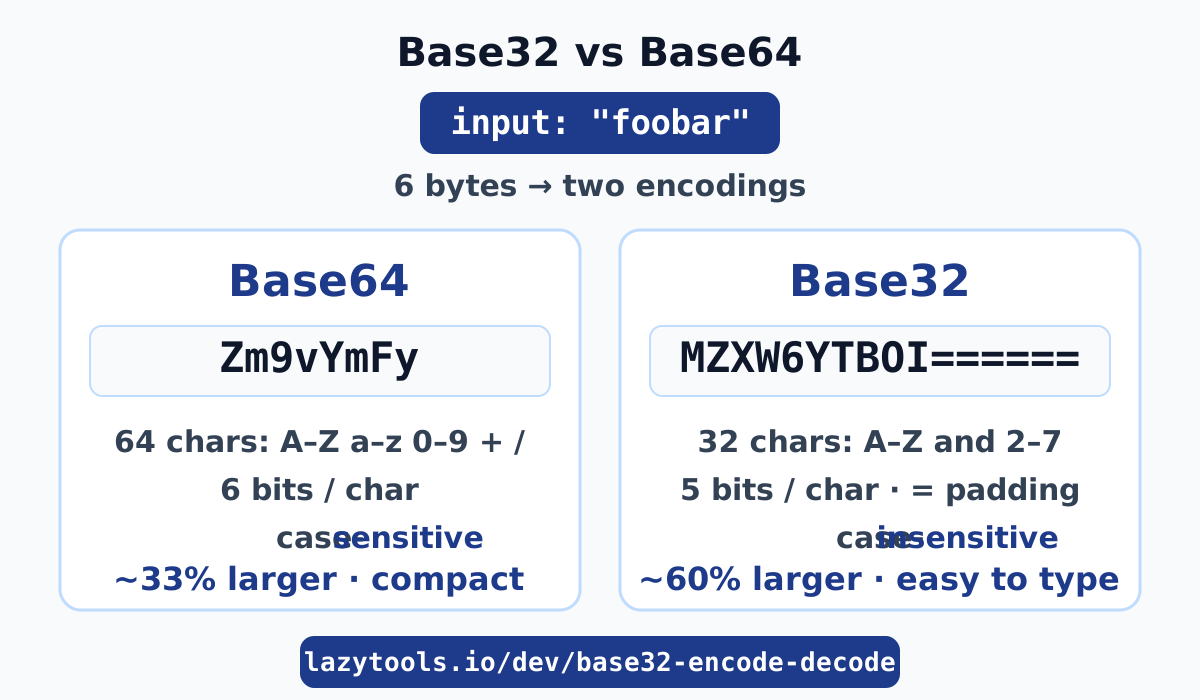
Base32 vs Base64 at a glance
Both encodings solve the same problem, representing arbitrary bytes using only safe text characters , and both come from RFC 4648. What separates them is how many characters the alphabet has and, therefore, how many bits each character carries.
| Base32 | Base64 | |
|---|---|---|
| Alphabet | A, Z and 2-7 (32 symbols) | A, Z, a, z, 0-9, +, / (64 symbols) |
| Bits per character | 5 | 6 |
| Group size | 5 bytes → 8 chars | 3 bytes → 4 chars |
| Case | Case-insensitive | Case-sensitive |
| Size overhead | ~60% larger than input | ~33% larger than input |
| Typical use | TOTP secrets, typed IDs, DNS, filenames | data: URLs, JSON blobs, email, JWT segments |
The number of characters is the whole story: 32 symbols encode 5 bits (2⁵ = 32), 64 symbols encode 6 bits (2⁶ = 64). More bits per character means fewer characters for the same data, which is why Base64 is more compact, and why Base32 needs a bigger, more forgiving alphabet to stay readable.
Why Base32 is easier for humans
Base32 is easier to read, type, and dictate because its alphabet is small and deliberately
unambiguous. It uses only uppercase A, Z and the digits 2-7, which means no lowercase to get wrong,
and crucially no easily-confused characters: there’s no 0 to mistake for O, and no 1 to
mistake for I or l. Base64, by contrast, uses upper- and lowercase letters plus + and /,
all of which matter and none of which you’d want to read down a phone line.
That’s why Base32 shows up wherever a person is in the loop. A two-factor authentication secret you type into an authenticator app, a short identifier printed on a label, or a value that has to survive being read aloud all benefit from an alphabet you can’t easily mistranscribe. Because it’s case-insensitive, it also fits systems that don’t preserve case, like DNS labels and some filesystems.
There’s also a sort-order variant worth knowing: base32hex uses the alphabet 0-9 then A, V,
which keeps encoded strings in the same order as the raw bytes they represent. Standard Base32
(A, Z, 2-7) is the common one and what most tools mean by “Base32.”
Size: how much bigger is Base32?
Base32 is bigger because it carries fewer bits per character. Base64 spends 4 characters on every 3 input bytes (24 bits ÷ 6 = 4), a 4/3 ratio, so output is about 33% larger than the input. Base32 spends 8 characters on every 5 input bytes (40 bits ÷ 5 = 8), an 8/5 ratio, so output is about 60% larger, roughly 20% larger than the equivalent Base64.
You can see it in a single example. The 6-byte string foobar encodes to:
- Base64:
Zm9vYmFy, 8 characters - Base32:
MZXW6YTBOI======, 16 characters, including=padding
Base32’s padding fills the output out to a multiple of 8 characters (Base64 pads to a multiple of 4).
Six bytes isn’t a clean multiple of Base32’s 5-byte group, so the final group is padded with =
signs, the same idea as Base64’s tail padding, just to a different boundary.
When to use each
Pick the encoding by asking who touches the value: a machine or a person. If it’s transported and parsed by software and size matters, use Base64; if a human reads, types, or dictates it, use Base32.
Reach for Base64 when size and density win. Embedding an image directly in CSS or HTML as a
data: URL (data:image/png;base64,iVBORw0…), stuffing a binary blob into a JSON field, MIME email
attachments, and the segments of a JWT all use Base64 because the extra
27 percentage points of size that Base32 would add is pure waste when nobody reads the string by hand.
Reach for Base32 when a human is in the loop. The classic case is a TOTP/2FA secret, the
seed behind those rotating six-digit codes is shared as Base32 precisely so you can type it into an
authenticator without confusing O and 0. (See how those codes are derived from that seed in the
TOTP generator.) The same logic covers some content-addressed file
hashes, short public identifiers, DNS labels, and case-insensitive filenames.
Common mistakes
The errors people make with these encodings cluster around a few misunderstandings:
- Thinking either one is encryption. Neither Base32 nor Base64 hides anything, both are reversible by anyone, instantly, with no key. “It’s Base32-encoded” is not a security measure.
- Mixing up the alphabets. Base32’s
2-7digits and Base64’s+//don’t overlap. Feeding a Base64 string to a Base32 decoder (or vice versa) fails or produces garbage. Also watch for base32hex (0-9 A, V) versus standard Base32 (A, Z 2-7). - Forgetting Base32 padding. Base32 pads to a multiple of 8 characters with
=; dropping or adding padding breaks round-trips in strict decoders. - Using Base64 where a human must transcribe it. A case-sensitive string full of
+,/, and look-alike characters is a support ticket waiting to happen. If someone types it, use Base32.
Encode and decode locally
Base32 and Base64 are two answers to one question, how to carry bytes through a text-only channel, and the right answer is whichever matches who handles the value. Base64 is compact for machines; Base32 is legible for people. When you need to inspect a TOTP secret, generate an identifier, or just see what a string decodes to, use the Base32 encoder/decoder or the Base64 encoder/decoder, both run entirely in your browser, so the values you paste never leave your machine.
The encodings are specified in RFC 4648.
Frequently asked questions
What's the difference between Base32 and Base64?
Both are binary-to-text encodings from RFC 4648. Base64 uses 64 characters (A, Z, a, z, 0-9, +, /) and packs 6 bits per character, so it's compact, about 33% larger than the input. Base32 uses 32 characters (A, Z and 2-7) and packs 5 bits per character, so it's case-insensitive and easy to type but bigger, about 60% larger than the input.
When should I use Base32?
Use Base32 wherever a human handles the value: TOTP/2FA secret keys, some file hashes and identifiers, and case-insensitive contexts like DNS labels or filenames. Its restricted alphabet (no 0/O or 1/I confusion) makes it easy to read aloud, transcribe by hand, or type without errors.
Why is Base32 case-insensitive?
Base32's alphabet is only uppercase A, Z plus the digits 2-7, so there are no lowercase letters to distinguish. A decoder can safely uppercase the input before decoding, which means the value survives being read aloud, retyped, or passed through systems that change case (like DNS).
How much bigger is Base32 than Base64?
Base64 output is about 33% larger than the input (4 characters per 3 bytes). Base32 is about 60% larger (8 characters per 5 bytes), roughly 20% larger than the equivalent Base64. You trade size for readability.
Is Base32 encryption?
No. Base32, like Base64, is an encoding, not encryption. It re-spells bytes as text and is fully reversible by anyone with no key and no secrecy. If data needs protecting, encrypt it, encoding only makes bytes safe to store or transmit as text.
Is my data uploaded when I use the Base32 tool?
No. The LazyTools Base32 encoder/decoder runs entirely in your browser, the text you paste is encoded or decoded locally and nothing is uploaded to a server.