
explainer
Base64 Is Not Encryption: What It Actually Does (and When to Use It)
By Uttam Regmi · Published 2026-07-05 · Updated 2026-07-05 · 5 min read · Fact-checked, sources cited
Base64 is an encoding, not encryption: it re-spells any bytes using 64 safe text characters so binary data can travel through text-only channels, and anyone can reverse it instantly, no key required. Decode or encode anything in the Base64 encoder/decoder. It runs locally, which matters, because the strings people paste into Base64 tools are so often credentials.
The problem Base64 solves
Plenty of infrastructure was built for text: email bodies, JSON documents, URLs, XML, HTTP
headers. Raw binary, an image, a key, a compressed blob, contains bytes those channels mangle or
forbid. Base64 is the standard bridge: it represents every possible byte sequence using only
A, Z a, z 0-9 + / (64 symbols, hence the name), characters that survive every text channel ever
built.
That’s the whole job. You meet it as:
data:URLs, images inlined into CSS/HTML (data:image/png;base64,iVBORw0…)- Email attachments, MIME encodes binary parts as Base64
- JSON APIs, binary fields (file uploads, keys, ciphertexts) carried as Base64 strings
- HTTP Basic auth,
Authorization: Basic dXNlcjpwYXNzis justuser:passencoded (not encrypted!) - JWTs, all three segments are base64url-encoded
How the encoding works
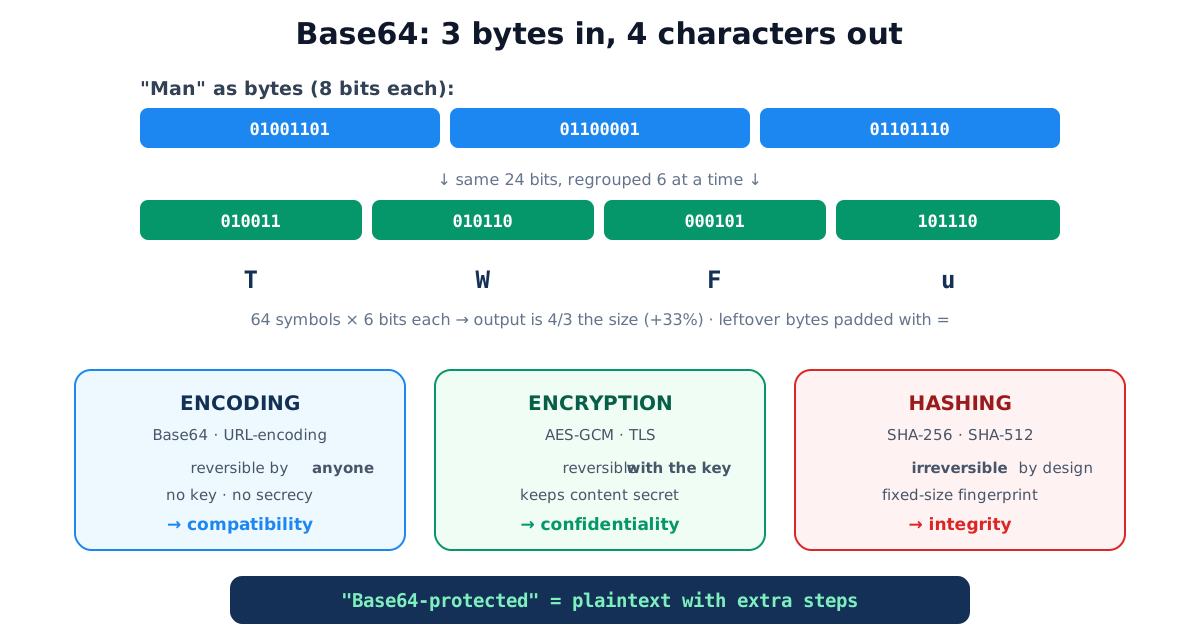
Each Base64 character carries 6 bits (2⁶ = 64 symbols). Bytes carry 8. The least common multiple is 24: so Base64 processes input in groups of 3 bytes (24 bits), emitting 4 characters per group.
input bytes :  01001101 01100001 01101110      "Man"
regrouped   :  010011 010110 000101 101110
as Base64   :    T      W      F      u    →   "TWFu"
Two consequences fall straight out of the math:
- Size: output = input × 4/3, Base64 costs 33% overhead. A 3 MB image becomes a 4 MB string,
which is why inlining large images as
data:URLs backfires. - Padding: when input length isn’t a multiple of 3, the last group has 1 or 2 real bytes and
is filled out with
=:"Ma"→TWE=,"M"→TQ==. The padding is why Base64 strings so recognizably end in=or==.
The variants you’ll actually meet
| Variant | Alphabet ends with | Padding | Where |
|---|---|---|---|
| Standard (RFC 4648 §4) | + / | = | MIME, data: URLs, most APIs |
| URL-safe / base64url (RFC 4648 §5) | - _ | usually omitted | JWTs, URL parameters, filenames |
The distinction bites in practice: + means space in URL query strings and / is a path
separator, so standard Base64 inside a URL corrupts silently. If a decoder rejects a string that
contains - or _, it’s base64url, the LazyTools tool has a
URL-safe toggle for exactly this. (For encoding text into URLs, that’s a different tool with
different rules: the URL encoder/decoder.)
A UTF-8 footnote that saves debugging time: Base64 encodes bytes, so text must first be
converted to bytes. JavaScript’s ancient btoa() assumes Latin-1 and throws (or garbles) on emoji
and most non-English text; correct implementations encode via UTF-8 first (TextEncoder), which is
what our encoder does, round-tripping héllo 🌍 intact.
The JWT case: readable by design
A JSON Web Token looks opaque, eyJhbGciOi..., but its first two segments (header and payload)
are just base64url-encoded JSON. Anyone can read them; the JWT decoder
shows the claims and expiry instantly, locally, with no key. Only the third segment, the signature,
involves a secret, and what it provides is integrity (the token wasn’t modified), not
confidentiality (the contents aren’t hidden).
Two rules follow: never put secrets in a JWT payload, and never paste a live token into a server-backed decoder, a JWT is a bearer credential, and whoever holds it is you. Decode locally or decode expired ones.
Encoding vs encryption vs hashing
The three get conflated constantly, and the confusion has a security cost:
| Reversible? | Needs a key? | Purpose | Examples | |
|---|---|---|---|---|
| Encoding | Yes, by anyone | No | Compatibility / transport | Base64, URL-encoding, HTML entities |
| Encryption | Yes, with the key | Yes | Confidentiality | AES-GCM, TLS |
| Hashing | No | No | Integrity / fingerprint | SHA-256 (try the hash generator) |
“The password is Base64-encoded in the config file” describes a plaintext password with extra steps. “We hash tokens before storing” and “we encrypt at rest” are real protections. If you can paste it into a decoder and read it, it was never protected.
Common Base64 mistakes
- Using it as secrecy, Basic auth headers, “obfuscated” API keys, encoded config passwords: all readable by anyone who finds them.
- Standard alphabet in URLs,
+and/corrupt; use base64url. - btoa() on Unicode, encode UTF-8 bytes, not raw JS strings.
- Inlining big files as data: URLs, the 33% tax plus lost caching makes large inline images slower, not faster.
- Pasting live credentials into online tools, a JWT or API key sent to someone’s server for “decoding” has been disclosed. Client-side tools exist for exactly this reason.
Quick summary
Base64 re-spells bytes as 64 safe characters so binary survives text channels: 3 bytes → 4
characters, 33% larger, =-padded, with a -_ URL-safe variant used by JWTs. It is reversible by
anyone and provides no secrecy, that’s encryption’s job, and integrity is hashing’s. Encode and
decode in the Base64 tool, inspect tokens in the
JWT decoder, both run entirely in your browser, because the things people
paste into these tools are exactly the things that shouldn’t travel.
Related tools: HTML entities encoder · regex tester · number base converter. The encoding is specified in RFC 4648.
Frequently asked questions
Is Base64 encryption?
No. Base64 is a reversible re-spelling of bytes as text, anyone can decode it instantly with no key. It provides exactly zero secrecy. If data needs protecting, encrypt it; Base64 only makes bytes safe to embed in text.
What is Base64 actually for?
Carrying arbitrary binary data through channels designed for text: email attachments (MIME), data: URLs embedding images in CSS/HTML, JSON payloads containing binary blobs, HTTP Basic auth headers, and the segments of a JWT.
Why does Base64 make data 33% bigger?
It spends 4 output characters for every 3 input bytes: each character carries 6 bits (2⁶ = 64 possible symbols), so 24 bits of input become 32 bits of ASCII output, a 4/3 ratio, plus up to two = padding characters at the end.
What are the = signs at the end?
Padding. When input length isn't a multiple of 3 bytes, the final group encodes 1 or 2 bytes instead of 3, and = fills the leftover positions: one byte remaining produces ==, two bytes produce =. Some variants (like JWT's base64url) omit padding entirely.
What is URL-safe Base64?
Standard Base64 uses + and /, which collide with URL syntax. The base64url variant (RFC 4648 §5) swaps them for - and _ and usually drops padding. JWTs use it, which is why pasting a JWT segment into a standard decoder sometimes fails.
Can I decode a JWT without the secret key?
The header and payload, yes, they're just base64url-encoded JSON, readable by anyone; only the signature requires the key, and it provides integrity (proof of no tampering), not secrecy. Never put confidential data in a JWT payload, and never paste a live production token into a server-backed tool.
Why does Base64 sometimes garble emoji or accented characters?
Base64 encodes bytes, and text must first become bytes via a character encoding. The old JavaScript btoa() chokes on anything beyond Latin-1; correct handling encodes the string as UTF-8 first (TextEncoder), which is what the LazyTools encoder does.
Encoding, encryption, hashing, what's the difference?
Encoding (Base64, URL-encoding) is reversible by anyone and exists for compatibility. Encryption is reversible only with a key and exists for confidentiality. Hashing (SHA-256) is irreversible by design and exists for integrity and fingerprinting. Using the first where you need the second is a classic vulnerability.