
explainer
chmod 755 Explained: Unix File Permissions Without the Guesswork
By Uttam Regmi · Published 2026-07-10 · Updated 2026-07-10 · 7 min read · Fact-checked, sources cited
chmod 755 sets rwxr-xr-x, full control for the owner, read-and-execute for everyone else, and once you know that each digit is just read (4) + write (2) + execute (1) added up, every chmod
number reads itself. Build any permission by clicking the read/write/execute boxes, or type a
number and see what it grants, with the
chmod calculator; here’s the whole system in five minutes.
The number is a sum
Unix gives every file three sets of permissions, for the owner, the group, and others (everyone else), and each set has three bits: read, write, execute. The chmod number encodes them with a simple trick: read is worth 4, write 2, execute 1, and each digit is whatever you add up.
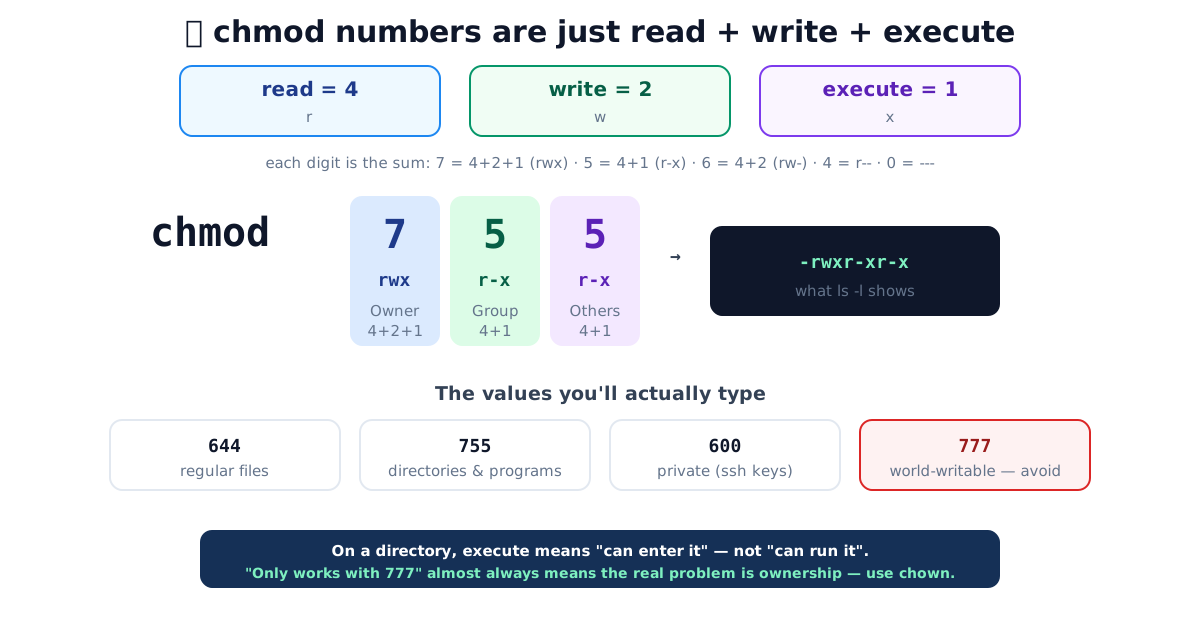
So each digit tells you the permissions at a glance. There are only eight possible values, one for every combination of the three bits:
| Digit | Bits | Symbolic | Meaning |
|---|---|---|---|
| 7 | 4+2+1 | rwx | read, write, execute |
| 6 | 4+2 | rw- | read, write |
| 5 | 4+1 | r-x | read, execute |
| 4 | 4 | r— | read only |
| 3 | 2+1 | -wx | write, execute |
| 2 | 2 | -w- | write only |
| 1 | 1 | —x | execute only |
| 0 | , | --- | no access |
Read chmod 755 left to right: owner 7 (rwx), group 5 (r-x), others 5 (r-x) → -rwxr-xr-x,
which is exactly what ls -l prints. The calculator converts both
ways live, tick the boxes to get the number, or type the number to light up the boxes.
Reading an ls -l line
The permission string at the start of ls -l is the same information in symbolic form. Take a
typical listing:
-rwxr-xr-x  1 alice  staff  8432  Jul 10 09:14  deploy.sh
drwxr-x---  2 alice  staff   128  Jul 10 09:10  private/
The very first character is the file type, not a permission: - for a regular file, d for a
directory, l for a symbolic link. After that come three groups of three, owner, group, others.
So deploy.sh is rwx / r-x / r-x, which is mode 755, and private/ is rwx / r-x /
---, which is mode 750. Reading the string back into a number is just adding up 4-2-1 in each
group.
The values you’ll actually type
In practice a handful of modes cover almost everything. Keep this reference table nearby:
| Mode | Symbolic | Typical use |
|---|---|---|
644 | rw-r—r— | Ordinary files: documents, images, HTML, config |
755 | rwxr-xr-x | Directories and executables others may run |
600 | rw------- | Private files, SSH keys, secrets, .env |
700 | rwx------ | Private directory only the owner may enter |
640 | rw-r----- | File the owner edits and the group reads |
775 | rwxrwxr-x | Shared directory a group can write into |
777 | rwxrwxrwx | World-writable, almost always a mistake |
A little more on the everyday ones:
644(rw-r—r—), the sensible default for content. Owner can edit; everyone can read; nobody executes.755(rwxr-xr-x), directories and executables. Directories need the execute bit, on a directory, “execute” means permission to enter it and reach what’s inside, not “run it as a program”. A directory that is644can be listed but not entered, which usually looks like a “Permission denied” that makes no sense until you remember this.600(rw-------), only the owner can read or write. This is effectively mandatory for SSH private keys,sshrefuses to use a key file that group or others can read, and will print a loud “UNPROTECTED PRIVATE KEY FILE” warning.700(rwx------), a private directory, entering and listing restricted to the owner; the standard mode for~/.ssh.
Symbolic mode: change one bit without touching the rest
Numeric mode sets all nine bits at once. Often you just want to add or remove one permission and leave the others alone, that’s what symbolic mode is for. It reads as who + operator + what:
- Who:
u= owner (user),g= group,o= others,a= all three. - Operator:
+adds,-removes,=sets exactly. - What:
r,w,x.
Some worked examples:
chmod u+x deploy.sh      # make it executable for the owner only
chmod +x deploy.sh       # add execute for everyone (a is implied)
chmod go-w report.txt    # remove write from group and others
chmod a+r notes.md       # everyone can read
chmod u=rw,go=r file     # set 644 exactly, in words
chmod -R o-rwx private/   # recursively strip all "others" access
The = form is the one to reach for when you want a known end state regardless of what was set
before. Note that -R recurses into directories, handy, but the same execute bit that a directory
needs is meaningless on a plain file, so blanket recursive +x is a common mistake. When in doubt,
build the exact mode in the chmod calculator and copy the numeric form.
Why chmod 777 is a red flag
777 grants read, write and execute to everyone, the file is now world-writable. It’s the
classic “just make it work” move, and it’s almost always wrong:
- On any shared host, world-writable means any other account, including a compromised one, can overwrite your file. It’s a genuine security hole, and it’s why web servers and many tools refuse to run scripts that are group- or world-writable.
- When something “only works with 777”, the actual problem is usually ownership, not
permissions. The web server runs as a different user than the one who uploaded the files, so the
right fix is
chown(change the owner to the service account) with a tight mode like644/755, not opening the file to the entire machine.
If you’re reaching for 777, pause and ask who needs access, the answer is usually one specific
user or group, which chown/chgrp plus 644/755 handles cleanly.
The fourth digit: setuid, setgid, sticky
chmod modes sometimes have a leading fourth digit for special bits:
- Setuid (4), an executable runs with the permissions of its owner, not the user launching
it.
passwduses this so ordinary users can update the root-owned password file.4755is 755 plus setuid. - Setgid (2), runs as the file’s group; on a directory, new files inside inherit that group, which is handy for shared project folders.
- Sticky bit (1), on a shared-writable directory like
/tmp(mode1777), it restricts deletion so only a file’s owner can remove it, even though everyone can write there.
These are powerful and occasionally dangerous (a setuid-root binary with a bug is a privilege
escalation), so use them deliberately. The chmod calculator includes
the special bits and shows how, say, 4755 differs from 755 in the symbolic string (the x
becomes s).
Where new files get their permissions: umask
You rarely chmod a brand-new file to 644. It usually arrives that way already. That default
comes from the umask, a mask that subtracts permission bits from a base value when a file or
directory is created. The typical base is 666 for files and 777 for directories (execute is
never granted automatically to a new file), and the umask clears bits from it.
With the common umask 022, a new file starts at 666 minus the masked bits, landing on 644,
and a new directory lands on 755:
| umask | New files | New directories | Effect |
|---|---|---|---|
022 | 644 | 755 | Group/others can read, not write (default) |
002 | 664 | 775 | Group can also write, shared team setups |
077 | 600 | 700 | Nothing for group or others, most private |
Check yours by running umask on its own; it is a per-session setting, so this is where “why does
every file come out group-readable?” is usually answered, not with a chmod on each file, but by
adjusting the umask.
Quick summary
chmod permissions are three sets, owner, group, others, of read (4), write (2), execute (1),
summed into each digit. 755 (rwxr-xr-x) is the norm for directories and programs, 644 for files,
600 for private keys; the execute bit on a directory means “enter”, not “run”. Treat 777 as a
warning sign that the real fix is ownership. Convert any mode both ways, special bits included, with
the chmod calculator, and while you’re automating server tasks, the
cron expression parser does the same demystifying for schedules.
Sources: GNU coreutils, chmod manual · Linux man-pages, chmod(1) and chmod(2) · Filesystem Hierarchy Standard.
Frequently asked questions
What does chmod 755 mean?
It sets read+write+execute for the owner (7 = 4+2+1), and read+execute for the group and everyone else (5 = 4+1). In symbolic form that's rwxr-xr-x. It's the standard permission for directories and for programs that others may run but not modify.
How do the chmod numbers work?
Each of the three digits is a sum of three permission bits: read = 4, write = 2, execute = 1. So 7 is all three (rwx), 6 is read+write (rw-), 5 is read+execute (r-x), 4 is read only (r--), 0 is none. The three digits set permissions for owner, group and others in that order.
What's the difference between 644 and 755?
644 (rw-r--r--) has no execute bit, right for ordinary files like documents, images and config. 755 (rwxr-xr-x) adds execute for everyone, needed for programs and for directories, where the execute bit means 'permission to enter the directory', not 'permission to run it'.
What does chmod 777 do, and should I use it?
777 grants read, write and execute to everyone, the file becomes world-writable. It's almost always the wrong fix: on a shared server it lets any other account modify your file, and 'it only works with 777' usually means the real problem is ownership, solved with chown rather than loosening permissions for all.
When should I use chmod 600?
For private files that only the owner should read or write, with no access for anyone else, most importantly SSH private keys, which SSH refuses to use if they're readable by others. 600 is rw------- : read+write for you, nothing for group or others.
What are the setuid, setgid and sticky bits?
An optional fourth leading digit. Setuid (4) runs an executable as its owner; setgid (2) runs it as its group, and on a directory makes new files inherit that group. The sticky bit (1) on a shared directory like /tmp (mode 1777) lets only a file's owner delete it. So 4755 is 755 plus setuid.