
how-to
How to Clean Up Any Messy List: Dedupe, Sort and Fix Broken Text in 4 Steps
By Uttam Regmi · Published 2026-07-05 · Updated 2026-08-23 · 6 min read · Fact-checked, sources cited

Every messy list cleans up with the same four-step pipeline: fix broken lines → remove duplicates → sort → pattern-fix the leftovers. Each step is a one-click tool, the whole thing takes under a minute, and nothing you paste leaves your browser, which matters, because messy lists are usually full of emails. Start at remove duplicate lines or follow the pipeline below.
The pipeline at a glance
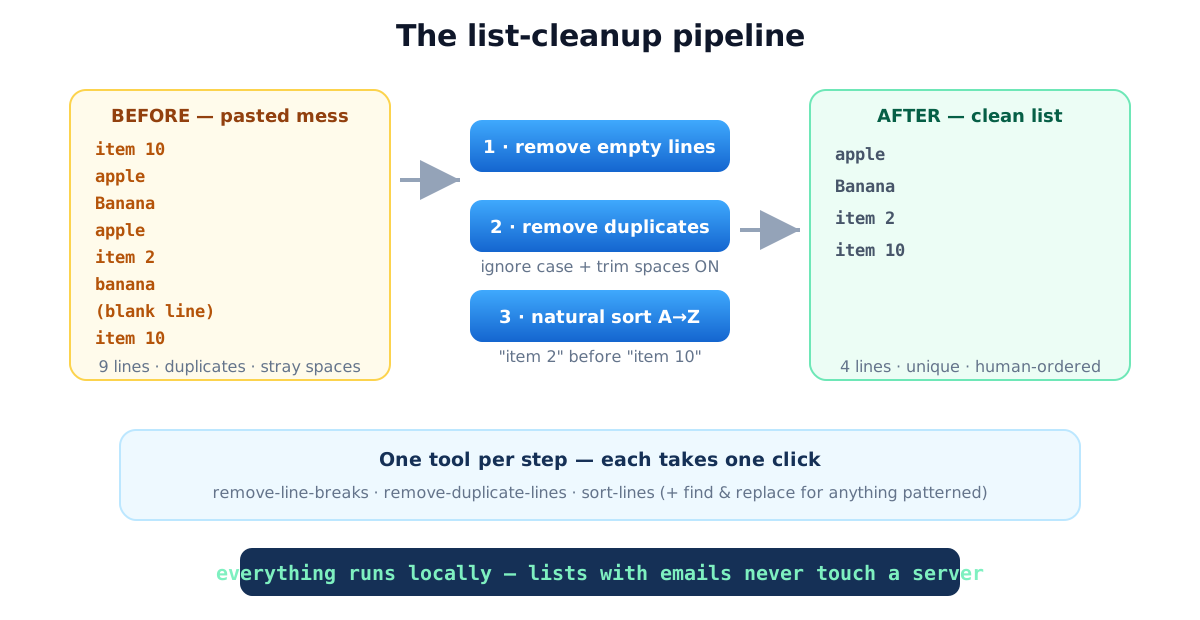
The order matters more than it looks. Each step assumes the one before it already ran: dedupe assumes “one line = one entry,” and sort assumes duplicates are already gone so it isn’t ordering noise. Run them out of order and you’ll spend more time undoing than cleaning. Here’s the whole pipeline on one screen, so you can see which tool owns which problem before you start pasting.
| Step | Problem it fixes | Tool | Key setting |
|---|---|---|---|
| 1. Structure | Broken lines, blank rows, CSV blobs | remove line breaks / find & replace | ”remove empty lines only” |
| 2. Dedupe | Repeated entries, near-duplicates | remove duplicate lines | ignore case + ignore spaces |
| 3. Sort | Random or char-sorted order | sort lines | natural order (default) |
| 4. Pattern-fix | Stray prefixes, old domains, name order | find & replace | regex mode when needed |
Step 1, Fix the structure (remove line breaks)
Messy data usually arrives structurally broken before it’s logically broken: PDF copies hard-wrap mid-sentence, emails wrap at 72 characters, and exports include blank separator lines.
- Broken paragraphs → “replace breaks with spaces” joins them back into flowing text.
- Blank lines between entries → “remove empty lines only” compacts the list.
- Comma-separated values → hop to find & replace, find
,and replace with a line break (regex mode:\n), now every value has its own line, which every later step assumes.
Step 2, Remove duplicates (remove duplicate lines)
Paste the list; duplicates vanish, first occurrences survive, original order is preserved, and the counter reports how many were removed.
The trap that catches everyone: two lines that look identical but both survive. The cause is
invisible, a trailing space, or Apple vs apple. Enable ignore case and ignore spaces and
they merge. (Our sample list demonstrates it: apple , apple and Banana/banana all collapse
once both options are on.)
Worked example: a 1,240-line newsletter export deduped to 1,061-179 duplicates from repeated sign-ups, found in one paste. For pulling addresses out of unstructured text first, the email extractor feeds this step directly (it even pre-deduplicates).
Step 3, Sort (sort lines)
A→Z with natural ordering is the default, item 2 lands before item 10, v1.9 before v1.10,
because embedded numbers compare by value rather than character-by-character. The difference is easiest
to see side by side: plain character sort walks left to right and stops at the first difference, so
item 10 sorts before item 2 because the character 1 comes before 2 in the code point order.
Natural sort reads the run of digits as one number and compares 2 against 10.
| Order | What it does | Good for |
|---|---|---|
| Natural (default) | Numbers compare by value: 2 before 10 | Versions, numbered items, filenames |
| Plain A→Z | Character-by-character | Pure text with no embedded numbers |
| By length | Shortest or longest line first | Keyword lists, spotting outliers |
| Reversed | Flips current order top-to-bottom | Newest-first exports → chronological |
| Random shuffle | Unbiased reordering | Fair draws, raffles, sampling |
Reversing is also available as a standalone line flip in reverse text when you only want to invert order without re-sorting. One caution on random shuffle: a fair shuffle needs an unbiased algorithm (the Fisher, Yates method is the standard one), naive “sort by random key” schemes skew toward some orderings, which matters if the draw has to be defensible.
Step 4, Pattern-fix the leftovers (find & replace)
Whatever survives steps 1-3 with consistent weirdness, a stray prefix, doubled commas, an old domain, is a find & replace job. The replacement count is the safety net: 0 means your search text has a typo;
an unexpectedly large count warns you before pasting the result anywhere important. Regex mode covers
the patterned cases: \d+ matches any number, capture groups reorder ((\w+), (\w+) → $2 $1 turns
“Doe, Jane” into “Jane Doe”).
A full run, start to finish
To see the four steps interact, take a realistic mess, a conference sign-up sheet somebody pasted out of an email thread:
Jane Doe, jane@old-corp.com
bob@example.com
Bob@example.com
priya@example.com
priya@example.com
Sam, sam@example.com

Jane Doe, jane@old-corp.com
Step 1 (structure): the two Name, email rows aren’t comparable to the bare-email rows, and there’s
a blank separator line. Run “remove empty lines only,” then in find & replace strip the name prefix with
the regex ^[^,]+, → empty. Every line is now just an address.
Step 2 (dedupe): paste into remove duplicate lines. bob@example.com and Bob@example.com only
merge with ignore case on; priya@example.com (trailing space) only merges with ignore spaces
on. With both enabled the counter reports the two Jane rows plus these near-duplicates removed, four
unique addresses survive.
Step 3 (sort): A→Z natural order gives bob, jane, priya, sam. Nothing here has embedded
numbers, so plain and natural agree, but leaving natural on costs nothing and protects you the moment a
user2@ and user10@ appear.
Step 4 (pattern-fix): the address still points at old-corp.com. Find @old-corp.com, replace with
@newco.com; the replacement count (1) confirms exactly one line changed before you trust the result.
Four passes, four clicks, and the counters at every step tell you what moved, no guessing whether the tool “got everything.”
Common list-cleanup mistakes
- Deduping before fixing structure, with CSVs or broken lines, “one line” isn’t yet “one entry”; run step 1 first.
- Trusting eyeballs on duplicates, invisible whitespace defeats visual inspection every time; let the ignore options do it.
- Plain-sorting numbered items,
10, 1, 2order is the giveaway; switch to natural sort. - Cleaning contact data on upload sites, a mailing list pasted into a server-side tool has been shared with that server, full stop. These tools run locally by design.
- Not keeping the original, paste from a copy; a cleanup that went sideways should cost one Ctrl+Z, not the source data.
Quick summary
Structure first, then dedupe (with both ignore options on), then natural sort, then pattern-fixes, four clicks across remove line breaks, remove duplicate lines, sort lines and find & replace. The counters at each step tell you what changed, and the whole pipeline runs in your browser, clean the list without sharing the list.
Related: email/URL extractor to harvest before cleaning · word counter to size the result.
Frequently asked questions
Why do two identical-looking lines survive deduplication?
Almost always invisible differences: trailing spaces or different capitalization. Turn on 'ignore case' and 'ignore spaces' in the dedupe tool and they merge. This one trap explains most 'the tool missed one' reports.
How do I sort a list where 'item 10' keeps landing before 'item 2'?
Use natural sorting, which compares embedded numbers by value. Plain character sorting puts '10' first because the character 1 precedes 2, the sort-lines tool defaults to natural order.
How do I turn a comma-separated list into lines?
Find & replace: find ', ' and replace with a line break (in regex mode, replace with \n). Then dedupe and sort operate per line.
Why does text copied from a PDF break mid-sentence?
PDFs store text as positioned lines, so copying preserves visual line ends as hard breaks. The remove-line-breaks tool joins them back into flowing paragraphs.
Should I dedupe before or after sorting?
Either, the final set is identical. Deduping first is marginally faster on huge lists and shows you the duplicate count against the original order.
Is it safe to paste customer emails into these tools?
These specific tools, yes: every step runs locally in your browser with nothing transmitted, which is exactly why cleanup of contact data shouldn't happen on upload-based websites.