
explainer
Extracting Colors from an Image: Pickers, Palettes and Naming
By Uttam Regmi · Published 2026-07-11 · Updated 2026-08-23 · 6 min read · Fact-checked, sources cited
There are three distinct jobs when you want colors from an image, pick one pixel, pull the whole palette, or name a color, and all three can run entirely in your browser. No upload, no watermark, nothing sent to a server. Here’s how each works.
The three jobs
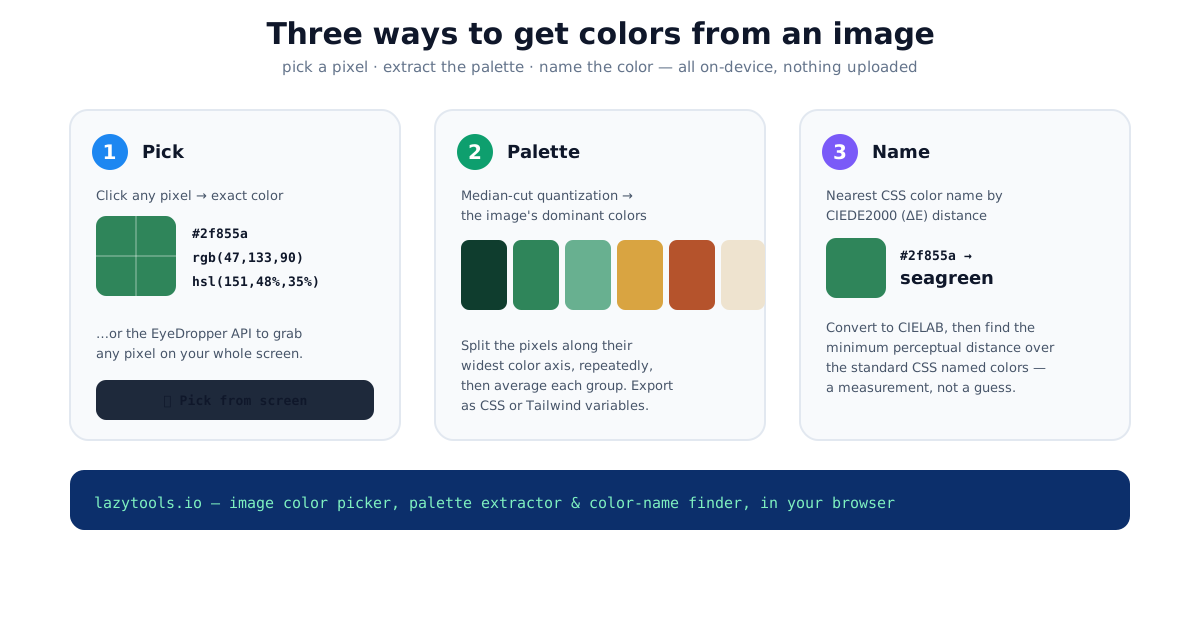
These three jobs sound similar but use different machinery. Picking reads one pixel. Palette extraction runs a quantization algorithm over many pixels. Naming compares your color against a fixed list using a perceptual distance formula. Matching the right job to the task saves you from, say, hand-eyeballing a palette or trusting a chatbot to “name” a hex it can only guess at.
| Job | Input | What runs | Output |
|---|---|---|---|
| Pick | One click on the image (or any screen pixel) | A single canvas pixel read | Exact HEX / RGB / HSL for that pixel |
| Palette | The whole image | Median-cut quantization over sampled pixels | A handful of dominant colors |
| Name | A single color value | CIEDE2000 distance to every CSS name | The closest named color + its ΔE |
1. Pick a single color
The simplest job: what colour is that pixel? An image color picker draws your image to a canvas, and clicking reads the pixel’s exact red/green/blue values, shown as HEX, RGB and HSL to copy.
For picking outside an uploaded image, say, a color in another app, Chrome and Edge expose the EyeDropper API, which opens the operating system’s own eyedropper so you can sample any pixel on your screen. It returns the picked color as an sRGB hex string. Where the API isn’t available, picking from the uploaded image still works everywhere.
Browser support is uneven, so a good tool feature-detects and falls back gracefully:
| Browser | EyeDropper API | Canvas pick from uploaded image |
|---|---|---|
| Chrome / Edge (desktop) | Yes | Yes |
| Firefox | No | Yes |
| Safari | No | Yes |
| Mobile browsers | Generally no | Yes |
HEX, RGB, HSL, and where OKLCH fits
The same pixel can be written many ways. HEX (#2f855a) is compact and pastes anywhere. RGB names the
three channels directly. HSL restates them as hue, saturation and lightness, which is friendlier for
nudging a color by hand. All three describe the same sRGB point, converting between them is lossless
arithmetic. If you want a perceptually uniform space where equal numeric steps look like equal visual
steps, reach for a modern model instead: the OKLCH color picker expresses
the same color as lightness, chroma and hue in a way that behaves predictably when you build tints and
shades. A quick reference for one green:
| Format | Value for the same green |
|---|---|
| HEX | #2f855a |
| RGB | rgb(47, 133, 90) |
| HSL | hsl(153, 48%, 35%) |
| OKLCH | roughly oklch(56% 0.10 158) |
2. Extract a palette
Pulling the dominant colors is a quantization problem: an image has thousands of distinct pixel colors, and you want to reduce them to a representative handful. The classic method is median cut:
- Put all the sampled pixels into one “box” in RGB space.
- Find the box’s widest channel (the axis, red, green or blue, with the largest spread) and split it at the median into two boxes.
- Repeat on the box with the widest range until you have as many boxes as colors you want.
- Average each final box into one representative color.
The result is the image’s dominant palette, ready to export as CSS or Tailwind variables. It runs pixel-by-pixel on the canvas, the same image color picker does both the pick and the palette.
A worked example. Imagine a photo whose pixels cluster into a bright sky, dark foliage and a mid-tone building. Start with one box holding every sampled pixel. Its widest spread is along the blue axis (sky vs. foliage), so split there, now you have a “bluer” box and a “less blue” box. The less-blue box still spans dark green foliage and grey stone, so its widest axis might be green; split again. After a few rounds you hold, say, six boxes, and averaging each gives six representative swatches. Because the split always targets the axis with the most variation, median-cut spends its limited color budget where the image actually has the most distinct colors, which is why it usually beats a naive “pick every Nth pixel” approach.
Two practical notes. First, tools usually downsample the image before quantizing, reading every pixel of a 24-megapixel photo is wasteful, and a scaled-down copy yields the same dominant colors far faster. Second, the number of swatches is a choice: four to six reads as a clean brand palette, while a larger count captures subtle gradients at the cost of near-duplicate entries.
3. Name a color
Sometimes you have a hex and want a name, “what would you call #2f855a?” The honest way to answer is
a perceptual measurement, not a guess:
- Convert your color and every standard CSS named color to CIELAB, a perceptually organised space.
- Compute the CIEDE2000 (ΔE) distance from your color to each name.
- The smallest distance is the nearest name (
#2f855a→ seagreen).
A ΔE around 1-2 is roughly a “just noticeable difference”, so a small ΔE means the name is essentially exact, while a large one is a warning that no CSS name is really close and you should keep the hex. This is exactly the kind of nearest-of-N calculation a language model gets wrong. It names a plausible but not actually closest color. The color name finder measures it.
Why not just compare RGB numbers? Because equal RGB steps don’t look equally different to the eye, a gap in the greens reads smaller than the same gap in the blues. CIELAB rearranges color so that distance tracks perception more closely, and CIEDE2000 adds corrections for lightness, chroma and hue so the ranking matches what you’d actually call “closest”. A rough sense of the scale:
| ΔE (CIEDE2000) | What it means |
|---|---|
| Under ~1 | Difference is imperceptible to most viewers |
| ~1 to ~2 | Only noticeable on close inspection |
| ~2 to ~10 | Clearly different but related colors |
| Over ~10 | Distinctly different colors |
So for #2f855a, seagreen coming back with a small ΔE tells you the name is a genuinely tight match,
not a hopeful label.
Why on-device matters here
Images are often private, a screenshot of an unreleased design, a client’s photo, a product mockup. Doing all of this in the browser (canvas pixel reads, in-memory quantization, local ΔE math) means the image never leaves your device. You can prove it: open DevTools’ network tab, or go offline mid-use, and everything keeps working.
Quick summary
To get colors from an image, match the tool to the job: pick a pixel (or use the EyeDropper API) for an exact HEX/RGB/HSL, extract a palette with median-cut quantization, and name a color by nearest CIEDE2000 distance to the CSS names. All three run on-device with no upload, start with the image color picker and the color name finder.
Sources: median-cut color quantization (Heckbert, 1982); CIEDE2000 color-difference formula; the MDN EyeDropper API. Educational information.
Frequently asked questions
How do I get the HEX color of a pixel in an image?
Open the image in an image color picker and click the pixel, the tool reads that pixel's exact color and shows the HEX, RGB and HSL values. In a browser that supports the EyeDropper API (Chrome, Edge), you can also sample any pixel anywhere on your screen.
How is a color palette extracted from an image?
By color quantization. Median-cut is the common method: it puts all the image's pixels in one box, repeatedly splits the box along its widest color channel, and averages each final box into one representative color, yielding the image's dominant palette. It runs in the browser on a canvas.
What is the EyeDropper API?
A browser feature (Chrome and Edge) that lets a web page open the operating system's eyedropper so you can pick a color from anywhere on screen, not just an uploaded image. Where it isn't available, picking from an uploaded image still works.
How do I find the name of a color?
Convert the color to CIELAB and measure its CIEDE2000 (ΔE) distance to each standard CSS color name; the smallest distance is the closest name. This is an exact perceptual measurement, unlike a chatbot's guess.
Is my image uploaded when I pick colors from it?
No, a good in-browser tool draws the image to a canvas and reads pixels locally. The image never leaves your device, which matters for screenshots of unreleased work or private photos.
What image formats can I use?
Any your browser can display, JPG, PNG, WebP, GIF, and usually AVIF. Large images are scaled down for picking, which doesn't change the colors.