
explainer
Cron Syntax Explained: The Five Fields, the Shortcuts, and the OR-Rule Trap
By Uttam Regmi · Published 2026-07-10 · Updated 2026-07-10 · 7 min read · Fact-checked, sources cited
A cron expression is five fields, minute, hour, day-of-month, month, day-of-week, and the one
thing that trips up everyone is that a schedule like 0 0 1 * 1 runs on the 1st of the month and
every Monday, not only when they coincide. Paste any expression to get a plain-English reading and
the next run times with the
cron expression parser; here’s how the syntax works and where it
bites.
The five fields
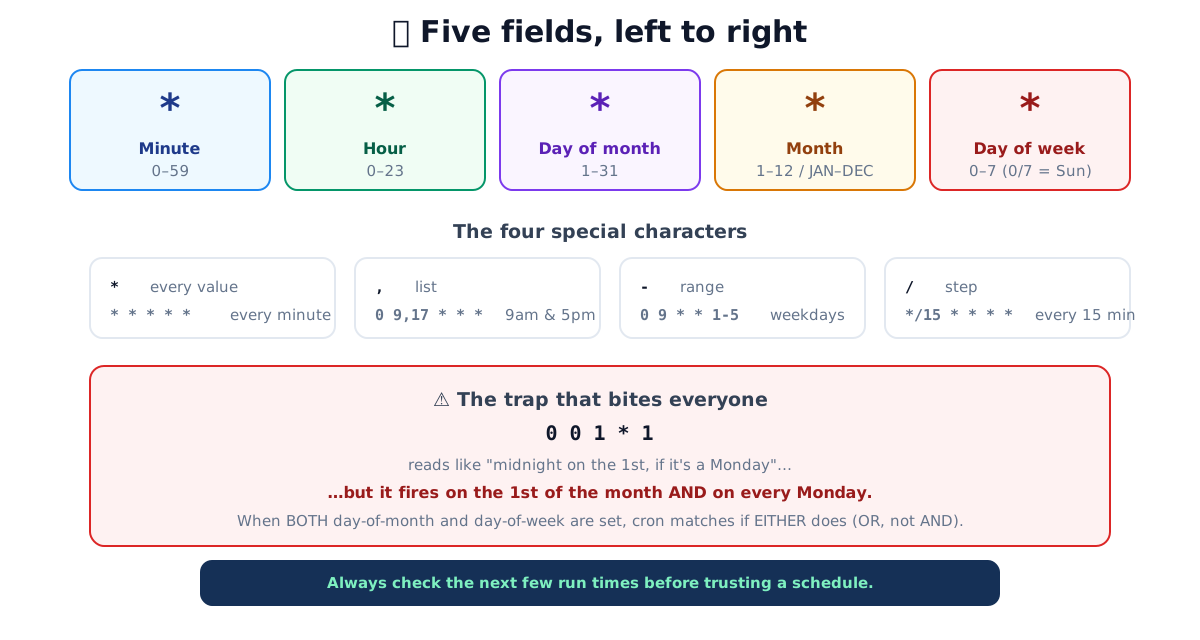
Cron schedules are read left to right as five space-separated fields:
| Position | Field | Range |
|---|---|---|
| 1 | Minute | 0-59 |
| 2 | Hour | 0-23 (24-hour) |
| 3 | Day of month | 1-31 |
| 4 | Month | 1-12 or JAN, DEC |
| 5 | Day of week | 0-7 (0 and 7 both = Sunday) or SUN, SAT |
So 30 9 * * 1-5 reads: minute 30, hour 9, any day of month, any month, days 1-5 (Mon, Fri). I.e. 09:30 every weekday. The two *s mean “every”, which is how you say “don’t constrain this
field.”
The four special characters
Each field accepts more than a single number:
*, every value.* * * * *is “every minute of every hour of every day.”,, a list.0 9,17 * * *runs at 9:00 and 17:00 (two specific hours).-, a range.0 9 * * 1-5runs at 9:00 Monday through Friday./, a step.*/15 * * * *runs every 15 minutes (at :00, :15, :30, :45). Steps combine with ranges:9-17/2in the hour field means 9, 11, 13, 15, 17.
Names work too in the month and day-of-week fields (JAN, MON), though numbers are more common.
The parser expands any combination and states the schedule in
plain English so you don’t have to decode it in your head.
Reading an expression step by step
The reliable way to read any crontab line is to take the five fields strictly left to right and
resolve each one before moving on. Take */10 8-18 * * 1-5:
| Field | Value | Reads as |
|---|---|---|
| Minute | */10 | every 10th minute, :00, :10, :20, :30, :40, :50 |
| Hour | 8-18 | hours 8 through 18 (08:00-18:00) |
| Day of month | * | every day |
| Month | * | every month |
| Day of week | 1-5 | Monday through Friday |
Put together, that job runs every 10 minutes from 08:00 to 18:00 on weekdays, 66 firings per
weekday (11 hours × 6 per hour). Two details catch people out. First, 8-18 is inclusive on both
ends, so the last hour that matches is 18:00, and the final run of the day is 18:50, not 18:00.
Second, because the minute field is a step from *, the sequence is anchored at :00, */10
means 0, 10, 20…, not “10 minutes after the job last ran.” Steps always count from the bottom of the
field’s range unless you pin the start yourself, as in 5/10 (5, 15, 25, …).
Common schedules
| Expression | Meaning | Shortcut |
|---|---|---|
*/5 * * * * | every 5 minutes | , |
0 * * * * | every hour, on the hour | @hourly |
0 0 * * * | daily at midnight | @daily |
0 9 * * 1-5 | 09:00 on weekdays | , |
0 0 * * 0 | weekly, Sunday midnight | @weekly |
0 0 1 * * | monthly, 1st at midnight | @monthly |
Those @-shortcuts (@hourly, @daily, @weekly, @monthly, @yearly, and @reboot) are
convenient aliases for the round schedules.
The trap: day-of-month AND day-of-week
Here’s the rule that produces more “why did my job run?” tickets than any other. When both the day-of-month (field 3) and the day-of-week (field 5) are restricted, cron runs the job if either one matches, an OR, not an AND.
So 0 0 1 * 1 looks like it should mean “midnight on the 1st, but only if it’s a Monday.” It
actually means midnight on the 1st of every month, and midnight every Monday. For a monthly
job that lands on ~5 Mondays plus the 1st, that’s roughly five extra runs a month.
The history: standard cron treats these two fields specially because there are two natural ways to say “which day” (by date or by weekday), and it errs toward running more rather than missing a match. The practical consequences:
- If you want “the 1st of the month”, leave day-of-week as
*:0 0 1 * *. - If you want “every Monday”, leave day-of-month as
*:0 0 * * 1. - Cron alone cannot express “the first Monday of the month”, for that, schedule every Monday
and test the date inside the job (
[ "$(date +%d)" -le 07 ]).
The parser shows the actual next run times, which is the fastest way to catch this before it goes into production.
Two more gotchas
Timezone. Cron uses the system timezone of the machine it runs on, frequently UTC on servers.
A job set to 0 9 runs at 9am server time, which may be the middle of your night. Check the
server’s zone (or set CRON_TZ where supported), and remember the parser shows times in your
browser’s timezone, which is a deliberate contrast to highlight.
Seconds. Classic Unix cron has no seconds field, the finest granularity is one minute. Some schedulers add a leading seconds field for six fields total; standard crontab, GitHub Actions and most Linux cron use the five-field form described here.
Not all “cron” is the same cron
The five-field syntax is the common core, but several popular schedulers extend or reinterpret it. When you copy an expression from one system into another, check which dialect you’re in, the same string can mean different things:
| System | Fields | Day-of-week values | Notes |
|---|---|---|---|
| Vixie / standard Unix cron | 5 | 0-7 (0 and 7 = Sunday) | The form in this guide; supports @daily shortcuts and CRON_TZ |
| GitHub Actions | 5 | 0-6 (0 = Sunday) | Same 5-field syntax; always runs in UTC, no @ shortcuts |
| Quartz (Java) | 6-7 | 1-7 (1 = Sunday), or names | Leading seconds field, optional trailing year, and uses ? for day-of-month/day-of-week |
| AWS EventBridge | 6 | 1-7 or SUN, SAT | Adds a year field and requires ? in one of the day fields, the two can’t both be * |
The recurring theme is the day-of-week numbering. Standard cron counts Sunday as both 0 and 7;
Quartz and EventBridge count Sunday as 1. So 0 0 * * 1 is Monday in standard cron but the same
weekday-position expression can be Sunday in a Quartz-style scheduler. If a “weekly” job fires a
day off, dialect mismatch is the first thing to check.
How to test before you deploy
Because a wrong cron line often fails silently, the job just runs at the wrong time or too often, verify the expression before it reaches production rather than waiting to see what happens:
- Preview the next runs. Paste the expression into the cron expression parser and read back the plain-English meaning plus the next several fire times. If those timestamps don’t match your intent, the expression is wrong regardless of how it looks.
- Watch for the OR-trap. If both day fields are set, the preview will show extra runs, that’s the day-of-month/day-of-week rule surfacing before it bites you.
- Confirm the timezone. Match the parser’s timezone note against the server’s actual zone; a correct expression in the wrong zone is still a wrong schedule.
Quick summary
Cron is five fields (minute, hour, day-of-month, month, day-of-week) combined with four characters
(* every, , list, - range, / step). */15 means every 15 minutes; 1-5 in the last field
means weekdays. The one rule to burn in: when day-of-month and day-of-week are both set, the job
runs when either matches, the reason schedules fire more often than intended. Confirm any
expression’s meaning and its next run times with the
cron expression parser, and mind that the real schedule runs in
the server’s timezone. For the other half of server housekeeping, the
chmod calculator demystifies file permissions the same way.
Sources: Linux man-pages, crontab(5) format · POSIX crontab specification (The Open Group) · Vixie cron documentation.
Frequently asked questions
What are the five cron fields?
In order: minute (0-59), hour (0-23), day of month (1-31), month (1-12 or JAN, DEC), and day of week (0-7, where both 0 and 7 mean Sunday). So '30 9 * * 1-5' means 09:30 on weekdays.
What does */15 mean in cron?
'Every 15th value.' In the minute field, */15 fires at :00, :15, :30 and :45, every 15 minutes. The slash is a step: */n means every nth value of that field, and it can combine with a range, so 9-17/2 in the hour field means 9, 11, 13, 15, 17.
What are the cron special characters?
Four: asterisk (*) means every value; comma (,) lists specific values (9,17 = 9am and 5pm); hyphen (-) gives a range (1-5 = Monday to Friday); and slash (/) gives steps (*/15 = every 15). Names like MON or JAN work in the day-of-week and month fields.
Why does my cron job run more often than I expected?
Almost always the day-of-month / day-of-week OR-rule: when both of those fields are restricted (neither is *), cron runs the job when EITHER matches. So '0 0 1 * 1' runs at midnight on the 1st of the month AND on every Monday, not only when the 1st is a Monday.
What timezone does cron use?
The system timezone of the machine running the crontab, which on servers is often UTC. This is a frequent source of off-by-hours surprises, a job scheduled for '0 9' runs at 9am server time, not your local time. Check the server's timezone, or use a scheduler that lets you set one.
How do I write 'every day at midnight' or 'every Monday'?
Daily at midnight is '0 0 * * *' (or the shortcut @daily). Every Monday at midnight is '0 0 * * 1'. Every 5 minutes is '*/5 * * * *' (or @hourly / @weekly / @monthly for the round ones). Paste any expression into a parser to confirm the next run times.