
explainer
HEX, RGB, HSL and CMYK: CSS Color Formats Explained (With Conversion Math)
By Uttam Regmi · Published 2026-07-05 · Updated 2026-07-05 · 6 min read · Fact-checked, sources cited
HEX, RGB and HSL are the same color wearing different clothes: #1d87f1 = rgb(29, 135, 241) = hsl(210, 88%, 53%). HEX is RGB written in base-16; HSL re-expresses the identical color as hue, saturation and lightness; only CMYK, the print format, is genuinely different territory. Convert any of them instantly in the color converter, or read the mechanics below.
The three screen formats, one color model
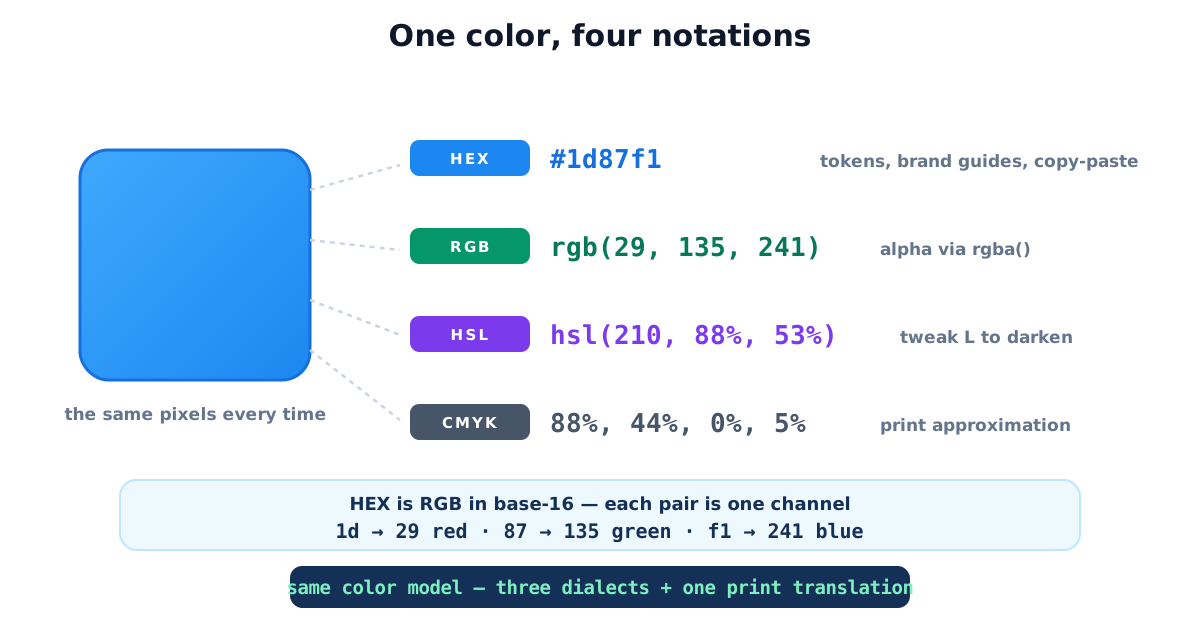
Everything on screen is additive RGB, three light channels, 0 to 255 each. The formats differ only in how they write those numbers:
| Format | Example | Strength |
|---|---|---|
| HEX | #1d87f1 | compact single token, brand guides, copy-paste, CSS variables |
| RGB | rgb(29, 135, 241) | numeric channels, alpha via rgba(), JS math |
| HSL | hsl(210, 88%, 53%) | human-meaningful, hue 0-360°, saturation, lightness |
| CMYK | 88%, 44%, 0%, 5% | print ink mix, different world, see below |
HEX ↔ RGB: the base-16 mechanics
A HEX code is three two-digit base-16 numbers glued together. Each channel spans one byte, 0 to 255,
or 00 to ff in base-16, so a six-digit HEX carries exactly the same information as three decimal
channels, no more and no less. There are 256 × 256 × 256 ≈ 16.7 million distinct opaque colors either
way. Converting by hand:
- Split
#1d87f1into pairs:1d,87,f1. - Each pair: first digit × 16 + second digit, where a, f mean 10-15.
1d= 1×16 + 13 = 29 ·87= 8×16 + 7 = 135 ·f1= 15×16 + 1 = 241.
Going the other way, divide each channel by 16, quotient then remainder, and pad values under 16
with a leading zero: rgb(0, 10, 200) is #000ac8, not #0ac8 (the most common manual mistake). The
HEX to RGB and RGB to HEX tools do both directions with a
live swatch.
A few HEX pairs are worth memorizing, because they anchor everything in between:
| Decimal | HEX pair | Meaning |
|---|---|---|
| 0 | 00 | channel fully off |
| 128 | 80 | roughly half |
| 153 | 99 | the 9 in a 3-digit shorthand |
| 204 | cc | the c in a 3-digit shorthand |
| 255 | ff | channel fully on |
That last row explains the pure primaries and neutrals at a glance: #ff0000 is red, #000000 is
black, #ffffff is white, and any code with three equal pairs (#808080, #333333) is a gray.
Transparency works in both dialects: rgba(29, 135, 241, 0.5) or the 8-digit HEX #1d87f180
(80₁₆ = 128, half of 255), identical results, universal support across current browsers. The alpha pair
is just a fourth channel converted the same way (round opacity × 255, then write it in base-16):
| Opacity | Alpha byte | HEX pair |
|---|---|---|
| 100% | 255 | ff |
| 75% | 191 | bf |
| 50% | 128 | 80 |
| 25% | 64 | 40 |
| 10% | 26 | 1a |
| 0% | 0 | 00 |
So #1d87f1bf is the same blue at 75% opacity. If you would rather not memorize the byte math, the
color converter shows the alpha pair as you drag an opacity slider.
HSL: the format you adjust in
HSL maps the same color onto three human-meaningful axes: hue (position on the color wheel, 0-360°), saturation (gray → vivid) and lightness (black → white). Its superpower is derivation:
- Hover state:
hsl(210, 88%, 43%), same blue, L −10. - Muted variant:
hsl(210, 40%, 53%), same blue, S −48. - Complementary accent:
hsl(30, 88%, 53%), H +180.
That’s why design systems compute state colors in HSL even when tokens are stored as HEX, and it’s the logic behind the shades & tints generator, which walks lightness for you. For blending two arbitrary colors instead, the color mixer interpolates the RGB channels, with the counterintuitive footnote that screen-mixing blue + yellow gives gray, not green (light is additive; paint is subtractive).
One caveat that trips people up: HSL lightness is not perceptual brightness. hsl(60, 100%, 50%)
(yellow) and hsl(240, 100%, 50%) (blue) share the same L value, yet the yellow looks far brighter to
the eye. That gap is exactly why newer CSS color spaces such as oklch() exist, but for the everyday
job of “same hue, a few steps lighter or darker,” HSL remains the fastest tool to reason in.
A full worked conversion, end to end
To see the three notations line up, take one color all the way through. Start from HSL and land on HEX:
- Target:
hsl(210, 88%, 53%), a hue of 210° (blue), high saturation, just above mid-lightness. - HSL → RGB yields roughly R 29, G 135, B 241. (The arithmetic is a chroma-and-offset formula; the converter runs it instantly, but the point is that the output is a deterministic set of 0-255 channels.)
- RGB → HEX: 29 ÷ 16 = 1 r 13 →
1d; 135 ÷ 16 = 8 r 7 →87; 241 ÷ 16 = 15 r 1 →f1. Glue them:#1d87f1.
Every step is reversible and lossless within the RGB gamut, the same pixel, re-labeled. Only the trip into CMYK below breaks that guarantee.
CMYK: why print never quite matches
CMYK describes ink, not light: cyan, magenta, yellow and black percentages that absorb color from white paper. Two consequences: the conversion is a formula-based approximation (the standard math the converter uses), and the final result depends on the actual printer, paper and ICC profile. Treat converted CMYK as the starting point for a proof, and never spec a brand color for print from screen values alone, that’s what Pantone matching and ICC workflows exist for.
Which format where: the practical rules
- Tokens and brand docs → HEX, one compact string that survives every copy-paste.
- Needs opacity → rgba() or 8-digit HEX, pick per codebase and stay consistent.
- Deriving hover/disabled/dark variants → HSL, adjust L and S, keep H.
- Gradients → HEX endpoints in
linear-gradient(), the gradient generator emits copy-ready CSS. - Print → CMYK via proofs, never via screen conversion alone.
Common color-format mistakes
- Dropping leading zeros in HEX (
#0ac8for#000ac8), malformed and misrendered. - Adjusting colors in HEX by nudging digits, you’re editing base-16 blind; convert to HSL, adjust, convert back.
- Expecting CMYK fidelity from a formula, the gamuts differ; proofs decide.
- Mixing alpha conventions in one codebase, rgba() here, 8-digit HEX there makes review harder; standardize.
- Assuming hsl() values transfer between color pickers, some tools show HSB/HSV, which is not HSL despite the similar name; the B/V axis behaves differently from L.
Quick summary
HEX, RGB and HSL are one color model in three notations, HEX for storing, RGB for alpha and math, HSL for adjusting, while CMYK is a print approximation to verify on paper. The conversions are exact and mechanical (each HEX pair is one channel in base-16), and the color converter moves between all four with a live swatch, entirely in your browser.
Related: contrast checker to validate the colors you pick · shades generator · gradient generator.
Frequently asked questions
Are HEX and RGB different colors?
Never. They are two notations for the same three 0-255 channels. #1d87f1 is rgb(29, 135, 241): 1d is 29 in base-16, 87 is 135, f1 is 241.
When should I use HSL instead of HEX?
When deriving variants: HSL separates hue from saturation and lightness, so 'same color, 20% darker' is literally L − 20. Design tokens often store HEX but compute states in HSL.
How do I convert HEX to RGB by hand?
Split into pairs and convert each from base-16: first digit × 16 + second digit, with a, f meaning 10-15. f1 = 15 × 16 + 1 = 241.
What is 8-digit HEX?
HEX with an alpha pair appended: #1d87f180 is the same blue at 50% opacity (80 in base-16 = 128 of 255). Supported in all modern browsers, equivalent to rgba().
Why does my CMYK print not match the screen?
Screens emit light (additive RGB); print reflects it through ink (subtractive CMYK), the color spaces overlap imperfectly, and results depend on the printer's profile. Formula conversions like ours are the standard starting approximation; brand-critical print needs ICC-profile workflows.
What is a 3-digit HEX like #09c?
Shorthand where each digit doubles: #09c = #0099cc. Handy for quick prototyping; expanded form is clearer in shared code.
Is uppercase or lowercase HEX correct?
Both are identical to the browser (#1D87F1 = #1d87f1). Most style guides standardize on lowercase for consistency.