
how-to
CSV to JSON Without the Traps: Quotes, Commas, Semicolons and Typed Values
By Uttam Regmi · Published 2026-07-05 · Updated 2026-08-23 · 6 min read · Fact-checked, sources cited
CSV-to-JSON conversion fails in three predictable ways: commas hiding inside quoted fields, semicolon-delimited “CSV” from European Excel, and numbers arriving as strings. All three are solved problems if the converter follows the rules, the CSV to JSON converter does, with delimiter auto-detect and typed output, entirely in your browser.
How the conversion actually works
CSV looks trivial, values separated by commas, but real CSV follows the
RFC 4180 conventions, and naive split(",") code
breaks on the first quoted field:
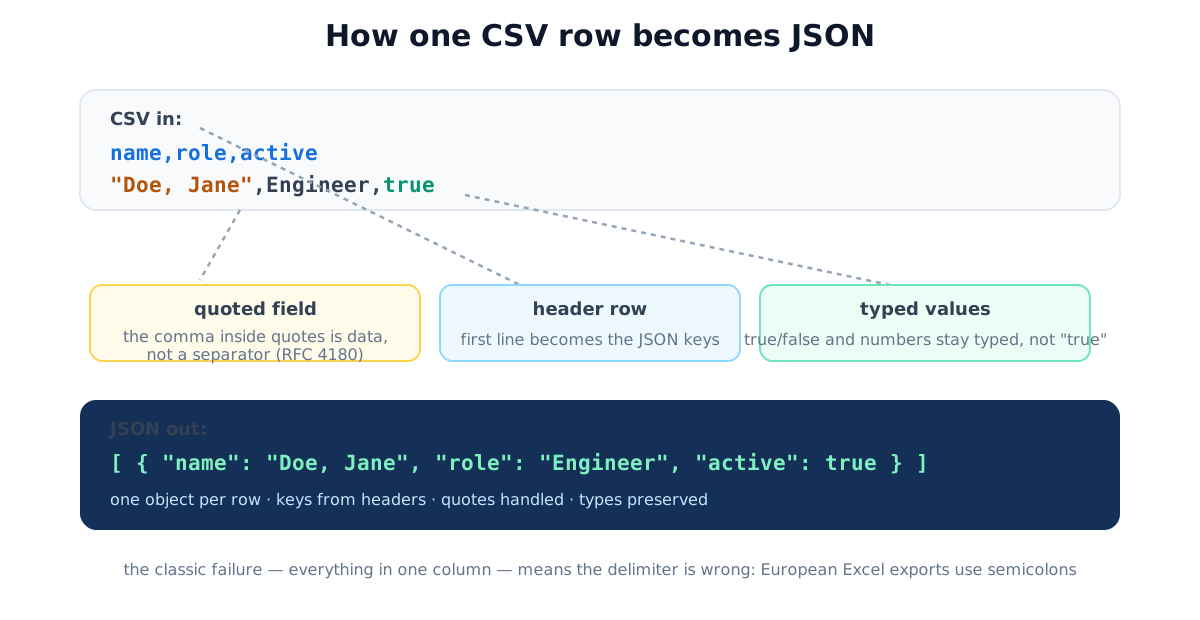
The three rules in play:
- Headers → keys. The first row names the fields; every following row becomes one JSON object.
- Quotes protect structure. A field wrapped in
"…"may contain commas, newlines, and doubled quotes (""= one literal"). - Values keep types.
42,true,nullbecome real JSON numbers, booleans and null, with one deliberate exception below.
Trap 1, the one-giant-column problem (semicolons)
Paste a “CSV” and get one column? Your file is semicolon-delimited. In locales where the comma is
the decimal separator (Germany, France, Spain, Brazil…), Excel writes 1,5 for one-and-a-half, so
its “CSV” export separates fields with ; instead. The
converter auto-detects by sampling the first lines; the delimiter dropdown
overrides it for stubborn files (tabs and pipes included, spreadsheet copy-paste arrives
tab-separated).
Four delimiters cover almost everything you will meet in the wild. The name “CSV” is a misnomer half the time, the file is really “character-separated values”, and knowing which character saves the guesswork:
| Delimiter | Character | Where it comes from | Tell-tale sign |
|---|---|---|---|
| Comma | , | The RFC 4180 default; US/UK Excel, most APIs and databases | The common case; breaks only on quoted commas |
| Semicolon | ; | Excel in comma-decimal locales (Germany, France, Spain, Brazil…) | Whole file collapses into one JSON key |
| Tab (TSV) | \t | Copy-paste out of a spreadsheet; many scientific exports | Values look space-separated but split cleanly on tab |
| Pipe | vertical bar | Legacy data feeds, log exports, some ETL tools | Chosen precisely because data rarely contains a pipe |
Auto-detection works by counting candidate delimiters per line and picking the one whose count is both high and consistent across rows, a semicolon file has one comma but nine semicolons per line, so the winner is obvious. When rows are ragged or the sample is tiny, set the delimiter by hand rather than trusting the guess.
Trap 2, quoted fields and embedded commas
"Doe, Jane",Engineer,true is a three-field row. Splitting on commas yields four broken fields, the
signature bug of quick homemade parsers, visible as names bleeding into the wrong columns. Any
converter (or code) touching real-world CSV must implement the quoting rules; the sample data in the
tool demonstrates the case on load.
Trap 3, types, and the long-number exception
"42" and 42 are different JSON values, and downstream code cares. Good conversion coerces
numbers, true/false and null into real types. The exception is deliberate: digit strings of
16+ characters (credit cards, phone numbers, snowflake IDs) stay strings, because JSON numbers ride on
64-bit floats, anything past 9007199254740991 (JavaScript’s Number.MAX_SAFE_INTEGER) can no
longer be represented exactly, so 9007199254740993 rounds to 9007199254740992. If your IDs come
back altered by any tool, this is why.
Here is how a well-behaved converter classifies each raw cell:
| CSV cell | JSON output | Type | Why |
|---|---|---|---|
42 | 42 | number | Plain integer, safely inside the 64-bit range |
3.14 | 3.14 | number | Decimal point, parses as a float |
true / false | true / false | boolean | Literal booleans, not the strings "true"/"false" |
| “ (empty) | null or "" | null / string | Empty cell, many converters map to null; pick per your schema |
007 | "007" | string | Leading zero is meaningful, so it stays text |
4165551234567890 | "4165551234567890" | string | 16 digits, kept as text to protect precision |
The leading-zero rule is the same instinct as the long-ID rule: coercing 007 to the number 7
throws away information the source deliberately encoded, so a cautious converter leaves it alone.
Going the other way: JSON → CSV
The JSON to CSV converter needs an array at the top level:
[{...}, {...}]→ header row from the union of all keys (records missing a key get empty cells).- Values containing the delimiter, quotes or newlines get quoted and escaped automatically.
- Nested objects embed as JSON strings, lossless and reversible. True flattening
(
address.city→ its own column) changes the data’s shape, so it’s a decision, not a default. - Shipping to European Excel? Choose the semicolon delimiter and download the file (downloading preserves UTF-8; copy-paste through the clipboard is where accents get garbled).
Worked example. Start with this CSV, note the quoted comma and the boolean:
name,role,active
"Doe, Jane",Engineer,true
Ravi Patel,Designer,false
Quote-aware parsing plus type coercion produces exactly this JSON:
[
  { "name": "Doe, Jane", "role": "Engineer", "active": true },
  { "name": "Ravi Patel", "role": "Designer", "active": false }
]
Doe, Jane stayed one field, and active became a real boolean rather than the string "true".
Now push a nested response back the other way: three records shaped {id, name, meta:{…}} convert to
a 4-column CSV (id, name, meta + one row each), with each meta object serialized into a single
JSON-string cell. Paste that CSV back through CSV-to-JSON and the structure round-trips intact, the
embed-as-string rule is what makes the loop lossless.
The quick-check habit
Before shipping converted data anywhere, two one-click sanity checks: run the JSON through the JSON formatter (validation with line/column errors), or render the CSV as a Markdown table for a human-readable eyeball of columns landing where they should.
Common CSV↔JSON mistakes
- Splitting on commas in code, works until the first
"Doe, Jane". Use a real parser. - Ignoring the delimiter question, semicolon files read as comma produce the one-column mess.
- Letting IDs become numbers, 16-digit IDs corrupt silently; verify they stayed strings.
- Expecting automatic flattening, nested JSON in CSV cells is correct behavior, not a bug.
- Copy-pasting into Excel, accents survive the file route, not always the clipboard route.
Quick summary
CSV-to-JSON is mechanical once three rules hold: quote-aware parsing (RFC 4180), the right delimiter (watch for European semicolons), and type coercion with the long-ID exception. The CSV to JSON and JSON to CSV converters implement all of it with file open/download and no size limits, locally, because business exports shouldn’t tour other people’s servers.
Related: JSON formatter · CSV to Markdown table · remove duplicate lines for pre-cleaning exports.
Frequently asked questions
Why does my CSV convert into one giant column?
Wrong delimiter. European-locale Excel exports 'CSV' with semicolons (because the comma is the decimal separator there), so a comma-based parse sees one field per row. Auto-detect fixes it, or pick semicolon explicitly.
How do commas inside values survive conversion?
Via quoting, per the RFC 4180 convention: fields wrapped in double quotes may contain commas and even newlines, and a doubled quote ("") means one literal quote. "Doe, Jane" is one field, not two.
Should numbers in CSV become JSON numbers or strings?
Usually numbers, 42 should be 42, not "42", and good converters type-coerce numbers, booleans and null. The exception: long digit strings like phone numbers and IDs (16+ digits) must stay strings, or floating-point precision silently corrupts them.
How do I convert JSON back to CSV?
The top level must be an array of objects (or arrays). Headers come from the union of all keys; nested objects embed as JSON strings rather than silently flattening. Pick the semicolon delimiter if the file must open in European Excel.
What breaks when opening converted CSV in Excel?
Two classics: accented characters garble when pasting (download the file instead, that preserves UTF-8), and everything lands in one column on European locales (use the semicolon delimiter).
Is there a row limit for these conversions?
Not here, parsing is local, so large exports convert instantly. Several competing converters cap free use at 1 MB per day; local processing has no reason to.