
explainer
0.1 + 0.2 ≠ 0.3: Why Most Calculators Quietly Round, and What Exact Arithmetic Looks Like
By Uttam Regmi · Published 2026-07-09 · Updated 2026-08-23 · 5 min read · Fact-checked, sources cited
Type 0.1 + 0.2 into a JavaScript console and you get 0.30000000000000004. Sum three thirds
on most calculators and you get 0.9999999999999999. Neither is a bug, it’s floating point, the
arithmetic almost every calculator on earth uses, quietly rounding and hoping you don’t need the
difference. Sometimes you do, and then you want arithmetic that keeps fractions as fractions and
integers exact at any size, like the fraction calculator and the rest
of the Mathematics tools.
The lie every calculator tells
Computers store numbers in binary. In decimal, 1/3 has no finite representation (0.3333…); in
binary the same fate befalls 1/10 and 2/10, so the moment you type 0.1, the machine actually
stores the nearest value a 64-bit float can hold, which is
0.1000000000000000055511151231257827…. Add the similarly-off 0.2 and the result lands at
0.30000000000000004. The IEEE 754 standard behind this powers JavaScript, Python floats, Excel
and virtually every pocket and phone calculator, with roughly 15-17 significant decimal digits
of headroom. Inside that budget errors hide behind display rounding; outside it, they surface:
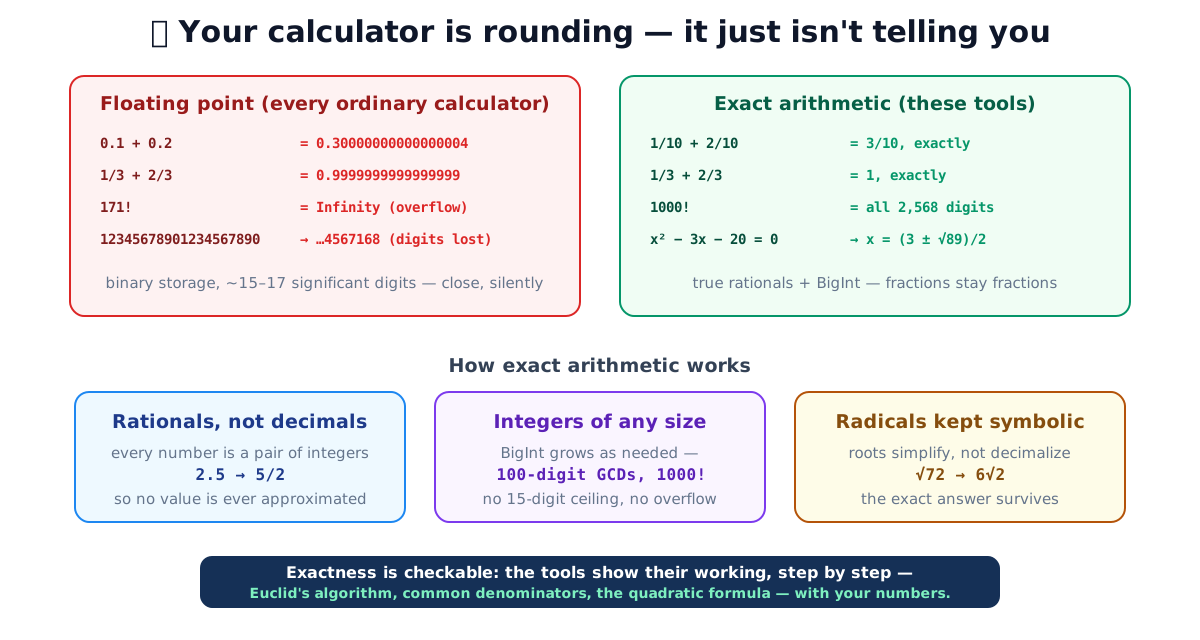
| You compute | Floating point says | Exactly |
|---|---|---|
| 0.1 + 0.2 | 0.30000000000000004 | 3/10 |
| 1/3 + 2/3 | 0.9999999999999999 | 1 |
| 12345678901234567890 | 12345678901234567168 | itself |
| 171! | Infinity (overflow) | a 309-digit integer |
| √72 | 8.48528137423857 | 6√2 |
What exact arithmetic does differently
Three representation choices remove the rounding entirely:
- Rationals instead of decimals. Every number is stored as a pair of integers, 2.5 is 5/2, 0.1 is 1/10, and arithmetic follows the school rules (common denominators for addition, straight-across for multiplication). 1/3 + 2/3 is exactly 1 because thirds were never approximated in the first place. The fraction calculator and decimal⇄fraction converter work this way, the latter even converts repeating decimals exactly, so 0.(142857) comes back as precisely 1/7.
- Integers that grow. Arbitrary-precision integers (BigInt) have no 15-digit ceiling: the GCD/LCM calculator runs Euclid on 100-digit inputs, and the combinations calculator produces 1000! digit-perfect, 2,568 digits, where floats gave up at 171!.
- Radicals kept symbolic. When x² − 3x − 20 = 0, the answer is (3 ± √89)/2; the decimal 6.216991 is a shadow of it. The quadratic solver extracts square factors (√72 → 6√2) and reduces the whole expression, handing you the exact form your homework’s next line actually needs, decimals alongside for practical use.
A worked example: adding two fractions exactly
Watch what a rational engine does with 1/6 + 1/10, a sum that floating point renders as
0.26666666666666666, an endless 6 chopped off at the fifteenth digit.
- Find a common denominator. The least common multiple of 6 and 10 is 30, so rewrite the fractions over 30: 1/6 becomes 5/30, and 1/10 becomes 3/30.
- Add the numerators. 5/30 + 3/30 = 8/30.
- Reduce. The greatest common divisor of 8 and 30 is 2, so divide both by 2 to get 4/15.
The final answer, 4/15, is exact and complete, no digit was ever discarded, because no decimal was ever formed. The fraction calculator performs exactly these steps and shows each one; the LCM in step 1 and the GCD in step 3 are the same routines the GCD/LCM calculator exposes on their own. Ask a float for 4/15 and you get 0.2666…7 rounded; the rational form keeps the truth and lets you convert to a decimal only if and when you actually want one.
How numbers are stored, a reference
The rounding problem is entirely a consequence of the storage format. Each representation trades something for something else:
| Representation | Stores | Exact? | Cost / limit |
|---|---|---|---|
| 64-bit float (IEEE 754 double) | sign, 52-bit fraction, 11-bit exponent | No, ~15-17 significant digits | Fixed 8 bytes; fast; silent rounding and overflow |
| Arbitrary-precision integer (BigInt) | the whole integer, digit-exact | Yes, for integers | Memory grows with the number; slower for huge values |
| Rational (pair of BigInts) | numerator ÷ denominator | Yes, for any fraction | Two integers per value; must reduce to stay small |
| Symbolic radical | e.g. 6√2 kept unevaluated | Yes, for that form | Needs algebra rules; not a plain number until evaluated |
A float is a fixed-width approximation optimized for speed; the exact types spend memory and a little time to guarantee the answer. For a physics measurement the float wins and the difference is invisible. For homework, money, or a 300-digit factorial, the exact types are the only ones that give a correct result at all.
When it matters (and when it doesn’t)
Floating point is fine for measurements, a length you know to three digits gains nothing from fifty exact ones. The difference bites when the answer is the point:
- Schoolwork: teachers mark (3 + √89)/2, not 6.216990566…; and the steps, which these tools show, are usually worth more than the result.
- Anything that compounds: scale a recipe by thirds four times in floats and the drift is real; in rationals it’s zero.
- Comparisons: to a computer, 0.9999999999999999 ≠ 1, a classic source of “impossible” bugs and false spreadsheet mismatches.
- Combinatorics and number theory: factorials, binomial coefficients, primality, domains where a float answer isn’t imprecise, it’s wrong or Infinity.
One more honest note: exactness constrains scope. These tools do arithmetic, algebra and number theory exactly; they don’t do calculus or symbolic manipulation beyond what’s shown. What they answer, they answer completely, computed in your browser, offline, with nothing typed ever leaving your device.
Quick summary
Ordinary calculators compute in binary floating point: ~15-17 significant digits, silent rounding, overflow at 171!, and famous artifacts like 0.30000000000000004. Exact arithmetic, true rationals, arbitrary-precision integers, symbolic radicals, eliminates the entire error class, and showing the working makes every answer checkable. That’s the design of the LazyTools Mathematics tools: fractions with steps, Euclid line by line, quadratic roots in simplified radical form, and factorials at any size, exact, local and free.
Sources: IEEE 754 floating-point standard · 0.30000000000000004.com (the classic cross-language demonstration) · MDN, Number precision in JavaScript
Frequently asked questions
Why does 0.1 + 0.2 give 0.30000000000000004?
Because computers store numbers in binary, and 0.1 and 0.2 have no finite binary representation, just as 1/3 has no finite decimal one. The computer stores the nearest representable values, and their sum lands a hair above 0.3. It isn't a bug in any one language; it's IEEE 754 floating point, the arithmetic almost everything uses.
How many digits can a normal calculator actually hold?
A 64-bit float (the 'double' used by JavaScript, spreadsheets and most calculators) carries about 15-17 significant decimal digits. Beyond that, digits are silently invented: 12345678901234567890 becomes 12345678901234567168 the moment it's stored.
What is exact (arbitrary-precision) arithmetic?
Arithmetic on numbers represented exactly: integers as big-integers that grow as needed, fractions as pairs of integers (5/2 instead of 2.5), radicals kept symbolic (6√2 instead of 8.485…). Operations then follow the school rules, common denominators, Euclid's algorithm, and no step ever rounds.
When does the difference actually matter?
Whenever the answer is the point rather than an estimate: homework where the next line needs the exact value, money and recipe scaling where drift compounds, combinatorics where 171! overflows floats entirely, number theory where a single wrong digit changes primality, and any comparison of results (0.9999999999999999 ≠ 1 to a computer).
Why do the LazyTools math calculators show their working?
Because a bare answer is unverifiable. Showing the Euclidean steps, the common-denominator working or the discriminant computation makes the result checkable, and makes the tools usable for learning, not just answer-copying.
Can't I just ask an AI chatbot to do the math?
Language models generate plausible text, including plausible-looking numbers. They don't run algorithms unless paired with a calculator tool, and their confident wrong answers are indistinguishable from right ones. Deterministic tools compute; that's the whole difference.