
explainer
What Your Photos Reveal: EXIF, GPS Location and How to Strip Them
By Uttam Regmi · Published 2026-07-05 · Updated 2026-07-05 · 7 min read · Fact-checked, sources cited

A phone photo taken with location services on carries GPS coordinates accurate to a few meters, along with the device model, exact capture time and more, in an invisible block called EXIF, and many sharing channels pass it along untouched. You can see what any photo carries and download a clean copy in the image metadata remover, which scans and strips entirely in your browser.
What’s actually in the file
An image file is mostly pixels, but formats like JPEG reserve space for labeled metadata segments, and cameras fill them generously. The main blocks:
| Block | Typical contents | Privacy weight |
|---|---|---|
| EXIF | device make/model, capture date & time, exposure settings, orientation, thumbnail | Medium, device + time patterns |
| EXIF GPS tags | latitude, longitude, altitude, GPS timestamp | High, pinpoints the location |
| XMP | editing software, edit history, creator info | Medium |
| IPTC | captions, keywords, copyright, credit | Low, medium (deliberate) |
| ICC profile | color space definition | None, keep it |
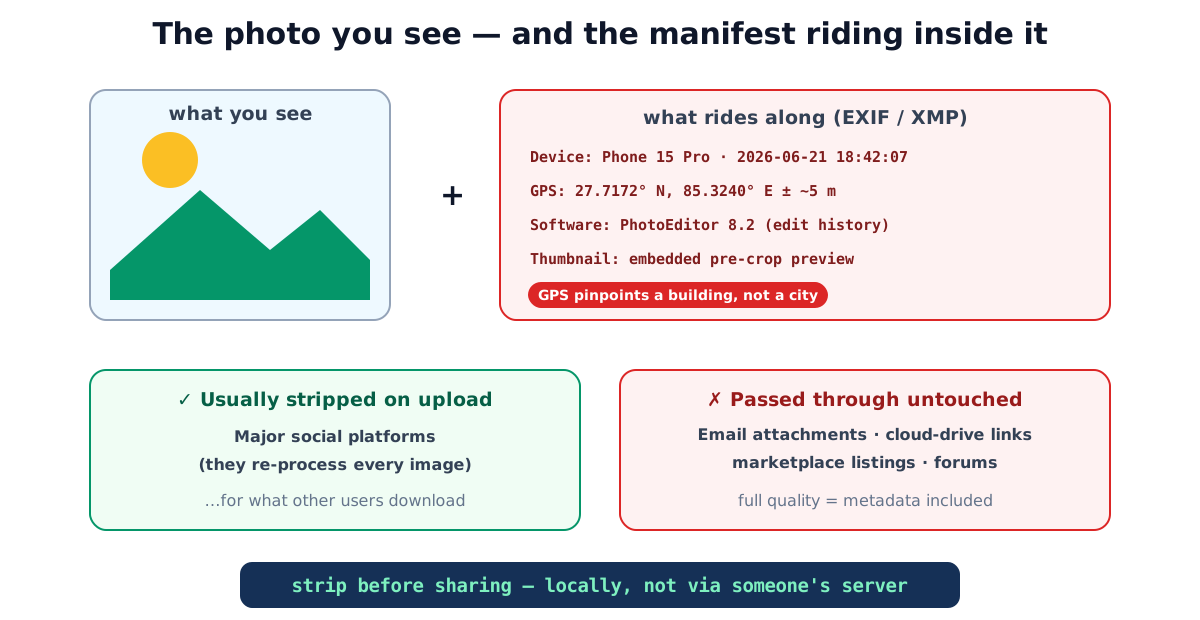
EXIF (the Exchangeable image file format, standardized as DC-008 by the Japanese camera-industry body CIPA) is what phones write automatically. The GPS tags are the sensitive part: a modern phone’s fix is accurate to roughly 5 meters in open sky, and it’s written into every photo while location access is granted to the camera.
Reading the coordinates yourself
The GPS tags aren’t a mystery, they’re plain numbers anyone can look up. EXIF stores latitude and
longitude in degrees, minutes and seconds (DMS), plus a reference letter for the hemisphere. A tag
that reads 37° 25' 19.07" N, 122° 5' 6.24" W converts to roughly 37.4220, -122.0851 in decimal
degrees, and pasting that pair into any map service drops a pin on the exact spot. There’s no
decoding skill involved, that’s the point. Whoever receives your file receives a map link.
How much a fractional degree is worth in the real world is easy to underestimate:
| Decimal places kept | Ground precision | What it resolves |
|---|---|---|
| 2 (e.g. 37.42) | ~1.1 km | A town or district |
| 3 (37.422) | ~110 m | A city block |
| 4 (37.4220) | ~11 m | A single building |
| 5 (37.42200) | ~1.1 m | A doorway or parked car |
Phones routinely write five or six decimal places. That is why “it’s only GPS data” understates the risk: the format’s resolution comfortably exceeds a house-sized target.
Where it leaks (and where it doesn’t)
The good news: major social platforms re-process uploads and strip most metadata from what other users can download. They learned this lesson years ago.
The channels that typically transmit your original file byte-for-byte, EXIF and all:
- Email attachments, the classic leak; the recipient gets your exact file
- Cloud-drive share links (Drive, Dropbox, OneDrive), sharing the original is the feature
- Marketplace and classified listings, selling furniture with your home’s coordinates attached
- Forums, blogs and small sites that don’t re-process uploads
- Messaging apps when you send “as file/document” instead of as a compressed photo
The rule of thumb: if the image arrives at full original quality, assume the metadata arrived too. Here’s how the common channels compare:
| Channel | What the recipient gets | Metadata risk |
|---|---|---|
| Major social feeds (Instagram, Facebook, X) | Re-encoded, resized copy | Low, most metadata dropped on upload |
| Messaging app, “send as photo” | Compressed copy | Low, usually re-encoded |
| Messaging app, “send as file/document” | Your exact original bytes | High |
| Email attachment | Your exact original bytes | High |
| Cloud-drive share link | Your exact original file | High |
| Marketplace / classified listing | Depends on the platform’s re-processing | Medium, high |
| Personal blog or small forum upload | Often the untouched original | Medium, high |
The lesson isn’t “social media is safe and everything else is dangerous”, it’s that re-encoding is what strips metadata. Any channel that hands over your original file hands over everything in it.
Checking and stripping in two minutes
- Open the image metadata remover and pick the photo. It lists the segments it finds, EXIF, GPS, XMP, IPTC, before you do anything.
- Click strip & download. The tool redraws the pixels onto a canvas and re-encodes: the new file physically contains image data only, because canvas encoding never copies metadata across.
- Share the clean copy; keep the original for your own archive (the metadata is genuinely useful to you, it’s how photo apps build timelines and maps).
Two structural notes worth knowing. First, this happens locally, the photo never leaves your browser, which you can verify by disconnecting from the internet. Sending a private photo to an “EXIF removal” server is the one workflow more ironic than the problem. Second, re-encoding a JPEG re-compresses it once; at the default high quality the change isn’t visible, and the image compressor exists when you want to shrink the file at the same time.
Beyond GPS: the quieter signals
Location is the headline, but EXIF leaks more than coordinates. The exact capture timestamp, down to the second, lets anyone reconstruct a timeline, post three photos across an afternoon and you’ve published your movements for that afternoon. The device make and model is a soft fingerprint: photos from the same phone share it, quietly linking an anonymous marketplace listing to a photo you posted under your real name elsewhere. Some cameras even embed a serial number in the maker-notes.
There’s also the embedded thumbnail. EXIF stores a small preview image so galleries can load fast, and historically some editors cropped or blurred the main image without regenerating that thumbnail, leaving the original, un-cropped scene visible to anyone who extracted it. A full metadata strip removes the stale thumbnail along with everything else, which is a good reason to re-encode rather than hand-edit tags one by one.
A worked example ties it together. Say you list a bike for sale and attach four photos straight from your phone. Individually they’re “just a bike.” Together, their EXIF says: same device model across all four (so they’re all yours), taken within a ten-minute window last Tuesday evening, at GPS coordinates that resolve to your driveway. A buyer, or anyone scraping the listing, now knows your address, that you own the item, and roughly when you’re home. Stripping the four files before upload removes every one of those signals at once.
Prevention beats cleanup
- Deny the camera location access (iOS: Settings → Privacy → Location Services → Camera → Never; Android: App permissions → Camera → Location off). New photos then carry no GPS at all.
- Use your platform’s share-sheet stripping where offered, iOS’s share sheet has an “Options” toggle for location when sharing photos.
- For photos that must stay private in transit, strip metadata and encrypt: the file encryption tool wraps any file in AES-256 with a password, also locally.
Common metadata mistakes
- Trusting “it’s just a photo of my dog”, the subject doesn’t matter; the coordinates say where your dog lives.
- Assuming every app strips like Instagram does, email and cloud links are the leaky channels precisely because they faithfully deliver your original file.
- Stripping the copy, sharing the original, check the filename you actually attach; the
clean copy is the one ending in
-clean. - Forgetting old photos already online, stripping helps from today forward; previously shared originals keep whatever they carried.
- Uploading private photos to strip them, client-side or nothing.
Quick summary
Photos carry a hidden manifest, EXIF metadata with your device, exact timestamps and, if location was on, GPS coordinates precise enough to identify a building. Social platforms strip it; email, cloud links and marketplaces generally don’t. Check any photo and download a metadata-free copy in the image metadata remover, locally, because tools handling private photos shouldn’t receive them. And turn off camera location access to stop the problem at the source.
Related tools: file encryption · password strength checker · image compressor. EXIF is standardized as CIPA DC-008 by the Camera & Imaging Products Association.
Frequently asked questions
What exactly is stored in a photo's EXIF data?
Typically: camera or phone model, capture date and time, exposure settings (shutter, aperture, ISO), software used, a thumbnail, and, if location services were enabled, GPS latitude, longitude and altitude. Edited files may add XMP editing history and IPTC captions.
How precise is the GPS data in photos?
Phone GPS fixes are typically accurate to within about 5 meters in open sky. Embedded in a photo, that identifies a specific house, not just a neighborhood.
Do WhatsApp, Instagram and Facebook remove EXIF?
Major social platforms re-process images on upload and strip most metadata from what other users can download. But email, cloud-drive links, many forums and marketplace listings pass the original file through untouched. Those are the channels to worry about.
Does taking a screenshot remove metadata?
A screenshot is a new image of your screen, so it carries none of the original photo's EXIF, it's a crude but effective strip. The cost is quality (screen resolution) and convenience; a metadata remover keeps full resolution.
Can I just turn off location for the camera app?
Yes, and it's worth doing: both iOS and Android let you deny the camera location access, which stops GPS tagging at the source. Photos you already took keep their embedded coordinates until stripped.
Does removing EXIF reduce image quality?
Stripping via re-encode re-compresses lossy formats once; at high quality settings the difference isn't visually detectable. The pixels and the metadata are separate, removal doesn't touch composition, resolution or color.
Is uploading my photo to an EXIF-removal site self-defeating?
It's exactly the irony to avoid: sending a private photo to a stranger's server to make it more private. Use a client-side tool, the LazyTools remover scans and re-encodes in your browser, verifiable by running it offline.