
how-to
How to Hash a Password with Bcrypt
By Uttam Regmi · Published 2026-07-28 · Updated 2026-07-28 · 6 min read · Fact-checked, sources cited
To hash a password with bcrypt, pick a cost factor (10-12 is standard), run the password
through bcrypt, and store the whole output string, the one that starts with $2b$. Bcrypt is a
deliberately slow, salted, one-way password hash: it builds a random salt into every
hash, so you save just that single $2b$ string (salt included) and never keep the password itself.
You can do all of this, hash and verify, in the
bcrypt hash generator, which runs in your browser so the password
never leaves your device.
Why passwords need bcrypt (not SHA-256)
Passwords need a hash that is slow on purpose, and bcrypt is exactly that. The reason is the threat model: at some point a database leaks, and the attacker gets your table of password hashes. From that moment the only thing standing between them and every account is how expensive it is to guess. A general-purpose hash like SHA-256 is engineered for speed, great for file checksums and integrity checks, terrible here, because “fast” means an attacker can try billions of candidate passwords per second against the stolen hashes.
Bcrypt inverts that. It is intentionally slow, and it mixes a random salt into every hash so that two people with the same password get different stored values. SHA-256 does neither: it’s fast, and with no salt, identical passwords produce identical hashes, which lets attackers precompute a giant lookup table (a rainbow table) once and crack many databases with it. Bcrypt’s slowness and per-hash salt are not accidents; they are the entire point. (Two modern functions, Argon2 and scrypt, pursue the same goal and are excellent choices too; bcrypt remains a solid, widely supported default.)
Anatomy of a bcrypt hash ($2b$10$…)
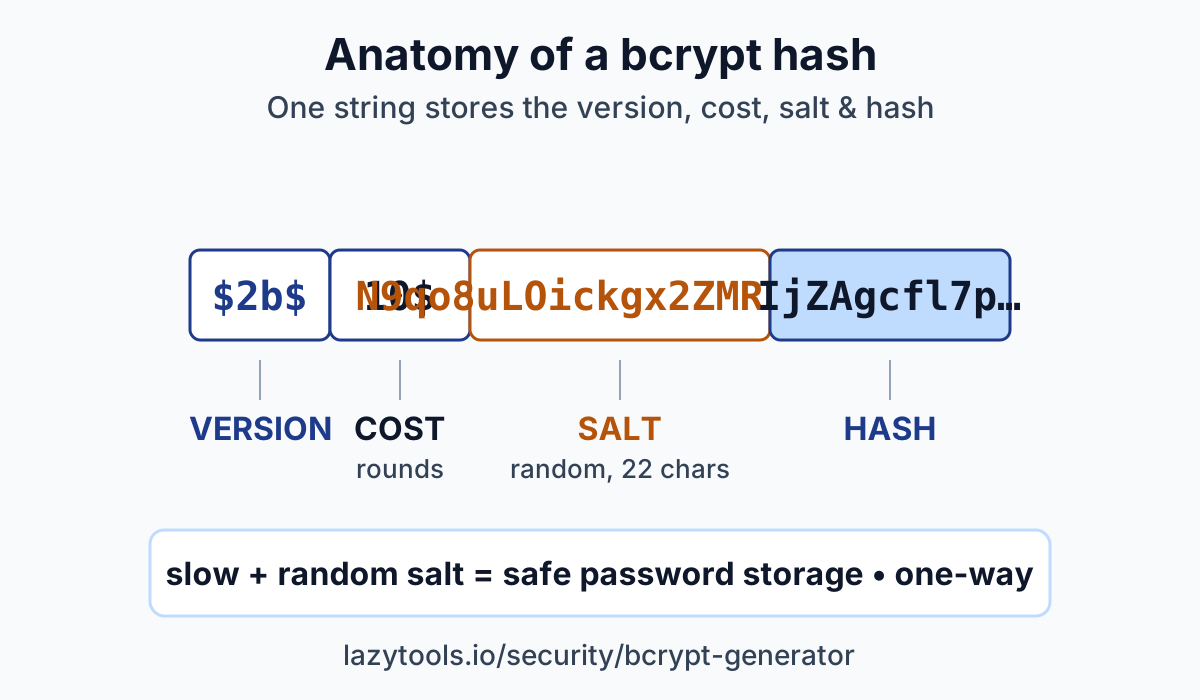
A bcrypt hash is one self-contained string with four parts, separated by $. Take this example:
$2b$10$N9qo8uLOickgx2ZMRZoMyeIjZAgcfl7p92ldGxad68LJZdL17lhWy
Reading it left to right:
| Part | Example | What it is |
|---|---|---|
| Version | 2b | The bcrypt algorithm version/identifier |
| Cost factor | 10 | The work factor (rounds), how slow the hash is |
| Salt | first 22 chars after the third $ | The random salt, encoded in the string |
| Hash | remaining 31 chars | The actual password hash |
The crucial takeaway: everything you need to verify a password later is inside this one string.
You store this single value in your users table. There is no separate salt column to manage and no
extra configuration to remember, the cost and salt travel with the hash. That’s why “store the
whole $2b$ string” is the whole storage instruction.
The cost factor (and why slow is good)
The cost factor is the tuning knob that sets how much work bcrypt does, and each step up roughly
doubles it. A cost of 10 means bcrypt runs 2¹⁰ iterations internally; a cost of 11 doubles that,
12 doubles it again. So going from 10 to 12 makes hashing about four times slower. That slowness
costs your server a few milliseconds per login but costs an attacker a fortune, because they have to
pay the same penalty on every single one of their billions of guesses.
The practical guidance: pick the highest cost your server can comfortably tolerate. Common values today are 10 to 12. You want each login hash to take a noticeable fraction of a second on your hardware, slow enough to punish brute force, fast enough that real users don’t wait. As hardware gets faster over the years, you raise the cost. Because the cost is embedded in every stored hash, you can bump it for new passwords and re-hash old ones on next login without any migration headache.
Why the same password hashes differently (salt)
Hash the same password twice with bcrypt and you get two different strings, and that is exactly what should happen. Before hashing, bcrypt generates a fresh random salt and folds it into the computation, then stores that salt inside the output. Different salt, different output. Yet both outputs still verify against the original password, because each one carries the specific salt it was made with.
This defeats rainbow tables. If every “hunter2” in the world hashed to the same value, an attacker could precompute that value once and instantly recognize it in any leaked database. With unique random salts, identical passwords look completely different in storage, and no precomputed table can help, the attacker is forced to attack each hash individually, at bcrypt’s deliberately slow pace. So if you paste the same password into the bcrypt generator twice and see two different hashes, nothing is broken; that’s the salt doing its job.
Verifying a password (bcrypt is one-way)
You never decrypt a bcrypt hash to check a login. You verify, because bcrypt is one-way by design. There is no key and no reverse function that turns a hash back into a password. Anyone promising to “decrypt” a bcrypt hash is really just guessing passwords, hashing each guess, and looking for a match.
Verification works like this: when a user logs in, bcrypt takes the password they typed, reads the
salt (and cost) out of the stored $2b$ string, re-hashes the typed password with that exact salt,
and compares the result to the stored hash. If they match, the password is correct; if not, it’s
wrong. You can try both directions in the tool, generate a hash on one side, then paste a candidate
password and the hash into the verifier to see it return match or no-match, all locally.
Common mistakes
- Using a fast hash for passwords. SHA-256, MD5, or SHA-1 are built for speed and have no salt. That’s ideal for checksums and wrong for passwords. Reach for bcrypt (or Argon2/scrypt) instead.
- Rolling your own salting scheme, or using none. Bcrypt already generates and stores a strong random salt per hash. Bolting a homemade salt onto a fast hash is far weaker and easy to get wrong , let bcrypt handle it.
- Setting the cost factor too low. A tiny cost (like 4) makes hashes cheap for attackers too. Use 10-12, and raise it as hardware improves.
- Trying to “decrypt” a hash. Bcrypt is one-way. If your plan involves recovering the original password from the hash, the design is wrong. You verify candidates, you don’t reverse.
- Storing the password itself (or a reversible-encrypted version). If your database leaks, plain or decryptable passwords leak with it. Store only the bcrypt hash, never the password.
Try it yourself
The fastest way to understand bcrypt is to watch it work. Open the bcrypt hash generator & verifier, type a password, pick a cost factor, and hash it, then hash it again and notice the output changes. Paste the password and a hash into the verifier to confirm they match. Everything runs in your browser via bcryptjs, so nothing is uploaded. Curious how strong the underlying password is in the first place? Check it in the password strength checker. And when you need a keyed, non-password hash for message authentication, that’s a different job, reach for the HMAC generator instead.
Frequently asked questions
How do I hash a password with bcrypt?
Pick a cost factor (10-12 is typical), run the password through bcrypt, and store the whole output string, the one that starts with $2b$. That string already contains the version, the cost, a random salt, and the hash, so you save just that one field. No separate salt column is needed. The LazyTools bcrypt generator does this in your browser, so the password never leaves your device.
What is the bcrypt cost factor?
The cost factor (also called rounds or work factor) is the number in the hash, e.g. the 10 in $2b$10$. It controls how much work bcrypt does: each +1 roughly doubles the computation time. A cost of 10 is far slower than 4; a cost of 12 is four times slower than 10. Higher cost makes brute-forcing harder but logins slower, so pick the highest value your server can tolerate, commonly 10 to 12.
Why does the same password give different hashes?
Because bcrypt generates a new random salt every time it runs. The salt is mixed into the hash and stored inside the same $2b$ string, so hashing 'hunter2' twice produces two different-looking outputs, and both still verify against 'hunter2'. This is intentional: unique salts mean identical passwords don't share a hash, which defeats precomputed rainbow-table attacks.
Can I decrypt a bcrypt hash?
No. Bcrypt is a one-way function, not encryption. There is no key that turns a hash back into the password. To check a login you don't decrypt anything; you verify. Bcrypt takes the candidate password, re-hashes it using the salt stored inside the existing hash, and compares the result. A match means the password is correct. If a tool claims to 'decrypt' a bcrypt hash, it's really just guessing passwords and hashing them.
Why not use SHA-256 for passwords?
SHA-256 is designed to be fast, which is exactly wrong for passwords. Fast means an attacker with a stolen database can try billions of guesses per second. SHA-256 also has no built-in salt, so identical passwords produce identical hashes. Bcrypt is deliberately slow and salts automatically, the slowness is the security feature. Use SHA-256 for checksums and integrity, not for storing passwords. Argon2 and scrypt are modern alternatives with the same goals as bcrypt.
Is my password uploaded when I use the tool?
No. The LazyTools bcrypt generator and verifier run entirely in your browser using the bcryptjs library. Your password, and any hash you paste to verify, is processed on your own device and never transmitted to a server. You can even use it offline.