
explainer
Homoglyph Attacks: How Lookalike Characters Spoof Domains and Brands
By Uttam Regmi · Published 2026-07-11 · Updated 2026-08-23 · 7 min read · Fact-checked, sources cited
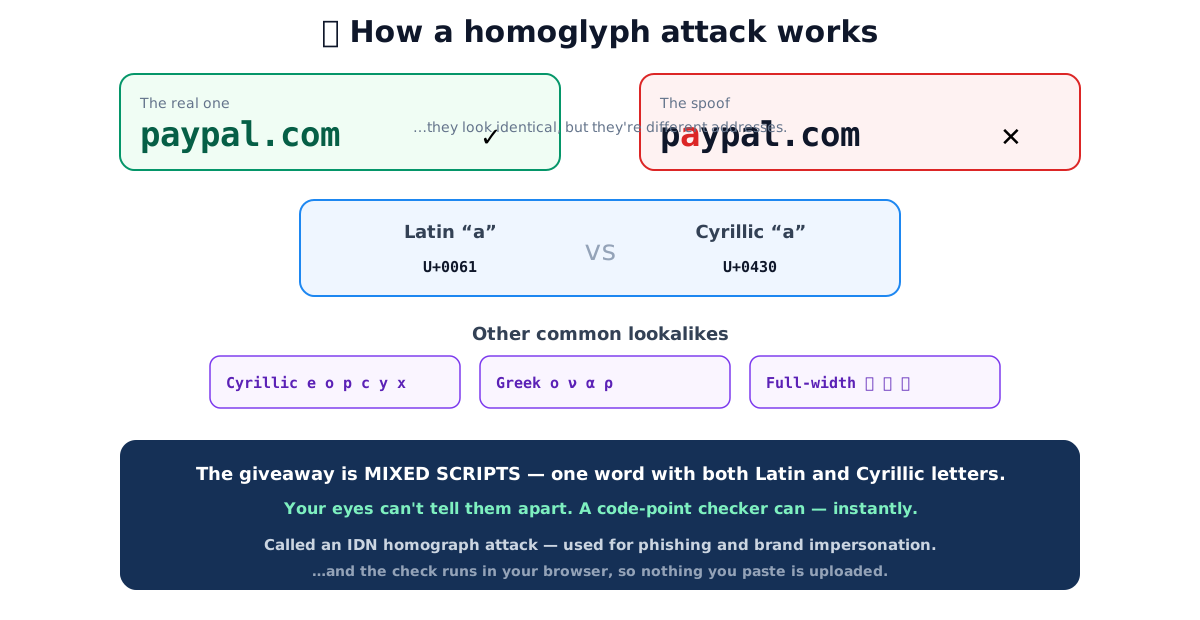
“pаypal.com” looks exactly like “paypal.com”, but the first “a” is a Cyrillic а (U+0430), not the Latin a (U+0061), a different character that happens to look identical, pointing to a different address. This is a homoglyph attack, and because your eyes physically cannot tell the two apart, the only reliable defence is to check the underlying code points. Do that instantly with the homoglyph detector; here’s how the trick works.
The trick, in one picture
What a homoglyph is
A homoglyph is a character that is drawn (nearly) identically to another but has a different Unicode code point, usually because it belongs to a different writing system. Unicode encodes dozens of scripts, and several of them contain letters whose shapes overlap with the Latin alphabet. The Cyrillic block alone supplies convincing stand-ins for a, e, o, p, c, y and x; Greek contributes ο, ν, α and ρ; and the full-width Latin block (used for East Asian typesetting) gives A, E, O. Because a well-designed font draws each pair with the same glyph, “аpple”, “раypal” and “gооgle” can each be written with a foreign letter hiding in plain sight.
The word “homoglyph” comes from homo- (same) and glyph (drawn shape): same shape, different identity. It is worth separating three closely related ideas:
- Homoglyph, same rendered shape, different code point (Cyrillic а vs Latin a).
- Confusable, Unicode’s formal term for characters likely to be mistaken for one another. Unicode Technical Standard #39 ships a machine-readable confusables table so software can map each lookalike to a canonical form.
- IDN homograph attack, the specific use of confusables inside an Internationalised Domain Name to register a lookalike web address.
A reference table of common confusables
The pairs below are the ones attackers reach for most, because their shapes are essentially indistinguishable in common fonts. The code points are the load-bearing detail. They are what a detector actually compares.
| Looks like | Latin (code point) | Impostor | Impostor script & code point |
|---|---|---|---|
| a | a (U+0061) | а | Cyrillic а (U+0430) |
| e | e (U+0065) | е | Cyrillic е (U+0435) |
| o | o (U+006F) | о | Cyrillic о (U+043E) |
| o | o (U+006F) | ο | Greek omicron (U+03BF) |
| p | p (U+0070) | р | Cyrillic er (U+0440) |
| c | c (U+0063) | с | Cyrillic es (U+0441) |
| y | y (U+0079) | у | Cyrillic u (U+0443) |
| x | x (U+0078) | х | Cyrillic ha (U+0445) |
| A | A (U+0041) | A | Full-width A (U+FF21) |
Notice that a single Latin letter can have impostors from more than one script, Latin “o” is imitated by both Cyrillic о (U+043E) and Greek omicron (U+03BF). That is why detection works on the code point, never the shape.
Why it’s dangerous
Substituting one lookalike character lets an attacker imitate a trusted name in any context where humans read text and trust what they see:
- Domains (IDN homograph attacks). A registered domain like “pаypal.com” can resolve to the attacker’s server while looking like the real brand, the basis of many phishing pages. The best-known proof of concept was security researcher Xudong Zheng’s 2017 demonstration, in which an all-Cyrillic string rendered as “apple.com” in the address bar of then-current browsers and served from a domain the researcher controlled.
- Email and display names. A “From” name or address with a single swapped character sails past a quick glance, and the recipient replies to, or trusts a request from, an address that is not who it appears to be.
- Brand and username impersonation. Social handles, npm/PyPI package names and org names use homoglyphs to pass as the real thing; a lookalike package name is a known supply-chain trick.
Consider a worked example. Suppose you receive a link to secure-lοgin.example. To the eye it reads
“secure-login”, but the third letter of “login” is a Greek omicron (U+03BF), not a Latin o (U+006F).
Encoded for DNS, an internationalised label like that is transformed into an ASCII-compatible
punycode form beginning with the xn-- prefix (the encoding is defined in RFC 3492). The two
labels, the pretty one you read and the xn-- one the network resolves, are not the same string,
which is exactly how the destination can differ from the brand you thought you clicked.
Browser defences, and their limits
Modern browsers fight IDN homographs with heuristics rather than a blanket ban. In broad terms, a
browser will display the friendly Unicode form when a label looks safe, but fall back to the raw
xn--… punycode when a label mixes scripts in suspicious ways or matches known confusable patterns, so a spoofed domain often reveals itself as gibberish in the address bar. The exact rules differ between
Chrome, Firefox and Safari and have tightened over the years.
That defence only covers the address bar. Homoglyphs still turn up in places no browser vets for you:
| Where you see it | Does the browser warn you? |
|---|---|
| Domain in the address bar | Often, may show xn--… punycode |
| Link text in an email or page | No, only the shape is shown |
| Email “From” / display name | No |
| Social handle or username | No |
| Copy-pasted brand name in a document | No |
Wherever the answer is “no”, the only reliable check is to inspect the code points yourself.
The giveaway: mixed scripts
Here’s the tell that catches almost every homoglyph: legitimate words are written in a single script. An English word is all Latin letters; a Russian word is all Cyrillic; a Greek word is all Greek. So when a single word contains letters from two scripts, a Latin “p” next to a Cyrillic “а”, something has almost certainly been substituted, because no natural language writes one word that way.
This is why “mixed-script detection” is the workhorse of a good checker. It does not need to guess intent or maintain a blocklist of brands; it simply asks, “does this one token draw from more than one writing system?” and flags it if so. Genuine multilingual text keeps its scripts in separate words, so the false-positive rate on ordinary content is low. The homoglyph detector flags exactly this condition and lists each offending character with its code point and the ASCII letter it imitates.
How to check text for homoglyphs
- Paste the suspicious text, a link, an email address, a brand name, into the homoglyph detector.
- It lists every lookalike character, its script (Cyrillic, Greek, full-width…) and the ASCII letter it mimics, and warns if scripts are mixed within a single token.
- It shows an ASCII-normalised version so you can read the “real” intended string and compare it with what you expected.
For a deeper look at exactly what a string contains, code points, categories and byte encodings, pair it with the Unicode character inspector, and check the same text for invisible characters such as zero-width spaces, the other half of the text-forensics toolkit. Everything runs in your browser, so pasting a suspicious link never sends it anywhere.
A few habits make this second nature: never trust link text, hover or inspect the real target; be suspicious of any address that arrived unexpectedly and pushes urgency; and when a name matters (a login page, a payment, a package you’re about to install), take the extra second to paste it into a checker rather than relying on your eyes.
Quick summary
Homoglyphs are characters from other scripts (Cyrillic а, Greek ο, full-width A) that look identical to ASCII letters, and swapping one in lets attackers spoof domains, emails and brands, an IDN homograph attack when it happens inside a web address. Your eyes cannot tell the pairs apart because they are the same shape, but the substitution always shows up as mixed scripts in the underlying code points. Browsers help by exposing punycode in the address bar, yet link text, display names and pasted strings go unchecked. Run any suspicious text through the homoglyph detector, instantly, and privately.
Sources: Unicode Technical Standard #39, Security Mechanisms (confusables) · RFC 3492, Punycode · IDN homograph attack (general security literature; Xudong Zheng’s 2017 proof of concept). Educational information, not a substitute for your organisation’s security controls.
Frequently asked questions
What is a homoglyph attack?
An attack that replaces a letter with a visually identical character from another script, for example the Latin “a” (U+0061) with the Cyrillic “а” (U+0430). The text looks the same to the eye but is technically different, so “pаypal.com” can point somewhere other than the real paypal.com. When used in domain names it's called an IDN homograph attack.
What are confusable or lookalike characters?
Characters from different Unicode scripts that render (nearly) identically, Cyrillic а/е/о/р/с, Greek ο/ν/α, and full-width A/E/O all look like their Latin counterparts. Unicode publishes a “confusables” list of these; attackers exploit them to imitate trusted names.
How can I tell if text contains homoglyphs?
Paste it into a homoglyph detector, which flags every non-ASCII character that imitates a Latin letter, shows its script and code point, and warns when a single piece of text mixes scripts. Mixed scripts within one word are the classic red flag, legitimate words rarely do it.
Why can't I just see the difference?
Because the characters are designed to be visually identical, that's the whole point. A Cyrillic “а” and a Latin “a” are the same shape in almost every font. Only their underlying code points differ, which is why a code-point checker catches what your eyes can't.
Are homoglyph domains still a threat?
Yes. Browsers now show punycode (xn--…) for suspicious mixed-script domains as a defence, but homoglyphs still appear in email display names, brand names, usernames, and copy-pasted links. Checking untrusted text for confusables remains a useful habit.
What is mixed-script detection?
Flagging text that contains letters from more than one writing system, say Latin and Cyrillic, within the same word or string. Because genuine words are almost always single-script, a mix is a strong signal that something has been substituted to deceive.