
how-to
How to Create and Sign a JWT (HS256)
By Uttam Regmi · Published 2026-07-28 · Updated 2026-07-28 · 6 min read · Fact-checked, sources cited
To create a JWT, you base64url-encode a small JSON header and a JSON payload, join them with a
dot, then sign that header.payload string with HMAC and your secret, the base64url signature
becomes the third part. That is the whole recipe for how to create a JWT with HS256, and you can
run it end to end in the JWT encoder / signer, which signs with the Web Crypto
API right in your browser so your secret never leaves the device.
The three parts of a JWT
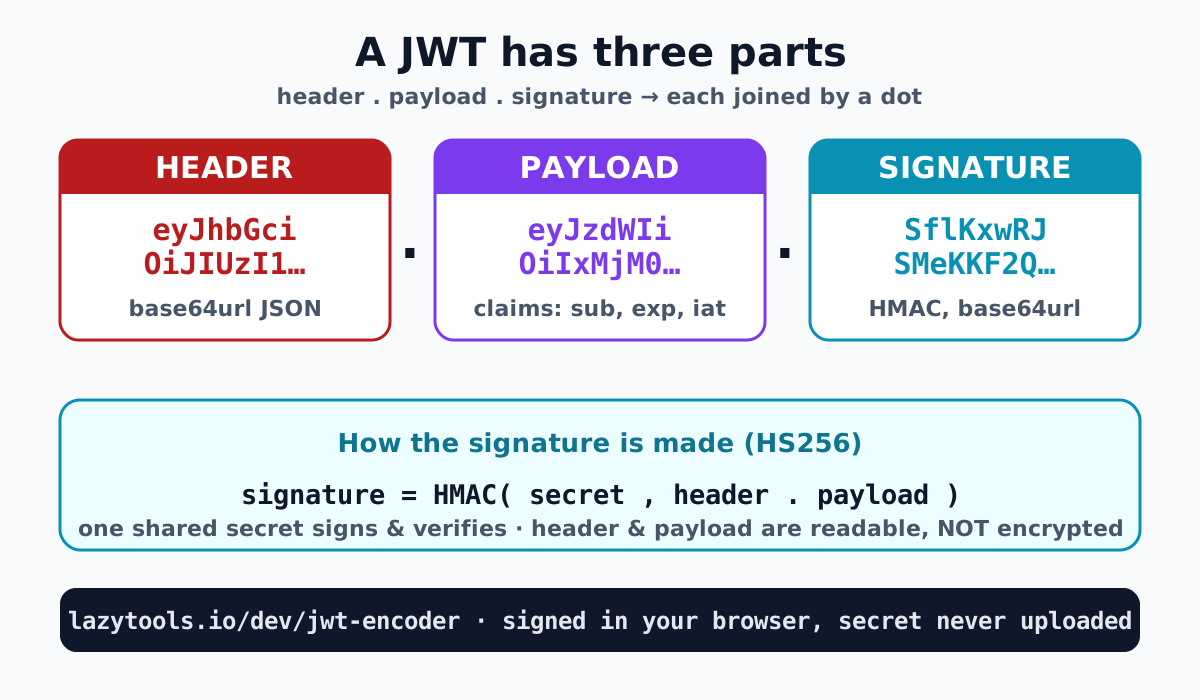
A JWT is three base64url strings joined by dots, header.payload.signature. The first two are just
JSON that has been base64url-encoded; the third is a signature computed over them.
The header names the algorithm and token type:
{
  "alg": "HS256",
  "typ": "JWT"
}
The payload carries the claims, the facts you want to assert:
{
  "sub": "1234567890",
  "name": "John Doe",
  "iat": 1516239022
}
Base64url-encode each of those, join with a dot, sign the result, and you get the canonical jwt.io example token:
eyJhbGciOiJIUzI1NiIsInR5cCI6IkpXVCJ9.eyJzdWIiOiIxMjM0NTY3ODkwIiwibmFtZSI6IkpvaG4gRG9lIiwiaWF0IjoxNTE2MjM5MDIyfQ.SflKxwRJSMeKKF2QT4fwpMeJf36POk6yJV_adQssw5cThat third segment was produced with the secret your-256-bit-secret. Change a single character in
the header or payload and the signature no longer matches, which is exactly the point.
Notice there is no encryption anywhere in that process. The header and payload are reversible by anyone: paste either segment into any base64url decoder and the original JSON comes straight back. The only thing the secret protects is the signature, and what the signature buys you is the ability to detect tampering. A JWT is a signed token, not a sealed one, a distinction worth keeping front of mind before you decide what to put in it.
How HMAC signing works (HS256)
Signing with HS256 means computing an HMAC-SHA256 over the encoded header and payload, using your secret as the key. Concretely, the signing input is the two base64url strings with a dot between them:
signature = base64url(
  HMAC-SHA256( secret, base64url(header) + "." + base64url(payload) )
)
HS384 and HS512 are identical except they use SHA-384 or SHA-512. Because the HMAC depends on both
the message and the secret, anyone who knows the secret can reproduce the signature to verify the
token, and nobody who lacks it can forge a valid one. To verify a token you simply recompute the HMAC
over its header.payload with the same secret and check that it equals the signature you received, if even one byte of the payload was altered in transit, the two will not match and the token is
rejected.
That single HMAC step is the heart of a signed JWT, the same primitive you can compute standalone in
the HMAC generator. The JWT encoder wires it together:
it encodes your JSON, runs the HMAC through the browser’s Web Crypto API, and assembles the final
header.payload.signature. Because Web Crypto executes locally, your secret is used to sign the
token on your own machine and is never transmitted anywhere.
HS256 vs RS256 (shared secret vs key pair)
The difference is symmetric versus asymmetric keys. HS256 uses one shared secret to both sign and verify, simple, and ideal when the same service issues and checks its own tokens. Everyone who can verify can also mint tokens, because they hold the same secret.
RS256 (and ES256) use a key pair: a private key signs, and a separate public key verifies. That lets you hand the public key to any number of verifiers without giving them the power to forge tokens, useful for identity providers whose tokens are checked by many independent services. Those algorithms need key-pair generation and are not offered in this tool; the LazyTools encoder covers the HMAC family (HS256 / HS384 / HS512), which is what most people mean by “sign a JWT with a secret”.
Claims and expiry (exp, iat, sub…)
Claims are the key, value statements in the payload, and a handful are standardised (“registered” claims). The most useful ones:
| Claim | Name | Meaning |
|---|---|---|
iss | Issuer | Who created and signed the token |
sub | Subject | Who the token is about (e.g. a user ID) |
aud | Audience | Who the token is intended for |
exp | Expiry | Unix timestamp after which the token is invalid |
iat | Issued-at | Unix timestamp when the token was created |
nbf | Not-before | Unix timestamp before which the token is invalid |
To make a token expire, add an exp claim set to a Unix timestamp (seconds since 1970). A
verifier compares it to the current time and rejects anything past it. Pair exp with iat so you
can reason about a token’s lifetime, and reach for nbf when a token should only become valid later, for example a token minted now but not usable until a scheduled start time. Everything beyond the
registered claims is yours to invent (role, email, plan), just remember every claim is public.
A common shape for a login token is a short-lived one: sub identifying the user, iat recording
when it was issued, and exp a few minutes or hours out. Short lifetimes limit the damage if a token
leaks, because a stolen token stops working on its own. The trade-off is that clients need a way to
obtain a fresh token when the old one expires, which is why real systems usually pair a short-lived
access token with a separate, longer-lived refresh mechanism.
Common mistakes
Most JWT bugs and vulnerabilities come from a few recurring errors:
- Putting secrets in the payload. The payload is base64url-encoded, not encrypted, passwords, card numbers or private data placed there are readable by anyone with the token. Keep it to non-sensitive claims.
- Forgetting
exp. A token with no expiry is valid forever. If it leaks, it stays a working key indefinitely. Always set a sensible expiry. - Using a weak secret. HS256 is only as strong as its secret; a short or guessable secret can be brute-forced offline. Use a long, high-entropy value (the name “256-bit secret” is a hint).
- Confusing signing with encryption. A signature proves integrity (nobody altered the token), not confidentiality (the contents are hidden). Those are different jobs.
- Accepting
alg: none. Some libraries historically honoured a header claiming no algorithm, letting attackers strip the signature. Always pin the expected algorithm when you verify.
Create and sign your JWT
That is how to create and sign a JWT: encode a JSON header and payload, then HMAC-sign
header.payload with your secret to produce the third segment. Build one now in the
JWT encoder / signer, set your claims, pick HS256/384/512, paste your secret,
and it assembles a signed token locally. When you need to read a token back, the JWT decoder does the
reverse; and for the raw primitive underneath, the HMAC generator computes
the signature on its own. Everything runs in your browser, so the secret you sign with never gets
uploaded.
The JWT format is specified in RFC 7519; the HMAC signing algorithms in RFC 7518.
Frequently asked questions
How do I create a JWT?
Write a JSON header like {"alg":"HS256","typ":"JWT"} and a JSON payload of claims, base64url-encode each, join them with a dot, then compute HMAC-SHA256 over that string using your secret and append the base64url signature. The result is header.payload.signature. The LazyTools JWT encoder does all three steps in your browser.
What are the three parts of a JWT?
Header, payload and signature, joined by dots: header.payload.signature. The header and payload are base64url-encoded JSON; the signature is an HMAC (for HS256) computed over the base64url header plus a dot plus the base64url payload, using your secret.
What's the difference between HS256 and RS256?
HS256 uses one shared secret to both sign and verify (symmetric HMAC-SHA256). RS256 uses a private key to sign and a matching public key to verify (asymmetric). HS256 is simplest when the same party issues and checks tokens; RS256 suits cases where verifiers must not be able to mint tokens. The LazyTools encoder offers HS256/384/512.
Is the JWT payload encrypted?
No. The payload is only base64url-encoded, not encrypted, so anyone holding the token can read it. The signature proves the token was not tampered with. It does not hide the contents. Never put passwords, card numbers or other secrets in a JWT payload.
How do I make a JWT expire?
Add an exp claim to the payload: a Unix timestamp (seconds since 1970) for the moment the token should stop being valid. Verifiers reject the token once the current time passes exp. You can also set nbf (not-before) and iat (issued-at).
Is my secret uploaded when I sign a JWT here?
No. The LazyTools JWT encoder runs entirely in your browser using the Web Crypto API. Your secret and payload are never sent to any server, nothing leaves your device.