
explainer
How TOTP (Two-Factor Authenticator) Codes Work
By Uttam Regmi · Published 2026-07-28 · Updated 2026-07-28 · 6 min read · Fact-checked, sources cited
TOTP (Time-based One-Time Password) is the rotating 6-digit code your authenticator app shows for two-factor authentication, and it’s simpler than it looks: the code is an HMAC of the current time and a shared secret, truncated to six digits, recomputed every 30 seconds. That single formula, standardised as RFC 6238, is why your app and the server land on the same number without ever exchanging it. You can watch it happen with the TOTP authenticator code generator, paste a secret and see the code and its live countdown, computed entirely in your browser.
What TOTP is and where the code comes from
TOTP stands for Time-based One-Time Password. It’s the short code, usually six digits, that an app like Google Authenticator, Authy or 1Password displays as your second factor when you log in. The name gives away the design: the password is one-time (each code is meant for a single login) and time-based (it’s tied to the clock rather than a button press or a counter you increment by hand).
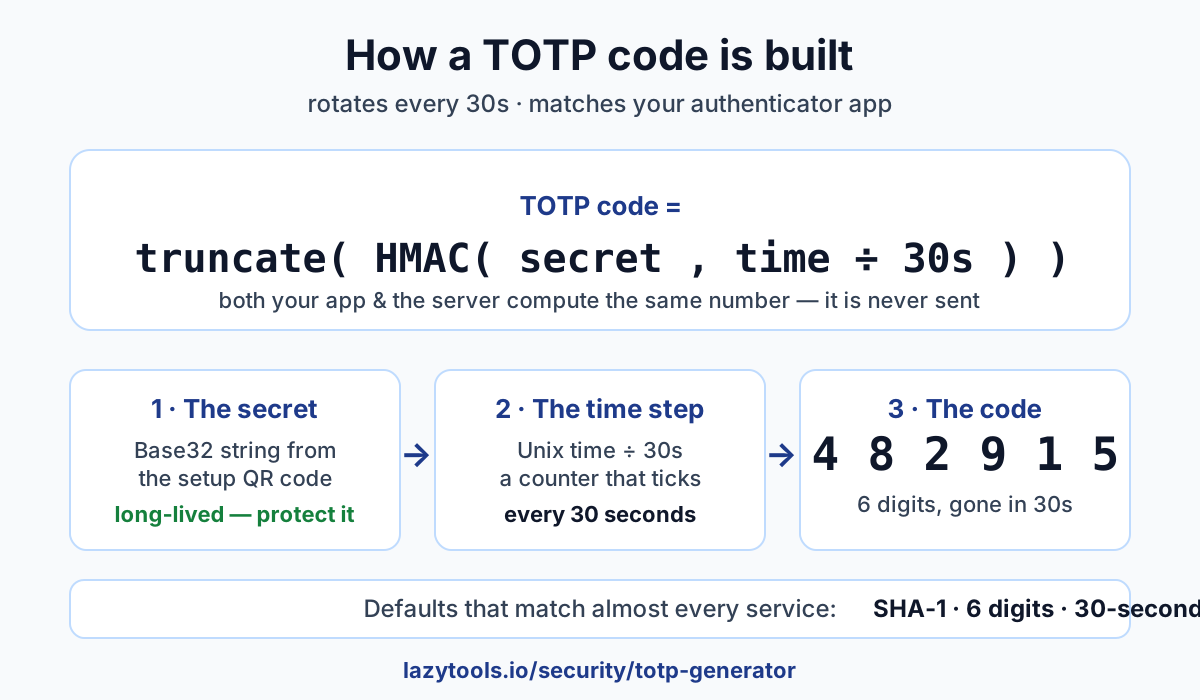
Here’s the whole recipe:
- Take the current Unix time (seconds since 1970).
- Divide it by the period, 30 seconds by default, and drop the remainder. That whole number is the time step, a counter that ticks up once every 30 seconds.
- Compute an HMAC (a keyed hash) of that counter, using your shared secret as the key. The default hash is SHA-1.
- Truncate the HMAC output down to 6 digits using the standard extraction from the spec.
That’s it. The result is your code. Crucially, the server you’re logging into holds the same secret and reads the same clock, so it runs the identical calculation and expects the identical number. The code itself is never transmitted between app and server during generation, both sides derive it independently. That’s what makes TOTP work offline: your phone needs no signal to produce a valid code, because it isn’t fetching anything.
The 30-second window (and clock skew)
Because the time step is Unix time divided by 30, it changes value every 30 seconds, and each new value feeds a completely different HMAC, producing an unrelated six-digit code. That short lifetime is deliberate: even if someone glimpses a code, it’s useless within half a minute.
But a strict 30-second boundary would be fragile. Your phone’s clock and the server’s clock are never exactly in sync, and you might type a code a few seconds after it appears. To absorb that, servers usually accept the code for the current window and one or more adjacent windows, a small tolerance known as clock skew. So a code from the window that just expired often still works for a moment. This is also why keeping your device’s clock accurate matters: most authenticator apps sync time automatically, and if a code is consistently rejected, a wrong clock is the usual culprit.
The Base32 secret behind the QR code
When you switch on 2FA, the service shows you a QR code and usually a string of letters and numbers
beneath it. That string is the shared secret, encoded in Base32 (uppercase A, Z and digits 2-7,
chosen because it’s unambiguous and easy to type). The QR code just packages the same secret, plus the
account name and settings, so your app can import it by scanning instead of typing. If you’d rather read
the QR image yourself, a QR code scanner will reveal the underlying
otpauth:// string.
The secret is the heart of the system, and it’s worth being clear about what it is: a long-lived credential. Unlike an individual code, it doesn’t expire in 30 seconds, it’s the same value for as long as 2FA stays enabled on that account. Anyone who has the secret can generate valid codes forever. Treat it with the same care as a password: don’t paste it into untrusted sites, and don’t leave a screenshot of the setup QR sitting in your camera roll or a shared drive.
Most services use the defaults: SHA-1, 6 digits, a 30-second period. Some tighten things up with SHA-256 or SHA-512, or issue 8-digit codes. A good authenticator honours whatever the service specifies, which is why the same secret can move between apps and keep working.
TOTP vs SMS vs passkeys
Second factors aren’t all equal. Here’s the honest ranking:
| Method | Strength | Weakness |
|---|---|---|
| SMS codes | Better than nothing; no app needed | SIM-swap and interception; needs signal |
| TOTP (authenticator app) | Offline, no phone number, wide support | Can be phished in real time |
| Passkeys / hardware keys | Bound to the real domain, resist phishing | Newer; not supported everywhere yet |
TOTP beats SMS. SMS second factors can be intercepted or stolen via SIM-swap attacks, and they depend on cellular reception. TOTP needs neither a phone number nor a signal. It runs entirely on-device.
Passkeys and hardware security keys beat TOTP on the one thing TOTP can’t fix: phishing. A passkey is cryptographically tied to the real website’s domain, so it simply won’t produce a valid response for a lookalike site. TOTP has no idea what site you’re on. It just shows a code, so a convincing fake page can trick you into handing one over.
None of this means TOTP is weak. For the vast majority of accounts it’s a large, practical security upgrade over a password alone, and it’s supported almost everywhere. Use passkeys where you can; use TOTP everywhere else; avoid SMS when you have a choice.
Common mistakes and gotchas
- Saving the secret with no backup. If your only copy of the secret lives on a phone you lose, you can be locked out. Store the recovery/backup codes the service offers, or keep the secret in a trusted password manager, because it’s a long-lived credential, a safe backup is a safe recovery.
- A wrong device clock. TOTP is time-based, so a phone or server clock that’s off by more than the skew tolerance produces codes the server rejects. Keep automatic time-sync on.
- Treating a screenshot of the setup QR as harmless. That image is the secret. Anyone who scans it can generate your codes indefinitely, so don’t leave it in shared albums, chat threads or cloud folders.
- Assuming TOTP stops all attacks. It defeats password-only breaches, but it does not stop real-time phishing, where a fake site relays your fresh code to the real one before it expires. Stay alert to the URL, and prefer phishing-resistant passkeys for your most sensitive accounts. Pairing TOTP with a genuinely strong first factor helps too, check yours with a password strength checker.
See it work, privately
The clearest way to understand TOTP is to watch the formula run. The TOTP authenticator code generator takes a Base32 secret and shows the current 6-digit code with a live countdown to the next rotation, matching what Google Authenticator or any other app would show for the same secret. It’s handy as a backup, or for testing a 2FA integration you’re building.
And it’s private by design: every code is computed locally in your browser with the Web Crypto API. Your secret, the one long-lived credential you most need to protect, never leaves your device and is never uploaded to any server. That’s the right default for something this sensitive.
Frequently asked questions
What is TOTP?
TOTP stands for Time-based One-Time Password, defined in RFC 6238. It's the rotating 6-digit (sometimes 8-digit) code that authenticator apps like Google Authenticator, Authy and 1Password show for two-factor authentication. The code is derived from the current time and a secret you share with the service when you enable 2FA, and it changes every 30 seconds.
How does an authenticator code get generated?
The app takes the current Unix time, divides it by the period (usually 30 seconds) to get a counter, then computes an HMAC of that counter using your shared secret as the key. It truncates the HMAC result down to 6 digits. The server does the exact same calculation with the same secret and clock, so both arrive at the same code without ever exchanging it.
Why do the codes change every 30 seconds?
The time step is Unix time divided by the period, and the default period is 30 seconds. Every 30 seconds the counter increments by one, which produces a completely different HMAC and therefore a new code. The short window limits how long a stolen code stays valid.
Will a generated code match Google Authenticator?
Yes, as long as both use the same secret and the same settings (SHA-1, 6 digits, 30-second period, which almost every service uses) and your device clocks agree, any correct TOTP implementation produces the identical code at the same moment. That's why you can move a secret between apps and still log in.
Is TOTP secure, or can it be phished?
TOTP is far stronger than a password alone: an attacker needs your secret (something you have) as well as your password. But it can be phished, a fake login page can relay a code you type to the real site in real time before it expires. That's why hardware security keys and passkeys, which are bound to the real domain, resist phishing better. TOTP is still a major upgrade over password-only login.
Is my secret uploaded when I use the LazyTools generator?
No. The TOTP generator computes codes entirely in your browser using the Web Crypto API. The secret you paste never leaves your device and is never sent to any server, which makes the tool safe to use as a backup or to test a 2FA integration.