
explainer
Invisible Characters in Text: Zero-Width Spaces, Hidden Watermarks, and How to Remove Them
By Uttam Regmi · Published 2026-07-11 · Updated 2026-08-23 · 6 min read · Fact-checked, sources cited
A zero-width space (U+200B) is completely invisible on screen but very real in the bytes, and it, along with non-breaking spaces, the byte-order mark, and the tag characters used to watermark AI-generated text, can silently break your search, code and spreadsheets. You can’t see them, so you can’t fix them by hand, but a scanner that walks the text code point by code point reveals and removes every one. Do it privately with the invisible character detector; here’s what’s hiding and why it matters.
What’s hiding in there
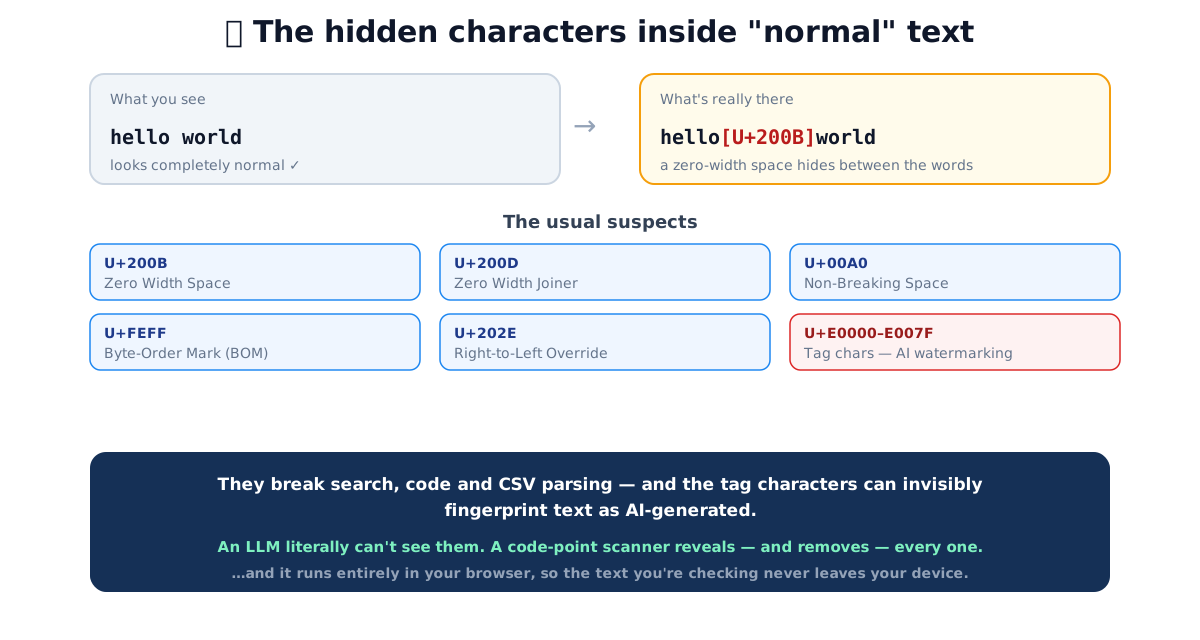
The usual suspects fall into a few groups:
- Zero-width characters, the zero-width space (U+200B), joiner (U+200D), non-joiner (U+200C) and word joiner (U+2060). They occupy no visible space at all.
- Deceptive spaces, the non-breaking space (U+00A0), narrow no-break space (U+202F) and ideographic space (U+3000). They look like a normal space but aren’t.
- The byte-order mark (U+FEFF), often left at the very start of a file; it silently corrupts the first field of a CSV or the first line of code.
- Bidirectional controls (U+202A-202E), can reorder how text displays, which has been used to disguise filenames and code.
- Tag characters (U+E0000-E007F) and variation selectors, increasingly used to invisibly watermark AI-generated text by encoding a hidden fingerprint.
A quick reference table
The characters you are most likely to run into, what they look like, and what they do:
| Character | Code point | Renders as | Typical problem it causes |
|---|---|---|---|
| Zero-width space | U+200B | Nothing | Breaks exact search, keyword and identifier matching |
| Zero-width non-joiner | U+200C | Nothing | Splits a “word” that looks whole |
| Zero-width joiner | U+200D | Nothing (joins glyphs) | Alters emoji sequences; confuses tokenizers |
| Word joiner | U+2060 | Nothing | Same as ZWSP but harder to spot in old tools |
| Non-breaking space | U+00A0 | A space | Breaks CSV parsing, trim(), number parsing |
| Narrow no-break space | U+202F | A thin space | Sneaks into copied numbers and dates |
| Ideographic space | U+3000 | A wide space | Pasted from CJK sources; fails whitespace checks |
| Byte-order mark | U+FEFF | Nothing | Corrupts the first CSV field or first line of code |
| Right-to-left override | U+202E | Nothing | Reverses displayed order to disguise filenames |
| Tag characters | U+E0000-E007F | Nothing | Carry hidden watermark or smuggled payloads |
Code points are shown in the standard Unicode U+ notation. The names come from the Unicode
Standard; the “typical problem” column reflects common text-processing experience rather than any single
specification.
Why they matter
These characters cause bugs that are infuriating precisely because the text looks correct:
- Search and matching fail. A zero-width space inside
passwordmeanspasswordwon’t match it. - Code breaks. A hidden character in a string literal or an identifier throws errors that don’t point to anything you can see.
- Spreadsheets misparse. A non-breaking space breaks a number into text, or splits a CSV field.
- Text gets fingerprinted. Watermark tag characters travel with copy-pasted text and can identify where it came from, a privacy consideration when you paste AI output into your own work.
A worked example
Suppose you copy a coupon code from a web page into your checkout form and it keeps getting rejected. On
screen it reads SAVE20, exactly what the page advertised. But the page author wrapped the code in
styling that left a zero-width space between the letters, so the real string is:
S A V E 2 0 → S·A·V·E·2·0 (a U+200B sits after the E)Your eyes see six characters; the server compares seven code points and finds no match. The same failure mode explains a whole family of “but it looks identical” bugs:
- A spreadsheet column of prices copied from a report imports as text, not numbers, because each
value is padded with a non-breaking space (U+00A0). Sums return
0or an error. - A JSON file refuses to parse because a byte-order mark (U+FEFF) sits before the opening brace.
- A Python or JavaScript file throws a syntax error on a line that looks perfectly normal, because an invisible character crept into an identifier during a copy-paste.
In every case the fix is the same: reveal the code points, then strip or convert them.
Where these characters come from
Invisible characters rarely arrive on purpose. Common sources include:
- Copy-paste from rich sources, web pages, PDFs, Word documents and chat apps often carry non-breaking spaces, narrow spaces and BOMs into whatever you paste them into.
- Exports and encodings, a file saved as “UTF-8 with BOM” prepends U+FEFF; some CSV exporters emit non-breaking spaces as thousands separators.
- Deliberate obfuscation, a bidirectional override (U+202E) placed inside a filename can flip the display order of the characters after it, so an executable named to end in “exe.jpg” can appear to end in a harmless image extension.
- Watermarking and payload smuggling, tag characters and variation selectors can encode a hidden fingerprint, or even a whole hidden message, that rides invisibly inside otherwise normal text.
Why a chatbot can’t help here
This is one of the clearest cases where a tool beats an AI. A large language model operates on tokens, not raw code points. It literally cannot reliably see an invisible character, and it will happily tell you a string is “clean” when it isn’t, or invent characters that aren’t there. A scanner that iterates the text code point by code point is exact, every time. (If you want to see exactly what’s there, the Unicode character inspector shows every code point, its category and its bytes.)
How to detect and remove them
- Paste your text into the invisible character detector.
- It lists every hidden character it found, the code point, the name, and how many times each appears.
- Copy the cleaned version, which removes zero-width and control characters and converts exotic spaces back to normal spaces.
For a broader cleanup of pasted or AI-generated text, straightening curly quotes, converting em-dashes, normalising whitespace and stripping hidden characters in one pass, use the text cleaner. Everything runs in your browser, which matters because the text you’re checking is often something you’d rather not upload.
Quick summary
Invisible characters, zero-width spaces, non-breaking spaces, the BOM, bidi controls, and AI-watermark tag characters, are invisible on screen but real in the bytes, and they quietly break search, code and CSV parsing and can fingerprint text. You can’t fix what you can’t see, and a chatbot can’t reliably find them, but a code-point scanner reveals and removes every one. Clean your text privately with the invisible character detector and the text cleaner.
Sources: the Unicode Standard (character categories and code points) · Unicode Technical Standard #39, Security Mechanisms · general text-processing practice. Educational information.
Frequently asked questions
What are invisible characters in text?
Unicode code points that render as nothing, or as a deceptive space. The most common are the zero-width space (U+200B), zero-width joiner (U+200D), non-breaking space (U+00A0), the byte-order mark (U+FEFF), bidirectional controls, and the tag characters (U+E0000-E007F). They're invisible on screen but very real in the underlying bytes.
How do I remove a zero-width space?
Paste the text into an invisible-character detector, which finds every hidden code point and gives you a cleaned copy with them removed. You can't reliably do it by hand because you can't see them, and find-and-replace only works if you can type the character.
Do AI tools add invisible watermarks to text?
They can. Some systems embed invisible tag or variation-selector characters (in ranges like U+E0000-E007F) to fingerprint AI-generated output. Because these characters render as nothing, you'd never notice them, but a code-point scanner flags them, and removing them is trivial once detected.
Why does a hidden character break my code or spreadsheet?
A zero-width space inside a keyword stops an exact match or an if-statement from matching; a non-breaking space (U+00A0) looks like a normal space but breaks CSV parsing, number formatting and trimming. The text looks right but behaves wrong, which makes these bugs maddening to track down.
Can an AI chatbot find invisible characters for me?
Not reliably. An LLM works on tokens and literally cannot 'see' or consistently emit individual invisible code points. It will often miss them or hallucinate. A deterministic scanner that walks the text code point by code point is exact every time.
What's the difference between a normal space and a non-breaking space?
They look identical but are different code points: a normal space is U+0020, a non-breaking space is U+00A0. The non-breaking space prevents a line break and is treated differently by many parsers, so it silently breaks CSV files, search and validation. Cleaning tools convert it to a normal space.