
explainer
OKLCH: The Modern CSS Color Format (and How to Convert from HEX)
By Uttam Regmi · Published 2026-07-11 · Updated 2026-07-11 · 7 min read · Fact-checked, sources cited
OKLCH is a way of writing colors, oklch(L% C H), that matches how your eyes actually work. L is
lightness, C is chroma (colorfulness), H is hue. It is a CSS Color 4 function supported in about 95% of
browsers and is Tailwind CSS 4’s default color space. The headline benefit: equal number changes look
like equal visual changes, which HEX and HSL never guaranteed. #1d87f1 is oklch(62.3% 0.183 253.6).
The three parts
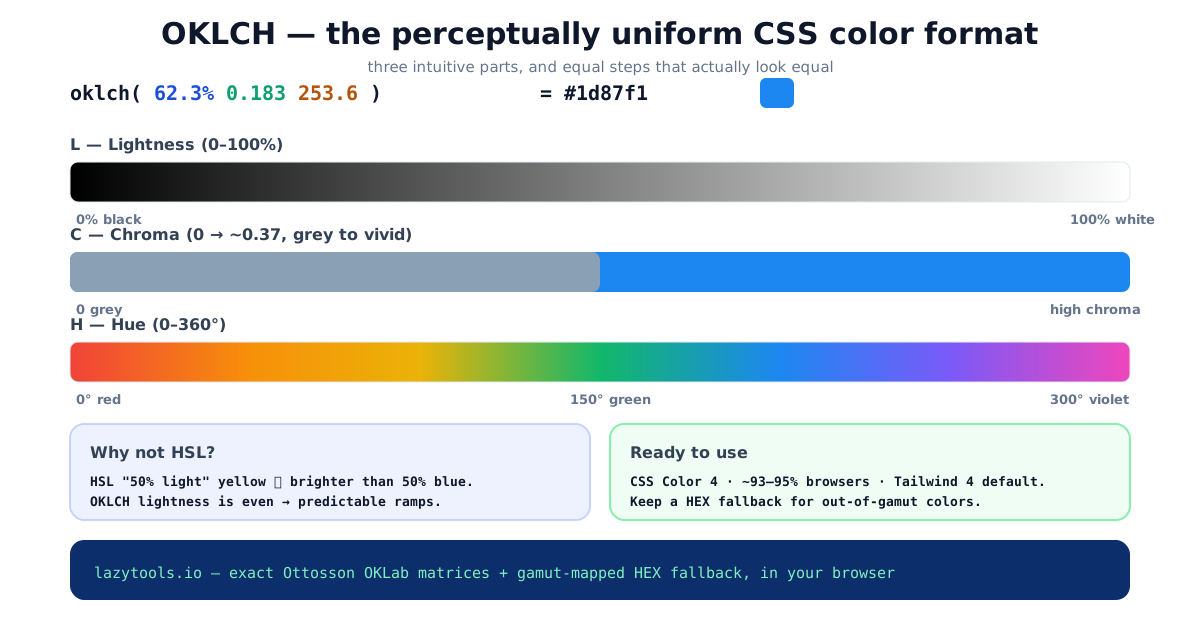
- L, Lightness (
0%–100%): how light the color is, from black to white. Crucially, this is perceptual lightness, so50%looks like a mid-grey regardless of hue. - C, Chroma: colorfulness, from
0(grey) upward (about0.37at the most vivid). There is no fixed maximum, how much chroma is achievable depends on the lightness, the hue, and the display. - H, Hue (
0–360): the angle on the color wheel, roughly0red,150green,250blue,300violet.
Paste any color into the OKLCH color picker to see all three, alongside OKLAB, LAB, LCH, HWB and the HEX/RGB forms.
Reading a value at a glance
Take oklch(62.3% 0.183 253.6). The 62.3% tells you it is a touch lighter than mid-grey. The 0.183
chroma says it is moderately vivid, not neon, not muted. The 253.6 hue lands in the blue arc. Change
just the first number to 40% and you get the same blue, only darker; change only the hue to 30 and
you get an orange of the same lightness and vividness. That independence is the whole point: each
channel moves one visual property and leaves the others alone, which HEX and RGB never let you do.
Why not just use HSL?
HSL has an L too, so why switch? Because HSL’s lightness is a lie. A hsl(60, 100%, 50%) yellow is
blindingly bright, while hsl(240, 100%, 50%) blue is dark, same “50%”, wildly different perceived
lightness. Build a UI’s shade scale in HSL and the steps look uneven; rotate the hue and some colors
jump in brightness.
OKLCH is built on the OKLab color space, published by Björn Ottosson in 2020 and designed so that
equal numeric distances match equal perceived distances. Hold L and C constant, sweep the hue, and every
color stays the same lightness. That is exactly what you want for design tokens: a 500 shade that
reads as the same weight across your entire palette.
Here is how the three common ways of writing a color compare on the things that matter when you are building a UI:
| Property | HEX / RGB | HSL | OKLCH |
|---|---|---|---|
| Perceptually uniform lightness | No | No | Yes |
| Change one visual property in isolation | No | Partly | Yes |
| Predictable shade ramps (50-950) | No | Uneven | Even |
| Hue rotation keeps brightness | No | No | Yes |
| Human-readable | Not really | Somewhat | Yes |
| Can describe wide-gamut (P3) colors | No | No | Yes |
| Universal fallback / legacy support | Yes | Yes | Needs a fallback |
The takeaway: HEX is the safe lowest common denominator, HSL feels intuitive but its lightness lies, and OKLCH is the one that behaves the way a designer expects.
How to convert HEX to OKLCH
The conversion is a fixed sequence of matrix operations, deterministic and exact:
- Decode the HEX to sRGB channels (0-255).
- Linearise each channel (undo the sRGB gamma curve).
- Apply the OKLab matrices (Björn Ottosson’s published constants): linear-sRGB → LMS → OKLab.
- Convert OKLab’s rectangular a/b to polar chroma and hue:
C = √(a² + b²),H = atan2(b, a).
The result for #1d87f1 is oklch(62.3% 0.183 253.6). The HEX to OKLCH converter
runs exactly this and shows OKLAB and LAB too, the same math the browser uses, so what you copy is what
renders. (A chatbot, by contrast, will confidently produce a plausible OKLCH that is subtly wrong,
because it can’t run the matrices.)
The one gotcha: gamut
OKLCH is more expressive than an sRGB screen. You can write an oklch() value whose chroma is higher
than any #rrggbb can show. It is out of gamut. Converting back to HEX then has no exact answer,
so a good tool reduces chroma (holding lightness and hue) until the color fits, and tells you it did.
This is why you still ship a HEX fallback: for the ~5% of browsers without oklch(), and for design
or email tools that only speak HEX. The OKLCH to HEX converter flags out-of-gamut
input and always returns a displayable fallback.
.button {
  background: #1d87f1;                 /* fallback first */
  background: oklch(62.3% 0.183 253.6); /* modern browsers override */
}
The two-declaration pattern works because CSS ignores any property value it does not understand: a browser
without oklch() keeps the HEX, a browser with it takes the second line. No @supports query needed.
Browser support in one line
The oklch() function shipped across the major engines a while ago: Chrome and Edge from version 111,
Safari from 15.4, and Firefox from 113. In practice that covers the large majority of users, commonly
cited figures put it in the low-to-mid 90s percent range, and the share keeps climbing as older browsers
age out. The remaining slice is exactly what the HEX fallback above is for, so you lose nothing by
adopting OKLCH today.
Worked example: a shade ramp
The perceptual evenness pays off most when you build a 50–950 scale. In OKLCH you keep the hue fixed,
keep chroma roughly constant (dialing it down slightly at the extremes so pale and dark ends do not clip),
and step the lightness in even amounts. Because lightness is perceptual, even steps look even:
:root {
  --blue-100: oklch(92% 0.05 253);
  --blue-300: oklch(78% 0.12 253);
  --blue-500: oklch(62% 0.18 253); /* the base */
  --blue-700: oklch(46% 0.15 253);
  --blue-900: oklch(30% 0.09 253);
}
Every swatch shares hue 253, so the family reads as one color; only the lightness marches down in
regular increments. Try the same thing by hand in HEX and you will spend an afternoon nudging channels and
still end up with a 700 that looks muddy next to its neighbours.
Where it pays off
Beyond ramps, the even lightness makes hue rotation reliable. Rotate the hue for a set of color harmonies, complementary, triadic, analogous, and every result stays the same visual weight, so no single accent shouts louder than the rest. This is the reason Tailwind CSS 4 moved its default palette to OKLCH, and why design-system teams increasingly define tokens in it and export HEX only for the legacy layer.
A few practical habits keep OKLCH work smooth:
- Anchor on lightness first. Decide how light each step should be, then add chroma and hue. Lightness is the channel your eye judges hardest.
- Ease chroma at the ends. Very light and very dark colors cannot hold much chroma before they clip,
so taper it toward
50and950. - Keep the HEX fallback generated, not hand-typed. Let the converter produce it so the two values always match.
Quick summary
OKLCH writes a color as lightness, chroma and hue in a perceptually uniform space, so equal steps look
equal, fixing HSL’s uneven lightness. It is a CSS Color 4 function with ~95% browser support and is
Tailwind 4’s default. Convert HEX to OKLCH by linearising sRGB and applying the OKLab matrices (e.g.
#1d87f1 → oklch(62.3% 0.183 253.6)), and keep a HEX fallback for out-of-gamut colors and older
browsers. Try it on the OKLCH color picker.
Sources: CSS Color Module Level 4 (W3C); Björn Ottosson, “A perceptual color space for image processing” (OKLab); Tailwind CSS 4 color documentation; MDN oklch(). Educational information.
Frequently asked questions
What is OKLCH?
OKLCH is a perceptually uniform color format written oklch(L% C H): L is lightness (0-100%), C is chroma (colorfulness, 0 to about 0.37), and H is hue in degrees (0-360). Equal numeric steps look like equal visual steps, which HSL and HEX do not guarantee. It is a CSS Color 4 function supported in roughly 95% of browsers.
How do I convert HEX to OKLCH?
Decode the HEX to sRGB, linearise it, and apply the OKLab matrices, then express the result in polar form. For example #1d87f1 becomes oklch(62.3% 0.183 253.6). A converter does this exactly, the same math the browser uses for the oklch() function.
Is OKLCH better than HSL?
For perceptual work, yes. In HSL, a 50%-lightness yellow looks far brighter than a 50%-lightness blue, so lightness ramps are uneven. OKLCH fixes this: lightness is perceptually uniform, so shade scales and hue rotations behave predictably. That is why design systems and Tailwind CSS 4 adopted it.
Do all browsers support oklch()?
The oklch() CSS function works in all current browsers, Chrome/Edge 111+, Safari 15.4+ and Firefox 113+, which is about 93-95% of users. For the small remainder and for tools that expect HEX, provide a HEX fallback alongside the oklch() value.
Why is my OKLCH color 'out of gamut'?
OKLCH can describe colors more saturated than an sRGB screen can display. When that happens, the exact HEX does not exist, so a good converter reduces chroma (keeping lightness and hue) until the color fits and flags it. Wide-gamut (P3) displays can show more of these colors.
What is chroma in OKLCH?
Chroma (C) is colorfulness, how far the color is from grey. 0 is a neutral grey; higher values are more vivid. Unlike HSL saturation, OKLCH chroma is not capped at a fixed maximum, because the achievable chroma depends on the lightness and hue and on the display's gamut.