
explainer
How Strong Is a Password, Really? Entropy Explained (Length Beats Complexity)
By Uttam Regmi · Published 2026-07-05 · Updated 2026-07-05 · 5 min read · Fact-checked, sources cited
Password strength is measured in entropy bits, length × log₂(alphabet size), and length dominates: 16 random lowercase letters (~75 bits) beat 8 characters of full symbol soup (~52 bits) by a factor of about 8 million. You can watch the math live in the password generator, which shows the entropy of every password it creates on your device.
What entropy actually counts
Entropy answers one question: how many equally likely passwords could this have been? If a password is built by picking each character uniformly at random from an alphabet of N symbols, a password of length L has NL possibilities, and expressing that as a power of 2 gives the entropy in bits:
entropy = L × log₂(N)
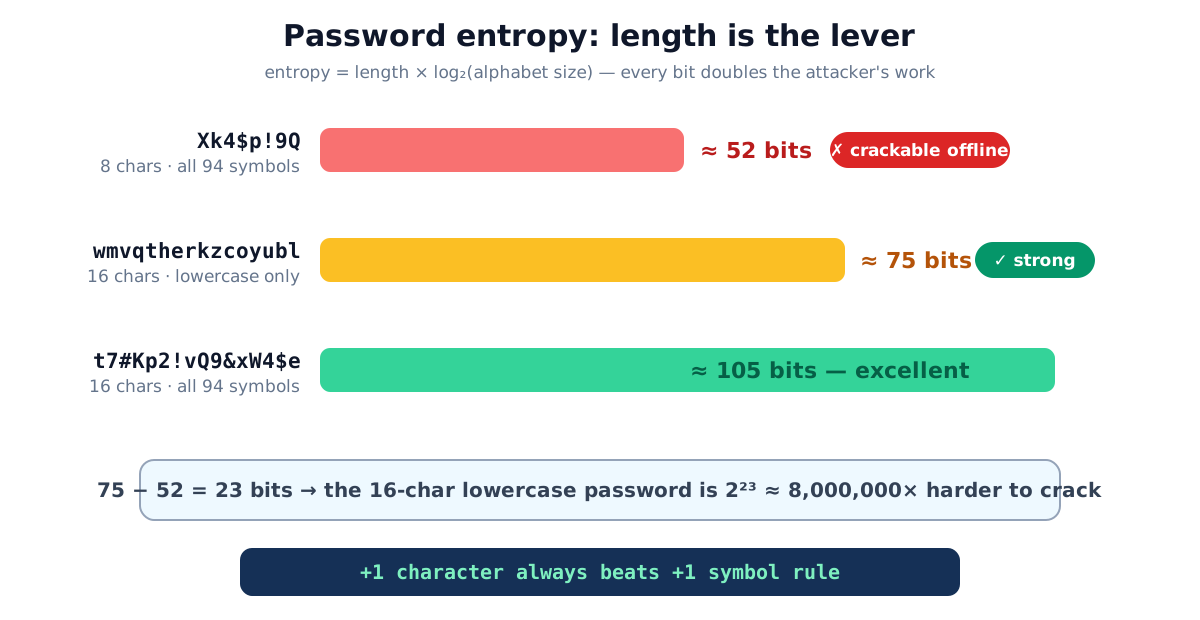
Bits are the right unit because each one doubles an attacker’s work. A 41-bit password has ~2.2 trillion possibilities; at 42 bits it’s 4.4 trillion. That doubling is why modest-looking length increases produce absurd strength gains, and why the difference between 52 and 75 bits isn’t “a bit better,” it’s 2²³ ≈ 8 million times better.
Per-character contributions by alphabet:
| Character set | Size (N) | Bits per character |
|---|---|---|
| Digits only (0-9) | 10 | 3.32 |
| Lowercase letters | 26 | 4.70 |
| Upper + lowercase | 52 | 5.70 |
| Letters + digits | 62 | 5.95 |
| All printable ASCII | 94 | 6.55 |
Notice how flat the right column is: going from lowercase-only to every symbol on the keyboard gains just 1.85 bits per character. Adding two characters of plain lowercase (+9.4 bits) beats switching an entire 8-character password from lowercase to full ASCII (+14.8 → but spread over 8 characters, i.e. the same password only reaches +14.8 total). Length is simply the bigger lever.
The classic comparison, worked
8 characters, all four character classes, “maximum complexity”: 94 possible symbols per position → 8 × 6.55 = 52.4 bits ≈ 6 × 10¹⁵ possibilities.
16 characters, lowercase only: 26 possible symbols per position → 16 × 4.70 = 75.2 bits ≈ 4.3 × 10²² possibilities.
The “weaker-looking” password has about 8 million times more possibilities. Against offline cracking rigs that test billions of guesses per second against a stolen hash database, 52 bits falls in days-to-weeks; 75 bits pushes into centuries. (Exact times depend on the hash the site used, which you don’t control, so the safe assumption is fast hardware and a weak hash.)
That’s also why composition rules (“must contain a symbol, a digit, an uppercase…”) never delivered
what they promised: they add at most a couple of bits per character while pushing humans toward
predictable patterns, capital first, 1! last, that cracking dictionaries encode as rules.
What the standards say
The authoritative reference is NIST SP 800-63B, the US federal digital-identity guideline. Its memorable points:
- Favor length. Verifiers should permit passwords of at least 64 characters.
- No forced composition rules. Mandatory symbol/digit/case requirements are explicitly discouraged. They don’t improve real-world strength.
- No scheduled expiration. Forcing periodic changes produces
Password1→Password2. Change passwords on evidence of compromise, not on a calendar. - Screen against known-breached passwords instead, the actual threat is reuse of something already in a cracker’s wordlist.
Practical targets
| What it protects | Recommended | Why |
|---|---|---|
| Online account (rate-limited login) | 12-14 random chars (~70-90 bits) | Attacker can only guess a few times per second through the login form |
| Anything crackable offline (leaked hash) | 16+ chars / 80+ bits | Offline rigs try billions per second |
| Password-manager master / disk encryption | 90+ bits | One password guards everything; assume the vault file leaks |
| WiFi key you’ll read to guests | passphrase or no-ambiguity mode | It gets typed by humans; exclude l/1/O/0 and add two characters to compensate |
The workflow that makes this painless: a password manager generates and stores a unique random password per site; the only password you memorize is the master. Generate the master as a long random passphrase, generate everything else at 16+ characters in the password generator or your manager’s built-in one.
Where randomness comes from (and why it matters)
The entropy formula assumes uniform randomness, every character equally likely. Two failure modes break that assumption:
- Humans. We pick words, birthdays, keyboard walks. Cracking software (wordlists + mangling rules) tries those first, so a human-invented 12-character password can have the effective strength of a random 30-bit one.
- Bad generators.
Math.random()is not cryptographic, its output is predictable from previous outputs. Proper generators use the OS’s CSPRNG: in the browser that’scrypto.getRandomValues, the same source TLS session keys come from. There’s a subtler bug too: mapping random bytes onto an alphabet with the modulo operator (byte % 26) makes early alphabet characters slightly more likely. The fix, rejection sampling, throws away out-of-range bytes instead of wrapping them, that’s what the LazyTools generator does, which is also why its entropy display is honest.
Common password mistakes
- Reusing one strong password everywhere, one site’s breach unlocks all of them; uniqueness beats strength.
- Trusting the formula for a password you invented, entropy math is for random processes,
not for
Summer2026!. - Believing the complexity checkboxes, an 8-character everything-enabled password is the weakest thing this article measured.
- Rotating passwords on a schedule, produces incremented suffixes; NIST dropped this requirement for good reason.
- Generating passwords on someone else’s server, a password a server produced is a password a server has seen. Client-side or nothing.
Quick summary
Strength is entropy: length × log₂(alphabet), in bits, where each bit doubles the attacker’s work. Length is the dominant term, 16 lowercase characters beat 8 maximally complex ones by a factor of millions, and the formula only applies to randomly generated passwords. Aim for ~70+ bits on ordinary accounts and 90+ on master passwords, store everything in a password manager, and generate locally: the password generator shows the bits as you go.
Related tools: UUID generator · random number generator · QR code generator. Guidance follows NIST SP 800-63B; entropy figures are straightforward applications of the formula shown.
Frequently asked questions
What is password entropy?
A measure of how many equally likely possibilities an attacker must try, expressed in bits: entropy = length × log₂(alphabet size). Each extra bit doubles the guessing work. 52 bits is crackable offline; 80+ bits is strong; 100+ is effectively out of reach.
Is a longer simple password really stronger than a short complex one?
Yes, and by a wide margin: 16 random lowercase letters give about 75 bits (26¹⁶ possibilities), while 8 characters drawn from all 94 printable symbols give about 52 bits. The lowercase one is roughly 8 million times harder to brute-force.
How long should my password be?
For online accounts protected by login rate-limiting, 12-14 random characters is ample. For anything an attacker could crack offline, your password manager's master password, disk encryption, aim for 16+ characters or roughly 90+ bits.
Does entropy math apply to a password I made up myself?
No, the formula assumes every character was chosen uniformly at random. Human-invented passwords follow patterns (words, dates, keyboard walks, 'a' capitalized first, '!' appended last) that cracking software tries first, so their effective entropy is far lower than the formula suggests.
What does NIST actually recommend?
NIST SP 800-63B recommends favoring length, allowing at least 64 characters, and dropping two old rituals: forced composition rules (mandatory symbols/digits) and scheduled password expiration. Change a password when there's evidence of compromise, not on a calendar.
Are passphrases like 'correct horse battery staple' good?
Yes, if the words are chosen randomly from a large list: four random words from a 7,776-word list give about 51.7 bits, five give ~64.6, six give ~77.5. Random characters pack more entropy per keystroke, but random-word passphrases are far easier to memorize for the few passwords you must type.
Is an online password generator safe to use?
Only if generation happens in your browser. A password created on a server is a password that server has seen. The LazyTools generator runs crypto.getRandomValues on your device, nothing is transmitted, and it works offline.