
explainer
Why PDF Redactions Keep Failing, and How to Redact (and Verify) for Real
By Uttam Regmi · Published 2026-07-08 · Updated 2026-07-08 · 6 min read · Fact-checked, sources cited
Most failed redactions share one mechanism: the black box changes what you see, not what the file contains, the text underneath stays copy-pastable, and if the box is an annotation, anyone can delete it. The fix has two halves: redact destructively (flatten pages so the content never exists in the output), and verify (extract the final file’s text and search for what you removed). Both run locally: the redaction checker and the rasterizing redactor never upload your document.
The failure, mechanically
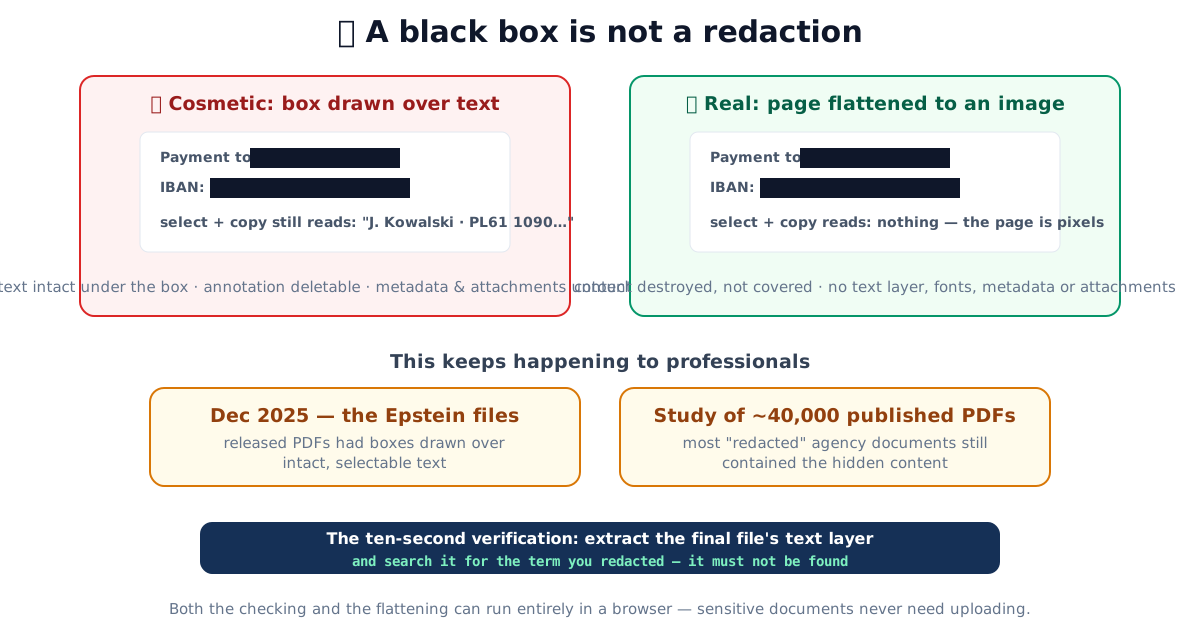
A PDF is not a picture of a page. It is a set of instructions, a content stream of text objects, font references, images and vector drawing commands, plus optional annotations layered on top. The viewer reads those instructions and paints the result. Crucially, the appearance you see and the data the file stores are two separate things. When someone “redacts” by drawing a filled rectangle, in a viewer’s comment tools, with a highlighter, or even as a shape merged into the page. They add one more drawing instruction. They remove nothing. Two things stay true of the file:
- The text object is still there. Select across the box and copy, run text extraction, or open the file in any PDF library, and the “hidden” content comes straight out. The rectangle is painted after the text in draw order, so it sits on top visually while the characters remain in the stream underneath. Search engines, e-discovery platforms and screen readers all read the text, not the box.
- If the box is an annotation, it’s removable. Annotations are editable by design, that is the whole point of comment and markup layers. Deleting the rectangle in any editor, or simply flattening it the wrong way, reveals the page exactly as it was.
And two leaks have nothing to do with the visible page at all. Document metadata, the author, title, the software that produced the file, creation and modification dates stored in the Info dictionary and XMP packet, travels untouched, which is awkward when the filing is supposed to be anonymous. So do embedded attachments and file-level objects: a PDF can carry other files inside it, and page-level boxes never reach them.
The receipts
This is not a hypothetical failure mode. In December 2025, PDFs released in the Epstein files were found to have black boxes drawn over intact, selectable text, the PDF Association published a forensic case study walking through exactly what the files still contained. And systematic research across roughly 40,000 published agency PDFs found that the majority of “redacted” documents still carried the hidden content in some recoverable form. And it is not new. One of the most widely cited examples is a 2019 US federal court filing by Paul Manafort’s legal team, where the “redacted” passages could be read simply by copying the blacked-out text and pasting it elsewhere, a lawyer’s error that made national news the same day it was filed. Courts, government agencies and law firms, organizations with professional tooling, keep making this mistake, because the failed and the real redaction look identical on screen.
Why the same method can pass or fail
The confusion is that “black box” is not one technique. It is at least three, and only one of them is safe:
| Method | What actually happens to the text | Recoverable by copy/extract? | Output searchable? |
|---|---|---|---|
| Highlight or comment annotation | Nothing, a note layer sits on top | Yes (and the box is deletable) | Yes |
| Drawn shape merged into the page | Nothing, a fill command paints over it | Yes | Yes |
| True redaction (content stream rewrite) | Characters removed and re-flowed out | No | Yes |
| Flatten to image (rasterize) | Page re-rendered to pixels; text gone | No | No (until OCR) |
The first two are the ones that leak. The last two genuinely remove the content. They differ only in whether the result keeps a text layer.
Redacting for real: destroy, don’t cover
Correct redaction removes the content from the file. Professional tools do it by rewriting content streams; the simpler route, recommended in forensic guidance as the “print and rescan” method, done digitally, is flattening:
- Render each page to pixels.
- Burn the black boxes into the pixels.
- Build a new PDF containing only those images.
The output never contained the sensitive text, fonts, metadata or attachments. There is nothing to un-hide, no annotation to delete, no layer to extract. That’s how the rasterizing redactor works: draw boxes on the rendered pages, and every page exports as a flat ~144 DPI image in a brand-new document, assembled entirely in your browser.
The honest trade-off: the result behaves like a scan, not searchable, not selectable, and invisible to screen readers until you OCR it (safely: OCR can only read what’s visible). For documents where certainty matters more than searchability, that’s the right trade.
A worked example
Say you need to release a two-page contract but hide one counterparty’s bank details. The wrong workflow is to open it in a viewer, drop black rectangles over the IBAN and account name, and export “with markup.” The rectangles render; the export looks clean; the account number is still one copy-paste away. The right workflow: draw the same boxes in a rasterizing redactor, export, and you now hold a two-page document made of two flat images. Open that output and try to select the IBAN. There is nothing to select, because page two is a picture of a page, not a page. Then confirm it, which is the step almost everyone skips.
The ten-second verification everyone skips
Whatever tool did the redaction, verify the output before it leaves your hands:
- Load the final file into the redaction checker.
- Read the headline number: how many characters of machine-readable text remain? (A flattened file should report zero.)
- Search for the exact thing you redacted, the name, the IBAN, the address. Finding it means the redaction is cosmetic.
- Review the metadata, annotation and attachment flags.
The checker proves presence, not absence, content inside images still needs your eyes, but it catches the mechanism behind essentially every headline redaction failure, in seconds, offline. That last word matters: a document being redacted is by definition sensitive, and most online redaction sites process uploads server-side. Both tools here are client-side only; disconnect from the internet and they work identically.
Quick summary
PDF redactions fail because boxes cover content instead of removing it, the text stays extractable, annotation boxes stay deletable, and metadata and attachments never get touched. Real redaction is destructive: flatten the pages with the boxes burned in, accept the scan-like output, and then verify by extracting the final file’s text and searching for what you removed. The redaction checker and rasterizing redactor do both halves in your browser, where sensitive documents belong: on your machine, and nowhere else.
Sources: PDF Association, A case study in PDF forensics: the Epstein PDFs · Argelius Labs, research on PDF redaction failures
Frequently asked questions
Why does drawing a black box over text not redact it?
Because a PDF separates appearance from content. The rectangle changes what renders on screen; the text object underneath remains in the file, fully recoverable by select-and-copy, text extraction or any PDF library. If the box is an annotation, deleting it in any editor reveals the content directly.
Has this actually caused real leaks?
Repeatedly, for decades. The most recent high-profile case: PDFs released in the Epstein files in December 2025 carried black boxes over intact, selectable text, as documented in the PDF Association's forensic case study. Research across roughly 40,000 published agency PDFs found the majority of 'redacted' documents still contained the hidden content.
What is the correct way to redact a PDF?
Destructively: the sensitive content must be removed from the file, not covered. Professional redaction tools rewrite the content streams; the simpler, verifiable route is flattening, re-rendering every page as an image with the boxes burned in, so the output never contained the secret in the first place.
What are the downsides of flattening a PDF to images?
The result is like a good scan: not searchable, not text-selectable, larger on disk, and inaccessible to screen readers until you run OCR on it (which can only read what's visible, the redacted content stays gone). For most redaction jobs, that trade is worth the certainty.
How do I verify a redaction actually worked?
Extract the final file's complete text layer and search it for the term you redacted, name, account number, address. Also check for removable overlay annotations, document metadata (author, software, dates) and embedded attachments. A redaction checker automates all four in seconds, locally.
Is it safe to use online redaction tools?
Only if the processing is genuinely client-side. A document being redacted is by definition sensitive, uploading it to a stranger's server to have boxes drawn on it defeats the purpose. Prefer tools that work offline in the browser, where the file never leaves your machine.