
explainer
Privacy-First Productivity: Plan, Focus and Track Without the Cloud
By Uttam Regmi · Published 2026-07-06 · Updated 2026-07-06 · 8 min read · Fact-checked, sources cited
The productivity apps everyone uses, Notion, Trello, Todoist, Asana, keep your tasks, notes and plans on their servers, behind an account. There’s a quieter alternative: single-purpose tools that run entirely in your browser, save to your own device, and never upload anything. LazyTools’ Productivity tools take that approach, start with the Pomodoro timer.
The hidden cost of cloud productivity apps
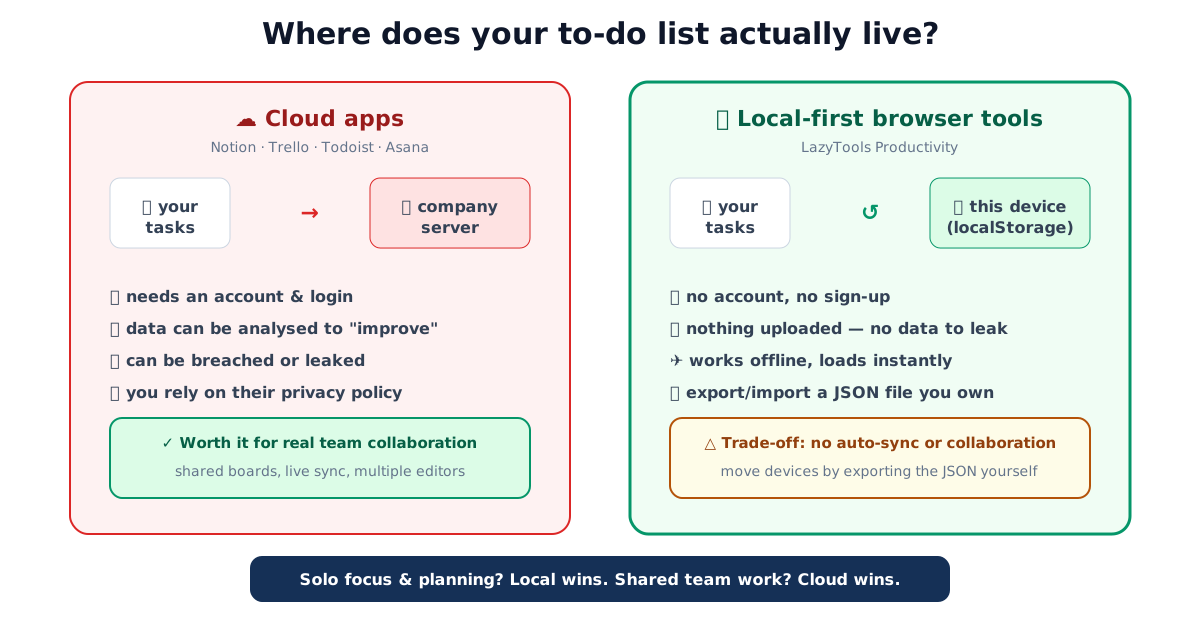
A modern to-do app is astonishing value, until you notice what it knows. Your task list is a map of your work, your worries and your plans; your calendar blocks reveal your habits; your notes hold half-formed ideas you’d never publish. Cloud productivity apps store all of it on their infrastructure, tied to an account, often analysed to “improve the product” and occasionally exposed in a breach.
For genuine team collaboration, that centralisation earns its keep. But an enormous amount of personal productivity, a focus timer, prioritising today’s tasks, tracking a habit, timing a workout, is solo, and doesn’t need a server at all. Handing that data to the cloud is a cost with no matching benefit.
The exposure is easy to underestimate because it accrues quietly. Every cloud tool you adopt adds one more account, one more privacy policy that can change, and one more copy of your data somewhere you don’t control. A single focus timer isn’t a threat model, but years of task lists, notes and calendars spread across half a dozen services add up to a detailed portrait of your working life that you never chose to assemble deliberately.
The local-first alternative
“Local-first” tools flip the model: the app runs in your browser and your data lives on your device, in the browser’s local storage. There’s no sign-up, nothing to install, and nothing to upload. The upsides are concrete:
- Privacy by architecture. Your data never leaves the device, so there’s no server to be hacked and no account to be compromised. It’s not a promise in a policy, it’s how the tool is built.
- Instant and offline. No login, no loading spinners, no connection required once the page is open.
- You own your data. A one-click JSON export gives you a file you control; import it anywhere. No lock-in, no export-restricted “free tier.”
Laid side by side, the two models diverge on almost every axis that matters for solo work:
| What matters | Cloud app (Notion, Todoist, Asana) | Local-first browser tool |
|---|---|---|
| Where your data lives | Company servers, tied to an account | Your device’s browser storage |
| Sign-up required | Yes (email, usually a password) | No |
| Works offline | Partially, if it has a sync client | Yes, fully, once the page loads |
| Breach exposure | Central database is a target | No server, no account to compromise |
| Cross-device sync | Automatic | Manual export/import |
| Team collaboration | Yes, real-time | No, single-user by design |
| Cost model | Free tier + paid upgrades | Free, no tier gates |
| Data portability | Depends on export features | You hold the JSON file |
Read the table as a decision aid, not a scoreboard: the cloud column wins on sync and collaboration, the local column wins on privacy, speed and ownership. Neither is universally “better”. They answer different questions.
What you give up (be honest)
Local-first isn’t free of trade-offs, and it’s only the right choice when you know them:
- No automatic sync. Your data is on one device unless you manually export/import to another.
- No real-time collaboration. These are personal tools, not shared team workspaces.
- Clearing browser data deletes the local copy. This is exactly why the export button matters, treat a JSON export like a backup.
If you need a team wiki or a shared board with live cursors, use a cloud app; that’s what it’s for. If you need to focus for 25 minutes, prioritise today’s tasks, or tick off a habit, a local tool is simpler, faster and private.
The starter kit
LazyTools’ Productivity category is built entirely local-first, every tool saves only to your browser and exports to JSON. The ones to start with:
- Pomodoro Timer, focused work intervals with breaks, a session count for the day, a chime and a countdown right in the browser-tab title. The single best tool for getting started, and it needs nothing but a tab.
- Eisenhower Matrix, drag today’s tasks into Do, Schedule, Delegate and Delete, and finally see that “urgent” and “important” aren’t the same thing. The quadrant everyone neglects, important but not urgent, is where the good work lives.
- Habit Tracker, a month grid, a streak counter, “don’t break the chain.” Track one or two things consistently rather than ten things badly.
- Meeting Cost Calculator, attendees × rate × time, with a live meter you can start at the top of a real meeting. A weekly hour for six people can run to tens of thousands a year; seeing the number tends to shorten agendas.
- Countdown & Stopwatch, count down to a deadline, time a task with laps, or run work/rest interval rounds for focus sprints.
More are on the way, a mind map builder, Gantt chart maker, Kanban board, flowchart builder, and decision tools like a weighted decision matrix and RICE prioritisation, all built the same way.
Two worked examples
Abstract benefits are easy to nod along to and hard to feel. Here are two concrete ones.
A Pomodoro morning. The technique, devised by Francesco Cirillo in the late 1980s, uses a fixed work-then-break rhythm, classically 25 minutes of focus followed by a 5-minute break, with a longer break after four intervals. Run four of those cycles before lunch and the arithmetic is simple: four × 25 minutes is 100 minutes of protected, single-task focus, wrapped in 15 minutes of short breaks and one longer rest. The point isn’t the exact numbers, shorten the work block to 20 minutes or stretch it to 50 if that suits you, it’s that the timer, and the day’s session count it keeps, turn “I did some work” into a figure you can actually see. None of that count needs to leave your tab.
Costing a recurring meeting. Say a standing weekly meeting has six attendees whose average fully-loaded cost is roughly $75 an hour. One hour is 6 × $75 = $450 per meeting. Held every week across a working year of about 48 weeks (allowing for holidays), that single recurring block runs to roughly $21,600 a year, before anyone counts the context-switching cost of stopping other work to attend. Type those numbers into the meeting cost calculator and the live meter does the multiplication in real time; watching it tick upward during the meeting itself is what tends to shorten agendas or cut the invite list. Adjust the rate and headcount to your own team, the figure moves fast.
A simple weekly routine
You don’t need all five tools at once. A workable starting rhythm:
| When | Tool | What you do |
|---|---|---|
| Monday morning | Eisenhower Matrix | Sort the week’s tasks into Do / Schedule / Delegate / Delete |
| Each work block | Pomodoro Timer | Run focused intervals on the “Do” and “Schedule” items |
| Before any recurring meeting | Meeting Cost Calculator | Sanity-check whether the meeting earns its cost |
| Every evening | Habit Tracker | Tick the one or two habits you’re building |
| Friday | JSON export | Back up anything you’d hate to lose to a file you keep |
The Friday export is the habit that makes the whole approach safe: because the data lives only on your device, a downloaded backup is your insurance against a cleared browser or a dead laptop.
Common questions, briefly
- “Isn’t localStorage insecure?” It’s not encrypted, but it’s local, the risk model is someone with physical access to your unlocked device, not a remote breach. For most personal planning that’s fine; don’t store secrets there (that’s what the file encryption tool is for).
- “What if I clear my cookies?” Local storage is cleared too, so export a JSON backup of anything you’d hate to lose.
- “Can I use these on my phone and laptop?” Yes, but the data doesn’t sync automatically, export from one and import to the other when you want them in step.
Quick summary
Most personal productivity, focusing, prioritising, tracking, timing, is solo work that doesn’t need a server, so it shouldn’t require handing your task list, habits and plans to a cloud company. Local-first browser tools keep that data on your device: private by architecture, instant, offline, and yours to export whenever you like. The trade is sync and collaboration for simplicity and privacy, a good deal for solo work. Start with the Productivity tools and see how much you can do without an account.
Related tools: Pomodoro timer · Eisenhower matrix · habit tracker · file encryption for anything that truly needs protecting.
Frequently asked questions
Can productivity tools really work without an account or the cloud?
Yes, a timer, a task board, a habit grid or a calculator needs no server. Everything can run in your browser and save to your device's local storage. You give up cross-device sync and team collaboration, but you gain privacy, instant loading, offline use and zero sign-up. For personal focus and planning, that's usually the better trade.
Where is my data stored if there's no account?
In your browser's local storage (localStorage), which lives on your device. It never travels to a server, so there's no account to breach and no database to leak. To back it up or move to another device, you export a small JSON file and import it on the other side.
What's the catch compared to Notion or Todoist?
No automatic sync between devices, no real-time collaboration, and if you clear your browser data the local copy is gone (which is why export matters). These are single-purpose tools, not an all-in-one workspace, the trade is simplicity and privacy for breadth and sync.
Do these tools work offline?
Yes. Once the page has loaded, all the logic and your data are on your device, so timers, boards and trackers keep working with no connection.
Is a browser-based Pomodoro timer as good as an app?
For the core job, focused work intervals with breaks and a session count, yes, and it loads instantly with nothing to install. A browser tab can be throttled in the background, so keep the timer visible or allow notifications for the end-of-session alert.
How do I move my data to a new computer?
Use each tool's export button to download a JSON file, copy it to the new machine, and use the import button. Because you hold the file, you're never locked in and nothing passes through a third party.