
explainer
Unix Timestamps Explained: Seconds vs Milliseconds, UTC and the Year 2038
By Uttam Regmi · Published 2026-07-05 · Updated 2026-07-05 · 6 min read · Fact-checked, sources cited
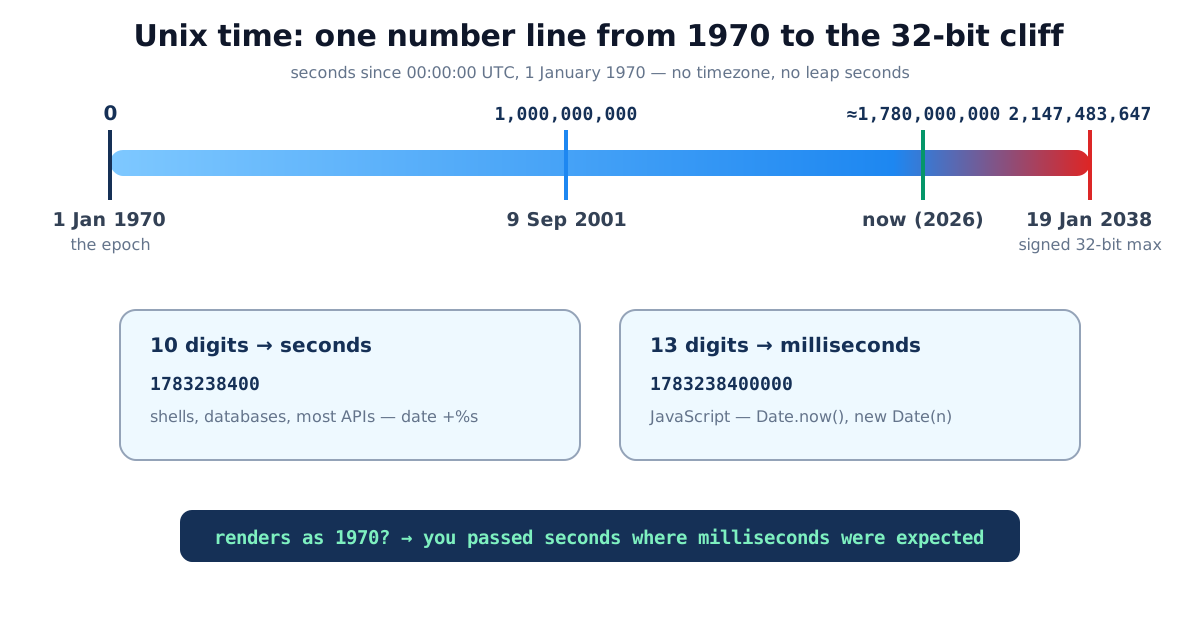
A Unix timestamp is the number of seconds since 00:00:00 UTC on 1 January 1970, so 1783238400
identifies one exact instant worldwide, and the only decoding step is knowing whether your value is
seconds (10 digits) or milliseconds (13 digits). Paste either into the
Unix timestamp converter and it detects the unit and shows the
moment in your local time, UTC and ISO 8601.
Why computers count seconds
Human date formats are ambiguous (is 04/07 April or July?), timezone-dependent, and awkward to do
arithmetic on. An integer count of seconds from a fixed starting point has none of those problems:
comparison is <, duration is subtraction, and the value means the same instant in Tokyo and Toronto.
The starting point, the epoch, 00:00:00 UTC on 1 January 1970, is arbitrary but universal; it
was simply a convenient round date when Unix was young.
Two properties trip people up, and both are features:
- No timezone. A timestamp is an absolute instant. “What date is 1783238400?” has no single answer until you pick a zone, 08:00 UTC on 5 July 2026 is 09:00 in London (BST) and 13:45 in Kathmandu, the same moment. Formatting for a zone is the display step, which the timezone converter handles for meetings across regions.
- No leap seconds. Every Unix day is exactly 86,400 seconds by definition. Precision timekeeping handles leap seconds by repeating or “smearing” a second; ordinary applications never notice.
Seconds vs milliseconds: the 10/13 rule
The single most common timestamp bug is a unit mismatch, and you can catch it by eye:
| Value | Digits | Unit | Meaning |
|---|---|---|---|
1783238400 | 10 | seconds | 5 July 2026, 08:00 UTC |
1783238400000 | 13 | milliseconds | the same instant |
1783238400 fed to a ms API | , | misread | 21 January 1970, the “1970 bug” |
1783238400000 fed to a s API | , | misread | around the year 58,000 |
JavaScript (Date.now(), new Date(n)) speaks milliseconds; Unix tools, databases, and most
APIs speak seconds. When a date renders as January 1970, you divided by 1000 implicitly; when it
renders tens of thousands of years out, you multiplied. The
converter auto-detects the unit (values above 10¹¹ are treated as
milliseconds, 10¹¹ seconds wouldn’t occur until the year 5138) and tells you which it assumed, so
the mismatch is visible immediately.
Converting in both directions
Timestamp → date: paste the number; read local time, UTC and ISO 8601. Sanity-check against the rough decade table: 1.0 billion was 2001, 1.5 billion was 2017, 2.0 billion will be 2033.
Date → timestamp: pick the date and time in the converter’s second panel; it returns seconds and
milliseconds. In code, the usual sources are date +%s (shell), time.time() (Python, seconds as a
float) and Date.now() (JavaScript, milliseconds).
Durations: because timestamps subtract cleanly, “how long between these two events” is one subtraction, but for calendar gaps (working days until a deadline, someone’s exact age) calendar arithmetic is the right tool, not seconds: the days between dates calculator and age calculator do that walk correctly across leap years.
A concrete worked example: an event starts at 1783238400 and ends at 1783263300. Subtracting
gives 24900 seconds; divide by 3600 and you get 6 hours 55 minutes, no timezone lookup, no
calendar library, just integer math. That is exactly why logs, billing systems and rate limiters
store instants as epoch seconds.
Generating a timestamp in every language
The unit a language hands you is the single most useful thing to memorise, because it decides whether you multiply or divide before comparing values. Almost every mainstream language exposes a “now” call; only JavaScript, Java and a handful of others default to milliseconds.
| Language / tool | ”Now” call | Unit returned |
|---|---|---|
Shell (date) | date +%s | seconds (integer) |
| Python | time.time() | seconds (float) |
| JavaScript | Date.now() | milliseconds |
| Java | System.currentTimeMillis() | milliseconds |
| Java (java.time) | Instant.now().getEpochSecond() | seconds |
| Go | time.Now().Unix() | seconds |
| Ruby | Time.now.to_i | seconds |
| PHP | time() | seconds |
| PostgreSQL | extract(epoch from now()) | seconds (float) |
| MySQL | UNIX_TIMESTAMP() | seconds |
When two of these meet across an API boundary, a JavaScript front end posting Date.now() to a
Python back end that assumes seconds. You get the 1970 bug on the server or a far-future date in the
UI. Deciding the unit once per interface, and naming it in the field, removes the entire class.
The year 2038, precisely
Early systems stored Unix time in a signed 32-bit integer, whose maximum is 2,147,483,647, the root of the Year 2038 problem. That count of seconds runs out at 03:14:07 UTC on 19 January 2038; one second later the value wraps negative, which naive code interprets as 13 December 1901.
The fix has long existed, store time in 64 bits, good for ~292 billion years, and modern operating
systems, languages and databases use it. The residual risk lives in embedded devices, old file
formats and 32-bit fields in legacy protocols. It’s the same genre of problem as Y2K: boring where
maintained, sharp where forgotten. (JavaScript, incidentally, was never at risk: its millisecond
count is an IEEE double, and the language caps the valid Date range at ±100,000,000 days from the
epoch, roughly ±273,000 years, every millisecond of which is represented exactly.)
Storage advice that prevents whole bug classes
- Store UTC, display local. A stored local time changes meaning when DST rules or the user’s zone change; a stored instant never does. Convert at the display edge, the timezone converter applies each zone’s current DST rules from the browser’s own IANA database.
- Name the unit in the field.
created_at_msprevents more incidents than any code review. - Prefer integers in transit. ISO 8601 strings are great for humans and logs; timestamps are great for math. Pick one per interface and convert deliberately.
Common timestamp mistakes
- Unit mismatch, the 1970/52,000 bug pair. Count digits: 10 vs 13.
- Treating a timestamp as local time, it’s UTC-anchored; the zone belongs to formatting.
- Doing calendar math in seconds, “30 days = 2,592,000 s” breaks on DST boundaries and month lengths; use calendar tools for calendar questions.
- Comparing timestamps from clocks that disagree, server A and server B can differ by seconds; don’t infer event order across machines from raw timestamps alone.
- Storing future events as timestamps when the wall-clock matters, “9:00 local on 1 March” should stay a zoned wall-clock time until the moment is fixed; DST rule changes between now and then can shift the instant.
Quick summary
Unix time = seconds since 1 January 1970 UTC: one integer, one instant, no timezone. Ten digits means seconds, thirteen means milliseconds, mismatching them produces the famous 1970 (or year 52,000) rendering bug. Store UTC and convert for display; do calendar math with calendar tools; and know that 19 January 2038 only bites systems still counting in signed 32 bits. For any value in front of you right now, the Unix timestamp converter decodes it locally, nothing you paste leaves your browser.
Related tools: date add/subtract · week number calculator · age calculator. Timezone rules come from the IANA time zone database, which ships inside every modern browser and OS.
Frequently asked questions
What is a Unix timestamp?
The number of seconds elapsed since 00:00:00 UTC on 1 January 1970, a moment called the epoch. It's the near-universal machine format for points in time: one integer, no timezone ambiguity, trivially compared and subtracted.
How do I tell seconds from milliseconds?
Count digits: current Unix time is 10 digits in seconds (about 1.78 billion in mid-2026) and 13 digits in milliseconds. JavaScript's Date.now() returns milliseconds; most Unix tools, databases and APIs use seconds.
Why does my timestamp render as January 1970?
You passed seconds to something expecting milliseconds (so the value was ~1/1000th of what was intended, landing days after the epoch). The mirror-image bug, milliseconds where seconds were expected, throws the date roughly 50,000 years into the future.
Is a Unix timestamp in my timezone?
No. It has no timezone at all. It identifies an absolute instant, anchored to UTC. The same timestamp renders as different wall-clock times in different zones; the timezone only enters when you format it for display.
What is the year 2038 problem?
Systems storing Unix time as a signed 32-bit integer can count only up to 2,147,483,647, which is 03:14:07 UTC on 19 January 2038. One second later the value overflows to a large negative number, i.e. December 1901. Modern 64-bit time handling is unaffected for billions of years.
Does Unix time count leap seconds?
No. Every Unix day is exactly 86,400 seconds by definition; when a leap second occurs, Unix time effectively repeats (or smears) a second rather than counting it. For civil purposes this almost never matters, it's a subtlety of precision timekeeping.
Can a Unix timestamp be negative?
Yes, negative values count backwards from 1970, so they represent earlier dates: −86400 is 31 December 1969. Systems vary in how well they handle negative timestamps, so test before relying on them for historical dates.