
explainer
WAV vs MP3: Lossless, Lossy, and Why Converting MP3 to WAV Doesn't Improve Anything
By Uttam Regmi · Published 2026-07-05 · Updated 2026-07-05 · 6 min read · Fact-checked, sources cited
WAV stores every audio sample, bit-exact, at about 10 MB per stereo minute; MP3 uses psychoacoustics to discard what you’re unlikely to hear and lands at roughly a tenth of that, and because those discards are permanent, converting MP3 to WAV never improves anything. When you do need WAV (editing, picky software, archiving), the audio to WAV converter decodes any browser-supported format locally.
Two philosophies of storing sound
Digital audio is a stream of samples, 44,100 measurements per second per channel for CD quality. The formats differ in what they do with that stream:
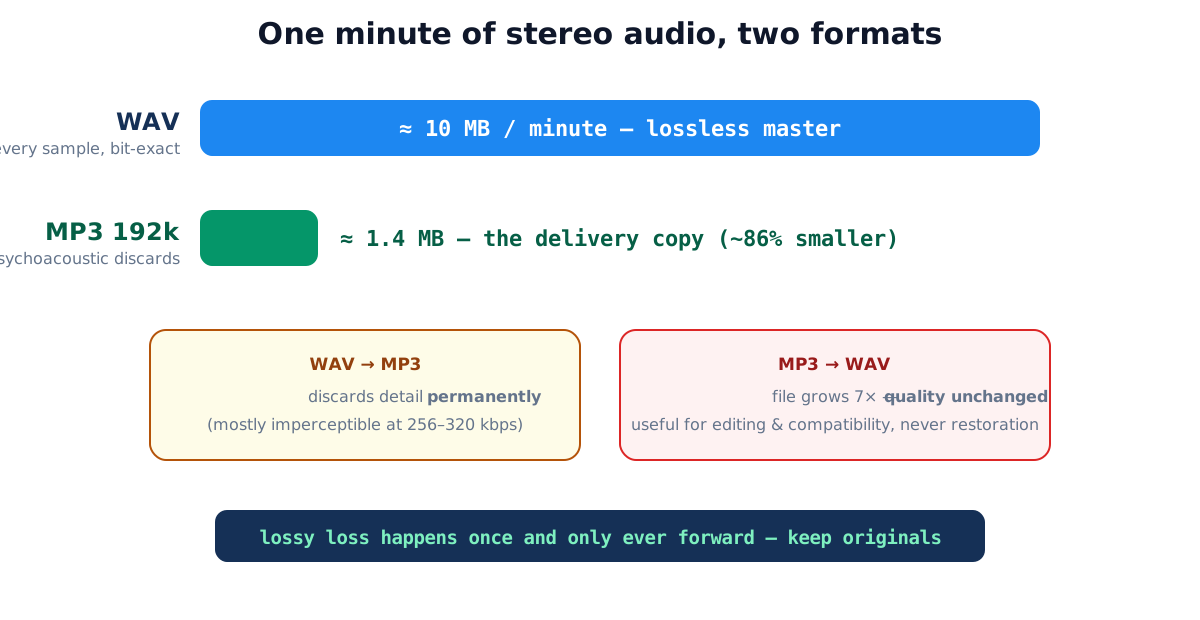
WAV (and its Apple cousin AIFF) writes the samples down verbatim: 16 bits × 44,100/sec × 2 channels ≈ 10.1 MB per minute, always, silence costs the same as an orchestra. Nothing is judged or discarded, which is why it’s the format of editing, mastering and archival.
MP3 (and successors AAC, OGG) runs a psychoacoustic model: quiet sounds masked by louder simultaneous ones, frequencies beyond typical hearing, components the model predicts you won’t perceive get discarded before encoding. At 128-192 kbps that’s roughly a 90% size reduction; at 256-320 kbps, controlled listening tests show most listeners can’t reliably distinguish the result from the original.
FLAC sits between: genuinely lossless like WAV but compressed like a ZIP, typically 50-60% of WAV size on music. If you’re archiving originals, FLAC is the efficient choice; WAV wins on universal compatibility, every audio editor, DAW and browser reads it without a codec.
The key mental split is master versus delivery. A WAV (or FLAC) is a master: nothing has been thrown away, so you can edit, remix and re-export it as many times as you like. An MP3 is a delivery copy: small, convenient, and permanently missing whatever the encoder decided you wouldn’t miss. You keep the master and hand out the copy. You never work the other way around.
The one-way street, spelled out
The single most common audio-format misunderstanding: “I’ll convert my MP3s to WAV for better quality.” What actually happens:
| Conversion | File size | Audio quality |
|---|---|---|
| WAV → MP3 (192 kbps) | ~10 MB/min → ~1.4 MB/min | slightly reduced, mostly imperceptible |
| MP3 → WAV | ~1.4 MB/min → ~10 MB/min | identical to the MP3, loss is permanent |
| MP3 → MP3 (re-encode) | similar | degrades again, losses stack per generation |
That middle row is why MP3→WAV is never a quality upgrade, and the bottom row is why it’s still sometimes the right move: once decoded to WAV, you can edit and re-save endlessly with zero further loss, then encode to MP3 exactly once at the end. Generation loss is the enemy; WAV is the safe workbench.
What bitrate actually buys you
For lossy formats, the single number that governs quality is the bitrate, how many kilobits per second the encoder is allowed to spend. More bits means fewer forced discards and fewer artifacts. Bitrate also is the file size: kilobits per second, converted to bytes and multiplied by duration, gives you the file directly, so you can predict sizes without opening anything.
| MP3 bitrate | Size per minute | Typical use | Quality notes |
|---|---|---|---|
| 96 kbps | ~0.7 MB | speech, podcasts | fine for voice, weak on music |
| 128 kbps | ~0.9 MB | streaming baseline | audible artifacts on cymbals/reverb |
| 192 kbps | ~1.4 MB | general music | good; hard to fault casually |
| 256 kbps | ~1.9 MB | high-quality delivery | transparent to most listeners |
| 320 kbps | ~2.4 MB | MP3 ceiling | maximum MP3 fidelity |
| WAV (16-bit/44.1 kHz) | ~10.1 MB | masters, editing | lossless, every sample stored |
The classic low-bitrate giveaway is a “swishy” or “underwater” quality on cymbals, applause and reverb tails, dense, noise-like high-frequency content is the hardest thing for a psychoacoustic model to fake cheaply. Constant bitrate (CBR) spends the same budget on every frame; variable bitrate (VBR) spends more on complex passages and less on simple ones, usually giving better quality per megabyte. For spoken word, 96-128 kbps is plenty; for music you care about, 256 kbps and up is the safe zone.
A worked example: sizing before you convert
Say you have a 45-minute lecture recording as a 128 kbps MP3 and a transcription tool that only accepts WAV. Two numbers decide your plan:
- The MP3 today: 128 kbps ≈ 0.9 MB/min × 45 ≈ 41 MB.
- The full WAV: ~10.1 MB/min × 45 ≈ 454 MB, an eleven-fold jump, storing the same already-lossy audio sample-for-sample.
If the tool needs the whole lecture, you accept the 454 MB WAV; converting doesn’t recover
anything, but it gives the tool the uncompressed input it demands. If you only need the ten-minute
Q&A at the end, trim first: ten minutes of WAV is ~101 MB, not 454. The
arithmetic is fixed, sample rate × bytes per sample × channels × seconds, so there are no
surprises once you know the inputs.
What the browser can (and can’t) do
Modern browsers ship the Web Audio API with decoders for MP3, M4A/AAC, OGG, FLAC and WAV, but no dependable built-in encoder for lossy formats. That shapes how honest client-side audio tools work:
- In: anything your browser plays, decoded to raw samples on your device.
- Processing: sample math, locally, trim a span, change speed (0.5-3×, pitch shifts with rate), adjust volume with measured clipping headroom.
- Out: 16-bit WAV, lossless, universal, and convertible to MP3 later at zero extra cost compared to direct encoding.
The privacy point is sharper for audio than almost anywhere: trimmed audio is overwhelmingly recordings of people, voice memos, meetings, interviews. On LazyTools the decode, the processing and the WAV encode all run in your browser; nothing is transmitted, and the tools work with networking disabled.
Practical format choices
| Situation | Choice |
|---|---|
| Recording/archiving originals | WAV (or FLAC for ~half the space) |
| Editing session files | WAV, re-save freely, no generation loss |
| Sharing / phones / streaming | MP3 or AAC at 192-320 kbps |
| Tool demands WAV input | convert locally, expect ~10 MB/min |
| A clip from a long recording | trim first, a 2-minute excerpt is ~20 MB of WAV, not 600 |
Common audio-format mistakes
- “Upgrading” MP3s to WAV for quality. You get the size of lossless with the sound of lossy.
- Editing and re-saving MP3 repeatedly, each save is another lossy generation; decode to WAV once, edit there, encode once.
- Recording irreplaceable audio straight to low-bitrate MP3, the discards happen at capture and are permanent; record important things lossless.
- Being surprised by WAV sizes, ~10 MB/min stereo is arithmetic, not a bug; trim before converting when you only need a section.
- Uploading voice recordings to converter sites, recordings of people are exactly what shouldn’t transit unknown servers; the browser can do all of this locally.
Quick summary
WAV stores everything (~10 MB per stereo minute) and is the format of editing and archives; MP3 discards imperceptible detail for a ~90% size cut and is the format of delivery. The loss only happens once and can’t be undone, so MP3→WAV is for compatibility and safe editing, never restoration. Trim, retime, re-level and convert locally with the audio tools, recordings never leave your browser. Audio processing uses the Web Audio API, the browser’s built-in audio engine.
Related tools: audio speed changer · audio volume changer · file encryption for recordings that must stay private in transit.
Frequently asked questions
What's the actual difference between WAV and MP3?
WAV stores every audio sample uncompressed, a bit-exact recording at ~10 MB per stereo minute. MP3 is lossy: it discards components psychoacoustic models say you're unlikely to hear, landing around 1 MB per minute at 128-192 kbps. One is a master; the other is an efficient delivery copy.
Does converting MP3 to WAV improve the sound?
No, the MP3 encoder's discards are permanent. Converting to WAV just stores the already-degraded audio losslessly in a ten-times-bigger file. The conversion is for compatibility and editing, never for quality recovery.
Then why convert to WAV at all?
Three real reasons: tools that only accept WAV input (samplers, transcription systems, legacy software), editing without stacking further loss (each MP3 re-save degrades again; WAV re-saves are free), and archiving a decode in the most universally readable form.
Can I hear the difference between WAV and a good MP3?
At 256-320 kbps, controlled listening tests show most people can't reliably tell them apart on typical equipment. Low bitrates (≤128 kbps) are audibly worse, swishy cymbals are the classic artifact. The safe rule: keep originals lossless, deliver lossy at a decent bitrate.
Why do LazyTools audio tools output WAV instead of MP3?
Browsers ship decoders for MP3, M4A, OGG and FLAC but no reliable built-in lossy encoder. Outputting WAV keeps the pipeline honest and lossless; converting the WAV to MP3 afterwards in any converter costs exactly the same quality as encoding directly would have.
Why is my WAV file so huge?
Uncompressed CD-quality stereo is fixed at ~10.1 MB per minute (44,100 samples/sec × 2 bytes × 2 channels) regardless of content, silence costs the same as a symphony. That's the price of storing every sample.
Are my recordings uploaded when I trim or convert them?
Not on LazyTools, the Web Audio API decodes and processes on your device, and the WAV encoder runs in the same page. Voice memos and meeting recordings never touch a server; the tools work offline.