
explainer
What Is HMAC? (And How to Generate One)
By Uttam Regmi · Published 2026-07-28 · Updated 2026-07-28 · 6 min read · Fact-checked, sources cited
HMAC (Hash-based Message Authentication Code) is a keyed hash: you feed it a message, a secret key, and a hash function like SHA-256, and it returns a fixed-length signature that only someone holding the same key can reproduce. That is what makes HMAC useful. It proves a message came from a key-holder and that nobody altered it along the way. Generate one instantly with the HMAC generator; it runs on Web Crypto in your browser, so your secret key is never uploaded.
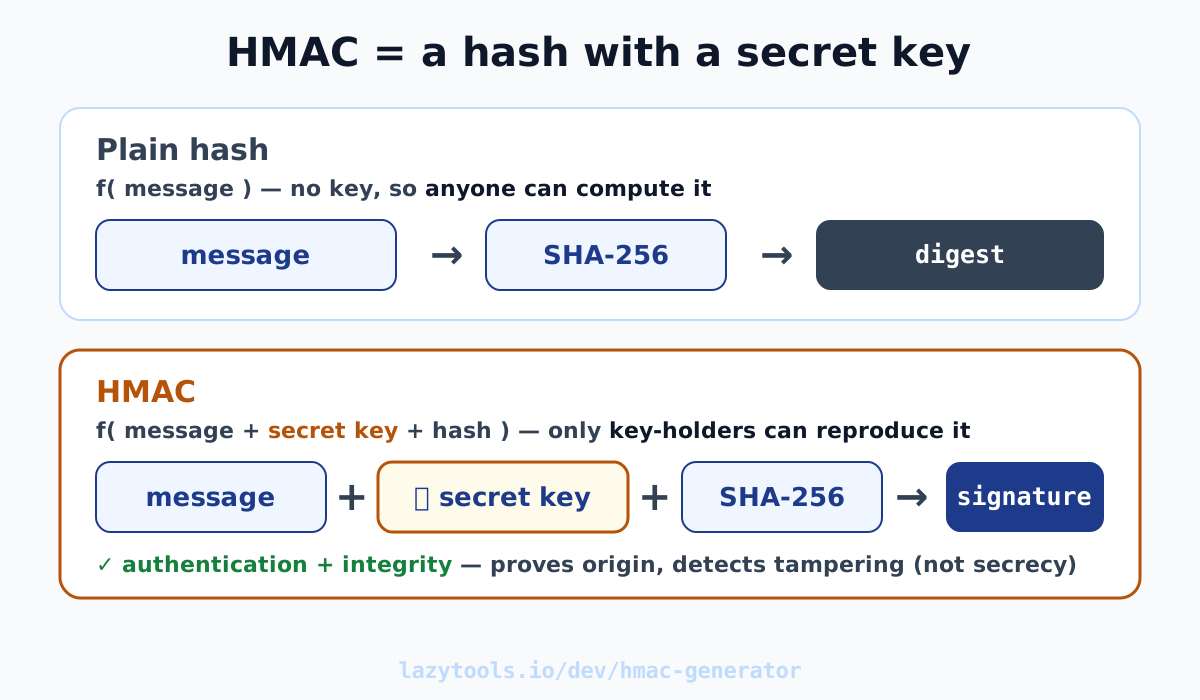
What HMAC is (in one line)
HMAC answers a very specific question: did this exact message come from someone who knows the secret? It does that by combining three ingredients, the message, a shared secret key, and a cryptographic hash function (SHA-1, SHA-256, SHA-384, or SHA-512), into one fixed-length output called the signature or digest.
Because the key is baked into the calculation, only parties who hold the same key can produce the same signature for a given message. Change one byte of the message, or use the wrong key, and the output changes completely. So a matching HMAC tells the receiver two things at once: the message is authentic (it came from a key-holder) and it has integrity (it wasn’t modified in transit). It does not tell you the contents are private, that’s a different job.
As a concrete example, the HMAC-SHA256 of the message The quick brown fox jumps over the lazy dog
using the key key is:
f7bc83f430538424b13298e6aa6fb143ef4d59a14946175997479dbc2d1a3cd8Anyone with that message and that key reproduces exactly those bytes. Anyone without the key can’t, that’s the point.
The hash function you pick sets the output length: HMAC-SHA256 gives 32 bytes (64 hex characters), HMAC-SHA512 gives 64 bytes, and so on. SHA-256 is the sensible default for new systems; SHA-1 still appears in older APIs but is best avoided for anything new. Whichever you choose, both sides must agree on the same hash, a receiver checking with SHA-512 will never match a sender signing with SHA-256.
HMAC vs a plain hash
The most common confusion is treating HMAC and a bare hash as interchangeable. They aren’t, and the gap is exactly one secret key.
| Plain hash (e.g. SHA-256) | HMAC (e.g. HMAC-SHA256) | |
|---|---|---|
| Inputs | Message only | Message + secret key |
| Who can compute it? | Anyone | Only key-holders |
| Detects tampering? | Only if the hash itself is protected | Yes, attacker can’t recompute without the key |
| Proves who sent it? | No | Yes (authentication) |
| Good for | Checksums, fingerprinting, dedup | Signing requests, verifying webhooks, API auth |
A plain SHA hash is a fingerprint: brilliant for spotting accidental corruption or de-duplicating files, but useless as proof of origin, because an attacker who alters the message can simply recompute the hash to match. HMAC closes that hole. Since the attacker doesn’t hold the key, they can’t produce a valid signature for their tampered message. The plain hash is the keyless cousin; HMAC is the version you use when someone might be adversarial.
How to verify a webhook signature
The everyday place developers meet HMAC is webhooks. When Stripe, GitHub, or a similar service sends your server an event, they HMAC the request body with a secret you both share and put the result in a signature header. Your job is to prove the request really came from them. Here’s the recipe:
- Read the raw request body exactly as received, same bytes, no re-serializing, no pretty-printing. Even reordering JSON keys will break the signature.
- Grab the shared secret the provider gave you (store it as an environment variable, never in code).
- Compute the HMAC over that raw body using the provider’s hash function, almost always SHA-256, and the shared secret.
- Read the signature header the provider sent (for example
X-SignatureorStripe-Signature). - Compare your computed signature to the one in the header. If they match, the request is genuine and untampered; if not, reject it.
One critical detail in step 5: use a constant-time comparison (such as crypto.timingSafeEqual
in Node, or hmac.compare_digest in Python). A naive == bails out at the first differing byte,
and the tiny timing difference can let an attacker recover the correct signature one byte at a
time. Constant-time comparison takes the same time regardless of where the strings differ, closing
that side channel.
You can dry-run the whole thing by hand: paste the body and secret into the HMAC generator, pick SHA-256, and check the output against the header your provider actually sent. If it lines up, your verification code is doing the right thing; if it doesn’t, you’ve usually got a body-encoding or hash-mismatch problem rather than a broken secret.
Hex vs base64 output
HMAC produces raw bytes, and those bytes can be written down two common ways: hexadecimal (like
the f7bc83f4… above) or base64. Neither is more secure than the other, they’re just
different spellings of the identical bytes, the same way 255 and FF are the same number. If you
base64-encode a hex digest’s underlying bytes, you get the shorter
base64 form back.
What matters is matching what the other system expects. Many webhook providers send a lowercase hex digest in the signature header, so you compute hex and compare. Some APIs specify base64 in their signing docs. Using the wrong representation is a classic reason a correct HMAC still “doesn’t match”, the bytes are right, the encoding is wrong. Check the provider’s documentation and produce exactly that format.
Common mistakes
- Using a plain hash where HMAC is needed. Signing a request with a bare SHA-256 of the body provides no authentication, anyone can recompute it. If origin matters, you need the key, so you need HMAC.
- Non-constant-time comparison. Comparing signatures with ordinary string equality opens a timing side channel. Always use a constant-time comparison function.
- Leaking or reusing the secret. The secret key is the entire security of the scheme. Keep it out of source control, logs, and URLs; rotate it if exposed; and don’t reuse one secret across unrelated systems.
- Expecting HMAC to hide the message. HMAC proves origin and integrity; it does not encrypt. The message travels in the clear alongside its signature. If the contents must stay private, encrypt them separately.
Generate an HMAC locally
HMAC is the workhorse behind signed webhooks, API request signing, and the signatures inside HMAC-signed JWTs, anywhere you need to prove this message, from a key-holder, unaltered. The mechanics are simple: message plus secret key plus hash function equals a signature only key-holders can reproduce.
When you need to compute or check one, the HMAC generator does it with the browser’s Web Crypto API, pick your hash, choose hex or base64, and read the result. Because it’s all client-side, your message and your secret key never leave your device, which is exactly what you want from a tool you’re pasting secrets into.
Frequently asked questions
What is HMAC?
HMAC (Hash-based Message Authentication Code) combines a message, a secret key and a hash function (SHA-1, SHA-256, SHA-384 or SHA-512) to produce a fixed-length signature. Only someone holding the same key can reproduce it, so a matching HMAC proves the message came from a key-holder and wasn't altered in transit.
How is HMAC different from a normal hash?
A plain hash like SHA-256 takes only the message, so anyone can compute it and anyone can recompute it after tampering. HMAC also requires a secret key. That single addition turns a fingerprint anyone can forge into a signature only key-holders can produce, giving you authentication on top of integrity.
How do I verify a webhook signature?
Take the exact raw request body, compute HMAC over it with the shared secret and the provider's hash (usually SHA-256), then compare your result to the signature header the provider sent. If they match, the request is genuine and untampered. Always use a constant-time comparison so an attacker can't learn the signature byte-by-byte from timing.
Is HMAC encryption?
No. HMAC does not hide the message, it's one-way and produces a signature, not ciphertext. It proves origin and integrity, not secrecy. If you need to keep the contents private, encrypt them; HMAC only tells you who sent the message and that nobody changed it.
Should the HMAC output be hex or base64?
Both encode the same signature bytes in different text representations, so neither is more secure. Use whichever the other system expects: many webhook providers send a hex digest in the signature header, while some APIs use base64. Match their format exactly or your comparison will never succeed.
Is my secret key uploaded when I use the LazyTools HMAC generator?
No. The generator computes the HMAC with the browser's built-in Web Crypto API, so the message and the secret key are processed entirely on your device and never leave it. Nothing is sent to a server.