
explainer
Why 0.1 + 0.2 Isn't 0.3: IEEE 754 Floating-Point Explained
By Uttam Regmi · Published 2026-08-03 · Updated 2026-08-23 · 6 min read · Fact-checked, sources cited
Type 0.1 + 0.2 into JavaScript, Python, Java or almost any language and you get
0.30000000000000004. It’s not a bug in the language, it’s how computers store fractional numbers.
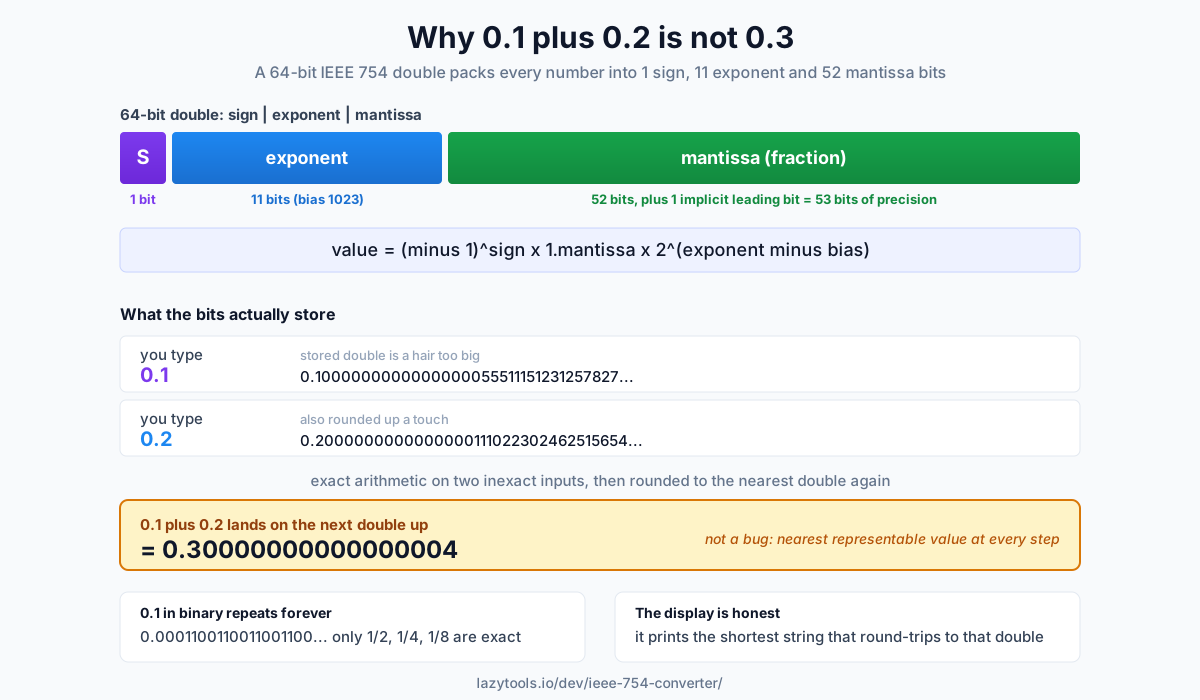
Both 0.1 and 0.2 are rounded to the nearest value a 64-bit binary float can hold, those rounded values
are each a hair too big, and the errors survive the addition. Here’s the full reason, and how to see it for
yourself with the IEEE 754 Converter.
Computers store numbers in binary fractions
We write 0.1 in decimal, but a computer stores it in binary. Some decimal fractions convert cleanly
, 0.5 is 0.1 in binary, 0.25 is 0.01, but most don’t. 0.1 in binary is:
0.0001100110011001100110011… (repeating forever)Just like 1/3 = 0.333… never terminates in decimal, 0.1 never terminates in binary. A float only has
a fixed number of bits, so it stores the nearest value it can and drops the rest. That stored value
is a hair larger than 0.1, and that hair is the whole story.
Which fractions do survive exactly? Only those whose denominator is a power of two, because binary place
values are 1/2, 1/4, 1/8, 1/16, …. Anything else, thirds, fifths, tenths, repeats:
| Decimal | Exact in binary? | Why |
|---|---|---|
0.5 | Yes | 1/2 |
0.25 | Yes | 1/4 |
0.75 | Yes | 1/2 + 1/4 |
0.1 | No | denominator 10 has a factor of 5 |
0.2 | No | same, repeats forever |
0.3 | No | not a sum of powers of two |
This is the mirror image of decimal, where 1/2 and 1/5 are clean (0.5, 0.2) but 1/3 is not.
Different base, same limitation.
How a float is built: sign, exponent, mantissa
IEEE 754 packs a number into three fields:
| Field | Single (32-bit) | Double (64-bit) | Role |
|---|---|---|---|
| Sign | 1 bit | 1 bit | positive or negative |
| Exponent | 8 bits | 11 bits | scales by a power of two |
| Mantissa | 23 bits | 52 bits | the significant fraction bits |
The value is approximately:
(−1)^sign × 1.mantissa × 2^(exponent − bias)
The bias (127 for single, 1023 for double) lets the exponent represent negative powers without its own
sign. The mantissa has an implicit leading 1, so single precision really carries 24 bits (~7 decimal
digits) and double carries 53 bits (~15-17 digits).
A worked encoding
Take 0.15625, which happens to be exact. In binary it is 0.00101, and normalising it (moving the
binary point until one 1 sits in front) gives 1.01 × 2^−3:
- Sign =
0(positive). - Exponent =
−3 + 127 = 124, or01111100in single precision. - Mantissa = the bits after the point,
01padded out to 23 bits:01000000000000000000000.
Reassembled, that is the 32-bit pattern 0 01111100 01000000000000000000000. Because 0.15625 needs only
three fraction bits, nothing is dropped and the stored value equals the number exactly. Feed a value like
0.1 through the same machine and the mantissa runs out of room, forcing a round, which is where the error
is born.
Watching the error happen
Store 0.1 as a double and you don’t get exactly 0.1. You get:
0.1 → 0.1000000000000000055511151231257827021181583404541015625That trailing …0555… is the rounding error. Do the same with 0.2 (also rounded up a touch), add the
two stored values, and the sum lands just above 0.3, at the nearest double to that sum, which displays as
0.30000000000000004. Nothing went wrong; each step just used the closest representable number.
The IEEE 754 Converter shows this directly: enter 0.1 and it displays the
exact stored value and the error field, the gap between what you typed and what the bits actually
represent.
Why does it print as 0.3 most of the time but 0.30000000000000004 here? Because languages don’t show
you the full 50-plus-digit stored value. They print the shortest decimal string that still round-trips
back to the same double. For the double nearest to 0.3, that shortest string is "0.3". But 0.1 + 0.2
lands on the next double up, whose shortest faithful string is "0.30000000000000004". The display isn’t
lying; it’s telling you these are two different stored numbers.
Precision at a glance
The three common formats trade bits for range and accuracy. Rough numbers worth memorising:
| Format | Total bits | Exponent | Mantissa | Significant digits | Approx. max |
|---|---|---|---|---|---|
| Half | 16 | 5 | 10 | ~3 | ~65,504 |
| Single | 32 | 8 | 23 | ~7 | ~3.4 × 10^38 |
| Double | 64 | 11 | 52 | ~15-17 | ~1.8 × 10^308 |
JavaScript numbers are always doubles. Python floats and most SQL FLOAT/DOUBLE columns are doubles too.
Single precision (float in C, float32 in NumPy) dominates graphics, machine learning and embedded work,
where half the memory and faster math matter more than the last few digits. Half precision is common in GPU
neural-network inference for the same reason, pushed further.
This is a feature, not a bug
Floating point trades exactness for range and speed: with 64 bits you can represent numbers from tiny subnormals to ~10^308, at the cost of most values being approximations. It only bites when code assumes exactness:
- Don’t compare floats with
==. CheckMath.abs(a - b) < epsiloninstead, sizing epsilon to your data. - Don’t use floats for money. Use integer cents, or a decimal/BigDecimal type where the rounding rules are exact.
- Do expect ~7 significant digits from single precision, ~15-17 from double, and round for display.
- Do remember the error can compound: summing a long list of floats accumulates rounding, which is why algorithms like Kahan summation exist.
The same mechanism explains other “surprises”: very large and very small numbers can’t be added meaningfully
(the small one falls off the end of the mantissa), and 0.1 + 0.2 === 0.3 is false in JavaScript for the
exact reason above. None of this is unique to one language, it’s the shared IEEE 754 standard nearly every
CPU implements in hardware.
See the bits yourself
The fastest way to build intuition is to look at the encoding. The IEEE 754 Converter turns any number into its half, single and double bit patterns, sign, exponent and mantissa broken out, in binary and hex, and shows the exact stored value and rounding error. You can also paste a raw bit pattern to decode it the other way. It runs entirely in your browser, and it makes “0.1 isn’t 0.1” go from mysterious to obvious.
Frequently asked questions
Why does 0.1 + 0.2 equal 0.30000000000000004?
Because 0.1 and 0.2 can't be represented exactly in binary floating point. Like 1/3 in decimal, they're infinitely repeating in binary, so each is rounded to the nearest value a 64-bit double can store. Those stored values are very slightly larger than 0.1 and 0.2, and when you add them the tiny errors combine into a value just above 0.3, which prints as 0.30000000000000004.
How does IEEE 754 store a number?
In three bit-fields: a sign bit, a biased exponent, and a mantissa (the fraction). The value is roughly sign × 1.mantissa × 2^(exponent − bias). Single precision uses 1 + 8 + 23 bits (32 total), double uses 1 + 11 + 52 bits (64 total), and half uses 1 + 5 + 10 bits (16 total).
What is the mantissa in a float?
The mantissa (also called the significand or fraction) holds the significant digits of the number in binary. For a normal number there's an implicit leading 1, so a 23-bit single-precision mantissa actually carries 24 bits of precision. The exponent then shifts the binary point to scale it.
Is floating-point error a bug?
No, it's an inherent, predictable consequence of representing infinitely many real numbers in a fixed number of bits. Every value is rounded to the nearest representable one. It only becomes a bug when code assumes exactness, for example comparing floats with == or using them for money. Use a tolerance for comparisons, and integers or a decimal type for currency.
How can I avoid floating-point errors?
Don't compare floats for exact equality, check that the difference is within a small epsilon. For money, use integer cents or a decimal/BigDecimal type instead of floats. And when you need to know exactly what's stored, inspect the bits: a converter shows the exact stored value and the rounding error.
What's the difference between single and double precision?
Double precision (64-bit) has an 11-bit exponent and 52-bit mantissa, giving about 15-17 significant decimal digits and a huge range; single precision (32-bit) has an 8-bit exponent and 23-bit mantissa, giving about 7 digits. Double is the default in most languages (including JavaScript); single is common in graphics, ML and embedded code where memory and speed matter more than precision.