
explainer
Aspect Ratio Explained: What 16:9 Means and How to Resize Without Stretching
By Uttam Regmi · Published 2026-07-25 · Updated 2026-07-25 · 4 min read · Fact-checked, sources cited
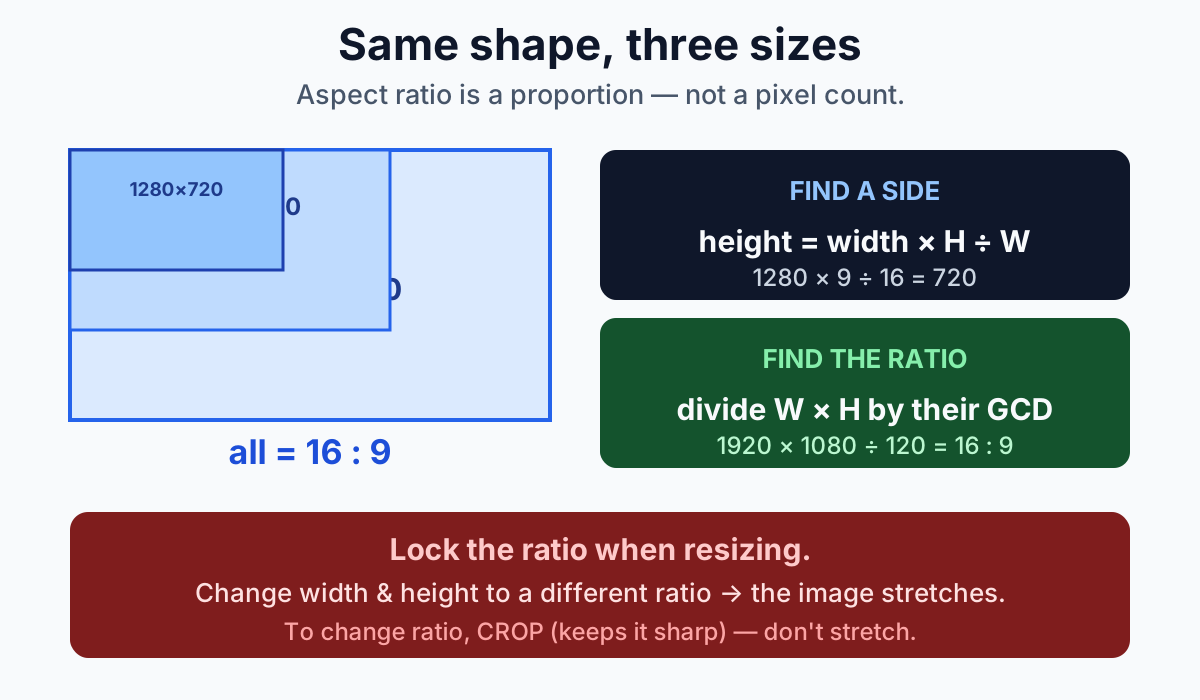
Aspect ratio is the proportion between width and height, written as two numbers with a colon, 16:9, 4:3, 1:1, and it’s independent of the actual pixel size. 1280×720, 1920×1080 and 3840×2160 are all 16:9, because each is 16 units wide for every 9 tall. To find a matching dimension for a ratio, cross-multiply: at 16:9, a width of 1280 gives a height of 1280 × 9 ÷ 16 = 720. To turn a pixel size into a ratio, divide both numbers by their greatest common divisor.
What the numbers mean
An aspect ratio compares width to height. “16:9” means the frame is 16 units wide for every 9 units tall, where a “unit” is just a shared scale factor, not a fixed measurement. Multiply both by 80 and you get 1280×720; by 120 and you get 1920×1080. Both are 16:9.
That’s the idea people most often miss: a ratio has no inherent size. Asking “how many pixels is 16:9?” has no single answer, it’s a family of resolutions that all share the same shape.
Finding a missing dimension
The everyday task is “I want this at 16:9 and I know one side, what’s the other?” Cross-multiply:
new height = new width × (H ÷ W) new width = new height × (W ÷ H)
At 16:9, a width of 1280 gives a height of 1280 × (9 ÷ 16) = 720. A height of 500 gives a width of 500 × (16 ÷ 9) ≈ 889. The aspect ratio calculator fills in the second box automatically as you type the first.
Turning a resolution into a ratio
To go the other way. You have a pixel size and want to know its ratio, divide both dimensions by their greatest common divisor (GCD), the largest number that divides both evenly:
- 1920×1080 → GCD is 120 → 1920÷120 : 1080÷120 → 16:9
- 1600×900 → GCD is 100 → 16:9
- 800×600 → GCD is 200 → 4:3
- 1080×1350 → GCD is 270 → 4:5
The calculator’s “get ratio from these dimensions” button does exactly this reduction.
Common ratios and where they’re used
| Ratio | Shape | Typical use | Example sizes |
|---|---|---|---|
| 16:9 | Landscape | HD video, YouTube, monitors, slides | 1280×720, 1920×1080, 3840×2160 |
| 9:16 | Vertical | Reels, TikTok, Stories, Shorts | 1080×1920 |
| 1:1 | Square | Profile pictures, feed posts | 1080×1080 |
| 4:5 | Portrait | Instagram/Facebook feed (most screen space) | 1080×1350 |
| 4:3 | Boxy | Older TVs, many slides, some cameras | 1024×768, 1600×1200 |
| 3:2 | Landscape | Most DSLR/mirrorless photos | 6000×4000 |
| 21:9 | Ultrawide | Cinematic film, ultrawide monitors | 2560×1080, 3440×1440 |
16:9 became the default as screens grew wider and replaced the old 4:3 television shape; vertical 9:16 rose with the phone.
Why locking the ratio matters when you resize
If you change width and height independently to a ratio that isn’t the original, the image is squashed or stretched, circles become ovals and faces distort. “Constraining proportions,” “lock aspect ratio” or object-fit: contain in CSS all describe the same protection: set one dimension, and the software recalculates the other from the original ratio so the shape is preserved.
The rule: resize proportionally. Only change the ratio deliberately, and when you do, crop rather than stretch, cropping removes pixels but keeps everything sharp and undistorted, whereas stretching warps what’s there. To resize an actual image file proportionally, the image resizer locks the ratio for you; for a round avatar with transparency, the circle crop tool centre-crops to a square first.
One thing a ratio can’t do
Matching an aspect ratio and enlarging to a bigger size are different things. Scaling a 1280×720 image up to 1920×1080 keeps it at 16:9, but it does not add real detail. The tool just spreads the existing 720p of information across more pixels, which looks softer. Aspect ratio governs shape; it says nothing about how much genuine resolution you have.
Frequently asked questions
What does 16:9 actually mean?
It means the frame is 16 units wide for every 9 units tall, where a unit is just a shared scale factor. 1280x720, 1920x1080 and 3840x2160 are all 16:9 because each keeps that same width-to-height proportion regardless of pixel size.
How do I find the other dimension for a given aspect ratio?
Cross-multiply. New height equals new width times H divided by W, and new width equals new height times W divided by H. At 16:9 a width of 1280 gives a height of 1280 x 9 / 16 = 720.
How do I turn a pixel resolution into an aspect ratio?
Divide both the width and height by their greatest common divisor (GCD), the largest number that divides both evenly. For example 1920x1080 has a GCD of 120, so it reduces to 16:9.
Why does my image stretch when I resize it?
Stretching happens when the new width and height do not match the original proportion, so the shape is distorted. Keep the aspect ratio locked when resizing so both dimensions scale together and the image stays undistorted.
Which aspect ratio should I use for social media?
Use 9:16 for Reels, TikTok and Stories, 1:1 or 4:5 for feed posts, and 16:9 for landscape video and screens. 4:3 suits slides and older TV formats.
Does scaling an image up to the same ratio add detail?
No. Enlarging to the same aspect ratio only stretches the existing pixels to a bigger size; it does not create new detail. The picture keeps its shape but can look softer or blockier.