
explainer
What Is a Good Typing Speed? Average WPM Explained
By Uttam Regmi · Published 2026-10-25 · Updated 2026-10-25 · 7 min read · Fact-checked, sources cited
The average typing speed is roughly 40 words per minute (WPM), and anything above that with good accuracy is a solid result. As a quick scale: about 40 WPM is average, 50 to 60 WPM is comfortably above average, 70 to 80 WPM is fast, and 90 WPM and beyond is professional-transcriptionist territory. Speed only counts when it is accurate, because the standard scoring subtracts your mistakes. You can measure your own number in under a minute with the Typing Speed Test, which shows your net WPM, raw WPM and accuracy live, all in your browser.
What counts as a good typing speed?
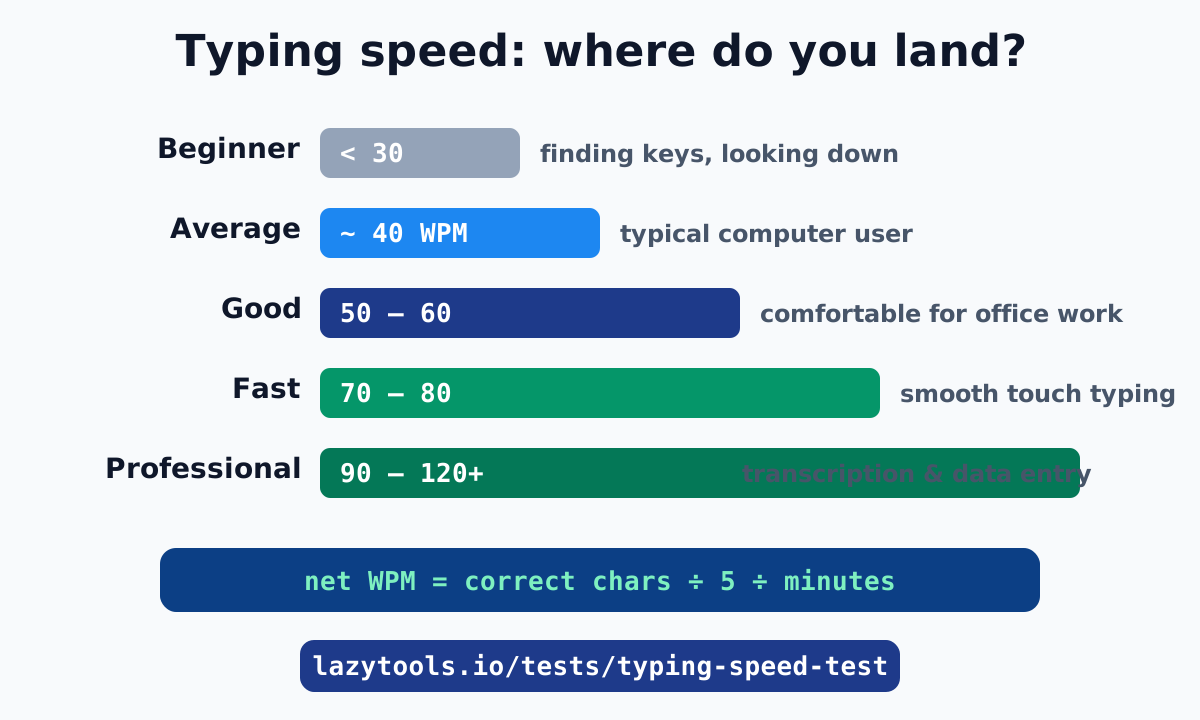
There is no single “good” number, because it depends on what you type and why. But the benchmarks below give an honest, widely-used scale for ordinary keyboard typing on a computer.
| Level | WPM | What it feels like |
|---|---|---|
| Beginner | under 30 | Hunting for keys, looking at the keyboard |
| Average | ~40 | Typical everyday computer user |
| Above average | 50 to 60 | Comfortable for most office work |
| Fast | 70 to 80 | Smooth touch-typing, rarely looking down |
| Professional | 90 to 120 | Transcription, data entry, coding at pace |
| Elite | 120+ | Record-chasing territory |
For most people, the goal worth aiming at is 60 WPM with high accuracy. It is a noticeable step above average, it is achievable with practice, and it is fast enough that typing stops being the bottleneck in almost any desk job.
What is the actual average typing speed?
“About 40 WPM” is the headline figure, but the real picture is a little more textured, and worth knowing so you can judge your own result fairly.
- Transcription (copying text): studies have put the average around 32 to 40 WPM. Copying is faster than composing because you are not also thinking of the words.
- Composition (writing your own text): averages drop to roughly 19 WPM, because thinking time is included.
- Two-finger “hunt and peck”: around 27 WPM when copying and up to 37 WPM for memorised text, which surprises people, skilled hunt-and-peck typists can be quicker than slow touch typists.
- Mobile phones: average thumb-typing is about 36 WPM, closing in on physical-keyboard speeds thanks to autocorrect and swipe input.
So when a typing test reports your speed, compare it to the right baseline: a copy-the-passage test (like most online tests, including ours) is measuring transcription, where ~40 WPM is a fair “average” line. These ranges come from the figures summarised on Wikipedia’s Words per minute overview.
How is WPM actually calculated?
This is the part that explains almost every “why is my score lower than I expected” question. Typing speed does not count real words. The universal convention is:
One “word” = 5 characters, including spaces and punctuation.
That standardisation exists so that typing “antidisestablishmentarianism” and typing “cat cat cat” can be scored on the same scale. From there:
- Raw WPM = (all characters you typed ÷ 5) ÷ minutes. It rewards sheer finger speed.
- Net WPM = (correct characters ÷ 5) ÷ minutes. It is the number that actually matters, because it subtracts your mistakes.
A worked example: you type 300 characters in one minute. Raw WPM = 300 ÷ 5 ÷ 1 = 60. But if 30 of those characters were wrong, your correct characters are 270, so net WPM = 270 ÷ 5 = 54. The 10% error rate cost you 6 WPM, plus the time you spent typing the wrong keys. That is why the typing test shows net WPM, raw WPM and accuracy side by side.
Why accuracy beats raw speed
It is tempting to chase a big number by typing as fast as your fingers move. It almost always backfires, for two reasons.
First, errors do not count toward net WPM, so a wrong keystroke is wasted effort. Second, fixing errors costs time, you have to notice the mistake, backspace, and retype, which is slower than getting it right once. A run at 80 WPM raw but 82% accuracy can easily net less than a calm run at 60 WPM raw and 98% accuracy.
The practical rule professionals follow: build accuracy first, then let speed follow. When correct typing becomes automatic, speed rises on its own, because you stop pausing to correct yourself. Aim to keep accuracy at 95% or higher; if yours is lower, slow down until it climbs, then rebuild pace.
Typing speed by job
If you are typing to meet a requirement, here is roughly where common roles sit. Always check the specific posting, because employers vary, but these are typical expectations.
| Role | Typical expectation |
|---|---|
| General office / admin | 50 to 60 WPM |
| Customer support / chat | 60 to 70 WPM |
| Data entry | 60 to 80 WPM (plus numeric keypad speed) |
| Medical / legal transcription | 80 to 95 WPM, very high accuracy |
| Court reporting (stenography) | 200+ WPM (specialised machine, not a standard keyboard) |
| Software developer | No formal bar, but 50+ WPM keeps typing from slowing your thinking |
Two things stand out. Court reporting numbers look superhuman because stenographers use a chorded steno machine, pressing multiple keys at once for whole syllables, not a normal QWERTY keyboard. And for developers, raw WPM matters less than you would think: most coding time is thinking, not typing, though fluent typing still removes friction.
Typing speed and age
Speed tends to rise through school and early working life as typing becomes second nature, then holds fairly steady, and can slow gradually later in life along with general reaction speed. But the single biggest factor is not age, it is practice and technique. A teenager who grew up messaging may out-type an adult who never learned touch typing, while an adult who practises deliberately can pass a faster peer within weeks. Treat age as a minor influence and your habits as the main one.
How to type faster (without wrecking your accuracy)
Improvement comes from a few durable habits rather than any trick:
- Touch-type with all ten fingers. Each finger owns a home-row zone; returning to the home row (the bumps on F and J) between keys is what lets you type without looking.
- Keep your eyes on the text, not the keyboard. Looking down breaks rhythm and hides upcoming words. It feels slower at first and then becomes much faster.
- Prioritise accuracy, then speed. Practise at the pace where you stay above 95% accuracy, and let speed rise as the motions become automatic.
- Practise little and often. Ten focused minutes a day beats a two-hour session once a week, because typing is muscle memory.
- Re-test regularly. Measuring yourself every week or two turns vague effort into visible progress, and the feedback keeps you motivated.
Run a baseline now, practise for a couple of weeks, and re-test under the same settings. Progress of 5 to 10 WPM in a month is very achievable for most people starting below 60.
How fast is the fastest?
For perspective: on short tests using simple, common English words, some typists have sustained over 300 WPM. Over longer, real-world passages with mixed vocabulary and punctuation the ceiling is much lower, because harder words and fatigue slow everyone. This is also why a 15-second test flatters your number compared with a 60-second one, there is less time to tire and more chance of a lucky streak of easy words. For a fair personal benchmark, pick one test length and stick with it.
Measure your typing speed
The average typing speed is about 40 WPM, “good” starts around 50 to 60, and fast is 70 to 80, but the number that matters most is your own, measured consistently and nudged upward over time. Remember that net WPM counts only correct characters, so accuracy is not separate from speed, it is part of it.
See where you stand right now with the Typing Speed Test: pick 15, 30 or 60 seconds, type the passage, and read your net WPM, raw WPM and accuracy. Like the rest of the Typing & Reflex Tests, it runs entirely in your browser, so your keystrokes are never uploaded. Then try the reaction time test and number memory test to round out the picture.
Average-speed figures and the 5-character word convention are drawn from the summary on Words per minute (Wikipedia).
Frequently asked questions
What is the average typing speed?
Around 40 words per minute (WPM) for general computer use. Research on transcription typing has measured averages near 32 to 40 WPM, and mobile phone typing averages around 36 WPM. Professional typists work faster, typically 43 to 80 WPM, and advanced typists can exceed 120 WPM.
What is a good typing speed?
Anything above the ~40 WPM average with high accuracy is good. Roughly: 40 WPM is average, 50 to 60 WPM is above average and comfortable for most office work, 70 to 80 WPM is fast, and 90 WPM and up is professional-transcriptionist territory. Accuracy matters as much as raw speed.
What is a good typing speed for a job?
Most office and administrative roles are comfortable with 50 to 60 WPM. Data entry and customer support often look for 60 to 70 WPM, and transcription or court reporting demands much higher, frequently 80 to 95 WPM or more with very high accuracy. Check the specific role, requirements vary widely.
How is typing speed (WPM) measured?
WPM uses the standard convention that one 'word' equals 5 characters including spaces and punctuation. Net WPM = (correct characters ÷ 5) ÷ minutes. Dividing by 5 rather than counting real words keeps scores comparable no matter how long the words are. Errors are subtracted, which is why accuracy affects your score.
Is 100 WPM fast?
Yes. 100 WPM is well above the ~40 WPM average and faster than most professional typists, who typically land in the 43 to 80 WPM range. Sustaining 100 WPM with high accuracy puts you in the top tier of everyday typists, though specialist transcriptionists and record holders go higher still.
What is the fastest typing speed ever recorded?
On short tests using simple English words, some typists have sustained over 300 WPM. Over longer, real-world passages the ceiling is lower because fatigue and harder vocabulary slow everyone down. Your own best is most meaningful when measured the same way each time.
Does accuracy matter more than speed?
They work together, but accuracy comes first. Net WPM only counts characters you typed correctly, so errors cost you twice: the wrong keystroke does not count, and fixing it wastes time. A careful 95%-accurate run usually beats a frantic 80%-accurate one.
How can I improve my typing speed?
Touch-type with all ten fingers, keep your eyes on the text instead of the keyboard, and prioritise accuracy before speed so good habits become automatic. Short, regular practice beats occasional marathons. Re-test every week or two to see progress.