
explainer
Base64 vs Ascii85 vs Base62: Which Binary-to-Text Encoding Should You Use?
By Uttam Regmi · Published 2026-08-02 · Updated 2026-08-23 · 7 min read · Fact-checked, sources cited
Base64, Ascii85 and Base62 all solve the same problem, safely carrying binary data through text-only channels, but they make different trade-offs between size and URL-safety. Pick the wrong one and you either waste bytes or end up percent-escaping characters in a URL. Here’s how each works and when to use it, with encoders for Base64, Ascii85 and Base62.
Why encode binary as text?
Email bodies, JSON strings, URLs, XML and source files are all built for text. Drop raw binary bytes into them and something downstream may strip a byte, choke on a control character, or reject the payload entirely. A binary-to-text encoding sidesteps that by re-expressing the bytes using a small set of “safe” printable characters. The price is size: you always get more characters out than bytes in. How much more, and which characters, is exactly what separates these three.
The reason there is any overhead comes down to counting. A raw byte carries 8 bits and can take any of 256 values, but a “safe” printable character draws from a much smaller pool. Base64’s 64 symbols carry only 6 bits each, so it takes 4 characters to express the 24 bits in 3 bytes. Fewer symbols means fewer bits per character, which means more characters per byte, that single fact drives every difference below.
The three at a glance
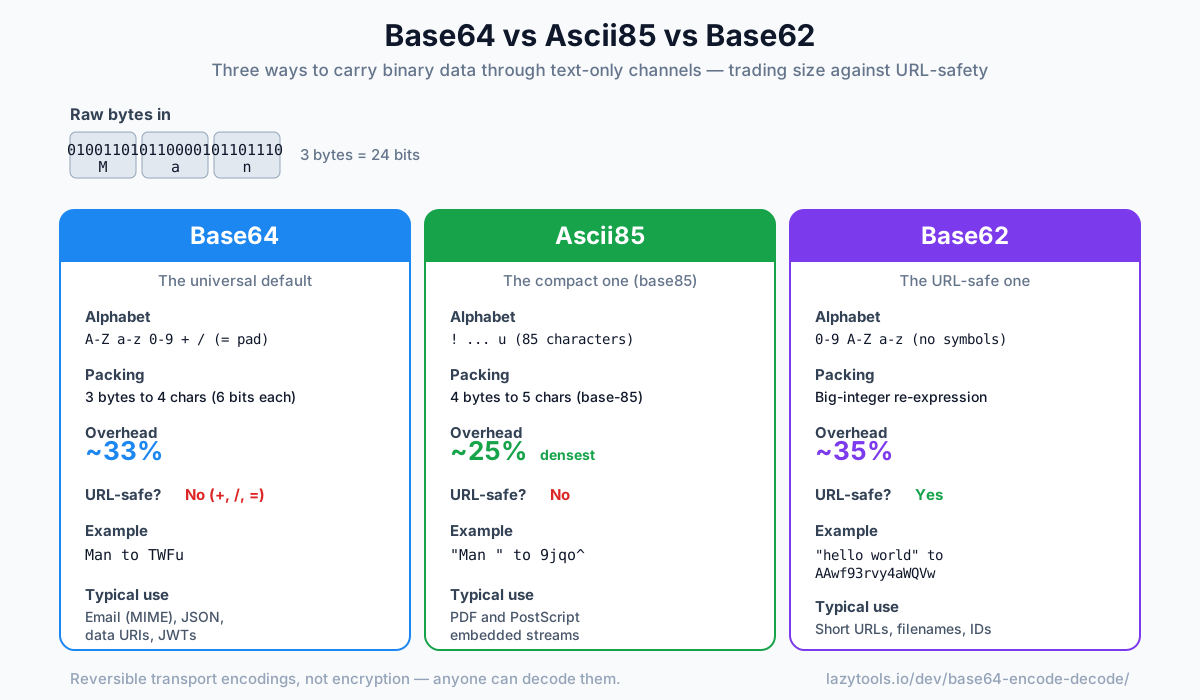
| Base64 | Ascii85 | Base62 | |
|---|---|---|---|
| Alphabet | A, Z a, z 0-9 + / (= pad) | ! … u (85 chars) | 0-9 A, Z a, z |
| Ratio | 3 bytes → 4 chars | 4 bytes → 5 chars | big-integer |
| Overhead | ~33% | ~25% (densest) | ~35% |
| URL-safe? | No (+, /, =) | No | Yes |
| Padding | Yes (=) | No | No |
| Typical use | Email, JSON, data URIs | PDF, PostScript | Short URLs, IDs |
Base64: the universal default
Base64 maps every 3 bytes to 4 characters using 64 symbols, so output is about 33% larger than
input, rounded up to a multiple of 4 with = padding. It’s everywhere, email attachments (MIME), JSON
payloads, data: URIs, JWTs. Its weakness is the URL: +, / and = all have special meaning in URLs
and must be escaped, which is why a “URL-safe Base64” variant (swapping +/ for -_) exists.
The mechanics are worth seeing once. Take the three bytes of Man, 01001101 01100001 01101110.
Line those 24 bits up and slice them into four 6-bit groups instead of three 8-bit ones:
Man → 010011 010110 000101 101110 → 19 22 5 46 → TWFuEach 6-bit group (0-63) indexes into the alphabet A, Z a, z 0-9 + /, giving TWFu. When the input
isn’t a clean multiple of 3 bytes, the last group is padded with zero bits and the output is topped up
with one or two = signs so the length is always a multiple of 4. That padding is the reason a single
byte of input still costs four characters of output.
Use it when you want maximum compatibility and the destination isn’t a URL.
Ascii85: the compact one
Ascii85 (base85) uses 85 symbols, packing 4 bytes into 5 characters for only about 25%
overhead, noticeably tighter than Base64. This is why it’s the encoding inside PDF and PostScript
streams. The Adobe variant adds two conveniences: a run of four zero bytes collapses to a single z,
and the stream can be wrapped in <~ … ~> markers.
"Man " → 9jqo^ (4 bytes → 5 chars)Under the hood, Ascii85 takes each group of 4 bytes, reads it as a single 32-bit number, and writes that
number in base 85 as 5 digits, each digit offset from the ! character. Because 85⁵ (just over 4.4
billion) comfortably exceeds 2³² (about 4.29 billion), five base-85 digits are always enough to represent
four bytes, and no more are needed. That tighter packing is where the ~25% overhead comes from versus
Base64’s ~33%.
Use it when density matters and you control both ends, especially PDF/PostScript work. Watch out: Adobe Ascii85 is not the same as Z85 (the ZeroMQ variant), which uses a different alphabet, nor the same as RFC 1924’s base-85 scheme for IPv6 addresses. If you mix variants, decoding silently produces garbage rather than an error, so always pair an encoder and decoder from the same family.
Base62: the URL-safe one
Base62 uses only letters and digits, no +, / or =, so its output drops straight into a URL,
filename or identifier with nothing to escape. It’s computed with a big-integer scheme (the same idea as
Base58), treating the input as one large number and re-expressing it in base 62. That makes it slightly
larger than Base64, but the payoff is zero URL headaches.
"hello world" → AAwf93rvy4aWQVwUse it when the value lives in a link, a path, or a short ID, the classic URL-shortener case. One caveat: there’s no single official Base62 standard for arbitrary bytes, so two libraries can disagree on alphabet order, decode with the same convention you encoded with.
How much do they actually cost?
Overhead percentages are easy to quote and easy to misjudge, so it helps to see them in whole
characters. The table below encodes the same payloads with each scheme. Base64 figures include =
padding; Ascii85 figures use the raw stream without <~ … ~> markers; Base62 is a big-integer estimate,
since its exact length varies slightly with the leading byte values.
| Input size | Base64 | Ascii85 | Base62 (approx) |
|---|---|---|---|
| 1 byte | 4 chars | 2 chars | 2 chars |
| 3 bytes | 4 chars | 4 chars | ~5 chars |
| 16 bytes | 24 chars | 20 chars | ~22 chars |
| 1,024 bytes | 1,368 chars | 1,280 chars | ~1,376 chars |
A few things stand out. For very small inputs Base64’s rounding-up to a multiple of four is punishing, a single byte still costs four characters, whereas Ascii85 lets a partial group shrink to just one more character than the bytes it holds. At kilobyte scale the ratios settle into their steady-state overheads: Ascii85 stays the leanest, Base64 sits about a third larger than the input, and Base62 lands a hair above Base64. If you are encoding megabytes, that gap between Ascii85 and Base64 is real bandwidth; if you are encoding a 16-byte token, it rounds away to almost nothing and other factors should decide.
URL-safe Base64: the fourth option
Before you reach for Base62 purely to survive a URL, know that standard Base64 has a URL-safe sibling.
Defined alongside the base encodings in RFC 4648, it keeps the 3-bytes-to-4-characters math and the whole
Base64 toolchain, but swaps the two troublesome symbols: + becomes - and / becomes _. Padding is
often dropped as well, since the decoder can infer length. JSON Web Tokens use exactly this variant, which
is why a JWT drops cleanly into an Authorization header or a query string.
| Standard Base64 | URL-safe Base64 | Base62 | |
|---|---|---|---|
| Char 62 | + | - | (n/a) |
| Char 63 | / | _ | (n/a) |
| Padding | = | usually omitted | none |
| Overhead | ~33% | ~33% | ~35% |
| Reuses Base64 code? | , | Yes | No |
So the choice in a URL is really Base62 versus URL-safe Base64. Base62 gives you a strictly
alphanumeric string, handy when even - and _ are awkward, such as in a value a human will read aloud
or double-click to select. URL-safe Base64 gives you the same near-universal library support as ordinary
Base64 at identical size. When both ends are your own code and you already have a Base64 library, the
URL-safe variant is usually the lower-friction pick.
Quick decision guide
- Going in a URL, filename or short ID? → Base62.
- Embedding in PDF/PostScript, or you just want the smallest output and control both ends? → Ascii85.
- Anything else, or you need it to Just Work everywhere? → Base64.
And remember all three are encodings, not encryption, reversible and readable by anyone. Encrypt first if the data is sensitive. Each encoder here runs entirely in your browser, so whatever you’re encoding never leaves your device.
Frequently asked questions
Why do we encode binary data as text at all?
Many channels, email bodies, JSON fields, URLs, XML, source code, are designed for text and can mangle or reject raw binary bytes. A binary-to-text encoding maps arbitrary bytes onto a safe set of printable characters so the data survives transport intact, at the cost of making it a bit larger. Base64, Ascii85 and Base62 are three such encodings with different trade-offs.
Which encoding is the most compact?
Ascii85 (base85) is the densest of the three. It maps every 4 bytes to 5 characters, adding about 25% overhead, versus Base64's 4-for-3 (about 33%). Base62 is slightly larger than Base64 because it carries fewer bits per character. So for pure size, Ascii85 wins; for URL-safety, Base62 wins; for universal support, Base64 wins.
What is Base64 overhead and why is it 33%?
Base64 encodes 3 bytes (24 bits) as 4 characters of 6 bits each, so the output has 4/3 as many characters as the input has bytes, about 33% larger. Padding with = rounds the length up to a multiple of 4, adding a byte or two more.
When should I use Base62 instead of Base64?
Use Base62 when the encoded value goes somewhere that dislikes Base64's +, / and = characters, most commonly URLs, filenames, and short IDs. Base62 uses only letters and digits, so it drops straight into a link or path with no percent-escaping. URL shorteners and database ID schemes use it for exactly this reason.
Where is Ascii85 actually used?
Ascii85 is the encoding inside PDF and PostScript files, where its density saves space over Base64 in embedded streams. Adobe's variant abbreviates a run of four zero bytes as a single 'z' and can wrap the data in <~ and ~> markers. Outside PDF/PostScript it's less common because Base64 is more universally supported.
Are any of these encryption?
No. Base64, Ascii85 and Base62 are all reversible transport encodings with zero secrecy, anyone can decode them. They protect data from being mangled in transit, not from being read. If you need confidentiality, encrypt the data first and then encode the ciphertext.