
explainer
CSS Grid vs Flexbox: When to Use Each
By Uttam Regmi · Published 2026-10-28 · Updated 2026-10-28 · 6 min read · Fact-checked, sources cited
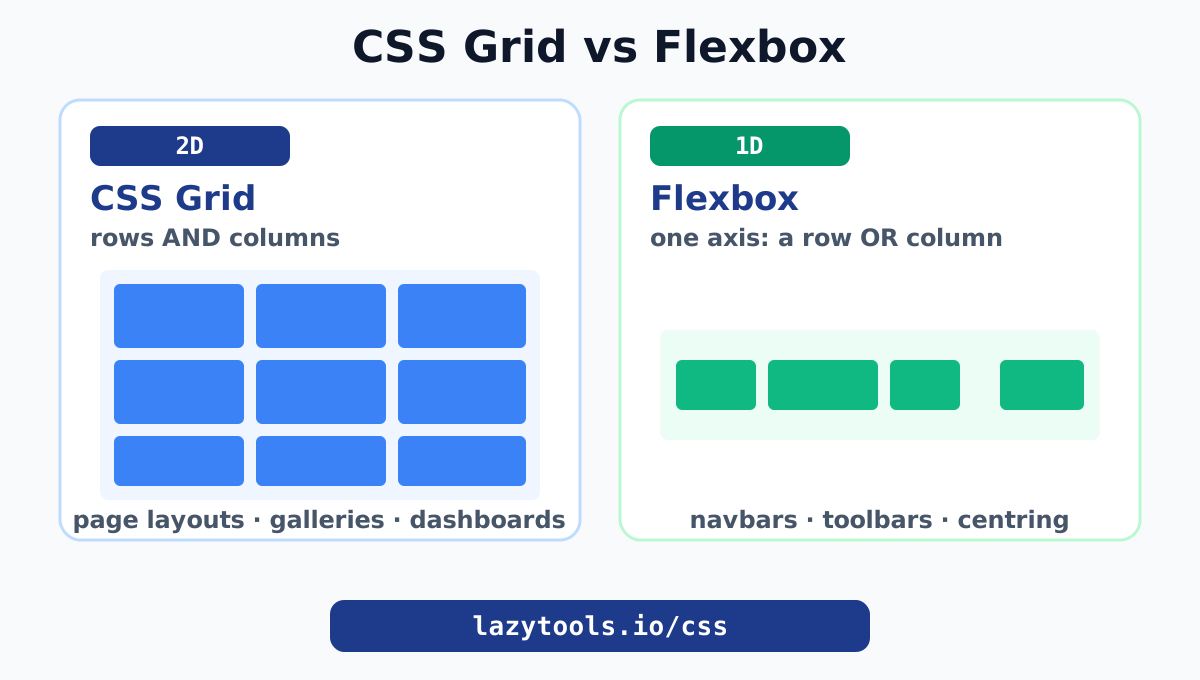
Use CSS Grid for two-dimensional layouts (rows and columns together) and Flexbox for one-dimensional layouts (a single row or a single column). That one distinction, 2D versus 1D, answers almost every “should I use Grid or Flexbox?” question. Grid lets you define a structure of rows and columns and place items into it, which is ideal for page layouts, dashboards and card grids. Flexbox distributes items and space along a single axis, which is ideal for navbars, toolbars, button rows and centring. They are not rivals; the best layouts often use Grid for the overall structure and Flexbox inside the pieces. Build either visually with the CSS Grid generator and the Flexbox generator.
The one rule that decides it
Here is the whole decision in a sentence: if you are laying out in one direction, use Flexbox; if you are laying out in two directions at once, use Grid.
- A navbar is a row of items. One direction. Flexbox.
- A page with a header, sidebar, main area and footer is rows and columns. Two directions. Grid.
- A row of cards that wraps is one direction with wrapping. Flexbox (or Grid, either works).
- An image gallery with even rows and columns is two directions. Grid.
Everything else is detail. The reason this rule works is that Grid and Flexbox were designed for different jobs, and each is genuinely better at its own job.
How they actually differ
| Flexbox | CSS Grid | |
|---|---|---|
| Dimensions | One (a row or a column) | Two (rows and columns) |
| Mental model | Distribute items along an axis | Define a grid, place items in it |
| Sizing driven by | Content (items size themselves) | The container (tracks you define) |
| Best for | Navbars, toolbars, button groups, centring | Page layouts, galleries, dashboards, card grids |
| Item placement | In source order, along the axis | Anywhere in the grid, by line or area |
| Gaps | gap supported | gap supported |
The deepest difference is content-first versus layout-first. Flexbox looks at your items and distributes them and the leftover space along one axis; the items largely size themselves. Grid works the other way around: you define the rows and columns first, then drop items into that structure. When the design starts from a structure (a 12-column layout, a 3-by-3 gallery), Grid is cleaner. When the design starts from a handful of items that should line up and share space (menu links, action buttons), Flexbox is cleaner.
When to use Flexbox
Reach for Flexbox when your layout lives on a single axis:
- Navigation bars and toolbars, a row of links or buttons, often with one pushed to the far side using
justify-content: space-betweenormargin-left: auto. - Centring, the famous
display: flex; justify-content: center; align-items: centerthat centres a child both ways. - Button groups and tag lists, items sized by their content that should sit neatly in a row and wrap when space runs out (
flex-wrap: wrap). - Media objects, an avatar next to a block of text, where one item is fixed and the other fills the rest with
flex: 1.
The giveaway is that you are thinking about items in a line. The classic confusion, that justify-content and align-items swap which direction they control when you change flex-direction, disappears the moment you watch it happen; the Flexbox generator makes it obvious by previewing the change live. MDN’s flexbox guide is the thorough reference once the mental model clicks.
When to use CSS Grid
Reach for CSS Grid when your layout is genuinely two-dimensional:
- Overall page layout, header, sidebar, content and footer placed into named rows and columns, which Grid expresses far more clearly than nested Flexbox containers.
- Image galleries and card grids, even rows and columns where items should align across both axes.
- Dashboards, widgets of different sizes placed into a grid, some spanning multiple rows or columns.
- Any design you can sketch as a grid, if you drew rows and columns on paper, Grid will match that sketch directly.
Grid’s power tools are the fr unit (which splits leftover space into fractions, so 1fr 2fr makes the second column twice as wide) and repeat(auto-fit, minmax(200px, 1fr)), which fills a row with as many columns as fit and stretches them, giving a responsive gallery without a single media query. The CSS Grid generator writes both patterns for you, and MDN’s grid layout guide covers the full syntax.
The best answer is often “both”
Grid and Flexbox are complementary, and real sites use them together constantly. The standard pattern:
- Grid for the shell. Lay out the page, the gallery or the card deck with Grid, because that structure is two-dimensional.
- Flexbox inside each piece. Within a card or a cell, use Flexbox to align the contents, a thumbnail above a title above a row of buttons pinned to the bottom.
A single card, for example, might be a Flexbox column (display: flex; flex-direction: column) so its footer sits at the bottom, while the deck of cards those live in is a Grid (repeat(auto-fit, minmax(240px, 1fr))). Neither tool is doing the other’s job; each is doing what it is best at.
A quick decision checklist
Ask these in order:
- Am I laying out in one direction or two? One, Flexbox. Two, Grid.
- Do the items size themselves, or am I defining a structure? Self-sizing items, Flexbox. A defined structure, Grid.
- Could I sketch this as rows and columns? If yes, Grid will map to the sketch cleanly.
- Am I just centring or spacing a few items? Flexbox, every time.
If you are still unsure, try it both ways with the live generators; seeing the layout respond tells you faster than any rule.
Common mistakes
- Forcing a 2D layout out of nested Flexbox. You can build a grid from rows of Flexbox containers, but alignment across rows becomes fragile. If items need to line up in both directions, use Grid.
- Using Grid for a simple row. A navbar in Grid works but is overkill; Flexbox expresses “a row of items that shares space” more naturally.
- Fighting
justify-contentafter changingflex-direction. Remember it follows the main axis, which flips between row and column. Watch it in the preview and it stops being confusing. - Ignoring
gap. Both Grid and Flexbox support thegapproperty now, so you rarely need margins between items. Usegapfor clean, consistent spacing.
Build it visually
CSS Grid and Flexbox stopped being hard the moment browsers let us see them respond. The rule to remember is simply dimensionality: Flexbox for one axis, Grid for two, and reach for both together when a two-dimensional shell holds one-dimensional contents.
Design either without writing the boilerplate: the Flexbox generator and the CSS Grid generator give you live previews and copyable code, part of the full CSS and design toolkit. For finishing touches, pair them with the box-shadow generator and the border-radius generator.
The authoritative references are MDN’s CSS grid layout and flexbox guides.
Frequently asked questions
What is the difference between CSS Grid and Flexbox?
CSS Grid is two-dimensional: it lays out content in rows and columns at the same time. Flexbox is one-dimensional: it arranges items along a single axis, either a row or a column. Use Grid for overall page and card layouts; use Flexbox for lining up items in one direction, like a navbar or a toolbar.
When should I use Flexbox instead of Grid?
Use Flexbox when you are arranging items in a single line (or a single column), especially when their sizes are driven by their content, such as a navigation bar, a row of buttons, or centring one element. Flexbox excels at distributing space along one axis.
When should I use CSS Grid instead of Flexbox?
Use Grid when you need control over both rows and columns at once, like a page layout, an image gallery, a dashboard, or a card grid. Grid lets you define the structure first and place items into it, which is cleaner for two-dimensional designs.
Can I use Grid and Flexbox together?
Yes, and you often should. A common pattern is CSS Grid for the overall page or card structure and Flexbox inside individual cells to align their contents. They are complementary, not competitors.
Is Flexbox or Grid better for responsive design?
Both are excellent. Flexbox wraps items with flex-wrap and shrinks them to fit; Grid can create responsive columns with repeat(auto-fit, minmax()) without media queries. Use whichever matches the dimensionality of the layout; many responsive designs use both.
How do I centre a div with Flexbox?
On the container, set display: flex, justify-content: center and align-items: center. That centres the child on both axes. It is the most common and reliable way to centre an element.
Do Grid and Flexbox work in all browsers?
Yes. Both are supported in every modern browser without prefixes. They are safe to use in production today.