
explainer
FLAC vs MP3 vs WAV: Three Formats, Three Ways to Store Tags
By Uttam Regmi · Published 2026-08-04 · Updated 2026-08-23 · 7 min read · Fact-checked, sources cited
FLAC, MP3 and WAV all store sound, but ask each one “what’s the title and artist?” and they answer in three completely different formats. FLAC keeps its tags as Vorbis comments, MP3 uses ID3 frames, and WAV tucks them into a RIFF chunk. Knowing which is which explains why a tag editor built for one format won’t touch another, and how to check whether that “hi-res” FLAC really lives up to the label. Here’s the rundown, with inspectors for FLAC, MP3 and WAV.
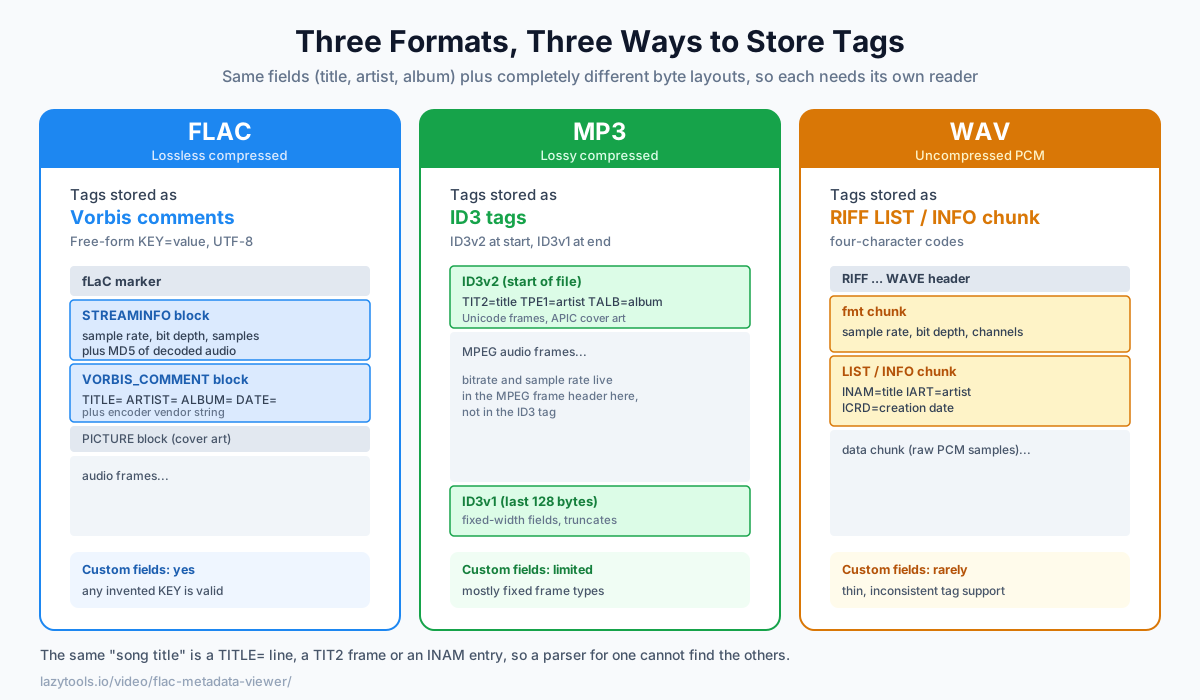
Same job, three tagging systems
The audio itself is encoded differently in each format, FLAC and WAV are lossless, MP3 is lossy, but the interesting difference here is where the metadata lives and how it is laid out on disk:
| Format | Audio | Tags stored as | Where in the file | Custom fields? |
|---|---|---|---|---|
| FLAC | Lossless compressed | Vorbis comments (KEY=value block) | Metadata block near the start | Yes, free-form keys |
| MP3 | Lossy compressed | ID3 tags (ID3v2 + ID3v1) | ID3v2 at start, ID3v1 at end | Limited, mostly fixed frames |
| WAV | Uncompressed PCM | RIFF LIST/INFO chunk | An INFO sub-chunk | Rarely, thin support |
They carry similar fields, title, artist, album, year, but the byte layouts share nothing. A TITLE=
line in a FLAC, a TIT2 frame in an MP3 and an INAM entry in a WAV all mean “song title,” yet a parser
written for one has no idea how to find the others. That is the whole reason a single “universal” tag
editor has to bundle three separate code paths under the hood.
FLAC: Vorbis comments + STREAMINFO
A FLAC file opens with a fLaC marker and a series of metadata blocks. Two matter most:
- STREAMINFO, the technical facts: sample rate, channel count, bit depth, total samples (so the exact duration), and an MD5 of the decoded audio that proves losslessness.
- VORBIS_COMMENT, the tags, as free-form
KEY=valuetext (TITLE=…,ARTIST=…), plus the encoder’s vendor string.
Because Vorbis comment keys aren’t a fixed list (unlike ID3), FLAC tagging is flexible, any field a tagger invents is valid. A typical block might read:
TITLE=Clair de Lune
ARTIST=Claude Debussy
ALBUM=Suite bergamasque
DATE=1905
REPLAYGAIN_TRACK_GAIN=-6.42 dB
Every line is plain UTF-8 text, which is why Vorbis comments handle any language and any custom field
(like the ReplayGain loudness values above) without special encoding rules. Album art, when present, lives
in a separate PICTURE metadata block rather than inside the comment text.
The “is it really hi-res?” check
FLAC is where the hi-res question comes up most, and STREAMINFO answers it. True hi-res is generally 24-bit at 88.2 kHz or higher. A file that decodes to 16-bit / 44.1 kHz is CD quality, no matter what the filename or store page claimed. Since the bit depth and sample rate are stored right in STREAMINFO, a quick look at the FLAC Metadata Viewer tells you the real resolution instead of the marketing one.
Here is how common resolutions read out, and roughly what each one means:
| STREAMINFO reports | Common name | Hi-res? |
|---|---|---|
| 16-bit / 44.1 kHz | CD quality | No |
| 16-bit / 48 kHz | DVD/streaming baseline | No |
| 24-bit / 48 kHz | Studio / broadcast | Borderline |
| 24-bit / 96 kHz | Hi-res | Yes |
| 24-bit / 192 kHz | Hi-res | Yes |
A worked example: suppose you buy an album advertised as “24-bit / 96 kHz FLAC.” You open one track in the viewer and STREAMINFO shows 16 bits per sample and a 44,100 Hz sample rate. That file was almost certainly upsampled from a CD-quality master, padding the numbers on the outside can’t recreate detail that was never captured. The stored values are the ground truth, so the check takes seconds and settles the argument. (Bear in mind that a genuine 24/96 STREAMINFO confirms the container’s resolution, not that the recording actually holds that much musical detail, but a 16/44.1 readout on a “hi-res” purchase is a clear red flag.)
MP3: ID3 tags
MP3 stores its tags with ID3, and there are two versions living in the same file:
- ID3v2 sits at the start of the file. It’s the modern, capable one, Unicode text frames with
four-character IDs (
TIT2for title,TPE1for artist,TALBfor album), embedded cover art in anAPICframe, and effectively no length limit on text. - ID3v1 is a fixed 128-byte block at the very end of the file, kept for backward compatibility. It crams title, artist, album, year and comment into fixed-width fields, which is why old players truncate long names.
Crucially, the audio specs, bitrate and sample rate, are not in the ID3 tag at all. They come from the MPEG frame header inside the audio stream itself. So if you want to know an MP3’s real bitrate, the MP3 Tag Reader reads the frame header, not just the tag someone typed in.
WAV: RIFF chunks
WAV is a RIFF container, a file split into labelled “chunks.” Two matter for our purposes:
- The
fmtchunk holds the technical facts: sample rate, bit depth, channel count and the PCM encoding. - Tags, when present, sit in a
LISTchunk of typeINFO, using four-character codes likeINAM(name/title),IART(artist) andICRD(creation date).
RIFF INFO tagging is real but thin: the standard set of fields is small, support across editors is
inconsistent, and there’s no universally agreed home for cover art. That’s the practical reason WAV files
in a big library so often show up with blank or partial metadata, the format simply wasn’t designed with
rich tagging in mind. The WAV/AIFF Inspector surfaces whatever chunks are
actually there.
FLAC vs WAV: both lossless, one smarter
Both FLAC and WAV are lossless, bit-for-bit identical to the source. The difference is that FLAC compresses (typically to about half the size) and tags richly, while WAV stores raw PCM (bigger) with weak tagging. Decompressing a FLAC gives you exactly the same samples the WAV would have held; the saving is pure packaging, not quality. For a library you want to keep and organize, FLAC is usually the better lossless choice; WAV shines in editing and production workflows where uncompressed simplicity, wide tool support and zero decode step matter more than disk space.
A rough way to decide:
- Archiving or ripping a music collection? FLAC, smaller files, real tags, and the MD5 integrity check below.
- Recording, editing, or handing audio to a DAW or video tool? WAV, universally readable and never needs decoding.
- Sharing casually where size matters most and perfect fidelity doesn’t? Neither, that’s MP3’s job.
The one guarantee only FLAC gives you
FLAC’s STREAMINFO block carries something the others don’t: an MD5 checksum of the decoded audio samples. When a decoder unpacks the file, it can hash the result and compare it against that stored value. If they match, the audio was reproduced exactly, that’s the mathematical proof behind the word “lossless.” If they don’t, the file is corrupted or was tagged as FLAC without genuinely being one. It’s a data-integrity check, not a tag, and it’s why serious archivists lean on FLAC: a viewer can flag a bad rip long before your ears would.
Inspect any of them privately
All three keep their metadata in documented headers, so you can read it without decoding the audio or uploading anything. The FLAC Metadata Viewer shows a FLAC’s sample rate, bit depth, duration, Vorbis tags and audio MD5; the MP3 Tag Reader and WAV/AIFF Inspector do the same for their formats, each parsing the file entirely in your browser, so your music never leaves your device. Whether you’re verifying a “hi-res” purchase, hunting down why a track shows the wrong artist, or auditing a whole library before importing it, reading the header directly beats trusting the filename every time.
Frequently asked questions
How do FLAC, MP3 and WAV store their tags differently?
Each format has its own tagging system. FLAC uses Vorbis comments, free-form KEY=value pairs in a metadata block. MP3 uses ID3 tags (ID3v2 at the start of the file, ID3v1 at the end) with fixed frame types. WAV, being a RIFF file, stores tags in a LIST/INFO chunk. They hold similar information (title, artist, album) but the byte formats are completely different, which is why each needs its own reader.
How can I tell if a FLAC file is really hi-res?
Read its STREAMINFO block, which stores the true sample rate and bit depth. Genuine hi-res audio is typically 24-bit at 88.2 kHz or higher; a file that's actually 16-bit / 44.1 kHz is CD quality no matter what it's labelled. A FLAC metadata viewer shows the stored values, so you can confirm the resolution rather than trusting the filename.
What are Vorbis comments?
Vorbis comments are FLAC's (and Ogg's) tagging system: simple UTF-8 KEY=value pairs like TITLE=…, ARTIST=…, ALBUM=…, DATE=…. Unlike MP3's fixed set of ID3 frames, the keys are free-form, so any tagger can add custom fields. FLAC stores them in a VORBIS_COMMENT metadata block along with the encoder's vendor string.
Is FLAC better than WAV?
For most people, yes, for storage: FLAC is losslessly compressed, so it's bit-for-bit identical to the original audio but roughly half the size of the equivalent WAV, and it supports rich tagging. WAV is uncompressed (larger) and has weaker, less standardized tagging. Both are lossless; FLAC just packs the same audio more efficiently and tags it better.
Why does FLAC store an MD5 of the audio?
FLAC's STREAMINFO block includes an MD5 checksum of the decoded (uncompressed) audio samples. A decoder can compare it after decoding to prove the audio was reproduced exactly, the guarantee that FLAC is truly lossless. It's a data-integrity check, not a tag.
Can I inspect these files without uploading them?
Yes, every one of these formats keeps its metadata in a documented header that can be read locally. The LazyTools FLAC Metadata Viewer, MP3 Tag Reader and WAV/AIFF Inspector all parse the file in your browser and never upload it, so your music stays on your device.