
explainer
How to Read an X.509 SSL Certificate: Every Field Explained (PEM, DER and ASN.1)
By Uttam Regmi · Published 2026-08-02 · Updated 2026-08-23 · 7 min read · Fact-checked, sources cited
An X.509 certificate looks like an intimidating wall of Base64, but underneath it’s just a structured record with a handful of readable fields, who it’s for, who signed it, when it expires, what key it carries and which domains it covers. Once you know the layout defined by the X.509 standard (RFC 5280), the “wall of text” becomes a short, predictable checklist. Here’s how to read every field, and how to decode one with the X.509 Certificate Decoder.
PEM, DER, ASN.1: three words for the same certificate
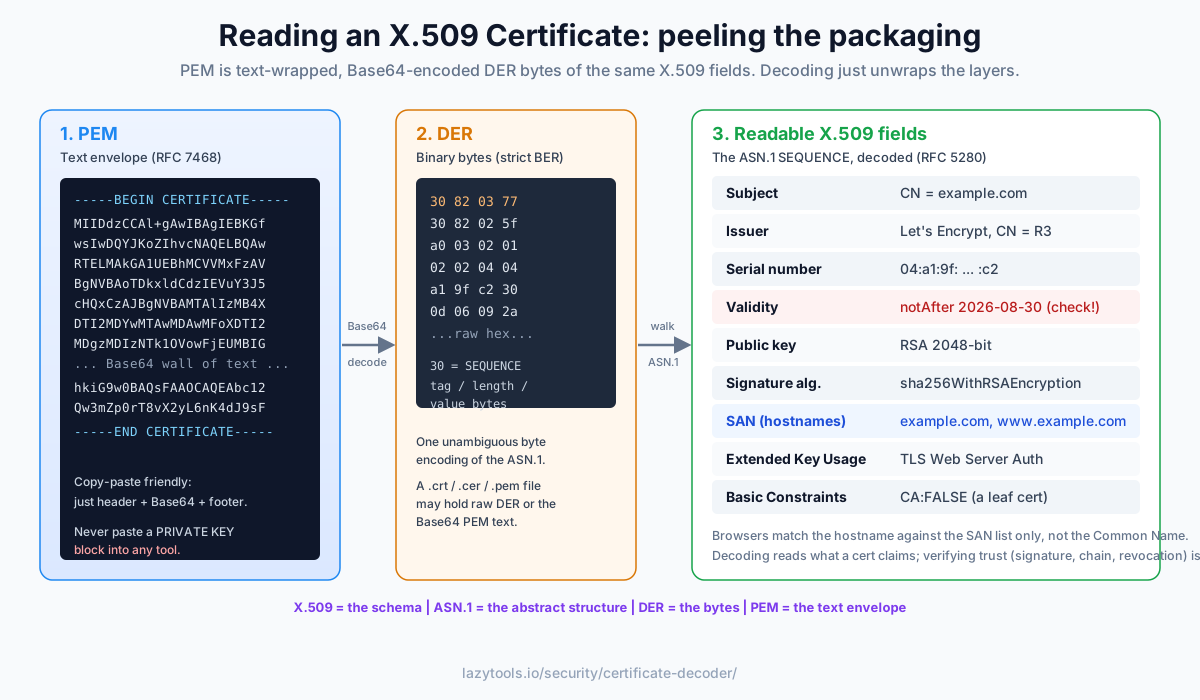
These three terms confuse everyone at first, but they’re just layers of packaging:
- X.509, the standard that says a certificate has a subject, an issuer, validity dates, a key and extensions.
- ASN.1, the abstract way those fields are described (a
SEQUENCEof values). - DER, the binary encoding of that ASN.1 structure: the actual bytes.
- PEM. Those DER bytes Base64-encoded and wrapped in
-----BEGIN CERTIFICATE-----lines so you can copy-paste them as text.
Decoding is simply unwrapping those layers: strip the PEM header, Base64-decode to DER, then walk the ASN.1 tree. That’s exactly what a decoder does for you.
A quick way to keep the four terms straight:
| Term | Layer | What it is |
|---|---|---|
| X.509 | The schema | Defines the fields a certificate must contain (RFC 5280) |
| ASN.1 | Abstract structure | A notation for describing those fields as nested SEQUENCEs |
| DER | Binary encoding | One unambiguous byte encoding of the ASN.1 (a strict subset of BER) |
| PEM | Text envelope | The DER bytes Base64-encoded and wrapped in BEGIN/END header lines (RFC 7468) |
One practical consequence: a .crt, .cer or .pem file may hold either raw DER bytes or the
Base64 PEM text. If a file opens as readable -----BEGIN CERTIFICATE----- text it’s PEM; if it looks
like binary garbage in a text editor, it’s DER. A good decoder accepts both.
The fields, one by one
Here’s what you’ll see when you decode a typical website certificate, and what each field is for:
| Field | What it tells you |
|---|---|
| Subject | Who the certificate identifies, for a site, the CN is a domain |
| Issuer | The CA that signed it (for a self-signed cert, same as Subject) |
| Serial number | A unique ID the issuer assigned to this certificate |
| Validity (notBefore / notAfter) | The UTC window during which it’s trusted |
| Public key | The algorithm (RSA / EC) and size (e.g. 2048-bit, P-256) |
| Signature algorithm | How the issuer signed it, e.g. SHA-256 with RSA |
| Subject Alternative Name | The list of hostnames (and IPs) the cert is valid for |
| Key usage / EKU | What the key may be used for (e.g. TLS server authentication) |
| Basic constraints | Whether this is a CA certificate |
Validity: the field people actually check
notBefore and notAfter bound when the certificate is valid. Most certificate “outages” are simply an
expired notAfter nobody was watching. A decoder compares those dates to now and tells you valid,
not yet valid, or expired, plus how many days remain, which is why running one on your production
certs before they lapse is worth the thirty seconds.
Validity windows have shrunk sharply over the years. Publicly trusted TLS certificates issued today are capped at a maximum of about 398 days (roughly 13 months) under the CA/Browser Forum Baseline Requirements, down from the multi-year lifetimes common a decade ago, and industry plans are moving the ceiling lower still. The practical lesson is the same either way: renewal is frequent enough that manual tracking is unreliable, automate it, and use a quick decode as a spot check.
Subject Alternative Name: why the CN no longer matters
You’ll often see the domain in the Subject’s Common Name, but browsers ignore it now. Host matching is done only against the Subject Alternative Name (SAN) extension, which lists every hostname the certificate covers:
X509v3 Subject Alternative Name:
    DNS:example.com, DNS:www.example.com
If you’re debugging a “certificate is not valid for this domain” error, the SAN list is the first thing
to check, the name you’re visiting has to be in it. Wildcards are allowed but only match one label:
DNS:*.example.com covers www.example.com and api.example.com, but not the bare example.com and
not a nested a.b.example.com. A frequent misconfiguration is a wildcard cert that forgets to also
list the apex domain.
A worked example: reading a real certificate top to bottom
Suppose you paste a site’s PEM block into a decoder and it returns something like this (trimmed):
Subject:            CN = example.com
Issuer:             C = US, O = Let's Encrypt, CN = R3
Serial number:      04:a1:9f:...:c2
Signature algorithm: sha256WithRSAEncryption
Not before:         2026-06-01 00:00:00 UTC
Not after:          2026-08-30 23:59:59 UTC
Public key:         RSA 2048-bit
X509v3 Subject Alternative Name:
    DNS:example.com, DNS:www.example.com
X509v3 Extended Key Usage:
    TLS Web Server Authentication
X509v3 Basic Constraints:
    CA:FALSE
Read it as a story. The issuer is an intermediate CA (R3) operated by a public authority, so this
is not self-signed, good sign for a public site. The validity window is about 90 days, typical of an
automated free CA. Today’s date sits inside that window, so it’s currently valid. The SAN covers both
the apex and www, so both hostnames will work. Basic Constraints says CA:FALSE, meaning this leaf
certificate cannot sign other certificates, exactly what you want on an end-entity server cert. The
Extended Key Usage restricts the key to TLS server authentication, so it can’t be repurposed for,
say, code signing. Nothing here proves the certificate is trusted, only that its self-description is
coherent and current.
Common red flags to notice in the same view:
notAfterin the past, expired; browsers will reject it outright.- Issuer identical to Subject on a public site, self-signed, so it chains to no trusted root.
- The hostname missing from the SAN, the number-one cause of “not valid for this domain”.
CA:TRUEon what should be a leaf, a sign you’re looking at an intermediate or root, not the server certificate.
Decode vs. verify, an important distinction
Reading a certificate is not the same as trusting it. A decoder shows you what the certificate claims. Verification is a separate process:
- Check the signature using the issuer’s public key (the same keyed-verification idea behind an HMAC, applied with public-key cryptography).
- Build a chain from the certificate up to a trusted root CA.
- Check revocation (CRL or OCSP) to be sure it wasn’t cancelled early.
Those steps need the issuer’s key and a network connection. A self-signed certificate, for instance, decodes perfectly but chains to nothing, readable, but not trusted. Keep the two ideas separate.
Decode a certificate privately
A public TLS certificate isn’t secret, it’s transmitted in plaintext on every connection, so decoding
one is low-risk. But never paste a private key (-----BEGIN PRIVATE KEY-----) into any online tool,
and for internal or pre-deployment certificates you may still prefer to keep everything local. The
X.509 Certificate Decoder parses the ASN.1/DER entirely in your
browser, paste the PEM block (or load a .pem/.crt file) and it never leaves your device.
Frequently asked questions
What is the difference between PEM, DER and X.509?
X.509 is the standard that defines what fields a certificate contains. DER is the binary encoding of those fields (a specific set of ASN.1 encoding rules). PEM is DER that has been Base64-encoded and wrapped in -----BEGIN CERTIFICATE----- / -----END CERTIFICATE----- lines so it can be pasted as text. So a PEM file is just a text-friendly envelope around the DER bytes of an X.509 certificate.
How do I decode a PEM certificate?
Paste the block between -----BEGIN CERTIFICATE----- and -----END CERTIFICATE----- into a decoder. It Base64-decodes the block to DER bytes, walks the ASN.1 structure, and shows the readable fields: subject, issuer, validity dates, public key and extensions like Subject Alternative Names. The LazyTools X.509 Certificate Decoder does this entirely in your browser.
What are the most important fields in a certificate?
Subject (who the certificate is for), Issuer (which CA signed it), the notBefore/notAfter validity window (when it's trusted), the public key (algorithm and size), and the Subject Alternative Name extension (the list of hostnames it's valid for). For a website certificate, the SAN list and the expiry date are usually what you're checking.
Why does the browser use the SAN and not the Common Name?
Historically the hostname went in the subject's Common Name (CN), but that was ambiguous and is now deprecated for host matching. Modern browsers only trust a certificate for a hostname if that exact name appears in the Subject Alternative Name (SAN) extension. A certificate with the right CN but a missing SAN entry will be rejected for that domain.
Does decoding a certificate verify that it's trusted?
No. Decoding shows you what a certificate says about itself. Verifying trust is separate: it means checking the issuer's signature, confirming the certificate chains to a trusted root CA, and checking it hasn't been revoked (via CRL or OCSP). Those steps need the issuer's public key and network access, decoding alone only reads the fields.
Is it safe to paste a certificate into an online decoder?
A public TLS certificate is sent in the clear during every connection, so it isn't secret, but a private key is, and you should never paste a key (the -----BEGIN PRIVATE KEY----- block) into any tool. For certificates you'd still rather keep local (internal or not-yet-deployed ones), use a decoder that runs in your browser, like this one, so nothing is uploaded.