
explainer
INI vs .env vs .properties: Three Config Formats Explained (and How to Convert Them to JSON)
By Uttam Regmi · Published 2026-08-02 · Updated 2026-08-23 · 7 min read · Fact-checked, sources cited
INI, .env and Java .properties files all do the same basic job, store key = value
configuration as plain text, but their parsing rules differ in small ways that quietly break
naïve conversions. Here’s what separates them, and how to turn any of the three into JSON with the
INI to JSON, .env to JSON and
.properties to JSON converters.
The same idea, three dialects
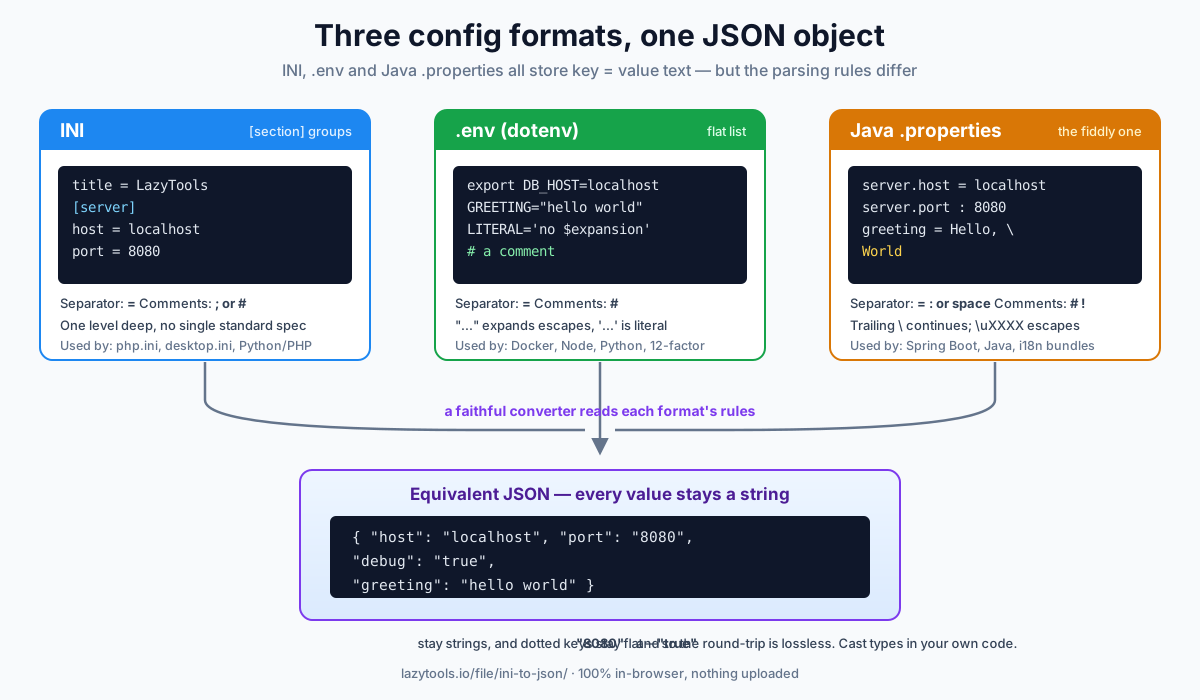
Every one of these formats is a list of names paired with values. What differs is structure (flat vs. grouped), the separator, and the escaping rules. Get those wrong and you’ll read a port number into the wrong key or lose a backslash in a Windows path.
| INI | .env (dotenv) | Java .properties | |
|---|---|---|---|
| Used by | php.ini, desktop.ini, Python/PHP apps | Docker, Node, Python, 12-factor apps | Spring Boot, Java, resource bundles |
| Structure | [section] groups | Flat | Flat |
| Separator | = | = | =, : or whitespace |
| Comments | ; or # | # | # or ! |
| Quoting | Optional "/' | "…" (escapes) / '…' (literal) | None (uses escapes) |
| Line continuation | No | No | Yes, trailing \ |
| Unicode escapes | No | \n \t in " | \uXXXX, \t, \n, … |
INI: sections make a shallow tree
INI is the format with [section] headers. Keys written before any header sit at the top level; each
[section] starts a group:
title = LazyTools
[server]
host = localhost
port = 8080
Converted to JSON, sections become nested objects:
{ "title": "LazyTools", "server": { "host": "localhost", "port": "8080" } }INI’s model is deliberately one level deep, there’s no universal syntax for nested sections. Note
port comes out as the string "8080": INI is untyped, so a faithful converter never guesses types.
The catch with INI is that it was never standardized by a single specification. Different parsers
disagree on the details: whether # starts a comment (traditional INI used ;, but many modern
parsers accept both), whether keys are case-sensitive, whether duplicate keys overwrite or accumulate,
and whether an empty value is a missing key or an empty string. Python’s configparser, PHP’s
parse_ini_file, and Windows’ own API all have subtly different behaviour. When you convert, pick a
tool that documents which rules it follows, and keep your files conservative, plain key = value
under [section] headers, so they read the same everywhere.
.env: a flat list of secrets
A .env file is what dotenv loaders (Node, Python, Docker Compose) read into environment variables, the approach popularised by the 12-factor app methodology.
It’s flat, and it has a few quirks worth knowing:
export DB_HOST=localhost
GREETING="hello world"
LITERAL='no $expansion'
# a comment- A leading
exportis ignored (it’s there so the file also works whensourced in a shell). - Double quotes allow spaces and expand
\n,\t; single quotes are taken literally. - An unquoted value’s trailing
# commentis trimmed. - Whitespace around the
=is usually trimmed, and everything after the first=is the value, soURL=https://a.example/?x=1keeps its second=intact.
One thing to watch: .env is a de-facto convention, not a formal standard, so behaviour varies between
loaders. Variable interpolation (PASSWORD=${DB_PASS}) is supported by some libraries and ignored by
others; multi-line values inside double quotes are handled inconsistently. If a value must survive
unchanged across tools, single-quote it. Because the file maps directly onto environment variables,
every value is a string by definition. There is no way to store a real number or boolean.
Security note:
.envfiles are where API keys and database passwords live. That’s exactly why the .env to JSON converter is 100% in-browser, the file is never uploaded, and why you should be wary of any config tool that isn’t.
.properties: the fiddly one
Java .properties (Spring Boot’s application.properties, i18n bundles) looks simple but has the most
rules. The separator can be =, :, or whitespace; a line ending in a backslash continues onto
the next; and \uXXXX escapes decode to Unicode:
server.host = localhost
server.port : 8080
greeting = Hello, \
           World
message = café
becomes:
{ "server.host": "localhost", "server.port": "8080",
  "greeting": "Hello, World", "message": "café" }
Two things trip people up. First, the continuation joins Hello, and World into one value.
Second, server.host stays a flat key, the dot is just part of the name. Turning it into
{ server: { host } } would be a guess that breaks the round-trip back to a .properties file, so the
converter keeps it literal. Expand dotted keys in your own code if you want a tree.
A worked example: the same config in all three
Say you need a host, a port, a feature flag and a greeting with a space in it. Here is how the same four settings look in each format, and the identical JSON they should all produce.
[app]
host = localhost
port = 8080
debug = true
greeting = hello worldHOST=localhost
PORT=8080
DEBUG=true
GREETING="hello world"host = localhost
port : 8080
debug = true
greeting = hello worldAll three describe the same intent, yet the details diverge: the .env greeting needs quotes to keep
its space, the .properties port uses a : separator, and the INI version wraps everything in an
[app] section that becomes a nested object. A faithful conversion of the flat files gives:
{ "host": "localhost", "port": "8080", "debug": "true", "greeting": "hello world" }Notice "port" and "debug" are still strings. That is correct and intentional, casting "true" to a
boolean or "8080" to a number is your application’s job, because only your code knows which keys are
meant to be typed.
Common conversion pitfalls
Most broken conversions come from a handful of edge cases. This quick reference maps the trap to what a correct converter does:
| Pitfall | What goes wrong | Correct behaviour |
|---|---|---|
| Windows paths | C:\Users loses the \ if backslash is treated as an escape | INI/.env keep \ literal outside quotes; .properties needs \\ |
Values with = | A URL or base64 string gets truncated at the second = | Split only on the first separator |
| Trailing whitespace | Invisible spaces get baked into the value | Trim surrounding whitespace unless quoted |
| Numbers and booleans | port becomes a number, breaking the round-trip | Keep every value as a string |
| Dotted keys | server.port silently becomes a nested object | Keep the flat key literal |
| Duplicate keys | Later value silently overwrites the earlier one | Follow the format’s rule (usually last-wins) and be consistent |
If you hit one of these, it is almost always a sign the parser is applying another format’s rules, for
example, treating a .properties backslash escape as if it were an INI literal.
Why convert to JSON at all?
JSON is the lingua franca of tooling: once your INI, .env or .properties is a JSON object you can
diff two environments, feed a script that expects JSON, validate against a schema, or just read it more
easily. Each LazyTools converter has a matching reverse tool
(JSON to INI, JSON to .env,
JSON to .properties) so you can round-trip in either direction.
All six run entirely in your browser, nothing is uploaded, and they work offline, which matters because config files so often carry the keys to everything else.
Frequently asked questions
What's the difference between INI, .env and .properties files?
All three store key=value configuration as plain text, but they differ in structure and rules. INI groups keys under [section] headers. A .env (dotenv) file is a flat list of KEY=value environment variables, often with an 'export' prefix and quoted values. Java .properties is also flat but allows ':' or whitespace as the separator, line continuations with a trailing backslash, and \uXXXX Unicode escapes. Those differences matter when you parse them.
How do I convert an INI or .env file to JSON?
Paste the file into the matching converter (INI to JSON, .env to JSON, or .properties to JSON). Each reads the format's specific rules, sections, quotes, comments, escapes, and outputs an equivalent JSON object you can copy or download. Because it's all client-side, the file never leaves your browser.
Why is a .env value like DEBUG=true a string, not a boolean, in the JSON?
Because environment variables and INI/properties values are untyped text on disk, there's no boolean or number type in the format. Faithful converters keep every value as a string ("true", "8080") so the conversion is lossless and reversible. Cast to a real boolean or number in your own code after loading.
Do dotted keys like server.port become nested objects?
Not automatically. In .properties and INI, a dot is just a character in the key name, with no standardized meaning of nesting. Keeping 'server.port' as a single flat key is unambiguous and lets you convert back to an identical file. If you want a nested tree, expand the dotted keys in your application code.
Are .env and config files safe to paste into an online converter?
Only if the tool is genuinely client-side. Config files, especially .env, routinely hold secrets like API keys and database passwords. The LazyTools converters run entirely in your browser and never upload the file, but you should still avoid pasting production secrets into any tool where you can't verify that, and treat the output as equally sensitive.
Which config format should I use?
Use whatever your framework expects: .env for Docker, Node, Python and 12-factor apps; .properties for Java and Spring Boot; INI for PHP, many Python apps and desktop tools. They're roughly equivalent in power for flat configuration, the choice is mostly ecosystem convention, not capability.