
explainer
JSON vs YAML vs XML: Which Data Format for Which Job
By Uttam Regmi · Published 2026-07-05 · Updated 2026-08-23 · 5 min read · Fact-checked, sources cited
The rule of thumb is one sentence: APIs speak JSON, humans edit YAML, legacy systems demand XML. All three encode the same tree-shaped data, the differences are syntax, features and ecosystem. The format converters move between all of them locally; here’s how to choose, and what to watch when converting.
The same data, three ways
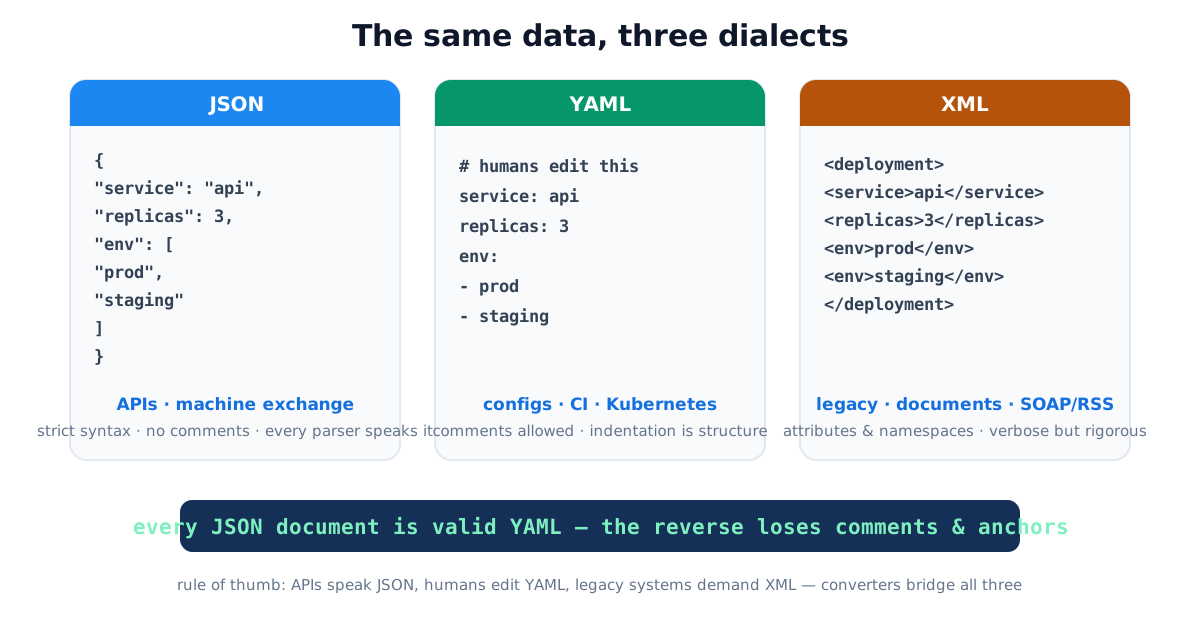
The formats’ own specifications live at json.org, yaml.org and the W3C XML recommendation:
| JSON | YAML | XML | |
|---|---|---|---|
| Born | 2001 (Crockford) | 2001 | 1998 (W3C) |
| Comments | ✗ | ✓ | ✓ |
| Attributes | ✗ | ✗ | ✓ |
| Structure via | braces/brackets | indentation | tags |
| Typical home | APIs, storage | CI, Kubernetes, compose | SOAP, RSS, Office files |
| Failure mode | trailing commas | invisible indentation bugs | verbosity |
The same data, spelled out
To make the differences concrete, here is one small record, a server entry with a name, a port and a flag, written in each format. Reading them side by side is the fastest way to internalize what each syntax costs and buys.
JSON is punctuation-driven:
{
  "server": {
    "name": "web-01",
    "port": 8080,
    "enabled": true
  }
}
YAML drops the braces and quotes, and adds a comment machines never see:
server:
  name: web-01
  port: 8080      # HTTP listener
  enabled: true
XML wraps every value in a named tag (or, equivalently, hangs it off an attribute):
<config>
  <server name="web-01">
    <port>8080</port>
    <enabled>true</enabled>
  </server>
</config>
Same three values, three philosophies: JSON optimizes for a parser, YAML for the person editing at 2 a.m., XML for a document that must validate against a schema years later.
How a value maps across the three
The subtle part of any conversion is how a single scalar is typed. JSON’s type is fixed by its punctuation; YAML infers a type from the bare text; XML treats everything as a string until a schema says otherwise. That mismatch is where round-trips quietly change meaning.
| Source text | JSON reads it as | YAML reads it as | XML reads it as |
|---|---|---|---|
8080 | number | number | text "8080" |
true | boolean | boolean | text "true" |
"8080" | string | string | text "8080" |
no | (must be quoted) | boolean false (1.1) | text "no" |
null / empty | null | null | empty element |
1.20 | number 1.2 | number 1.2 (trailing zero lost) | text "1.20" preserved |
The practical takeaway: if a value must survive verbatim, a zip code with a leading zero, a version string, a country code, quote it in JSON and YAML, or you may get back a number that dropped the zero. XML preserves the text but loses the type, which is the opposite failure.
When JSON wins
Anything a machine consumes: API payloads, data storage, inter-service messages. Its strictness is
the feature, one canonical syntax, native parsers in every language, no ambiguity about what no
means. Its weaknesses are human ones: no comments, unforgiving punctuation. (When JSON misbehaves, the
formatter/validator pinpoints the line and column, trailing commas and
single quotes account for most failures.)
When YAML wins
Anything a human edits repeatedly: CI pipelines, Kubernetes manifests, docker-compose. Comments
document intent next to the config, and indentation reads cleanly, which is exactly why the
cloud-native ecosystem standardized on it. The costs are real too: whitespace is structure (one
mis-indented line changes meaning silently), tabs are forbidden, and YAML 1.1’s clever scalars bite, the famous Norway problem, where an unquoted NO in a country list parses as false. Quote
anything that must stay a string.
Converting: JSON → YAML is always lossless (YAML is a superset); YAML → JSON resolves anchors and drops comments, the two things JSON can’t represent.
When XML wins (still)
XML is where the documents are: RSS/Atom feeds, SOAP enterprise services, SVG, Office formats (a .docx is zipped XML), banking and healthcare interchange standards. It has machinery JSON never aimed at, attributes, namespaces, schema validation (XSD), which suits document problems more than data problems.
Converting is convention-bound because JSON lacks two XML concepts. In
XML → JSON: attributes become @-prefixed keys and repeated sibling elements
become arrays, with the classic gotcha that one <item> maps to an object but two map to an
array, so feed-consuming code must handle both shapes. In JSON → XML,
everything becomes elements (JSON has no attributes to translate), with your choice of root element.
Choosing in practice: four quick scenarios
- Building an API → JSON, no debate, it’s what clients expect and parse natively.
- A config teammates will edit monthly → YAML with comments explaining each knob.
- Feeding a legacy SOAP endpoint or RSS reader → XML, converted from your JSON source at the edge.
- A README table or docs page → neither; that’s Markdown territory, one converter over.
The pattern behind all four: store data in one source format, convert at the boundaries rather than hand-maintaining parallel copies that drift.
Common conversion mistakes
- Editing YAML with tabs, forbidden by spec; the parser error names the line. Spaces only.
- Unquoted no/yes/on/off in YAML, booleans by 1.1 rules. Quote country codes and literal strings.
- Assuming XML→JSON has one true mapping. It has conventions; know yours (@attributes, arrays).
- Expecting comments to round-trip. They don’t; JSON has nowhere to put them.
- Hand-writing the second format, parallel JSON and YAML copies of one config will diverge; generate one from the other.
Quick summary
JSON for machines, YAML for humans, XML for legacy and documents, one tree-shaped data model in three syntaxes. JSON→YAML converts losslessly; the reverse drops comments; XML crossings follow the @-attribute and repeated-element conventions. All six directions run in the file converters, locally, with file open and download, configs and payloads never leave your machine.
Related: JSON formatter for validation · CSV ↔ JSON for tabular data · naming cases for the keys inside these files.
Frequently asked questions
When should I use JSON vs YAML?
JSON for machine-to-machine exchange (APIs, storage), strict, fast, universally parsed. YAML for files humans edit (CI pipelines, Kubernetes, docker-compose), comments and clean indentation earn their keep there, and nowhere else.
Is YAML a superset of JSON?
Effectively yes, every JSON document parses as valid YAML, which is why JSON→YAML conversion is lossless. The reverse can drop YAML-only features: comments, anchors/aliases, and custom tags.
What is the YAML Norway problem?
Under YAML 1.1 conventions, unquoted yes/no/on/off parse as booleans, so a country-code list containing NO becomes false. Quote such values ("NO") in the source; converters faithfully reflect what the spec says the document means.
Why does XML still exist?
Billions of documents and thousands of enterprise systems: SOAP services, RSS/Atom feeds, Office and SVG file formats, banking and healthcare standards. XML's schemas, namespaces and attributes solve document problems JSON never aimed at.
Why does XML→JSON conversion have 'conventions'?
JSON has no attributes and no repeated keys, so mappings must choose: attributes become @-prefixed keys, and repeated sibling elements become arrays. That's the widely used convention our converter follows, but a single item converts to an object while two convert to an array, so consuming code should handle both.
Do comments survive conversion?
No, neither JSON nor the converted output has anywhere to put YAML/XML comments, making them the one reliably lossy element. Keep a commented master copy if comments carry meaning.