
explainer
Meta Tags for SEO: Title, Description, Open Graph & Twitter Cards
By Uttam Regmi · Published 2026-11-13 · Updated 2026-11-13 · 5 min read · Fact-checked, sources cited
The meta tags that matter are the title and meta description (how your page looks in Google) and the Open Graph and Twitter Card tags (how it looks when shared). The title tag is your result’s clickable headline, the meta description is the snippet beneath it, and the Open Graph tags (og:title, og:description, og:image, og:url) are what Facebook, LinkedIn, WhatsApp, Slack, Discord and most platforms use to build a rich preview card. Get these right and your links earn more clicks from search and look professional when shared. Build the full set with a live preview using the Meta Tag Generator.
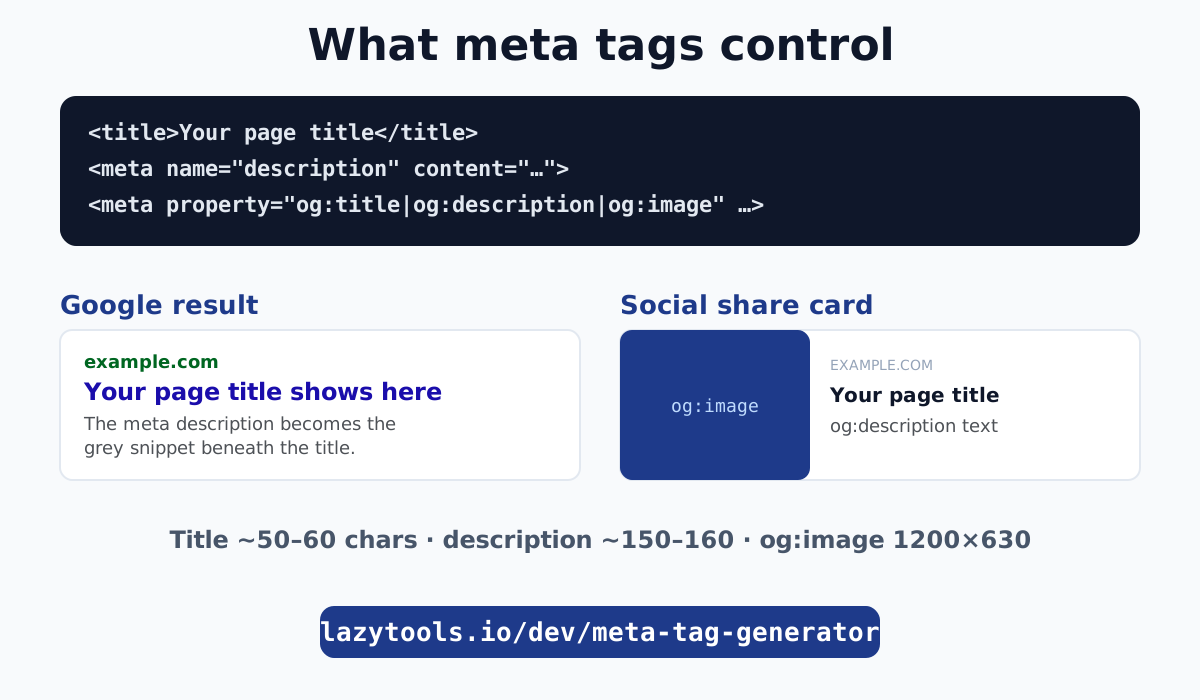
What meta tags actually do
Meta tags live in the <head> of your HTML, invisible on the page itself, and act as instructions for the machines that read your page: search engines and the “unfurlers” that build a preview when someone pastes your link into a chat or post. There are two jobs they do.
For search, the <title> and <meta name="description"> shape your Google result: the title becomes the blue clickable headline, the description becomes the grey snippet under it. Google does not always use your description verbatim, but a good one strongly influences the snippet and your click-through rate.
For sharing, the Open Graph and Twitter tags decide what the preview card looks like: the big image, the bold title, the line of description. Without them, a shared link is a bare, unappealing URL; with them, it is a rich card that gets clicks.
The core SEO tags: title and description
These two are the workhorses.
<title>Meta Tags for SEO: The Complete Guide | Example</title>
<meta name="description" content="What the title, description, Open Graph and Twitter tags do, and the ideal lengths to avoid truncation.">
<link rel="canonical" href="https://example.com/meta-tags/">- Title tag. Keep it around 50 to 60 characters. Beyond that Google truncates it with an ellipsis. Put the important, descriptive words first, and keep it unique per page.
- Meta description. Aim for 150 to 160 characters. It has no direct ranking effect, but a clear, compelling description improves click-through, which matters. Write it like ad copy: say what the page offers.
- Canonical link. Not strictly a meta tag, but it belongs here: it tells Google the preferred URL for the page, consolidating ranking signals and avoiding duplicate-content confusion.
| Tag | Ideal length | Job |
|---|---|---|
<title> | 50–60 chars | Google headline + browser tab |
meta description | 150–160 chars | Google snippet (influences CTR) |
link rel="canonical" | a full URL | the page’s preferred address |
Open Graph: the share card for (almost) everything
The Open Graph protocol, created at Facebook and now used across the web, is how platforms build a rich preview. The essential four:
<meta property="og:title" content="Meta Tags for SEO: The Complete Guide">
<meta property="og:description" content="Title, description, Open Graph and Twitter cards explained.">
<meta property="og:image" content="https://example.com/og-image.png">
<meta property="og:url" content="https://example.com/meta-tags/">
<meta property="og:type" content="website">
<meta property="og:site_name" content="Example">
The single most impactful one is og:image. Use 1200×630 pixels for the large card that dominates a feed; keep key content away from the edges because platforms crop a little. An image under roughly 600×315 may be shown as a small thumbnail instead of a big card.
The beauty of Open Graph is reach: Facebook, LinkedIn, WhatsApp, Slack, Discord, Telegram, Pinterest and many more read these same tags, so one correct set covers most of the internet.
Twitter (X) Card tags
X reads Open Graph as a fallback, but its own tags let you control the card type precisely:
<meta name="twitter:card" content="summary_large_image">
<meta name="twitter:title" content="Meta Tags for SEO: The Complete Guide">
<meta name="twitter:description" content="Title, description, Open Graph and Twitter cards explained.">
<meta name="twitter:image" content="https://example.com/og-image.png">
<meta name="twitter:site" content="@example">
twitter:card is the key one: summary_large_image gives the big-image card, while summary gives a small-thumbnail card. If you omit the other Twitter tags, X simply uses your Open Graph values, so in practice you often need only twitter:card plus your Open Graph set.
What you can skip
- Meta keywords. The
<meta name="keywords">tag has been ignored by Google for well over a decade and carries no ranking weight. Leave it out. - Author, revisit-after, and most legacy meta tags. They do nothing for ranking. Do not clutter your head with them.
- Per-platform duplication beyond Twitter. Because Open Graph is near-universal, you rarely need bespoke tags for LinkedIn, Facebook and the rest; the
og:set covers them.
Common mistakes
- Titles and descriptions too long, so Google cuts them off mid-sentence. Respect the 60 and 160 character guides.
- Missing or wrong-sized og:image, giving an ugly, imageless or thumbnail card. Use a 1200×630 image and check the preview.
- Relative image URLs.
og:imagemust be an absolute URL (starting with https://), because the platform fetching it is not on your domain. - Unescaped characters. Quotes and angle brackets in your title or description can break the markup. A generator escapes these automatically; by hand, encode
&,<,>and". - Duplicate titles across pages. Every page should have a unique, descriptive title; duplicates confuse search engines and users.
Generate them with a live preview
Meta tags are small but high-leverage: a handful of lines in your <head> decide how every link to your page looks in Google and across social. Nail the title and description lengths, add a complete Open Graph set with a proper 1200×630 image, and set twitter:card, and you have covered search and sharing.
The fastest way to get them right is to see them render as you type. The Meta Tag Generator shows a live Google result preview and a social-card preview, escapes your text safely, and outputs copy-ready HTML, all in your browser. Pair it with the UTM builder for campaign links and the rest of the developer tools.
The standards are the Open Graph protocol and MDN’s documentation on the HTML meta element.
Frequently asked questions
What are the most important meta tags for SEO?
The title tag and meta description, which control your Google result's headline and snippet, plus the canonical link. For sharing, the Open Graph tags (og:title, og:description, og:image, og:url) control how your link looks on social platforms. Twitter Card tags refine the preview on X. Together these cover how your page appears in search and when shared.
How long should a title tag and meta description be?
Keep the title around 50 to 60 characters and the meta description around 150 to 160, so Google does not truncate them with an ellipsis. Front-load the important words. Titles and descriptions longer than that still work but may be cut off in the results.
What is the difference between Open Graph and Twitter Card tags?
Open Graph (og:) tags are the shared standard used by Facebook, LinkedIn, WhatsApp, Discord, Slack and most platforms. Twitter (X) has its own twitter: tags but falls back to Open Graph when they are missing. In practice you set Open Graph for everything and add a couple of Twitter tags to control the card type.
What size should the og:image be?
Use 1200×630 pixels for the large summary_large_image card that shows a big preview. Keep important content away from the edges, since platforms may crop slightly. Under about 600×315 the image may show as a small thumbnail instead of a large card.
Do meta keywords still matter for SEO?
No. The meta keywords tag has been ignored by Google for many years and has no ranking effect. Focus on the title, description, quality content and Open Graph tags instead; the keywords tag is a historical artefact.
Where do meta tags go?
Inside the <head> element of your HTML, before the closing </head>. They are not visible on the page itself; they are instructions for search engines and social platforms that read the head when they crawl or when someone shares the link.
Can I just use one set of tags for all platforms?
Mostly, yes. Open Graph tags are read by almost every platform, so a complete Open Graph set plus a title and description covers the vast majority of cases. Add twitter:card (and optionally twitter:site) to control how X renders the preview.