
explainer
Inside a PNG File: Chunks, CRCs and Hidden Metadata
By Uttam Regmi · Published 2026-08-04 · Updated 2026-08-23 · 7 min read · Fact-checked, sources cited
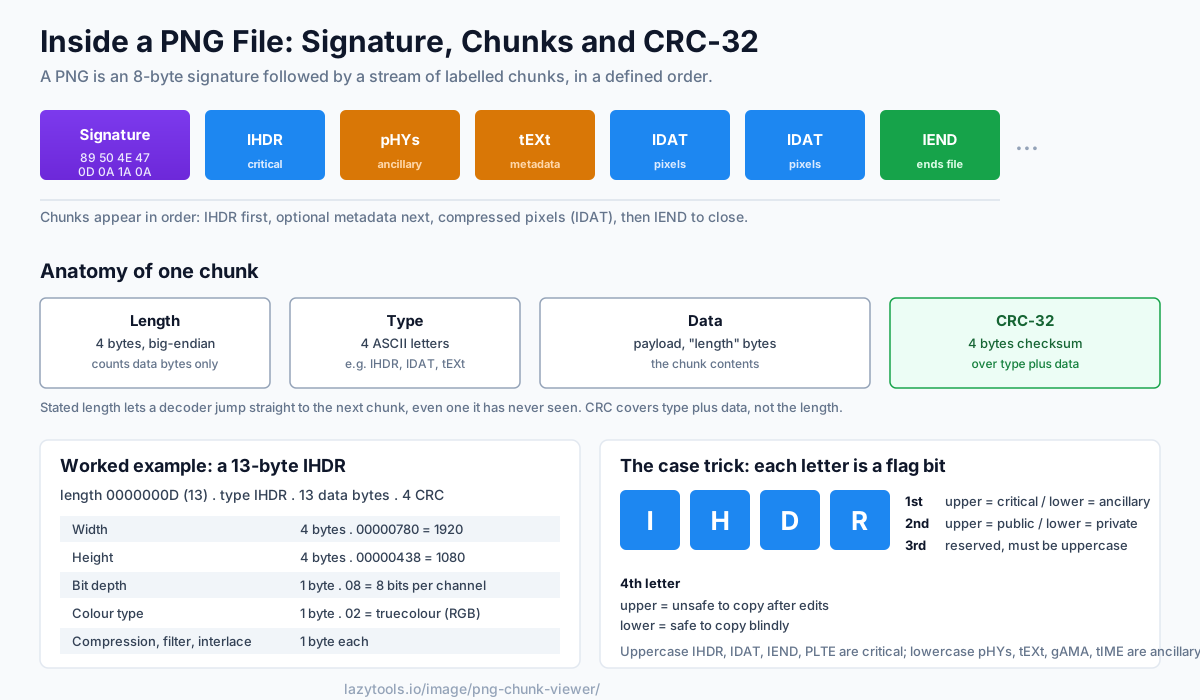
A PNG looks like a single image, but open it up and it’s a tidy stream of labelled blocks called chunks, each one carrying its own CRC-32 checksum so corruption gets caught. The file is an 8-byte signature followed by chunks that appear in a defined order: IHDR first, then optional metadata, then the compressed pixel data (IDAT), then IEND to close. Understanding that structure tells you where an image’s dimensions, DPI and hidden metadata live, and how PNG guarantees integrity. Here’s the anatomy, plus the PNG Chunk Viewer to look inside any file.
Signature, then chunks
Every PNG starts with the same 8-byte signature (89 50 4E 47 0D 0A 1A 0A), fixed by the PNG specification, the PNG in there is
visible in the middle three bytes, and the surrounding bytes are chosen deliberately: the leading 0x89
has the high bit set to catch systems that strip it, the 0D 0A / 0D 0A 1A 0A sequence catches the
classic corruption where a file transfer converts line endings, and the 1A byte stops output early on
some old terminals. If any of those bytes are wrong, a decoder knows immediately the file was mangled in
transit and never even reaches the first chunk.
After the signature comes a sequence of chunks, each with the same four parts:
[ length (4 bytes) ][ type (4 letters) ][ data (length bytes) ][ CRC-32 (4 bytes) ]The length is a big-endian count of data bytes only. It does not include the type or the CRC. The
type is a four-letter ASCII code (IHDR, IDAT, tEXt…), the data is the payload, and the
CRC-32 is a checksum of the type + data. Because the length is stated up front, a decoder always knows
exactly how far to jump to reach the next chunk, even for a chunk type it has never heard of. That single
design choice is why PNG has stayed extensible for decades: new chunk types can be added and old software
simply steps over them.
A worked walk-through
Say the viewer reads a chunk whose length field is 0000000D (13 in decimal) and whose type is IHDR.
It now knows to read 13 bytes of data, then 4 bytes of CRC, 21 bytes total for this chunk after the
length field. Those 13 IHDR bytes decode as: 4 bytes width, 4 bytes height, then one byte each for bit
depth, colour type, compression method, filter method and interlace method. A 1920×1080 truecolour PNG
would show width 00000780, height 00000438, bit depth 08, colour type 02. The decoder then adds
the CRC and lands precisely on the start of the next chunk.
The chunks you’ll meet
| Chunk | Critical? | Role |
|---|---|---|
| IHDR | Critical | Image header, width, height, bit depth, colour type (must come first) |
| PLTE | Critical | Palette, required for indexed-colour images |
| IDAT | Critical | The compressed pixel data (often split across several IDAT chunks) |
| IEND | Critical | Empty marker that ends the file (its data length is always 0) |
| pHYs | Ancillary | Physical resolution. This is where DPI lives |
| tEXt / zTXt / iTXt | Ancillary | Text metadata (Software, Author, Comment…) |
| gAMA / sRGB / iCCP | Ancillary | Gamma, colour intent, embedded ICC colour profile |
| tRNS | Ancillary | Transparency for palette or non-alpha images |
| tIME | Ancillary | Last-modification timestamp |
IHDR is the key one: it declares the width, height, bit depth (bits per channel) and colour type, grayscale, truecolour (RGB), indexed, or a variant with an alpha channel (grayscale+alpha or RGBA). Everything else is read relative to it, so a corrupt IHDR effectively destroys the whole file.
IDAT carries the actual picture. The raw pixel rows are pre-processed by a per-row filter (to help compression) and then compressed with DEFLATE, the same algorithm behind zlib and ZIP. The compressed stream can be split across multiple consecutive IDAT chunks; a decoder concatenates them before decompressing. That is why a large photo-style PNG often shows a long run of IDAT chunks in a viewer.
Critical vs ancillary: the case trick
PNG encodes something clever in each chunk’s name: the case of each letter carries a flag. The most important is the first letter.
- Uppercase first letter → critical (IHDR, IDAT, IEND, PLTE), needed to render the image.
- Lowercase first letter → ancillary (pHYs, tEXt, gAMA, tIME), optional; a decoder can skip it.
But the trick goes further, all four letters use case as a property bit:
| Letter position | Uppercase means | Lowercase means |
|---|---|---|
| 1st | Critical | Ancillary |
| 2nd | Public (registered type) | Private (application-specific) |
| 3rd | Reserved, must be uppercase | (must not be used yet) |
| 4th | Unsafe to copy | Safe to copy blindly |
The fourth-letter “safe to copy” bit matters for editors: if a program modifies the pixels, a chunk
marked safe-to-copy (lowercase fourth letter) may still be carried into the output, while an unsafe one
should be dropped because it might no longer be valid. So a viewer that doesn’t understand tEXt can
safely ignore it, but it must handle IHDR, and all of that is readable straight from the four-letter
code without a lookup table.
The CRC: integrity on every chunk
Each chunk ends with a CRC-32 computed over its type and data (the length field is not included). The polynomial is the standard ISO/IEEE CRC-32, the same one used by zlib and ZIP. When a decoder reads the chunk, it recomputes the CRC and compares it to the stored value. If they differ, the chunk was corrupted or tampered with, and the file can be rejected. It means a PNG isn’t just checked once, every chunk is independently verified, which is why a partially-downloaded or bit-flipped PNG fails loudly instead of showing garbage. A single flipped bit anywhere in a chunk’s type or data will, with overwhelming probability, produce a different CRC and be caught.
This is also a handy forensic signal: if you edit a PNG’s metadata by hand in a hex editor and forget to recompute the CRC, a strict decoder will reject the file. A viewer that verifies CRCs will show you exactly which chunk no longer matches.
Hidden metadata: what a PNG can reveal
The tEXt, zTXt and iTXt chunks store keyword/value text, and image editors love to write into
them. The three differ only in encoding: tEXt is uncompressed Latin-1, zTXt is the same but DEFLATE-
compressed for long values, and iTXt uses UTF-8 (so it can hold non-Latin scripts) and may optionally
be compressed. Common keywords include Software, Author, Description, Copyright, Creation Time
and Comment.
A PNG exported from a photo editor often carries a Software tag naming the exact application and
version, and may include an author, description or comment. Screenshots and AI-generated images can carry
tool names or generation parameters here too. If you care about what a shared image discloses, those
chunks are worth a look, and stripping them before publishing is worth considering, much like the
camera details a photo can carry in its EXIF metadata. Note that physical
resolution (DPI) is stored separately in the pHYs chunk as pixels-per-metre, so a “300 DPI” export
actually stores roughly 11811 pixels per metre.
Look inside any PNG
The chunk layout is simple and public, so you can inspect it without installing anything. The PNG Chunk Viewer walks the file in your browser: it lists every chunk with its size, decodes IHDR (dimensions, bit depth, colour type), pHYs (DPI), and the text metadata, marks critical vs ancillary chunks, and verifies each chunk’s CRC-32 to flag corruption, all locally, with the image never leaving your device. It’s the fastest way to answer “what created this PNG?”, “why won’t this file open?”, or “what resolution does it really claim?” without a hex editor.
Frequently asked questions
What are PNG chunks?
A PNG file is built from chunks, self-contained blocks that each have a 4-byte length, a 4-letter type (like IHDR or tEXt), the chunk's data, and a 4-byte CRC-32 checksum. The chunks appear in sequence after an 8-byte signature. Some chunks are required to display the image; others are optional metadata. This modular design lets software skip chunks it doesn't understand.
What is the CRC in a PNG chunk for?
Every chunk ends with a CRC-32 computed over its type and data. When a decoder reads the chunk it recomputes the CRC and compares it to the stored value; a mismatch means the bytes were corrupted or altered, and the decoder can reject the file. It's a built-in integrity check on every part of the image.
What is the IHDR chunk?
IHDR is the image header, the first chunk after the signature, and it holds the essential properties: width, height, bit depth (bits per channel), color type (grayscale, truecolor/RGB, indexed palette, or with alpha), and the compression, filter and interlace methods. Everything else in the file is interpreted relative to IHDR.
Where is metadata stored in a PNG?
In tEXt, zTXt and iTXt chunks. tEXt holds plain Latin-1 keyword/value pairs (like Software, Author, Description); zTXt is the same but compressed; iTXt is UTF-8 and can be compressed. Editing software often writes its name here, so a PNG can quietly reveal what created it. Physical resolution (DPI) lives in a separate pHYs chunk.
What's the difference between critical and ancillary chunks?
The case of the first letter of a chunk's type tells you. An uppercase first letter (IHDR, IDAT, IEND, PLTE) marks a critical chunk needed to render the image; a lowercase first letter (pHYs, tEXt, gAMA, tIME) marks an ancillary chunk carrying optional information a decoder can ignore. It's a clever convention encoded right in the name.
How can I see what's inside a PNG without special software?
Because the chunk structure is simple and public, a tool can walk it in the browser. The LazyTools PNG Chunk Viewer lists every chunk, decodes the common ones, shows embedded text metadata, and verifies each chunk's CRC, all locally, so the image is never uploaded.