
explainer
Lap vs Split Times: How to Use a Stopwatch Properly
By Uttam Regmi · Published 2026-11-13 · Updated 2026-11-13 · 5 min read · Fact-checked, sources cited
A stopwatch counts time up from zero; a lap records how long one segment took; a split records the total time elapsed so far. Press Lap during a run and the clock keeps going, logging that moment. In the common convention, the lap time is the segment on its own (the time since your last press) and the split time is the cumulative total from the start, so lap times compare each effort while split times track overall progress. Good stopwatches show both. Time anything with laps and splits using the Online Stopwatch, precise to the centisecond and working offline.
Stopwatch vs timer
They are opposites, and mixing them up is the most common confusion:
- A stopwatch counts up from zero. You start it, the activity happens, you stop it, and it tells you how long that took. It is open-ended.
- A countdown timer counts down from a set time to zero and alerts you at the end. It is bounded.
Use a stopwatch to measure something whose length you do not know in advance (how long a task took, a workout, a lap). Use a timer to limit something to a fixed length (a 25-minute focus block, a 3-minute egg). If you want the countdown instead, LazyTools has a countdown timer and a Pomodoro timer.
Lap vs split: the real difference
This is the part worth getting right, because the two words are often used loosely. On most stopwatches the convention is:
- Lap time = the duration of a single segment, the time since you last pressed the button.
- Split time = the cumulative elapsed time from the start to the moment you pressed.
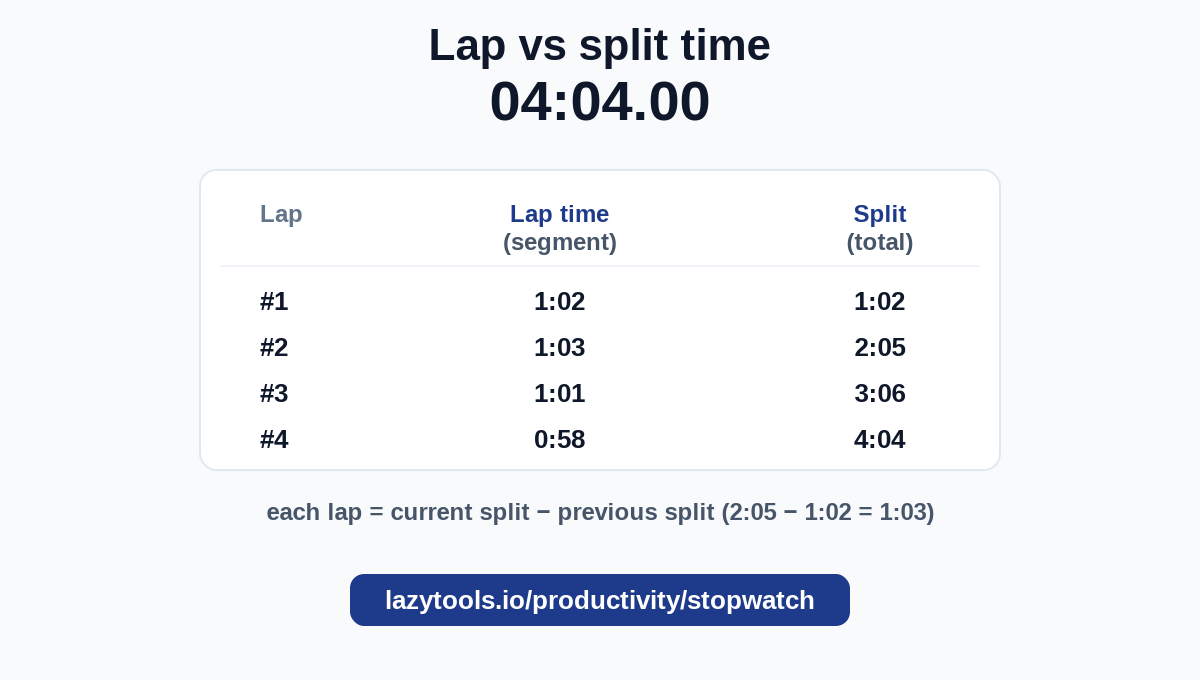
An example makes it clear. Say you run four laps of a track and press Lap at the end of each:
| Lap | Lap time (segment) | Split time (total) |
|---|---|---|
| 1 | 1:02 | 1:02 |
| 2 | 1:03 | 2:05 |
| 3 | 1:01 | 3:06 |
| 4 | 0:58 | 4:04 |
The lap column shows how fast each individual lap was, so you can see you sped up at the end (0:58 was your quickest). The split column shows your running total, so after three laps you were at 3:06. Notice the relationship: each lap time is the current split minus the previous split (2:05 − 1:02 = 1:03). A good stopwatch shows both columns so you never have to do that subtraction yourself, which is exactly what the Online Stopwatch does.
When to use lap times vs split times
- Lap times answer “how was each effort?” Use them to compare repetitions: laps of a pool, intervals in a workout, iterations of a task. They reveal whether you are consistent, speeding up or fading.
- Split times answer “how am I doing overall?” Use them to track progress against a target: are you on pace to finish in time? Runners famously chase an even split (second half as fast as the first) or a negative split (faster second half).
Most training uses both at once: lap times to judge each piece, split times to judge the whole.
How to record laps without stopping
The key skill is pressing Lap while the clock keeps running. The stopwatch logs that instant and immediately continues, so you time a sequence of efforts in one continuous session without ever stopping and restarting. Start/Stop is for pausing the whole thing (and you can resume, the elapsed time accumulates); Lap is for marking points along the way; Reset clears everything back to zero.
Why timing precision matters
A stopwatch is only useful if it is accurate. A well-built browser stopwatch is precise to the centisecond (hundredths of a second) and, crucially, measures elapsed time from the real start using the browser’s high-resolution clock, rather than counting ticks that could be delayed. That distinction matters: if a stopwatch simply added up timer ticks, a brief moment of the tab being busy could make it lose time. By computing the total from the true start timestamp, the Online Stopwatch stays accurate even if the page is momentarily throttled, and it runs entirely on your device, so it works offline at a track, a pool or on a plane.
Everyday uses
A stopwatch with laps is handy far beyond sport:
- Workouts: time sets and rest, lap each round of a circuit.
- Running and swimming: lap each length or lap, read splits to judge pace.
- Cooking and brewing: time steps precisely.
- Work and study: time how long tasks actually take to plan better (a reality check many people find eye-opening).
- Games and challenges: time attempts and compare laps.
Time it precisely
The whole thing comes down to three words: a stopwatch counts up, a lap is one segment, and a split is the running total, with each lap equal to the difference between consecutive splits. Lap times compare your efforts; split times track your overall progress; and precise, drift-free timing is what makes either trustworthy.
Start timing with the Online Stopwatch: Start, Stop, Lap and Reset, with a lap-and-split table and centisecond precision, running entirely in your browser. It sits in the productivity toolkit next to the countdown and Pomodoro timers for when you need to count down instead.
Frequently asked questions
What is the difference between a lap time and a split time?
It depends on the watch, but in the common convention a lap time is how long one segment took (the time since the previous press), while a split time is the total elapsed time from the start to that press. So lap times measure each piece on its own; split times measure cumulative progress. Many stopwatches, including this one, show both side by side.
What is the difference between a stopwatch and a timer?
A stopwatch counts up from zero to measure how long something takes. A countdown timer counts down from a set time to zero and alerts you when it finishes. Use a stopwatch to time an open-ended activity; use a timer to limit one to a fixed length.
How do I record a lap without stopping the stopwatch?
Press the Lap button while the stopwatch keeps running. It records the current time as a lap and immediately continues counting, so you can time repeated efforts, like laps of a track or sets of an exercise, without ever stopping the clock.
How accurate is a browser-based stopwatch?
A well-built one is precise to the centisecond. It measures elapsed time from the real start using the browser's high-resolution clock rather than counting ticks, so brief background slowdowns do not make it drift. For everyday and training use it is more than accurate enough.
How do I add up split times to check lap times?
Split times are cumulative, so each lap time equals the current split minus the previous split. If split 1 is 1:02 and split 2 is 2:05, the second lap took 1:03. A good stopwatch shows the lap (segment) and split (total) columns so you do not have to subtract.
Can I use an online stopwatch offline?
Yes, once the page has loaded it runs entirely in your browser and needs no connection, so it keeps timing on a plane, at a track or anywhere without internet. Reloading the page clears the current time and laps.