
explainer
What Is a JWK Thumbprint? Stable Key IDs the RFC 7638 Way
By Uttam Regmi · Published 2026-08-04 · Updated 2026-08-23 · 7 min read · Fact-checked, sources cited
When a service publishes its signing keys at a JWKS endpoint, each key needs a name, and that name is usually its thumbprint, a reproducible fingerprint defined by RFC 7638. It’s how a JWT says “I was signed by this key.” The thumbprint is computed by reducing a JSON Web Key to its required members, in a strictly canonical form, and hashing them with SHA-256, so anyone holding the same key derives the exact same identifier. Here’s precisely how the thumbprint is built and how to compute one with the JWK Thumbprint Calculator.
The problem: naming a key
A JSON Web Key (JWK) is a JSON object describing a cryptographic key. To reference a specific key, say, to tell a verifier which one signed a token. You need a stable identifier (a kid). You could make one up, but then two parties might disagree, or a key rotation could reuse a name and point verifiers at the wrong material. RFC 7638 avoids all of that by defining a way to derive the identifier from the key itself, so it’s always the same for the same key and never accidentally collides for different keys.
Deriving the name has a second benefit: it needs no coordination. A publisher and a consumer who have never spoken can independently compute the same thumbprint from the same public key and immediately agree on what to call it. That property is what lets thumbprints act as a lingua franca across OAuth, OpenID Connect, and JOSE proof-of-possession.
The algorithm, exactly
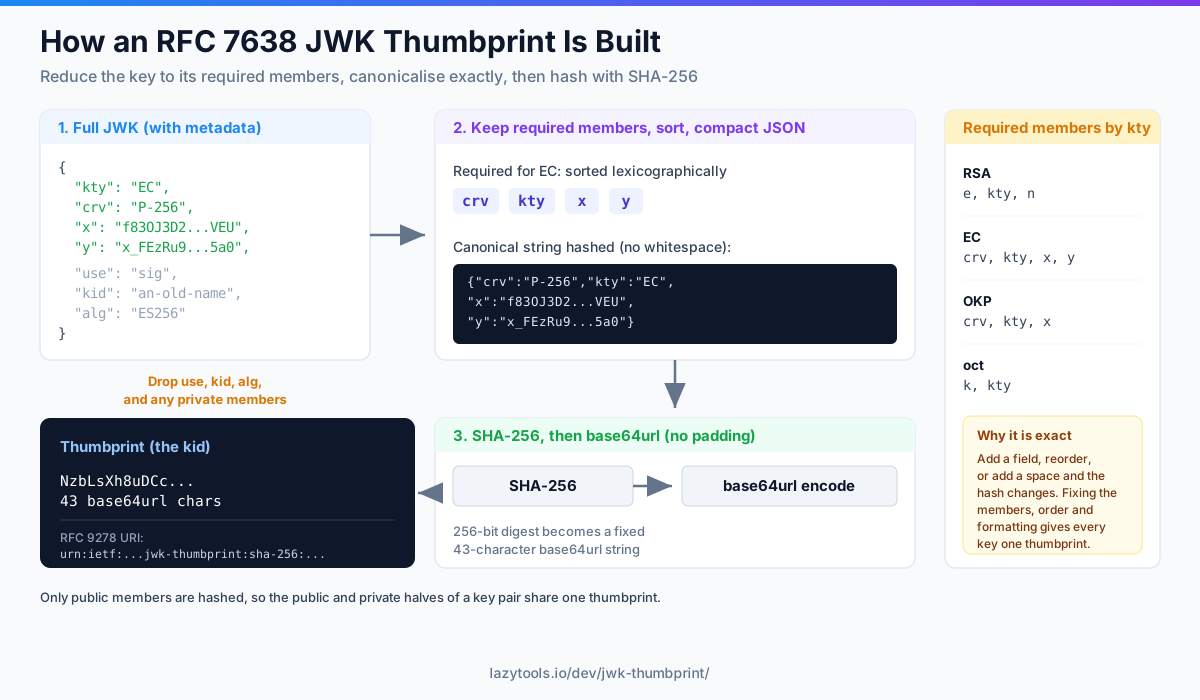
The thumbprint is a hash, and hashes are unforgiving about input, so the spec pins down the input precisely. To compute it:
- Keep only the required members. Each key type has a fixed set (see the table below). Everything
else,
kid,use,alg, and any private members, is dropped. - Sort the members into lexicographic (alphabetical) order by member name.
- Serialize as compact JSON, no whitespace, no extra characters, member values as strings.
- Hash the UTF-8 bytes with SHA-256.
- base64url-encode the digest, with no padding.
The “required members” in step 1 are exactly the ones RFC 7638 (and, for OKP, RFC 8037) names as
mandatory for each key type. Nothing optional is included, because optional fields vary between copies of
the same key and would break reproducibility:
Key type (kty) | Required members, in lexicographic order | Typical use |
|---|---|---|
RSA | e, kty, n | RSA signing / encryption keys |
EC | crv, kty, x, y | Elliptic-curve keys (P-256, P-384…) |
OKP | crv, kty, x | Edwards / Montgomery curves (Ed25519, X25519) |
oct | k, kty | Symmetric (HMAC, AES) keys |
Note that the members are already listed above in the order the canonical JSON needs. The order is a pure
string sort, so crv precedes kty precedes x precedes y, and e precedes kty precedes n.
A worked EC example
Start with a fuller EC key, the kind you might see in a JWKS, with extra metadata:
{
  "kty": "EC",
  "crv": "P-256",
  "x": "f83OJ3D2xF1Bg8vub9tLe1gHMzV76e8Tus9uPHvRVEU",
  "y": "x_FEzRu9m36HLN_tue659LNpXW6pCyStikYjKIWI5a0",
  "use": "sig",
  "kid": "an-old-name",
  "alg": "ES256"
}
Drop use, kid, and alg; keep crv, kty, x, y; sort them; and serialize with no whitespace.
Step 3 produces exactly this canonical string:
{"crv":"P-256","kty":"EC","x":"f83OJ3D2xF1Bg8vub9tLe1gHMzV76e8Tus9uPHvRVEU","y":"x_FEzRu9m36HLN_tue659LNpXW6pCyStikYjKIWI5a0"}Hashing those UTF-8 bytes with SHA-256 and base64url-encoding the digest gives the thumbprint, a fixed 43-character base64url string (a 256-bit digest, unpadded). The calculator shows this canonical string alongside the digest so you can see precisely what was hashed, which makes it easy to confirm your own implementation agrees byte-for-byte.
Why the formatting is the whole point
It’s tempting to think “it’s just JSON,” but the byte-level details are everything here:
- Include an extra member like
kid, and the hash changes. - Put the members in a different order, and the hash changes.
- Add a single space, and the hash changes.
RFC 7638 eliminates every degree of freedom, fixed members, fixed order, no whitespace, so that a key has exactly one thumbprint and every implementation computes it identically. That determinism is what makes it usable as an identifier at all.
Public and private give the same thumbprint
Because only the required public members are hashed (never d, p, q…), the public JWK and the
private JWK of a key pair produce the same thumbprint. This is by design: a server holding the private
key and a client holding the public key can both name the key the same way. (The
calculator still flags when your input contains private members, as a nudge not to
share them.)
Thumbprint vs a hand-picked kid
The kid field in a JWK is free-form. You can set it to anything. So why derive one? The trade-offs make
the case:
| Aspect | Hand-picked kid | RFC 7638 thumbprint |
|---|---|---|
| Uniqueness | Up to you to guarantee | Effectively guaranteed by SHA-256 |
| Agreement between parties | Requires coordination | Automatic, both sides compute it |
| Ties the name to the key | No, a name can outlive its key | Yes, a new key gets a new name |
| Human-readability | Can be friendly (2026-signing) | Opaque base64url string |
| Reuse risk on rotation | Easy to reuse a name by mistake | Impossible for a genuinely new key |
A common pattern is to use the thumbprint as the kid when publishing a JWKS: you get guaranteed
uniqueness and zero-coordination matching, at the cost of a non-friendly name, usually a worthwhile deal
for machine-to-machine flows.
Where you’ll use it
kidin a JWKS, the most common use, so a token’s header can point at the exact signing key.- OAuth / OIDC key matching and key rotation, when a provider rotates keys, thumbprints let clients track which key is which without a shared naming scheme.
- DPoP and other JOSE proof-of-possession flows, where a token is bound to a specific client key.
- RFC 9278 thumbprint URI,
urn:ietf:params:oauth:jwk-thumbprint:sha-256:<thumbprint>, a standard URI form that names the hash algorithm explicitly, which the calculator also generates.
A few things that trip people up
- Base64url, not standard base64. The digest uses the URL-safe alphabet (
-and_) with padding stripped, so a thumbprint is safe to drop into a URL or a header without escaping. - The hash algorithm is not baked into the raw thumbprint. RFC 7638 defines the procedure with
SHA-256 as the canonical hash, but the bare string doesn’t announce which hash produced it, that’s
exactly why the RFC 9278 URI carries
sha-256in it. - Symmetric keys hash secret material. For an
octkey the required memberkis the secret. A thumbprint of a symmetric key is therefore not something to publish casually. - Whitespace and ordering from your JSON library. Many serializers add spaces or preserve insertion order. The canonical form needs neither. This is the single most common reason two implementations disagree.
Compute one privately
Since the thumbprint is derived from the key, you can generate it locally with no server involved. The JWK Thumbprint Calculator takes a JWK, shows the canonical JSON it hashes, computes the SHA-256 thumbprint and the RFC 9278 URI in your browser with the Web Crypto API, and warns if the key includes private members, with nothing ever uploaded.
Frequently asked questions
What is a JWK thumbprint?
A JWK thumbprint is a reproducible fingerprint of a JSON Web Key, defined by RFC 7638. It's computed by taking the key's required members in a canonical form and hashing them with SHA-256, then base64url-encoding the result. Because the process is exact and deterministic, anyone who has the same key computes the same thumbprint, which makes it a reliable identifier for the key.
What is a JWK thumbprint used for?
Most commonly as the key ID (kid) in a JWKS (JSON Web Key Set), so a JWT's header can point at the exact key that signed it and a verifier can find the right key. Thumbprints are also used for key matching in OAuth and OpenID Connect, in DPoP proof-of-possession, and anywhere a canonical, collision-resistant name for a key is needed.
How is a JWK thumbprint calculated?
RFC 7638 specifies it precisely: take only the key's required members (for RSA that's e, kty and n; for EC it's crv, kty, x and y), place them in lexicographic order in a JSON object with no whitespace and no extra members, encode that string as UTF-8, hash it with SHA-256, and base64url-encode the digest (no padding). The exactness of the canonical form is what makes the result reproducible.
Does the private key affect the thumbprint?
No. Only the required public members are hashed, never the private components like d, p or q. So the public JWK and the private JWK of the same key pair produce an identical thumbprint. That's deliberate: it lets the thumbprint identify a key consistently whether you're holding the public or private half.
Why does the exact JSON formatting matter?
Because the thumbprint is a hash of the JSON bytes, any difference, a space, a different member order, an extra field like kid or use, changes the hash and produces a different thumbprint. RFC 7638 removes that ambiguity by fixing the members, their order (lexicographic) and the formatting (no whitespace), so every correct implementation agrees.
Is it safe to compute a thumbprint online?
The thumbprint only uses public members, so it doesn't hash your private key material, but you still shouldn't paste real private keys into tools you don't control. The LazyTools JWK Thumbprint Calculator runs entirely in your browser with the built-in Web Crypto API, uploads nothing, and warns you if the JWK you pasted contains private members.