
explainer
What Is an EPUB File? A Look Inside the E-book Format
By Uttam Regmi · Published 2026-08-03 · Updated 2026-08-23 · 7 min read · Fact-checked, sources cited
An EPUB e-book looks like a single file, but open it up and it’s a small website in a ZIP: web pages for the chapters, CSS for styling, and a couple of XML files that tie it together and describe the book. Understanding that structure explains why EPUBs reflow to any screen and where a book’s title, author and ISBN actually live. Here’s the tour, plus how to read any EPUB’s metadata with the EPUB Metadata Viewer.
An EPUB is a ZIP with rules
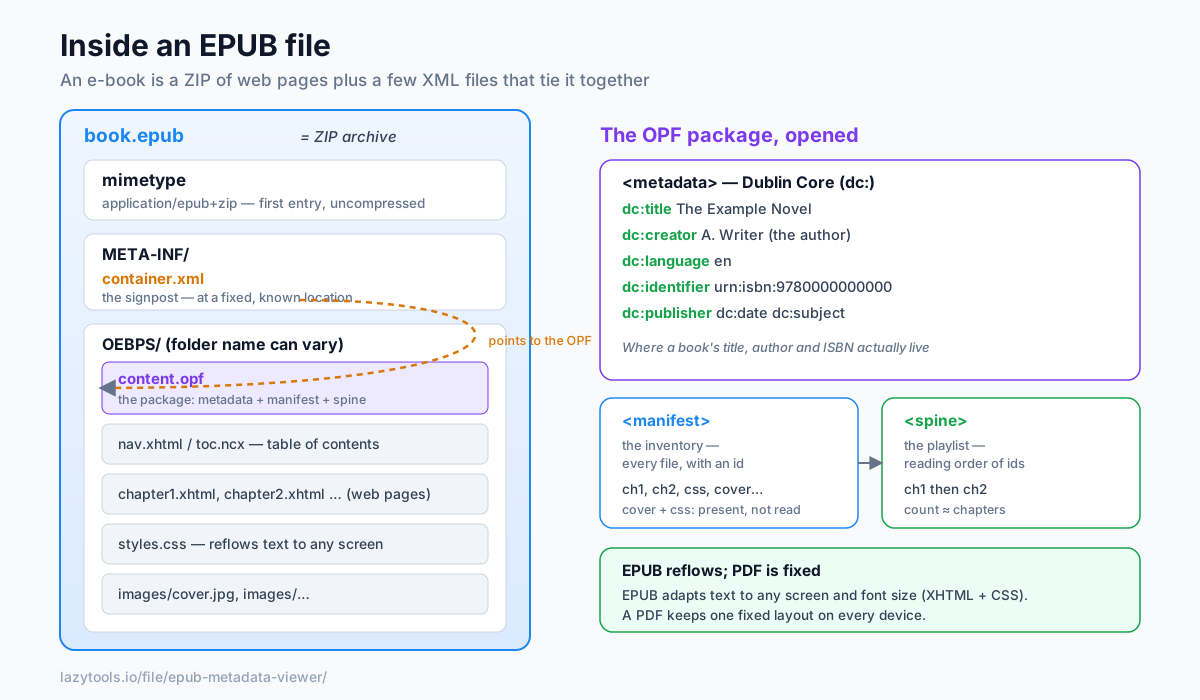
Rename a DRM-free .epub to .zip, open it, and you’ll find a predictable structure:
mimetype                     ← "application/epub+zip" (uncompressed, always first)
META-INF/
  container.xml              ← points to the OPF package
OEBPS/  (or similar)
  content.opf                ← the package: metadata + manifest + spine
  toc.ncx / nav.xhtml        ← table of contents
  chapter1.xhtml, …          ← the actual content, as web pages
  styles.css, images/…
Because the chapters are XHTML (web pages) and the styling is CSS, the text reflows to fit any screen and font size, the key difference from a fixed-layout PDF.
Two details make the archive recognisable. The very first entry is always a tiny file called
mimetype, stored uncompressed, whose only content is the string application/epub+zip. Keeping it
first and uncompressed lets a program identify an EPUB by peeking at the opening bytes, without
unzipping the whole thing. Everything after it, the folder names like OEBPS, OPS or something a
publisher chose, can vary, which is exactly why the format needs a signpost to find its own contents.
container.xml: the signpost
A reader doesn’t guess where the book’s data is. It opens the one file at a fixed location, META-INF/container.xml, which contains a single important line pointing at the package document:
<rootfile full-path="OEBPS/content.opf"
          media-type="application/oebps-package+xml"/>
Follow that full-path and you reach the heart of the EPUB. Because container.xml is the one file
guaranteed to sit at a known location, it’s the entry point every reader and every metadata tool starts
from. The folder could be named anything; the signpost is what makes the structure discoverable.
The OPF package: metadata, manifest, spine
The OPF (Open Packaging Format) file has three parts:
<metadata>, the book’s descriptive data (title, author, ISBN…), in Dublin Core.<manifest>, a list of every file in the book (chapters, images, CSS, cover), each with a unique id and a media type.<spine>, the reading order: which documents to show, in what sequence. The number of items in the spine is roughly the chapter count.
The split between manifest and spine is worth pausing on. The manifest is an inventory. It just says “these files exist and here is what each one is.” The spine is a playlist. It references manifest ids in the order the reader should walk through them. A file can be in the manifest without being in the spine (a cover image, a stylesheet, a footnotes page reached only by a link), but every readable chapter in the spine must be declared in the manifest first. That separation is what lets an EPUB carry assets that are used but not read straight through.
Here is a trimmed OPF showing all three parts together:
<package xmlns="http://www.idpf.org/2007/opf" version="3.0" unique-identifier="book-id">
  <metadata xmlns:dc="http://purl.org/dc/elements/1.1/">
    <dc:title>The Example Novel</dc:title>
    <dc:creator>A. Writer</dc:creator>
    <dc:language>en</dc:language>
    <dc:identifier id="book-id">urn:isbn:9780000000000</dc:identifier>
  </metadata>
  <manifest>
    <item id="ch1" href="chapter1.xhtml" media-type="application/xhtml+xml"/>
    <item id="ch2" href="chapter2.xhtml" media-type="application/xhtml+xml"/>
    <item id="css" href="styles.css" media-type="text/css"/>
    <item id="cover" href="images/cover.jpg" media-type="image/jpeg"/>
  </manifest>
  <spine>
    <itemref idref="ch1"/>
    <itemref idref="ch2"/>
  </spine>
</package>
Notice the cover image and stylesheet appear in the manifest but not the spine. They are used, not read in sequence.
Dublin Core: where the title and author live
The metadata uses Dublin Core, a small standard vocabulary of dc: elements:
| Element | Meaning |
|---|---|
dc:title | Book title |
dc:creator | Author (can repeat for co-authors) |
dc:language | Language code (e.g. en) |
dc:identifier | Unique ID, often the ISBN |
dc:publisher | Publisher |
dc:date | Publication date |
dc:subject | Genre / keywords (can repeat) |
dc:description | Blurb |
EPUB 3 adds refinements, for example a belongs-to-collection meta for series information, and
Calibre stores series in its own calibre:series tags. That’s why a good reader can show you not just
the title and author but the series and position too.
One thing to watch: a field can be present but empty, or missing entirely. A dc:identifier might hold
a real ISBN, a UUID a tool generated, or a URL, the element only promises to be unique, not to be an
ISBN. So when a viewer shows a blank publisher or an odd-looking identifier, that usually reflects what
the publisher actually wrote into the file, not a bug in the reader.
EPUB 2 vs EPUB 3
Most files you meet are either EPUB 2 or EPUB 3, and the difference is mostly about the table of contents and what the content pages may contain.
| Aspect | EPUB 2 | EPUB 3 |
|---|---|---|
| Content documents | XHTML | XHTML5, with richer semantics |
| Table of contents | toc.ncx (separate XML file) | nav.xhtml (a real navigation page); .ncx often kept for backward compatibility |
| Media | Images, basic CSS | Adds audio, video and scripting support |
| Metadata | Dublin Core | Dublin Core plus refinements (series, roles, richer relationships) |
| Accessibility | Limited | Structured semantics and accessibility metadata |
The practical upshot: an EPUB 3 file can still be opened by many older readers because it keeps a familiar shape, and the structural tour above, mimetype, container.xml, OPF, spine, holds for both versions.
EPUB vs PDF, and the Kindle question
EPUB reflows; PDF is fixed. For novels and long reading on phones or e-readers, EPUB’s adaptable layout wins; for documents where exact pagination matters, PDF is better. The table below sums up when each format is the right tool.
| EPUB | ||
|---|---|---|
| Layout | Reflowable, adapts to screen and font size | Fixed, identical on every device |
| Best for | Novels, long-form reading on phones/e-readers | Forms, manuals, anything print-exact |
| Font size | Reader chooses | Zoom only |
| Under the hood | ZIP of XHTML + CSS | Page-description document |
| Metadata location | OPF package (Dublin Core XML) | Document info dictionary / XMP |
| Kindle support | Via Send to Kindle (converted) | Via Send to Kindle |
As for Kindle: Amazon long used its own formats (MOBI, then AZW/KFX), but now accepts EPUB via Send to Kindle, converting it on their side. Apple Books, Google Play Books and Kobo all use EPUB directly, which is why EPUB is often described as the closest thing the e-book world has to a universal format.
Read a book’s metadata privately
Since the metadata is just XML inside a ZIP, you can read it without any app installing itself into your
library. The EPUB Metadata Viewer opens the EPUB in your browser, follows
container.xml to the OPF, and shows the title, author, series, publisher, date, language, ISBN,
subjects and description, with the book never leaving your device. (It reads the metadata; it doesn’t
change the book, and DRM-protected files can’t be opened.)
The path it walks is exactly the one described above:
- Treat the
.epubas a ZIP and open it. - Read
META-INF/container.xmlto find thefull-pathof the OPF package. - Parse the OPF’s
<metadata>section and pull out the Dublin Coredc:fields. - Check for EPUB 3 refinements and Calibre tags to recover series and position.
Because all four steps run locally in JavaScript, nothing is uploaded, a useful property when the book is a review copy, a manuscript, or simply yours and no one else’s business. It’s a good way to confirm a downloaded book really carries the right ISBN and author before you sort it into a library, or to see why two files that look like “the same book” are being treated as different editions.
Frequently asked questions
What is an EPUB file?
EPUB (electronic publication) is the open standard e-book format used by most readers except Amazon Kindle. Technically it's a ZIP archive containing the book's content as XHTML web pages, its styling as CSS, its images, and a set of metadata and structure files. Because it's built on web standards, EPUB text reflows to fit any screen size, unlike a fixed-layout PDF.
Is an EPUB just a ZIP file?
Yes, an EPUB is a ZIP archive with a specific internal structure and the extension .epub. If you rename a DRM-free EPUB to .zip you can open it and see the XHTML chapters, CSS, images, the META-INF folder and the OPF package file inside. The first entry is always an uncompressed 'mimetype' file identifying it as application/epub+zip.
Where is an EPUB's metadata stored?
In the OPF (Open Packaging Format) package document, usually named content.opf. Its <metadata> section holds Dublin Core fields, title, creator (author), language, identifier, publisher, date, subject and description. The file META-INF/container.xml at the root of the ZIP tells a reader where to find that OPF file.
What is the difference between EPUB and PDF?
A PDF has a fixed layout, every page looks the same on every device, which suits print. An EPUB is reflowable: the text adapts to the screen and the reader's chosen font size, like a web page. EPUB is better for novels and long-form reading on phones and e-readers; PDF is better when exact page layout matters.
Why won't my EPUB open on a Kindle?
Historically Amazon Kindle used its own formats (MOBI, then AZW/KFX) rather than EPUB, so an EPUB had to be converted first. Amazon now accepts EPUB through Send to Kindle, which converts it on their side. The EPUB standard itself is used by Apple Books, Google Play Books, Kobo and most other readers.
Can I read an EPUB's metadata without special software?
Yes. Because the metadata is plain XML inside the ZIP, a tool can open the archive, follow container.xml to the OPF, and read the Dublin Core fields. The LazyTools EPUB Metadata Viewer does this entirely in your browser, so you can check a book's title, author, series and ISBN without uploading it anywhere.