
explainer
What Is CBOR? Binary JSON for Passkeys, COSE and IoT, Explained
By Uttam Regmi · Published 2026-08-03 · Updated 2026-08-23 · 7 min read · Fact-checked, sources cited
When you create a passkey, your browser and the site exchange a blob of binary data, and that blob is CBOR. CBOR is a compact, JSON-like binary format that shows up in WebAuthn, COSE-signed tokens and a lot of IoT, yet most developers never see inside it. This guide explains how CBOR works, how a single byte tells the decoder what comes next, why it beats JSON when size matters, and how to read one for yourself with the CBOR Decoder.
CBOR in one sentence
CBOR (Concise Binary Object Representation, RFC 8949) is binary JSON with extra types. It encodes the same data model as JSON, numbers, strings, arrays, maps, booleans, null, but in a smaller binary form, and it adds native byte strings, tags, and exact 64-bit integers. The trade-off versus JSON is readability for efficiency: you give up being able to read it in a text editor in exchange for a payload that is smaller on the wire and quicker for a constrained device to parse.
Two design goals shape everything about the format. First, messages should be small without a compression step, so even a tiny microcontroller can produce and consume them. Second, a decoder should be able to walk any message without a schema, the bytes themselves carry enough information to reconstruct the structure. Those two goals are why CBOR looks the way it does.
How a CBOR item is encoded
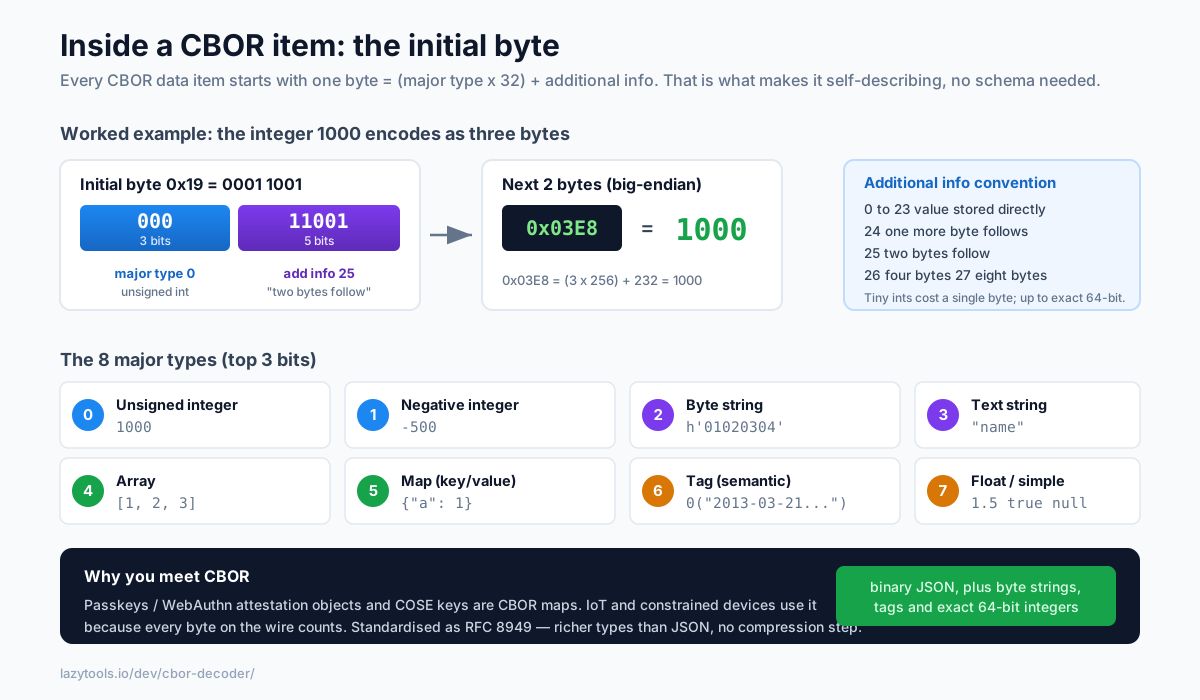
The elegant part: every data item starts with a single “initial byte” that splits into two pieces:
initial byte = (major type × 32) + additional info
The major type (top 3 bits) says what kind of thing it is; the additional info (low 5 bits) gives a small value directly, or says how many following bytes hold the value or length.
| Major type | Meaning | Example diagnostic |
|---|---|---|
| 0 | Unsigned integer | 1000 |
| 1 | Negative integer | -500 |
| 2 | Byte string | h'01020304' |
| 3 | Text string (UTF-8) | "name" |
| 4 | Array | [1, 2, 3] |
| 5 | Map (key/value pairs) | {"a": 1} |
| 6 | Tag (semantic label on the next item) | 0("2013-03-21T20:04:00Z") |
| 7 | Floats and simple values (true/false/null) | 1.5, true, null |
The additional-info field has a neat convention. Values 0-23 encode a small number directly in the initial byte, so the tiniest integers cost a single byte. Value 24 means “one more byte follows”, 25 means “two bytes follow”, 26 means “four bytes”, and 27 means “eight bytes”, big-endian in every case. That is how CBOR represents anything from a one-digit count to a full 64-bit integer with no ambiguity and no wasted space.
A worked example, byte by byte
Take the byte 0x01. In binary that is 000 00001: major type 0 (unsigned integer), additional info 1, so it is simply the integer 1, encoded in one byte.
Now take 0x19 0x03 0xe8. The initial byte 0x19 is 000 11001: major type 0, additional info 25,
which means “two bytes follow”. Those two bytes, 0x03e8, are 1000 in hex, so the whole three-byte
sequence decodes to the integer 1000. Strings and arrays follow the identical pattern: the initial
byte encodes the type and a length, then the contents come immediately after. A text string of five
characters, for instance, starts with major type 3 and additional info 5, then the five UTF-8 bytes.
Because the type and length always come first, a decoder never has to guess or look ahead. It reads one item, knows exactly how long it is, and moves to the next. That is what “self-describing” means in practice.
Diagnostic notation: CBOR you can read
Because raw CBOR is binary, the RFC defines diagnostic notation, a text form that looks like JSON but is precise about CBOR’s extra types:
{"age": 1000, "name": "Chloe"}     ← a map
[1, 2, 3]                          ← an array
h'01020304'                        ← a byte string
0("2013-03-21T20:04:00Z")          ← tag 0 (a date-time string)
1.5   Infinity   NaN               ← floats (always with a point)
Byte strings become h'…', tags become N(value), and floats always carry a decimal point so you can
tell 1.0 (a float) from 1 (an integer), a distinction JSON simply cannot express. A decoder prints
this so a binary message becomes legible at a glance, which is exactly what you want when you are staring
at a hex dump and trying to work out what a device sent.
CBOR vs JSON vs MessagePack
CBOR is not the only compact format, and it is worth knowing where it sits. The table below compares it with plain JSON and with MessagePack, the other well-known binary-JSON encoding.
| Feature | JSON | CBOR | MessagePack |
|---|---|---|---|
| Form | Text | Binary | Binary |
| Human-readable directly | Yes | No (use diagnostic notation) | No |
| Native binary (byte strings) | No, base64 in a string | Yes | Yes |
| Semantic tags (dates, big nums, etc.) | No | Yes | No (built-in extension type) |
| Formal standard | RFC 8259 | RFC 8949 | Community spec |
| Self-describing (no schema) | Yes | Yes | Yes |
| Used by WebAuthn / COSE | No | Yes | No |
The practical takeaway: JSON stays king for anything a human reads or edits and for universal tooling; CBOR wins when you need a standardised, tag-rich binary format, which is precisely why the security world chose it. CBOR and MessagePack overlap heavily, but they use different byte encodings, so a MessagePack blob will not decode as CBOR or the other way round.
Why you’ll meet CBOR: passkeys and COSE
The reason CBOR matters to web developers today is WebAuthn / passkeys. When a passkey is created, the
authenticator returns an attestation object, a CBOR map containing the format (fmt), the
authenticator data (authData, itself a byte string) and an attestation statement. The public keys inside
use COSE (CBOR Object Signing and Encryption), which is also CBOR: a COSE key is a small CBOR map whose
integer keys identify the key type, algorithm and curve parameters.
If you are debugging a registration flow and the browser hands you an attestationObject, decoding that
CBOR is the only way to see what the authenticator actually sent, which algorithm it chose, what the
credential public key looks like, whether a particular attestation format is present. The same format
turns up well beyond the browser: IoT and constrained-device protocols lean on CBOR because its small
size suits devices with kilobytes of RAM, and it appears in some messaging, sensor and blockchain systems
for the same reason. Learn to read it once and it keeps paying off.
Decode a CBOR message privately
CBOR is self-describing, so you don’t need a schema to read it, just the bytes. The CBOR Decoder takes hex or base64, decodes every major type (including tags, indefinite-length items and half/single/double floats, with 64-bit integers kept exact), and shows both the diagnostic notation and a typed tree, entirely in your browser, so a passkey response or signed token never leaves your device. (It decodes the structure; it doesn’t verify signatures.)
A typical workflow: copy the attestationObject (or any CBOR payload) as base64 or hex, paste it into the
decoder, and read off the map keys and values. Because the tool runs client-side, you can safely inspect
real registration responses, session tokens or device telemetry without shipping sensitive bytes to a
third-party server, which, for anything touching authentication, is exactly the property you want.
Frequently asked questions
What is CBOR?
CBOR (Concise Binary Object Representation) is a compact binary data format defined in RFC 8949. It represents the same kinds of data as JSON, numbers, strings, arrays, objects, booleans, null, but in a smaller, faster-to-parse binary form, and it adds a few things JSON lacks, like native byte strings, tags and exact 64-bit integers. It's designed for situations where size and parsing speed matter.
How is CBOR different from JSON?
CBOR is binary where JSON is text, so it's smaller and quicker to parse but not human-readable directly. CBOR also natively supports byte strings (JSON has to base64-encode binary), semantic tags (e.g. marking a value as a date), exact big integers, and non-text map keys. JSON's advantage is readability and universal tooling; CBOR's is efficiency and richer types.
Where is CBOR used?
Most visibly in WebAuthn and passkeys: the attestation objects and COSE (CBOR Object Signing and Encryption) keys exchanged during registration are CBOR. It's also common in IoT and constrained-device protocols where every byte counts, in some blockchain and messaging systems, and anywhere a compact self-describing binary format is useful.
What is CBOR diagnostic notation?
A human-readable text representation of a CBOR value, defined in the RFC. It looks a lot like JSON, arrays in [brackets], maps in {braces}, but writes byte strings as h'0102', tags as N(value), and floats with a decimal point (1.0, 1.5) so they're distinguishable from integers. Decoders print it so you can read a binary CBOR message at a glance.
How do I decode a CBOR message?
Take the raw bytes (often shown as hex or base64) and run them through a CBOR decoder, which reads each item's major type and value and reconstructs the structure. The LazyTools CBOR Decoder does this in your browser and shows both the diagnostic notation and a typed tree, no schema needed, because CBOR is self-describing.
Is CBOR the same as MessagePack?
No, though they're similar in spirit, both are compact binary alternatives to JSON. They use different byte encodings and type systems, so a MessagePack blob won't decode as CBOR or vice versa. CBOR is standardized as RFC 8949 and is the one used by WebAuthn/COSE.