
explainer
What's Inside a Font File? TTF and OTF Metadata Explained
By Uttam Regmi · Published 2026-08-02 · Updated 2026-08-23 · 8 min read · Fact-checked, sources cited
A .ttf or .otf font isn’t one blob, it’s a small filesystem. Under the hood it’s an sfnt
file: a directory of named tables, each holding one kind of information, from the glyph outlines to the
family name to a licence flag that says whether you’re even allowed to embed it. Read the name table
and you know exactly what font you have; read the OS/2 table and you know whether you’re allowed to
ship it. Here’s what the key tables store, and how to read them with the
Font Metadata Inspector.
The sfnt container: a directory of tables
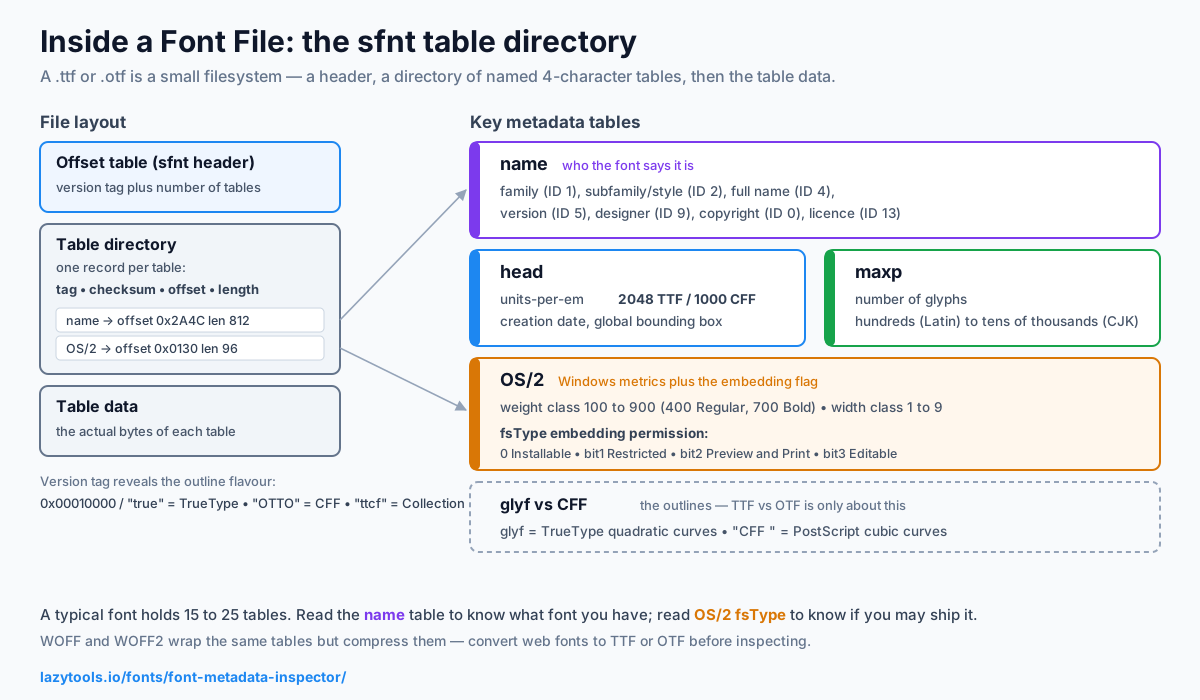
Every TrueType and OpenType font starts with an offset table (also called the sfnt header) that begins with a version tag and says how many tables the font contains. It’s followed by a table directory, one record per table giving its 4-character tag, a checksum, its offset from the start of the file, and its length. To read any piece of a font, you look up the tag in the directory and jump to that offset. It’s the same idea as a ZIP’s central directory, just for font data.
That first version tag also tells you the outline flavour at a glance: 0x00010000 (often shown as
1.0) or the tag true signals TrueType outlines, while the ASCII tag OTTO signals PostScript/CFF
outlines. A ttcf tag instead marks a TrueType Collection (.ttc), several fonts sharing tables
in one file, common for CJK families where the glyph data is large.
A typical font has on the order of 15-25 tables. A handful carry the metadata people actually ask about:
| Table | Tag | What it holds |
|---|---|---|
| Naming | name | Family, style, full name, version, designer, copyright, licence |
| Header | head | Units-per-em, creation/modification dates, bounding box |
| Maximum profile | maxp | Number of glyphs |
| OS/2 & Windows metrics | OS/2 | Weight class, width class, fsType embedding permission |
| Glyph outlines | glyf / CFF | The actual letter shapes (TrueType vs PostScript) |
The name table: who the font says it is
The name table is a list of strings, each tagged with a name ID that says what the string means.
The standard IDs you’ll run into most often:
| Name ID | Meaning | Example |
|---|---|---|
| 0 | Copyright notice | ”© 2001 The Font Foundry” |
| 1 | Font family | ”Helvetica” |
| 2 | Font subfamily (style) | “Bold” |
| 3 | Unique identifier | internal build string |
| 4 | Full font name | ”Helvetica Bold” |
| 5 | Version string | ”Version 2.10” |
| 6 | PostScript name | ”Helvetica-Bold” |
| 9 | Designer | ”Max Miedinger” |
| 13 | Licence description | usage terms in plain text |
| 14 | Licence info URL | link to the full licence |
| 16 / 17 | Typographic family / subfamily | grouping for large families |
IDs 1 and 2 are the four-style family and style that older software understands (Regular, Bold, Italic, Bold Italic); IDs 16 and 17 exist so a big family with weights like Light, Semibold and Black can group correctly in modern menus. The same string can also appear multiple times for different platforms (Windows vs Macintosh) and languages, which is why a good reader prefers the Windows/English record and de-duplicates. This table is the definitive answer to “what font is this file?”, far more reliable than the filename, which anyone can rename.
Worked example: you’re handed a file called helv-b.ttf. The filename suggests Helvetica Bold, but the
name table might read family “Nimbus Sans”, subfamily “Bold”, version “Version 1.05”, copyright “URW”.
Now you know it’s actually a Nimbus Sans clone, not the file you were promised, a distinction that
matters for licensing.
head, maxp and OS/2: the technical facts
headstores units-per-em (the coordinate grid, usually 2048 for TrueType, 1000 for OpenType/CFF) and the font’s creation and modification dates, counted in seconds since midnight, 1 January 1904 (the same epoch classic Mac software used). It also holds the global bounding box that encloses every glyph.maxpgives the glyph count, a quick gauge of how much language and symbol coverage a font has. A basic Latin face may carry a few hundred glyphs; a font covering many scripts or a full CJK set can run into the tens of thousands.OS/2holds the weight class (100-900, where 400 is Regular/Normal and 700 Bold), the width class (1-9, where 5 is Medium/Normal), the Unicode and code-page coverage bitmaps, and the fsType embedding flag.
Units-per-em is worth dwelling on because it confuses people. It is not the size the font renders at, that’s your point size. It’s the resolution of the internal grid every outline is drawn on. A glyph stem that’s 82 units wide means 82/2048 of the em at 2048 upm, or 40/1000 of the em at 1000 upm; both render identically at a given point size. TrueType tooling favours a power of two (2048) because its grid-fitting maths is cleaner there, while PostScript/CFF fonts stick with 1000 for historical reasons.
fsType: the licence flag baked into the file
fsType is easy to overlook but important. It’s a bit-field in OS/2 that encodes whether, and how, the font may be embedded in a document:
| fsType meaning | What it permits |
|---|---|
| Installable (value 0) | No embedding restriction at all |
| Restricted (bit 1 set) | No embedding permitted |
| Preview & Print (bit 2) | Embed for viewing/printing only, not editing |
| Editable (bit 3) | Embed and allow document editing |
Two further bits can accompany the above: No subsetting (only the whole font may be embedded) and
Bitmap embedding only (only bitmap data, not the outlines). PDF writers and presentation apps are
expected to read this field and refuse to embed a restricted font, so if you’re bundling a font into a
document, app or website, it’s worth checking first. One caveat: fsType reflects only what the font
declares in the file. It is not a legal contract, and it isn’t a substitute for reading the actual
foundry licence, which may be more or less permissive than the flag suggests.
TTF vs OTF: it’s about the outlines
Both formats share everything above; they differ in how glyph shapes are stored. A glyf table
(with its companion loca index) means TrueType outlines built from quadratic Bézier curves; a
CFF table (note the trailing space in the tag) means PostScript/CFF outlines built from cubic
Bézier curves, which is what people usually mean by an OpenType .otf. Because OpenType is a superset
that absorbed TrueType, a .ttf is technically an OpenType font too, the extension is a convention,
not a hard rule, and the outline table is the real tell.
In practice the two flavours differ in ways you may notice: TrueType hinting (in the prep, fpgm and
cvt tables) gives fine control over rendering at small sizes on screen, while CFF fonts tend to be a
touch smaller on disk and were long favoured for print. Variable fonts add a fvar table describing
their design axes (weight, width, optical size and more) on top of either outline type. The inspector
reports which outline table a font carries, so you can tell a TrueType-flavoured font from a
PostScript-flavoured one at a glance.
A quick tour of the tables you’ll see
Beyond the metadata tables, most fonts carry the machinery that makes them render and lay out text. You don’t usually read these by hand, but recognising the tags helps:
| Tag | Role |
|---|---|
cmap | Maps character codes (Unicode) to glyph indices |
hmtx / hhea | Horizontal metrics, advance widths and side bearings |
post | PostScript glyph names and italic angle |
GSUB / GPOS | OpenType layout: ligatures, kerning, alternates |
kern | Legacy kerning pairs (older fonts) |
Seeing GSUB/GPOS tells you a font has real OpenType features (ligatures, small caps, tabular
figures); their absence suggests a simpler or older font.
Read a font’s metadata privately
Because fonts are often licensed, and unreleased fonts are confidential. You don’t want to upload one
to a random server just to read its name. The Font Metadata Inspector
parses the sfnt tables entirely in your browser: drop in a .ttf, .otf or .ttc and it shows the
family, style, version, glyph count, units-per-em, weight and embedding permission, with the file never
leaving your device. (WOFF/WOFF2 web fonts are compressed; convert them to TTF/OTF first.) It sits
alongside the rest of the LazyTools font tools if you want to go further.
Frequently asked questions
What is the difference between TTF and OTF?
Both are sfnt font files with the same overall structure; the difference is how glyph shapes are stored. TrueType (.ttf) uses quadratic curves in a 'glyf' table, while OpenType (.otf) usually means PostScript/CFF outlines with cubic curves in a 'CFF ' table. OpenType is technically a superset, a .ttf is a kind of OpenType font too, and both can carry the same metadata tables like name, head and OS/2.
How do I find the real name and version of a font file?
Read the font's 'name' table, which stores human-readable strings including the family, subfamily (style), full name, version, designer and copyright. A font metadata inspector parses this table and shows those fields exactly as the font author wrote them, the reliable way to identify an unlabelled font file.
What is fsType / font embedding permission?
fsType is a field in the OS/2 table that records whether, and how, the font may be embedded in documents. Values range from freely installable, through 'preview and print only' or 'editable', to 'restricted' (no embedding allowed). Applications that embed fonts (PDF writers, presentation tools) are supposed to honour it, so it's worth checking before you bundle a font.
What is units-per-em in a font?
Units-per-em (upm) is the size of the internal coordinate grid that every glyph is drawn on. All the font's measurements are relative to it. TrueType fonts commonly use 2048 upm and OpenType/CFF fonts 1000. It doesn't change how big the font looks, that's set by point size, but it determines the resolution of the outline coordinates.
Can I read WOFF or WOFF2 web fonts the same way?
Not directly. WOFF and WOFF2 contain the same sfnt tables but compress them, WOFF with zlib and WOFF2 with Brotli, so the bytes must be decompressed before the tables can be read. Convert a web font back to TTF/OTF first, then inspect it. Plain .ttf and .otf files are uncompressed and can be read as-is.
Is it safe to inspect a licensed or unreleased font online?
Only with a tool that works locally. Fonts are often licensed assets, and an unreleased font is confidential. The LazyTools Font Metadata Inspector parses the file entirely in your browser and never uploads it, so the font stays on your device, unlike tools that send the file to a server.