
explainer
What's Inside a .torrent File? Bencode, the Info-Hash and Magnet Links
By Uttam Regmi · Published 2026-08-03 · Updated 2026-08-23 · 6 min read · Fact-checked, sources cited
A .torrent file is tiny, a few kilobytes, yet it can represent a download of many gigabytes. That’s
because it contains none of the actual content, only a precise description of it. That description is a
small structured record: the file names and sizes, how the data is chopped into pieces, a checksum for
every piece, and where to find peers. Understanding it explains the info-hash, magnet links, and how
BitTorrent verifies data byte for byte. Here’s the anatomy, plus the
Torrent File Viewer to read one yourself.
A .torrent is metadata, not data
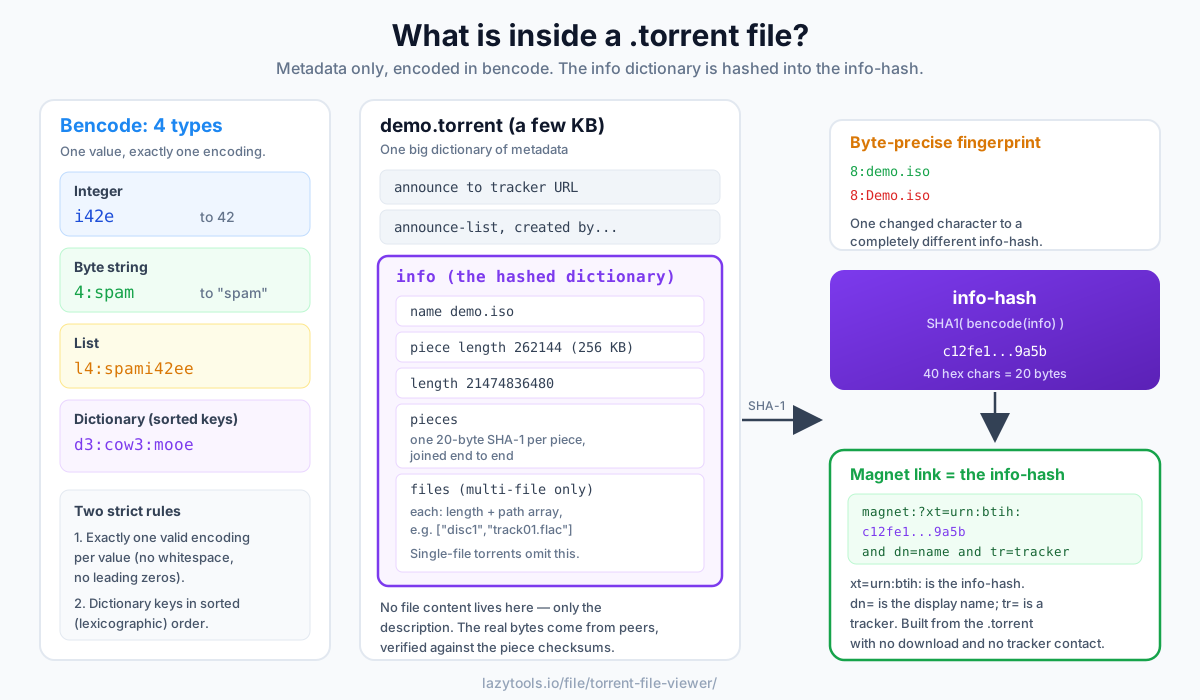
Open a .torrent and you won’t find any of the files it’s for. You’ll find a description:
- the name of the torrent,
- the list of files and their sizes,
- the piece length, the data is split into equal-size pieces (commonly 256 KB, 512 KB, 1 MB or larger for big torrents),
- a pieces field: a SHA-1 checksum for every piece, so your client can verify each chunk as it arrives,
- and the tracker URLs (in
announceandannounce-list) that help you find peers.
The real bytes come from other people sharing the torrent; the .torrent file just tells your client
what to ask for and how to check it. This split is the whole point of BitTorrent: the description is
small and easy to pass around, while the heavy data is fetched in parallel from many peers and verified
against the checksums as it lands. If a downloaded piece doesn’t hash to the value stored in pieces,
your client throws it away and re-requests it, which is why a completed torrent is a bit-for-bit copy of
the original.
Why the piece length matters
The piece length is a trade-off. Smaller pieces mean the pieces field carries more 20-byte SHA-1
checksums, inflating the size of the .torrent itself; larger pieces keep the file compact but make each
failed verification more expensive to re-download. For a rough sense of scale, a 20 GB torrent split into
256 KB pieces needs about 80,000 pieces, and since each piece contributes a 20-byte hash, the pieces
field alone runs to roughly 1.6 MB. Bump the piece length to 1 MB and that drops to about 20,000 pieces
and ~400 KB of hashes, one reason large torrents tend to use bigger pieces.
Bencode: the format inside
All of that is stored in bencode, BitTorrent’s simple binary encoding. It has exactly four types:
| Type | Syntax | Example | Decodes to |
|---|---|---|---|
| Integer | i<number>e | i42e | 42 |
| Byte string | <length>:<bytes> | 4:spam | "spam" |
| List | l<items>e | l4:spami42ee | ["spam", 42] |
| Dictionary | d<pairs>e | d3:cow3:mooe | {"cow": "moo"} |
Two rules make bencode unusually strict, and both exist to protect the info-hash. First, there is exactly one valid encoding for any given value, no whitespace, no leading zeros on integers, no ambiguity. Second, dictionary keys must appear in sorted (lexicographic) order. Both rules guarantee that the same data always produces the same bytes, and therefore the same hash, on every client.
A .torrent is one big dictionary. At the top level you’ll typically see keys like announce (the main
tracker), announce-list, creation date, created by, comment, and, the important one, info.
The info value is itself a dictionary holding the name, piece length, pieces and file list. That info
dictionary is special, because it’s what gets hashed.
Single-file vs multi-file torrents
The info dictionary comes in two shapes. A single-file torrent stores a name (the filename) and a
length (its byte size). A multi-file torrent stores a name (used as the folder) and a files list,
where each entry has its own length and a path array of folder/file components. Everything else, piece length, pieces, and how the hash is computed, is identical.
| Single-file | Multi-file | |
|---|---|---|
name key | The file’s name | The top-level folder name |
| Size stored in | length | A length per entry in files |
| File paths | Just name | path array per file, e.g. ["disc1", "track01.flac"] |
| Pieces span | One file | Concatenated across all files in order |
Note the last row: pieces are computed over the files joined end to end, so a single piece can straddle the boundary between two files. That’s why you can’t verify one file in a multi-file torrent in isolation.
The info-hash: a torrent’s fingerprint
The info-hash is the SHA-1 of the exact bencoded bytes of the info dictionary. It’s a
40-character hex value (20 bytes) that uniquely identifies the torrent across the whole network:
info-hash = SHA1( bencode(info) )Trackers and peers use it to group everyone sharing the same content. Because it’s computed from the
exact bytes, changing anything in info, even one character of a filename, produces a completely
different info-hash and, effectively, a different torrent. This is exactly why bencode is byte-precise:
the hash depends on it. If you enjoy reading a file’s raw structure like this, the same idea underlies
how magic bytes identify a file from its first few bytes.
A worked sketch makes it concrete. Suppose the info dictionary bencodes to the bytes
d4:name8:demo.iso12:piece lengthi262144e6:pieces20:....e. Your client takes those exact bytes, the
whole info value including its opening d and closing e, and runs SHA-1 over them. The 40-character
hex digest is the info-hash. Re-name the file from demo.iso to Demo.iso and the byte string
8:demo.iso becomes 8:Demo.iso; the input to SHA-1 differs, so the digest is entirely different. There
is no partial match, one changed bit flips the hash unrecognisably.
Magnet links are just the info-hash
A magnet link dispenses with the .torrent file entirely and carries the info-hash directly:
magnet:?xt=urn:btih:<info-hash>&dn=<name>&tr=<tracker>xt=urn:btih: is the info-hash; dn= is the display name (a convenience for humans, not used for
verification); each tr= is a tracker URL. Given a .torrent file you can always compute the info-hash
and build the magnet link, no download, no tracker contact, just a hash of the metadata. The reverse
isn’t fully symmetric: a magnet link with only the info-hash doesn’t carry the file list or piece
checksums, so a client has to fetch that metadata from peers before it can verify anything. The
.torrent file is the complete record; the magnet link is a compact pointer to it.
Read a .torrent privately
A .torrent reveals what you’re about to download, so it’s worth reading locally rather than uploading
it somewhere. The Torrent File Viewer decodes the bencode in your browser,
lists every file and size, shows the trackers and piece info, and computes the info-hash with the
browser’s built-in crypto, then assembles the magnet link. It contacts nothing and downloads nothing;
the file never leaves your device. That makes it a safe way to answer the practical questions before you
ever open a torrent client: what’s actually in here, how big is it, which trackers does it point at, and
what’s its fingerprint.
Frequently asked questions
What does a .torrent file actually contain?
Not the content itself, a .torrent file is only a description of what you're about to download. It holds the name, the list of files and their sizes, how the data is split into fixed-size 'pieces', SHA-1 checksums for every piece, and the tracker URLs. The real data comes from other peers; the .torrent just tells your client what to fetch and how to verify it.
What is a torrent info-hash?
The info-hash is the SHA-1 of the bencoded 'info' dictionary inside the .torrent file, a 40-character hex string that uniquely identifies the torrent. Trackers and peers use it to match everyone sharing the same content, and it's the core of a magnet link. Change a single byte of the info dictionary and the info-hash changes completely.
What is bencode?
Bencode is the simple binary encoding BitTorrent uses inside .torrent files. It has four types: integers as i42e, byte strings as length:data (like 4:spam), lists as l…e, and dictionaries as d…e with sorted string keys. It's compact and unambiguous, which is important because the info-hash depends on the exact bytes.
How do I turn a .torrent file into a magnet link?
A magnet link is built from the info-hash: magnet:?xt=urn:btih:<info-hash>, usually with the display name (dn=) and tracker URLs (tr=) appended. Because the info-hash is computed from the .torrent's info dictionary, any tool that parses the file can generate the magnet link, no download required.
Does opening a .torrent file download anything?
Opening it in a BitTorrent client starts a download, but simply reading or parsing the .torrent file does not, the file is just metadata. A viewer that only decodes the file (like this one) contacts no tracker or peer and downloads nothing; it just shows you what the torrent describes.
Is it safe to inspect a .torrent online?
A .torrent can reveal what you intend to download, so prefer a tool that parses it locally. The LazyTools Torrent File Viewer decodes the file entirely in your browser and computes the info-hash with the browser's built-in crypto, nothing is uploaded, so the file and what it describes stay on your device.