
explainer
eDPI and Mouse Sensitivity Explained (Keep Your Aim Across Games)
By Uttam Regmi · Published 2026-10-28 · Updated 2026-10-28 · 5 min read · Fact-checked, sources cited
eDPI (effective DPI) is your mouse DPI multiplied by your in-game sensitivity, and it is the number that lets you compare aim settings fairly between players. Raw in-game sensitivity is meaningless on its own, because 800 DPI at 2.0 sensitivity feels exactly the same as 1600 DPI at 1.0. eDPI multiplies them into one figure (1,600 in both cases) so you can line your settings up against a pro or a teammate in the same game. To carry your aim between games, you match your cm/360 instead. Calculate yours with the eDPI calculator and move settings across titles with the mouse sensitivity converter.
Why raw sensitivity is meaningless
Open any two players’ settings and you will see different numbers that feel the same. One runs 400 DPI at 3.2 in-game sens; another runs 1600 DPI at 0.8. Who is faster? Neither, they are identical, because what matters is DPI and sensitivity multiplied together.
That product is eDPI:
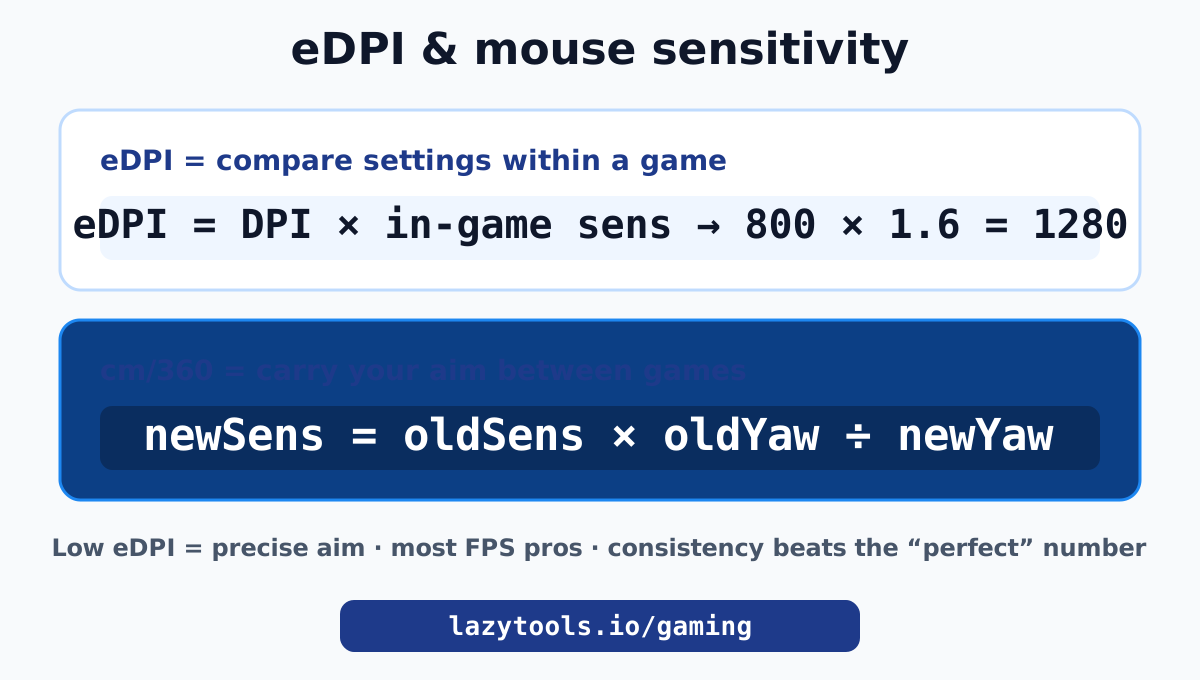
eDPI = mouse DPI × in-game sensitivity
Both players above sit at 1,280 eDPI. This is why you cannot judge a sensitivity by its in-game number alone, and why every pro settings page lists eDPI. Calculate yours instantly with the eDPI calculator: 800 DPI at 1.6 is 1,280 eDPI, the same as 1600 DPI at 0.8.
Lower eDPI means slower, more precise aim (you move the mouse further to turn); higher eDPI means faster, twitchier aim. Most competitive FPS players favour the lower end for precision, and the single most important thing is to pick a value and stick to it so your aim becomes automatic.
cm/360: the one true measurement
eDPI is perfect for comparing settings within one game, but it breaks across games, because each game scales sensitivity differently. The measure that works everywhere is cm/360: how many centimetres you slide your mouse to turn a full 360 degrees.
cm/360 is the real, physical truth of your sensitivity. It does not care about DPI numbers or in-game sliders; it is the arm movement your muscle memory actually learns. Two games with the same cm/360 feel the same, which is exactly what you want when you switch titles. A low cm/360 (say 20 cm) is a fast, wristy setup; a high cm/360 (say 45 cm or more) is a slow, arm-aiming setup used by many precision players.
How to convert sensitivity between games
To carry your aim from one game to another, you keep your cm/360 the same at the same DPI. Each game turns your view by a fixed amount per mouse count, a value called yaw, and the conversion is:
newSens = oldSens × (oldGameYaw ÷ newGameYaw)
The DPI term cancels out, so as long as you keep the same DPI, this one line gives you the matching sensitivity. The mouse sensitivity converter stores the yaw for popular titles and does it for you, so your flicks cover the same distance in the new game.
A worked example: Valorant uses a yaw of 0.07 and CS2 uses 0.022. To move a Valorant sensitivity of 0.4 into CS2 at the same DPI: 0.4 × (0.07 ÷ 0.022) ≈ 1.27. Your 360 now takes the same mouse distance in both games.
| Common conversion | Keeps constant |
|---|---|
| Valorant → CS2 / CS:GO | cm/360 at same DPI |
| CS2 → Apex Legends | cm/360 at same DPI |
| Any game → Overwatch 2 | cm/360 at same DPI |
A caveat: this works for games that use the standard yaw model (Source-engine titles, Valorant, Apex, Overwatch 2 and similar). Games with bespoke sensitivity systems, like Fortnite’s percentage sliders or Rainbow Six Siege, do not map cleanly and need their own in-game conversion.
High vs low sensitivity: which should you use?
There is no universally correct sensitivity, but there are trade-offs:
- Low sensitivity (high cm/360): more precise micro-adjustments, steadier aim, favoured by most competitive FPS players. The cost is that you need more desk space and bigger arm movements, and fast 180-degree turns take effort.
- High sensitivity (low cm/360): quick turns and flicks with tiny movements, easy in tight spaces. The cost is less precision; small hand jitters translate to big crosshair jumps.
Most players land somewhere in the middle and refine from there. The key is to choose based on your available mouse space and playstyle, then stop changing it. Constantly tweaking sensitivity resets your muscle memory and is the fastest way to stall your aim improvement.
Setting your DPI
A quick note on DPI itself: for most players, a DPI of 400 or 800 is plenty, and 800 is the most common competitive choice. Very high DPI does not make you aim better; it just means each mouse count moves the cursor further, which you then counteract with a lower in-game sensitivity to reach the same eDPI. What matters is the resulting eDPI and cm/360, not the DPI number in isolation.
If you do change DPI, remember eDPI is DPI × sensitivity: to keep the same feel, scale your in-game sensitivity by the inverse of the DPI change (double the DPI, halve the sens).
Dial it in
The whole subject comes down to three ideas: eDPI (DPI × sens) lets you compare settings within a game, cm/360 is the true measure that carries across games, and consistency matters more than any specific number because aim is muscle memory. Find a sensitivity you can aim with, convert it faithfully when you switch games, and then leave it alone long enough to master it.
Calculate your eDPI with the eDPI calculator and move your settings between titles with the mouse sensitivity converter, both part of the gaming toolkit alongside the KDA calculator and the FOV calculator.
Frequently asked questions
What is eDPI?
eDPI (effective DPI) is your mouse DPI multiplied by your in-game sensitivity. Because the same real sensitivity can be reached with different DPI-and-sens combinations, eDPI collapses them into one number you can compare directly with other players in the same game.
How do I calculate eDPI?
Multiply your mouse DPI by your in-game sensitivity. For example, 800 DPI at 1.6 sensitivity is 800 × 1.6 = 1,280 eDPI. Use the eDPI calculator to do it instantly.
What is a good eDPI?
There is no single best number, but competitive FPS players tend to use relatively low eDPI for precision, often somewhere in the few-hundreds to low-thousands depending on the game. Compare against pros in the same title and, above all, pick a value and stay consistent so your aim becomes muscle memory.
How do I convert my sensitivity between games?
Match your cm/360 (the mouse distance for a full turn) at the same DPI. The formula is newSens = oldSens × oldGameYaw ÷ newGameYaw. A sensitivity converter does this using each game's yaw value, so your aim feels identical when you switch titles.
What is cm/360?
cm/360 is how many centimetres you move your mouse to turn a full 360 degrees in game. It is the truest measure of sensitivity because it does not depend on DPI or in-game numbers. Keeping it equal across games keeps your muscle memory intact.
Should I use high or low sensitivity?
Lower sensitivity (higher cm/360) gives more precise aim and is favoured by most competitive FPS players, at the cost of needing more mouse space and bigger arm movements. Higher sensitivity is faster to turn but harder to aim precisely. Pick based on your space and playstyle, then commit.
Does changing DPI change my eDPI?
Yes. eDPI is DPI × sensitivity, so raising DPI raises eDPI unless you lower in-game sensitivity to compensate. To keep the same real sensitivity when changing DPI, scale your in-game sens by the inverse of the DPI change.