
explainer
ID3 Tags Explained: How MP3 Metadata Actually Works
By Uttam Regmi · Published 2026-08-03 · Updated 2026-08-23 · 7 min read · Fact-checked, sources cited
When your music player shows “Bohemian Rhapsody, Queen, A Night at the Opera,” it isn’t reading the filename, it’s reading ID3 tags embedded inside the MP3. These are blocks of metadata baked into the file itself, and understanding how they work explains why tags sometimes go missing, show garbled text, or disagree between apps. Here’s the full breakdown, plus how to read any file’s tags with the MP3 Tag Reader.
What ID3 tags are
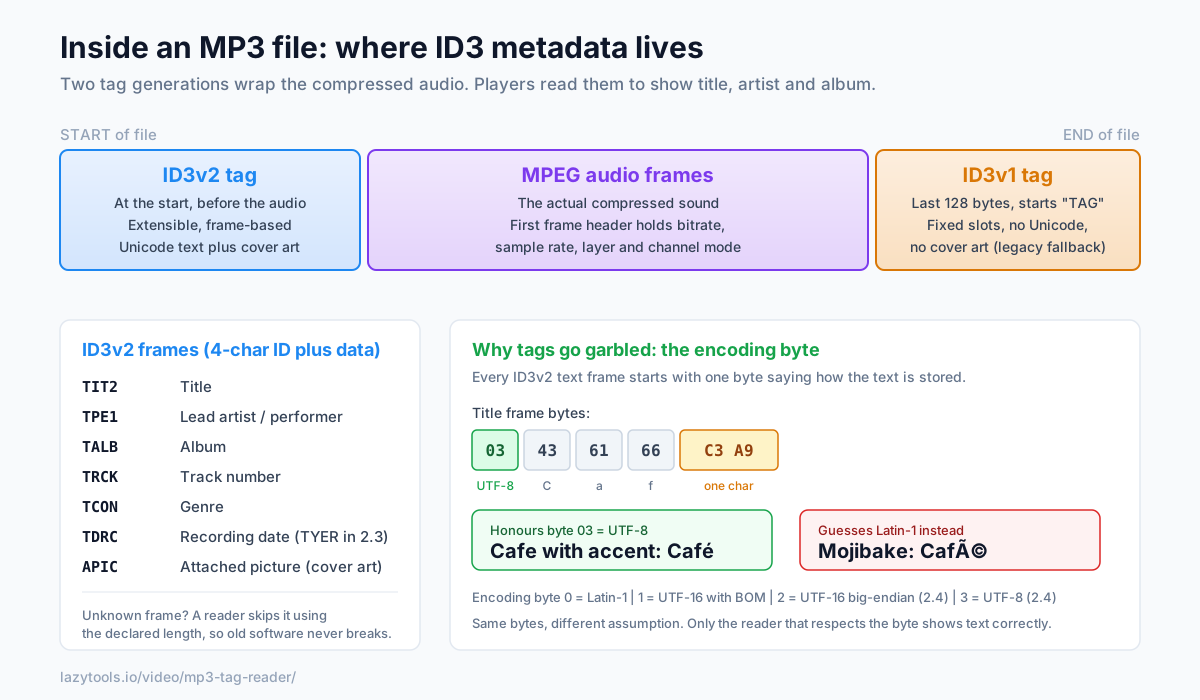
An MP3 file is mostly compressed audio frames, but it also carries metadata describing the track: title, artist, album, year, genre, track number, cover art and more. That metadata is stored in ID3 tags (the name comes from “IDentify an MP3”). Without them, your library would be a wall of filenames. There are two generations of the format, and a single file often carries both at once, ID3v2 at the front and ID3v1 at the back, which is exactly why two apps can occasionally show slightly different details for the same song.
ID3v1: the 128-byte relic
The original ID3v1 is dead simple: a fixed 128-byte block at the very end of the file, starting
with the letters TAG. It has fixed-size slots and nothing more:
| Field | Size |
|---|---|
| ”TAG” marker | 3 bytes |
| Title | 30 bytes |
| Artist | 30 bytes |
| Album | 30 bytes |
| Year | 4 bytes |
| Comment | 30 bytes |
| Genre | 1 byte (a number into a fixed list) |
Its limits are obvious: titles longer than 30 characters get truncated, there’s no Unicode, no cover art, and the genre is just a number into a predefined list (17 = Rock, 13 = Pop…). A later tweak, ID3v1.1, stole the last two bytes of the comment field to squeeze in a track number, which is why some old files show a track and others don’t. The whole format survives today only as a fallback for software too old to understand ID3v2.
ID3v2: the modern format
ID3v2 is what essentially everything writes today. It sits at the start of the file (so players read it without scanning the whole thing) and is built from frames, each a four-character ID plus a length and its data. A handful of frames cover almost everything you see in a player:
| Frame ID | Holds |
|---|---|
TIT2 | Title |
TPE1 | Lead artist / performer |
TALB | Album |
TCON | Genre |
TRCK | Track number |
TYER / TDRC | Year / recording date |
TCOM | Composer |
COMM | Comment |
APIC | Attached picture (cover art) |
Because the format is frame-based it is extensible: a reader that meets a frame ID it doesn’t
recognise simply skips it using the declared length, so new frame types never break old software. It
supports long Unicode text and can embed a full-resolution album cover right in the file. Versions
2.3 and 2.4 are the common ones in the wild. The main practical difference: 2.4 stores every
frame size as a “synchsafe” integer (seven usable bits per byte) so tag bytes can never be mistaken for
an MPEG audio sync signal, and it adds UTF-8 as a text option. Note that the year moved from the TYER
frame in 2.3 to the combined TDRC date frame in 2.4, a common reason a “year” field looks empty after
a version change.
Why tags sometimes look garbled
Each ID3v2 text frame begins with an encoding byte that declares how the following text is stored:
| Byte | Encoding | Available in |
|---|---|---|
| 0 | Latin-1 (ISO-8859-1) | 2.3 and 2.4 |
| 1 | UTF-16 with BOM | 2.3 and 2.4 |
| 2 | UTF-16 big-endian | 2.4 only |
| 3 | UTF-8 | 2.4 only |
If a player ignores that byte and just guesses an encoding, non-Latin or accented text becomes mojibake, the classic example is “Café” turning into “Café” when UTF-8 bytes are misread as Latin-1. Cyrillic, Greek, Japanese and Chinese titles suffer the worst, sometimes collapsing into rows of question marks. A reader that honours the declared encoding byte shows the text exactly as it was written. This mismatch is the single most common cause of “weird characters” in music libraries, and it is why the same file can look fine in one app and broken in another.
A worked example
Say a track’s title frame holds the bytes 03 43 61 66 C3 A9. The first byte, 03, declares UTF-8.
The remaining bytes 43 61 66 C3 A9 decode as C, a, f, and then the two-byte UTF-8 sequence
C3 A9, which is é, giving the correct Café. A naive reader that assumed Latin-1 would treat
C3 and A9 as two separate characters (à and ©) and display Café. Same bytes, different
assumption, and only one of them respects what the file actually said.
Bitrate and sample rate live elsewhere
One thing ID3 tags don’t store is the audio spec. The bitrate, sample rate, MPEG version, layer and channel mode come from the MPEG audio frame header, a 4-byte header that begins every audio frame, starting with a run of “sync” bits. Read the first frame header and you know how the audio was encoded.
For variable-bitrate (VBR) files the average bitrate alone would give a wrong duration, so encoders write a small Xing (or Info, for constant-bitrate) header inside the first frame recording the total frame count and often the total byte size. Multiplying the frame count by the samples-per-frame and dividing by the sample rate yields an exact duration instead of a guess. That is why a good reader can show, say, 4:33 precisely rather than an estimate that drifts by several seconds on a VBR file.
Reading vs editing: nothing touches the audio
It is worth stressing that tags and audio are separate regions of the file. Reading a tag just parses those metadata bytes. Even editing a tag only rewrites the metadata block, the compressed audio frames are never decoded or re-encoded, so there is no generation loss and no change in sound quality. The only thing that shifts is where the audio starts, because a larger ID3v2 tag pushes it slightly later in the file. (Many encoders leave padding after the tag precisely so small edits don’t require rewriting the whole file.)
Read a track’s tags privately
Because all of this is embedded in the file, you can read it without any server round-trip. The
MP3 Tag Reader parses the ID3v2 and ID3v1 tags and the MPEG frame header
entirely in your browser: drop in an .mp3 and it shows the title, artist, album, genre, year and track
, decoded in the correct character set, so no mojibake, plus the bitrate, sample rate, channel mode and
duration read straight from the frame header. The file never leaves your device. It reads tags; it
doesn’t change them, so it’s a safe way to inspect a library and diagnose exactly why a stubborn track
displays the way it does. For how lossless and other formats store the same kind of metadata, see
FLAC vs MP3 vs WAV.
Frequently asked questions
What are ID3 tags?
ID3 tags are blocks of metadata embedded inside an MP3 file that store information about the track, title, artist, album, year, genre, track number, cover art and more. They're what your music player reads to display a song's details instead of just the filename. There are two generations: the older ID3v1 and the modern ID3v2.
What's the difference between ID3v1 and ID3v2?
ID3v1 is a fixed 128-byte block at the very end of the file with room for only short title, artist, album, year, comment and a single genre number. ID3v2 sits at the start of the file, is extensible, supports long Unicode text, many frame types and embedded cover art, and is what modern software writes. Many files contain both; players prefer ID3v2.
Why do some MP3 tags show garbled or weird characters?
Because ID3 text can be stored in several character encodings, Latin-1, UTF-16 or UTF-8, and each text frame declares which one it uses. If a player assumes the wrong encoding, accented or non-Latin characters turn into mojibake (garbled symbols). A reader that respects the declared encoding byte shows the text correctly.
Where in the file are ID3 tags stored?
ID3v2 is at the very beginning of the file, before the audio, so players can read metadata without scanning the whole file. ID3v1, when present, is the last 128 bytes of the file, starting with the letters 'TAG'. The MP3 audio frames sit in between.
Can I read an MP3's bitrate and sample rate from the file?
Yes. Those come from the MPEG audio frame header, not the ID3 tag. The first frame header encodes the MPEG version, layer, bitrate, sample rate and channel mode. For variable-bitrate files, a Xing/Info header near the start stores the frame count so the exact duration can be computed.
Does editing ID3 tags change the audio?
No. Tags are metadata stored alongside the audio frames; changing a title or artist doesn't touch the compressed audio, so there's no quality loss and no re-encoding. Reading tags, as this tool does, never modifies the file at all.