
explainer
An Online Notepad That Saves in Your Browser (Not the Cloud)
By Uttam Regmi · Published 2026-08-06 · Updated 2026-08-23 · 5 min read · Fact-checked, sources cited
Search “online notepad” and most results are apps that quietly upload every keystroke to their servers. For a quick, private jot that’s overkill, and a privacy cost. A browser-only notepad keeps the note on your device using the browser’s built-in localStorage, so nothing is ever sent anywhere, it works offline, and there’s no account. This guide explains exactly how that works, how it compares to cloud notes, its genuine trade-offs and storage limits, and how to keep anything important safe, using the Online Notepad.
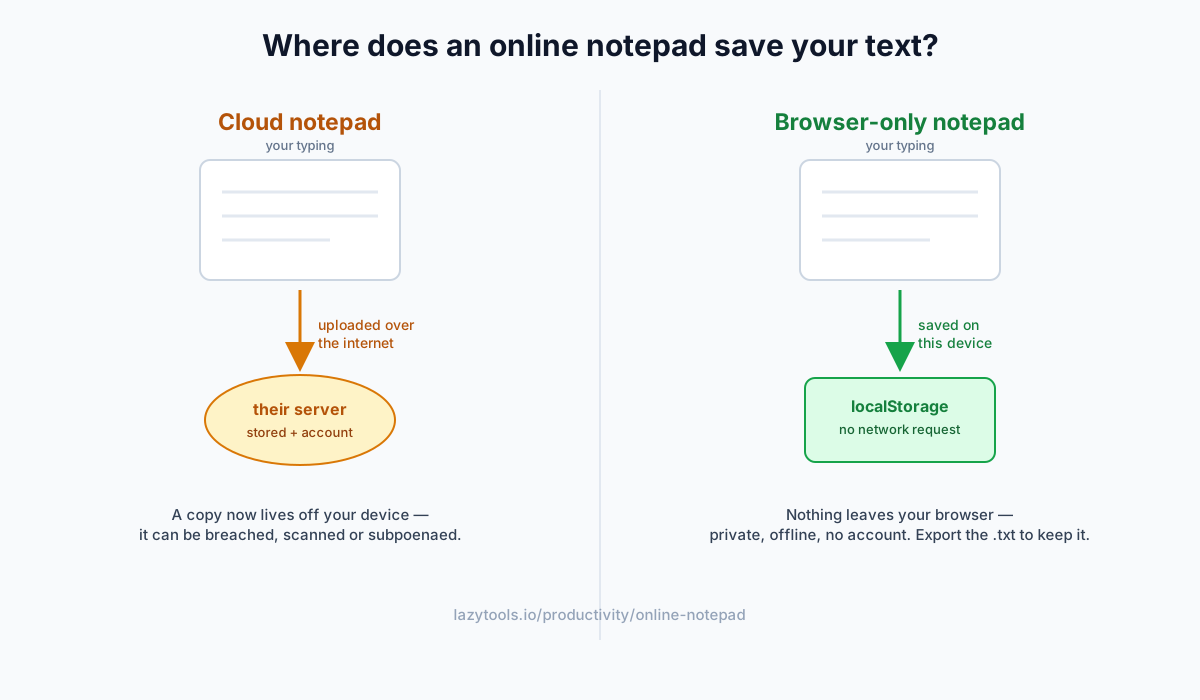
Two very different kinds of “online notepad”
The phrase hides a big distinction that decides how private your notes are:
| Cloud notepad | Browser-only notepad | |
|---|---|---|
| Where notes live | Company’s servers | localStorage on your device |
| Account needed | Usually | No |
| Syncs across devices | Yes | No |
| Works offline | Rarely | Always |
| Server copy exists | Yes | No |
| Best for | Long-term, multi-device docs | Fast, private, throwaway notes |
Neither is universally “better”, but for the things people actually paste into a random note site (a one-time code, a draft message, a snippet of client work), the browser-only kind is the right call.
How local autosave works (localStorage)
Every browser ships a small built-in key-value store called localStorage. A browser notepad uses it like this:
- You type.
- A moment after you pause, the note is written to localStorage under a key for the site (a “debounce”, so it isn’t saving on every single keystroke).
- Reopen the page and it reads that key back, restoring your note exactly where you left it.
There’s no save button, no login and no network request, which is precisely why it works offline and why nothing leaves your device. A “Saved” indicator confirms the write succeeded. Unlike cookies, localStorage is never attached to network requests, so the text can’t leak to a server even by accident.
Why local storage is more private
Because the text never touches a server:
- No server copy to be hacked, leaked, subpoenaed, or scanned for advertising.
- No account linking the note to your identity or email.
- Nothing to phone home, with the network off, it physically cannot upload.
That makes a local notepad a good fit for exactly the sensitive scraps people jot down: a verification code, a password hint, a half-written message, a piece of work you can’t paste into someone else’s cloud.
The trade-offs (and how to handle them)
Local storage is private precisely because it’s tied to one browser, and that has consequences worth knowing:
- It doesn’t sync. Another browser or device won’t show the note.
- Clearing browsing data erases it, “clear cookies and site data” wipes localStorage too.
- Incognito/private windows forget it when the session ends.
- It isn’t encrypted at rest, so anyone using your computer and browser profile can read it.
The fix for all of these is the same one habit: download the .txt (or copy it out) whenever a note matters. Treat the browser copy as a live scratchpad and the exported file as the keeper. If you need multi-device sync and privacy, save the .txt into your own encrypted drive or password manager rather than a notes cloud.
How much can it hold?
Plenty for text. localStorage gives each site roughly 5 MB (some browsers up to 10 MB), on the order of 2-5 million characters, or a book’s worth of notes. It stores strings only, so it’s ideal for plain text but not for images or attachments. For everyday jotting you’re extremely unlikely to hit the ceiling.
Small habits that make it better
- One note, one job. Because it’s instant and local, it shines as a scratchpad, codes, drafts, to-dos, rather than a document manager.
- Export before you clean up. Running a browser cleaner or “clear site data” will erase it, so download first.
- Watch the counts. A live word/character/line count and reading time help when you’re drafting to a length.
- Keyboard-first. No mouse trip to a save button means your train of thought isn’t interrupted.
Jot something down, privately
The Online Notepad is a distraction-free writing box that autosaves to your browser as you type, shows a live word, character and line count plus reading time, and lets you download or copy the note any time, with nothing ever uploaded. Open it, start typing, and it remembers your note the next time you come back, online or off. It’s part of the same privacy-first productivity toolkit, tools that keep your data on your device.
Frequently asked questions
Does an online notepad save my notes automatically?
A good one does. It writes your text to the browser's local storage a moment after you stop typing, with no save button and no account. Reopen the page in the same browser and the note is still there. The LazyTools Online Notepad shows a 'Saved' indicator so you know it's stored.
Where are my notes stored, is it the cloud?
In a browser-only notepad, notes are stored in localStorage on your own device, not on a server. Nothing is uploaded. That's the opposite of most 'online notes' apps, which sync to their servers (and their accounts). Local storage means the note stays on the machine you typed it on.
Is a browser notepad private?
More private than a cloud one, yes: because the text never leaves your browser, there's no server copy to be breached, subpoenaed, scanned or used for ads. The trade-off is that anyone with access to your computer and browser profile can open the same browser and see it, so it's private from the internet, not from someone at your keyboard.
Will my note still be there after I close the tab or restart?
Yes, as long as you use the same browser on the same device and don't clear its site data. localStorage persists across tabs, reloads and restarts. It does not follow you to another browser or device, and private/incognito windows discard it when the session ends.
How much text can a browser notepad hold?
localStorage gives each site roughly 5 MB per browser (some browsers allow up to 10 MB). That is around 2-5 million characters, enough for a very long document, so for plain-text notes you are unlikely to hit the limit. It stores text only, not images or files.
How do I back up or move a note?
Download it as a .txt file (or copy it out). Because a local note is tied to one browser, exporting is the way to keep a permanent copy or move it to another device, think of the browser copy as a working scratchpad, and the .txt as the archive.
Does it work offline?
Yes, since everything runs in your browser with no server calls, a browser notepad keeps working with no internet connection. Your typing and autosave don't depend on being online, which is why it also loads instantly.