
explainer
Sample Rate, Bit Depth and the WAV File Format Explained
By Uttam Regmi · Published 2026-08-03 · Updated 2026-08-23 · 6 min read · Fact-checked, sources cited
“44.1 kHz, 16-bit, stereo” is on every audio file’s spec sheet, but what do those numbers actually mean, and where does the file keep them? Understanding sample rate and bit depth (and the simple container that stores them) makes it obvious why a WAV is the size it is and how long it plays. Here’s the breakdown, plus how to read any file’s header with the WAV / AIFF Inspector.
Sample rate: how often the sound is measured
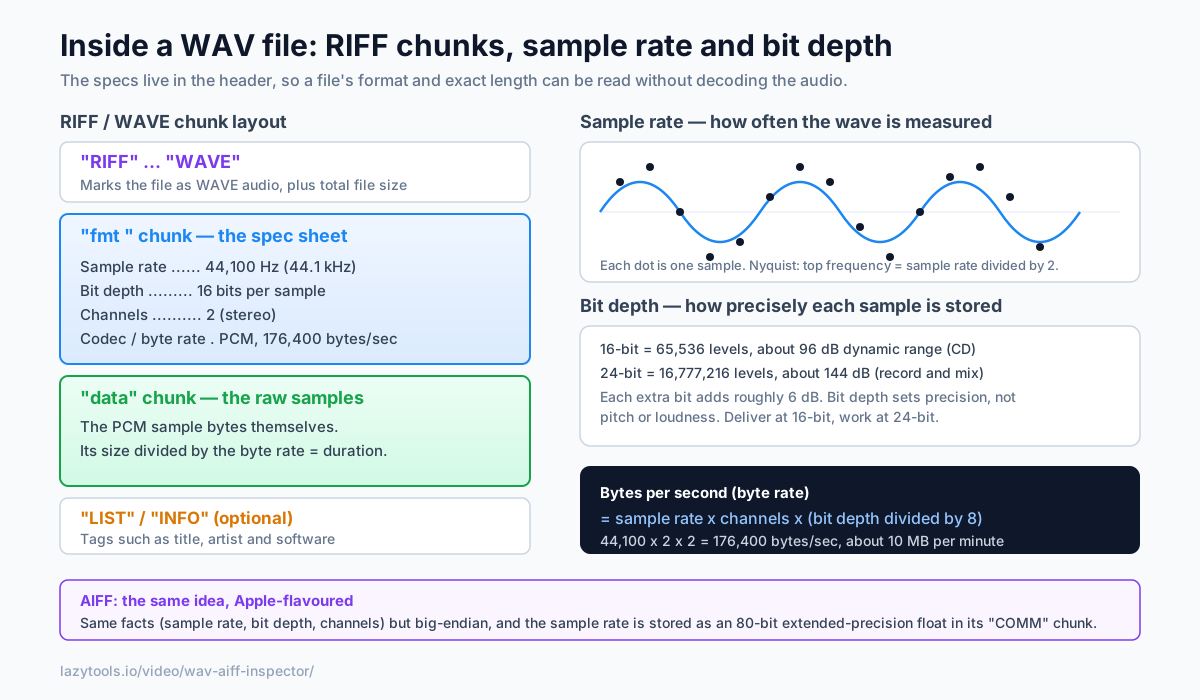
Digitising sound means measuring the waveform’s height many times per second. Each measurement is a sample, and the sample rate is how many you take per second, in hertz.
- 44.1 kHz (44,100 samples/sec), the CD and streaming standard.
- 48 kHz, the video/film standard.
- 96 kHz / 192 kHz, high-resolution recording.
Why 44.1 kHz specifically? The Nyquist theorem says a sample rate can faithfully capture frequencies up to half its value, the Nyquist frequency. Human hearing tops out around 20 kHz, and 44.1 kHz / 2 = 22.05 kHz covers it with a little room for the anti-aliasing filter to roll off cleanly. The odd-looking 44,100 figure is a historical artefact: it fit neatly onto the video tape recorders used to master the first digital audio, and it stuck as the CD standard. Higher rates mainly help during production, not playback.
Here’s how the common rates line up with what they’re used for and the highest frequency each can represent:
| Sample rate | Nyquist limit | Typical use |
|---|---|---|
| 8 kHz | 4 kHz | Telephone / voice |
| 44.1 kHz | 22.05 kHz | CD, streaming, music delivery |
| 48 kHz | 24 kHz | Video, film, broadcast |
| 96 kHz | 48 kHz | High-resolution recording |
| 192 kHz | 96 kHz | Studio mastering, archival |
Recording above 48 kHz doesn’t make audible frequencies “sound better” on its own, the extra range sits above hearing, but it gives processing like pitch-shifting and steep filtering more room to work before artefacts creep into the audible band.
Bit depth: how precisely each sample is stored
Each sample’s height has to be rounded to a number, and bit depth is how many bits that number gets. More bits mean finer steps and a wider dynamic range (the gap between the quietest and loudest sound before noise or clipping):
- 16-bit → ~96 dB dynamic range (CD quality).
- 24-bit → ~144 dB, the extra headroom engineers want while recording and mixing.
Bit depth doesn’t change pitch or “loudness”. It changes precision. Each extra bit doubles the number of levels available and adds roughly 6 dB of dynamic range: 16 bits give 65,536 possible levels, while 24 bits give over 16 million. That deeper “floor” is why engineers record at 24-bit. You can set levels conservatively to avoid clipping and still keep the quiet detail well above the quantisation noise. The rule of thumb: record and mix at 24-bit, deliver at 16-bit.
A quick reference for the common depths:
| Bit depth | Levels per sample | Approx. dynamic range | Where it’s used |
|---|---|---|---|
| 8-bit | 256 | ~48 dB | Legacy / retro, gritty samples |
| 16-bit | 65,536 | ~96 dB | CD, streaming delivery |
| 24-bit | 16,777,216 | ~144 dB | Recording, mixing, mastering |
| 32-bit float | , | practically unclippable | DAW internal processing, field recorders |
32-bit float is a special case: instead of fixed steps it stores each sample as a floating-point number, so levels that would “clip” in a fixed-point file can be pulled back down later without damage. It’s a working format, not a delivery one. You still export to 16- or 24-bit at the end.
Putting it together: file size and duration
Sample rate and bit depth directly determine the data rate of uncompressed audio:
bytes per second = sample rate × channels × (bit depth ÷ 8)
For 44.1 kHz, 16-bit, stereo that’s 44,100 × 2 × 2 = 176,400 bytes/sec (~1.4 Mbit/s). Divide the audio data size by that and you get the exact duration, no decoding required. It’s also why uncompressed audio is big: about 10 MB per minute at CD quality (which is the whole reason lossy codecs exist, see WAV vs MP3).
Worked example. Say a WAV’s data chunk is 30,870,000 bytes. First find the byte rate from its
fmt chunk, 44.1 kHz, 16-bit, stereo gives 176,400 bytes/sec. Then 30,870,000 ÷ 176,400 = 175
seconds, or 2 minutes 55 seconds. No player, no decoder, just two numbers pulled straight from the
header.
Switching the specs scales the size predictably. The same three-minute stereo recording weighs:
| Specs | Byte rate | Size of a 3-minute file |
|---|---|---|
| 44.1 kHz / 16-bit | 176,400 B/s | ~30.3 MB |
| 48 kHz / 24-bit | 288,000 B/s | ~49.4 MB |
| 96 kHz / 24-bit | 576,000 B/s | ~98.9 MB |
Doubling the sample rate or bumping the bit depth from 16 to 24 doesn’t touch the audible content much, but it does grow the file in direct proportion, which is exactly why delivery formats settle back to 44.1 kHz / 16-bit.
Where the specs live: the WAV (RIFF) format
A WAV file is a RIFF container, a list of chunks. The layout is simple:
| Chunk | Holds |
|---|---|
RIFF / WAVE header | Marks the file as WAVE audio + total size |
fmt | Sample rate, bit depth, channels, codec, byte rate |
data | The raw PCM samples |
LIST / INFO | Optional tags, title, artist, software |
Everything on the spec sheet comes from the fmt chunk; the duration comes from the data chunk’s
size. That’s the whole trick to reading a WAV’s metadata. You never touch the audio itself.
AIFF: the same idea, Apple-flavoured
AIFF (Apple’s format) is the same concept with two twists: it’s big-endian, and it stores the
sample rate as an unusual 80-bit extended-precision float in its COMM chunk. Otherwise it carries
the same facts, sample rate, bit depth, channels, and the duration comes from the number of sample
frames divided by the sample rate.
Read a file’s specs instantly, in your browser
Because all of this lives in the header, you can read a file’s specs without decoding a single sample, which means it’s instant even on a huge file. The WAV / AIFF Inspector
parses the RIFF/AIFF chunks entirely in your browser: drop in a .wav or .aiff and it shows the
sample rate, bit depth, channels, codec, bitrate and exact duration, with the audio never leaving your
device, handy for unreleased recordings.
Frequently asked questions
What is sample rate in audio?
Sample rate is how many times per second the audio waveform is measured (sampled) when it's digitised, expressed in hertz. 44,100 Hz (44.1 kHz) means 44,100 measurements per second. A higher sample rate can represent higher frequencies, by the Nyquist theorem, the highest frequency a recording can contain is half its sample rate, so 44.1 kHz covers the ~20 kHz limit of human hearing.
What is bit depth and why does 16-bit vs 24-bit matter?
Bit depth is how many bits store each individual sample, which sets how precisely each measurement is recorded and therefore the dynamic range. 16-bit gives about 96 dB of dynamic range (CD quality); 24-bit gives about 144 dB, leaving more headroom for recording and mixing before quantisation noise becomes audible. More bits mean a bigger file, not a 'louder' or higher-pitched sound.
What sample rate and bit depth should I use?
For final delivery, 44.1 kHz / 16-bit is the CD and streaming standard and is plenty for listening. For recording and mixing, many engineers work at 48 kHz (video standard) or higher and at 24-bit to preserve headroom, then export to 44.1/16 at the end. Match your target platform's spec for the final file.
How is a WAV file structured?
A WAV is a RIFF file: it starts with the tag 'RIFF', a size, and 'WAVE', then a series of chunks. The 'fmt ' chunk stores the audio format, sample rate, bit depth, channel count and codec, and the 'data' chunk holds the raw samples. Optional chunks like LIST/INFO can carry tags such as title and artist. Reading the 'fmt ' and 'data' chunks tells you everything about the file's specs.
How do you calculate a WAV file's duration?
Divide the size of the 'data' chunk by the number of bytes per second. Bytes per second (the byte rate) equals sample rate × channels × (bit depth ÷ 8). So a 44.1 kHz, 16-bit, stereo file uses 44,100 × 2 × 2 = 176,400 bytes per second; a data chunk of that size is exactly one second. This is exact and needs no decoding.
What's the difference between WAV and AIFF?
They're two flavours of the same idea. WAV is Microsoft's RIFF-based format and stores multi-byte numbers little-endian; AIFF is Apple's format, is big-endian, and stores the sample rate as an unusual 80-bit extended-precision float in its 'COMM' chunk. Both hold uncompressed PCM audio and carry the same core information, sample rate, bit depth and channels.