
explainer
What Is a Snowflake ID? How Discord and Twitter Hide a Timestamp in Every ID
By Uttam Regmi · Published 2026-08-02 · Updated 2026-08-23 · 7 min read · Fact-checked, sources cited
A Discord or Twitter/X ID like 175928847299117063 looks random, but it isn’t, it’s a
Snowflake, a 64-bit number with the exact millisecond it was created baked right into its bits.
Decode it and you learn precisely when that message was sent or that account was made, with no API call.
Here’s how the format works, and how to read any ID with the
Snowflake ID Decoder.
The problem Snowflakes solve
When a service like Discord or Twitter creates billions of IDs across many servers, it needs each ID to be unique, generated without a central coordinator, and ideally sortable by time. A random UUID is unique but tells you nothing and doesn’t sort. An auto-incrementing database counter sorts but needs one central authority handing out numbers, a bottleneck.
The Snowflake format (originally from Twitter) threads the needle: pack a timestamp, a machine identifier, and a small counter into one 64-bit integer. Because the timestamp is in the high bits, IDs generated later are always numerically larger, so sorting by ID is sorting by time, and because each machine has its own ID and its own counter, two servers never clash even within the same millisecond.
How the 64 bits are laid out
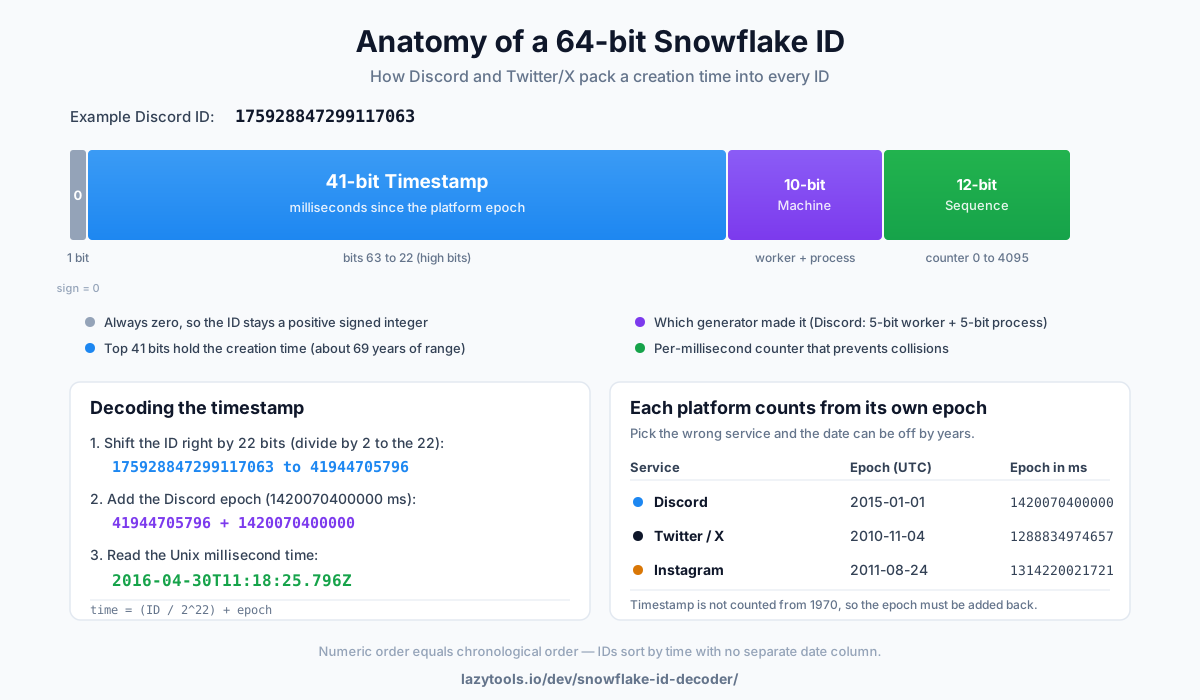
A Snowflake is one 64-bit number, read from the most significant bit down:
| Bits | Field | Meaning |
|---|---|---|
| 1 | Unused/sign | Always 0, so the value stays a positive signed 64-bit int |
| 41 | Timestamp | Milliseconds since the service’s epoch |
| 10 | Machine | Which generator made it (Discord: 5-bit worker + 5-bit process) |
| 12 | Sequence | A per-millisecond counter (0-4095) for that machine |
Those 41 timestamp bits are the interesting part. Forty-one bits of milliseconds is about 69 years of range (2⁴¹ milliseconds ≈ 69.7 years), enough to last decades from whatever start date the platform picks, after which the timestamp field would overflow and need a new scheme.
One thing worth knowing: the 64-bit width and the “timestamp on top” idea are shared, but the exact split of the lower 22 bits is a platform decision, not a universal standard. Twitter’s original design and Discord both use 10 machine bits and 12 sequence bits, but Instagram’s variant reportedly uses a different split (more bits for the shard, fewer for the counter). So treat the table below as “how the major services do it,” not a single spec everyone follows.
| Service | Machine bits | Sequence bits | Notes |
|---|---|---|---|
| Twitter / X | 10 (5 datacenter + 5 worker) | 12 | The original Snowflake design |
| Discord | 10 (5 worker + 5 process) | 12 | Same shape as Twitter |
| wider shard field | narrower counter | Same 41-bit timestamp, different low-bit split |
The epoch: why the same number decodes to different dates
The timestamp doesn’t count from the Unix epoch (1970). Each platform counts from its own epoch:
| Service | Epoch (UTC) | Epoch in ms |
|---|---|---|
| Discord | 2015-01-01 | 1420070400000 |
| Twitter / X | 2010-11-04 | 1288834974657 |
| 2011-08-24 | 1314220021721 |
To recover the real time you shift the timestamp bits down and add the epoch back:
creation time (Unix ms) = (ID ÷ 2²²) + epoch
Because the epoch differs, the same 64-bit number means a different date on each platform. Decode a Discord ID with Twitter’s epoch and you’ll be off by more than four years. That’s why the decoder asks you to pick the service first, it’s choosing which epoch to add.
Worked example: decoding a Discord ID
Take the ID Discord uses in its own documentation, 175928847299117063:
- Shift right 22 bits to drop the machine and sequence bits, leaving the raw timestamp:
41944705796. - Add the Discord epoch
1420070400000→1462015105796ms. - That Unix time is 2016-04-30T11:18:25.796Z, the moment the ID was created.
- The low bits unpack to worker 1, process 0, sequence 7.
The Snowflake ID Decoder does all four steps the instant you paste the ID, and shows the full 64-bit binary split into its three fields so you can see the structure.
Note: decoding needs 64-bit precision. JavaScript’s normal numbers lose accuracy above 2⁵³ (about 9.0 × 10¹⁵), and Snowflakes are routinely larger than that, so a correct decoder (including this one) uses BigInt for the bit math, otherwise the last few digits, and the sequence, come out wrong.
Reversing it: from a date to an ID range
The same arithmetic runs backwards, which is how APIs let you paginate by time. To find the smallest Discord Snowflake that could exist at a given moment, subtract the epoch and shift left 22 bits:
minimum ID for a time = (Unix ms − epoch) × 2²²
For example, midnight UTC on 1 January 2022 is 1640995200000 ms. Subtract Discord’s epoch
(1420070400000) to get 220924800000 ms since the epoch, then multiply by 2²² (4,194,304) to get
roughly 9.27 × 10¹⁷. Any message posted after that instant has a larger ID, so “give me messages
after this Snowflake” is really “give me messages after this time”, no separate date column required.
This is why Discord’s before/after pagination parameters accept Snowflakes directly.
What you can (and can’t) learn from an ID
Because every Discord user, message, channel and guild ID is a Snowflake, decoding one is a quick way to find when something was created:
- A user ID → the account’s registration time.
- A message ID → when the message was sent.
- A channel or server ID → when it was created.
What you can’t get is anything about a person. The worker and process IDs point at the platform’s own servers, not at you; the sequence is just an anti-collision counter. A Snowflake carries a timestamp and some infrastructure bookkeeping, nothing more. It doesn’t encode your name, IP, location, or device, and the machine bits describe which of the platform’s generators handed out the number, which changes as the company reshuffles its own infrastructure.
There’s also a subtle limit on the timestamp itself: it records when the ID was minted, which is essentially when the object was created. For a user account that’s the registration time; for a message it’s the send time. It is not an “edited at” or “last seen” time, later activity doesn’t change the Snowflake, because the number is fixed the moment it’s issued.
Why platforms bother: sorting and pagination for free
The real payoff of putting the timestamp in the high bits is that numeric order equals chronological order. That single property removes work everywhere downstream:
- A database can use the Snowflake as a primary key and get a roughly time-ordered index for free.
- “Newest first” is just
ORDER BY id DESC, no separate timestamp column to sort on. - Cursor-based pagination (“load older messages”) walks the ID space instead of juggling offsets, which stays correct even as new items arrive.
- IDs are generated independently on many machines with no central counter, so the system scales horizontally without a coordination bottleneck.
The trade-off is that Snowflakes are guessable in bulk, because they’re sequential in time, they’re not suitable as unguessable secrets like session tokens or password-reset links. For public object IDs that’s fine and intended; for anything that needs to be unpredictable, a random UUID or a signed token is the right tool instead.
Decode it privately, in your browser
Since decoding is pure arithmetic on the number itself, it never needs a server. The Snowflake ID Decoder runs entirely in your browser, the ID isn’t uploaded or logged, and it works with the network disconnected. Pick the service (or type a custom epoch for any other Snowflake-style scheme), paste the ID, and read the exact creation time.
Frequently asked questions
What is a Snowflake ID?
A Snowflake is a 64-bit unique ID used by Discord, Twitter/X, Instagram and others instead of a random UUID. Unlike a random ID, it's structured: the top bits encode the millisecond the ID was created, and the remaining bits identify the machine that generated it plus a per-millisecond counter. That means you can read the creation time straight out of the number, and IDs sort chronologically.
How do I get the timestamp from a Discord ID?
Take the ID as a 64-bit integer, shift it right by 22 bits to isolate the timestamp portion, then add Discord's epoch of 1420070400000 milliseconds (1 January 2015). The result is the Unix millisecond time the ID was created. A decoder does this for you, paste the ID, choose Discord, and read the date.
Why does the epoch matter?
The timestamp bits count milliseconds from a starting point the platform chose, not from 1970. Discord counts from 2015-01-01, Twitter/X from 2010-11-04, Instagram from 2011-08-24. If you decode with the wrong epoch, the date can be off by years, so you must tell the decoder which service the ID came from.
What are the worker and process IDs inside a Snowflake?
After the timestamp, Snowflakes reserve bits to identify which server generated the ID so two IDs created in the same millisecond on different machines don't collide. Discord splits its 10 machine bits into a 5-bit worker ID and a 5-bit process ID. These describe Discord's infrastructure, not you.
Can I find out when a Discord account or message was created?
Yes. Every Discord user, message, channel and server ID is a Snowflake, so decoding any of them reveals the exact creation time. Decoding a user ID gives the account's registration time; decoding a message ID gives when it was sent, all from the ID alone, with no API call.
Is decoding a Snowflake ID private?
It can be. Decoding is pure arithmetic on the number, so no server is needed. The LazyTools Snowflake ID Decoder runs entirely in your browser, the ID is never uploaded, and it even works offline.