
explainer
What's Inside an MP4 File? Boxes, Atoms and the 'moov' Problem
By Uttam Regmi · Published 2026-08-05 · Updated 2026-08-23 · 7 min read · Fact-checked, sources cited
An MP4 file looks like a single container of video, but inside it’s a neat tree of labelled blocks called boxes (or atoms). Each box has a size and a four-character name, and boxes nest inside one another to form a tree. Understanding that tree explains codecs, metadata, and, most usefully, why some MP4s refuse to play or won’t start streaming. Here’s the structure, and how to look inside any file with the MP4 Box Viewer.
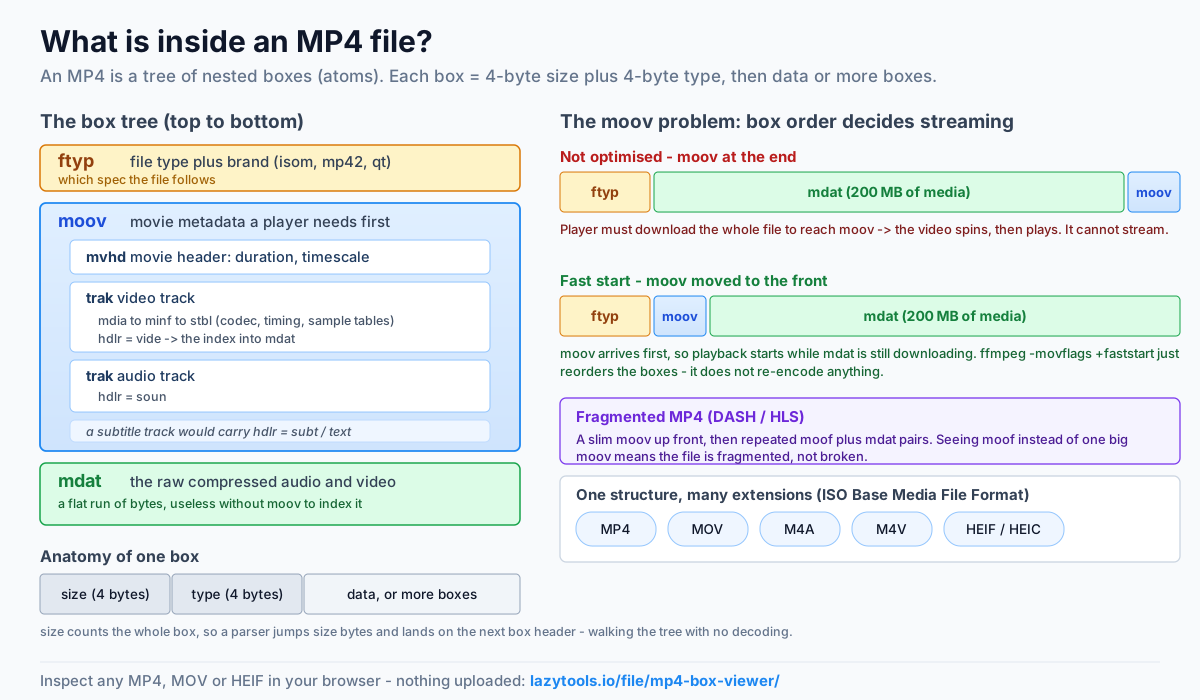
MP4 is a tree of boxes
MP4 and its relatives are built on the ISO Base Media File Format (ISOBMFF), where everything is a box: a size, a four-character type, and then either data or more boxes. Read from the top, a typical MP4 looks like:
ftyp  , file type & brand
moov  , movie metadata (a container)
 ├─ mvhd , movie header (duration, timescale)
 ├─ trak , a track (video)
 │   └─ mdia → minf → stbl → …  (codec, timing, sample tables)
 └─ trak , a track (audio)
mdat  , the actual media samples
Three boxes carry most of the meaning: ftyp (the brand), moov (all the metadata), and
mdat (the media itself).
Anatomy of a single box
Every box begins with an 8-byte header: a 4-byte size followed by a 4-byte type. The size counts the whole
box including the header, so a parser can read the size, jump that many bytes, and land exactly on the next
box’s header, that’s how you walk the tree without decoding anything. Two special sizes exist: a size of
1 means “the real size is a 64-bit value that follows the type” (used for boxes larger than about 4 GB,
such as a big mdat), and a size of 0 means “this box runs to the end of the file.” After the header, a
container box holds more boxes, while a leaf box holds fields, and many boxes are the full box
variant, which adds a 1-byte version and 3-byte flags before its data.
Here are the boxes you’ll meet most often, and what each one is for:
| Box | Lives inside | Container? | What it tells you |
|---|---|---|---|
ftyp | (top level) | leaf | Major brand + compatible brands, which spec the file follows |
moov | (top level) | container | The movie: all metadata a player needs before playback |
mvhd | moov | leaf | Movie header: overall duration and timescale |
trak | moov | container | One track (video, audio or text) |
tkhd | trak | leaf | Track header: track ID, dimensions, enabled flag |
mdia | trak | container | Media information for the track |
hdlr | mdia | leaf | Handler type: vide, soun, subt/text |
stbl | mdia → minf | container | Sample tables, the index into mdat |
mdat | (top level) | leaf | The raw compressed audio/video samples |
moof | (top level) | container | A fragment header (fragmented / streaming MP4) |
Reading just the first level of the tree, ftyp, then moov or mdat, and in which order, already
answers most practical questions about a file. The deeper boxes matter when you want codec detail.
ftyp: what kind of MP4 is this?
The first box, ftyp, declares the file’s brand, a code like isom, mp42 or qt , plus a
list of compatible brands. It tells a player which version of the spec the file follows. If you’ve ever
wondered whether a .mp4 is “really” an MP4 or a QuickTime MOV wearing the wrong extension, ftyp is the
answer.
moov: the box that makes or breaks playback
moov is the movie box, and it holds everything a player needs before it can show a frame: the
track list, durations, codec descriptions and the tables that say where each sample lives in mdat. The
media data in mdat is useless without it.
This is why moov is the source of most “won’t play” problems:
- moov at the end of the file → a player can’t start until it has downloaded the whole thing, so the
video won’t stream progressively. The fix is “fast start”, moving moov to the front (ffmpeg’s
-movflags +faststart). - moov missing or truncated → usually an interrupted recording (a phone that died mid-capture). The
samples may be sitting in
mdat, but with no moov the file is unplayable until it’s rebuilt.
Opening the box tree tells you instantly whether moov is present and whether it comes before or after mdat.
A worked example: two files, same footage
Imagine the same 200 MB clip exported two ways. A player streaming over a slow link behaves very differently depending on box order:
- Not optimised — the top level reads
ftyp, thenmdat, thenmoov. The player downloads the 200 MB of media first just to reach the metadata at the very end, so playback can’t begin until the file is essentially complete. On a web page this looks like a video that spins forever, then suddenly plays. - Fast start — the top level reads
ftyp, thenmoov, thenmdat. The smallmoovarrives in the first moments, the player learns the track layout and sample offsets immediately, and playback starts whilemdatis still downloading.
Same frames, same codec, same file size, only the order of two boxes changed, and one version streams
while the other doesn’t. That single reordering is exactly what ffmpeg -movflags +faststart performs;
it doesn’t re-encode anything, it just rewrites the file with moov moved to the front.
mdat and the tracks
mdat is just the raw, compressed media, often the biggest box by far, and opaque without moov to
index it. mdat carries no labels of its own: it’s a flat run of bytes, and only the sample tables in
moov (the stbl boxes) know where each frame starts, how long it lasts, and which are keyframes. That’s
why a file with a healthy mdat but a damaged moov still won’t play, the media is all there, but the
map is gone.
The trak boxes under moov each describe one track. Inside a track, the hdlr box names its
handler, vide for video, soun for audio, subt/text for subtitles, so you can see at a glance
what streams a file contains. A typical camera clip has two trak boxes (one video, one audio); a screen
recording with captions might have three. Seeing more or fewer tracks than you expect is often the first
clue that an export went wrong.
Fragmented MP4: when moov isn’t the whole story
Not every MP4 keeps all its metadata in one moov. Fragmented MP4 (fMP4), used by adaptive
streaming such as MPEG-DASH and HLS, splits the file into many small pieces. A slim moov at the front
declares the tracks, then the media arrives as repeated moof (movie fragment) + mdat pairs, each
fragment carrying its own timing so a player can start, seek, or switch quality without a giant sample
table. If you inspect a streaming segment and see moof boxes instead of one big moov, that’s expected, it’s a fragmented file, not a broken one.
One structure, many extensions
Because MP4, MOV, M4A, M4V and HEIF/HEIC all sit on ISOBMFF, they share this box layout, the same ftyp/moov/mdat grammar, just different brands and handler types. A .mov from a camera and
a .mp4 from an editor can be almost identical inside; the extension is mostly a hint. A single inspector
reads them all, which is handy when a file has the wrong extension, refuses to open in one app but not
another, or you simply want to confirm what an unfamiliar media file actually is before trusting it.
Look inside any MP4
The box tree lives in the file’s header, so you can read it without decoding a single frame. The
MP4 Box Viewer walks the tree in your browser, showing each box’s type, size and
offset, decoding the brand, duration and track types, and making it obvious where moov sits, so a
“why won’t this play?” file gives up its answer in seconds, with nothing uploaded.
Frequently asked questions
What are MP4 boxes (atoms)?
An MP4 file is built from nested containers called boxes (the older QuickTime term is atoms). Each box has a size, a four-character type (like ftyp, moov, or mdat), and either data or more boxes inside it. The whole file is a tree of these boxes, and reading that tree tells you how the file is organized without decoding any video.
What do ftyp, moov and mdat do?
ftyp is the first box and declares the file's brand, which spec it follows. moov is the 'movie' box holding all the metadata a player needs: track structure, timing, codecs and where the samples are. mdat holds the actual media data (the compressed audio and video). A player reads moov to understand the file, then pulls samples from mdat.
Why won't my MP4 play or stream?
A very common cause is the moov box being missing, truncated, or located at the end of the file. Players need moov before they can start, so if it's at the end, the file won't begin streaming until it's fully downloaded, and if a recording was interrupted, moov may never have been written, leaving an unplayable file. Inspecting the box tree shows immediately whether moov is present and where.
What is MP4 'fast start'?
Fast start (also called web optimization) moves the moov box from the end of the file to the front, so a player can read the metadata immediately and begin playback while the rest downloads. Tools like ffmpeg's -movflags +faststart do this. In the box tree, a fast-start file has moov before mdat.
Do MOV, M4A and HEIF use the same structure?
Yes. QuickTime MOV, M4A audio, M4V video and HEIF/HEIC images are all based on the ISO Base Media File Format, the same box/atom structure as MP4. That's why one inspector can read all of them and show their box trees and track types.
Can I inspect an MP4 without uploading it?
Yes, the box structure is in the file's header region, which can be read locally. The LazyTools MP4 Box Viewer parses the tree in your browser and never uploads the file, so even a private or unreleased video stays on your device.