
how-to
Dropbox Direct Download Links: dl=1 and Raw Hosting Explained
By Uttam Regmi · Published 2026-10-07 · Updated 2026-10-07 · 11 min read · Fact-checked, sources cited
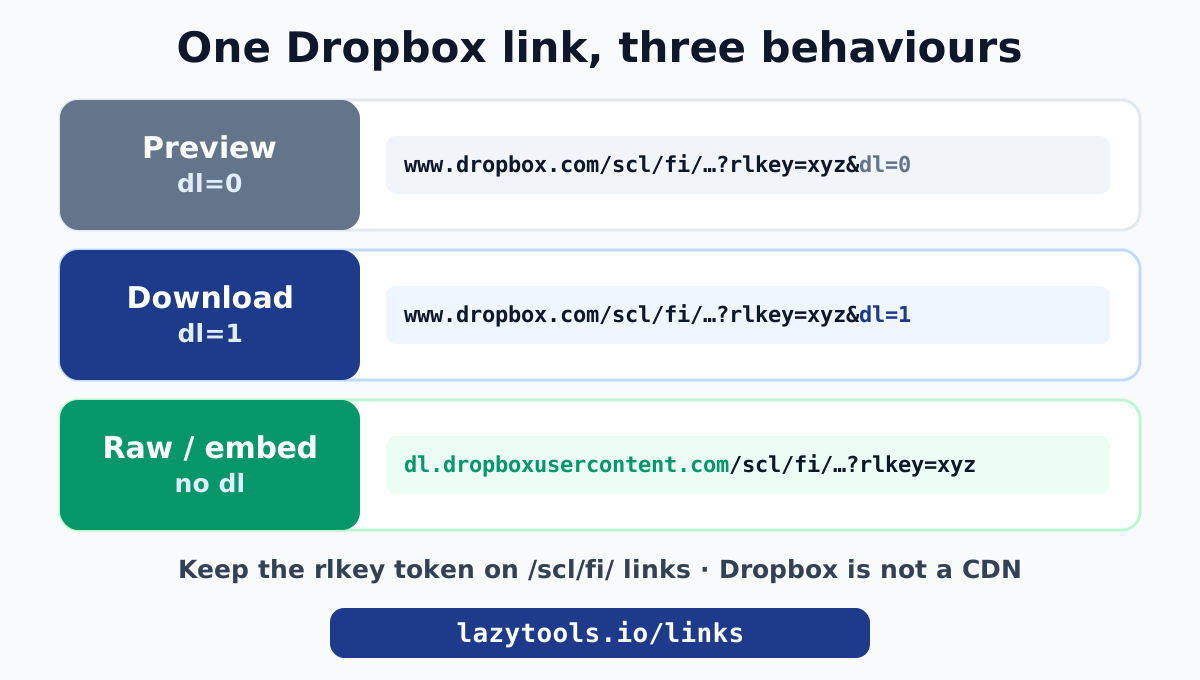
To make a Dropbox link download directly, change the ?dl=0 at the end of the share link to ?dl=1. That one parameter switch tells Dropbox to send the file as a download instead of opening its preview page. For embedding or hot-linking (an image in a page, a file fetched by code), swap the host www.dropbox.com for dl.dropboxusercontent.com, which serves the raw bytes with no Dropbox wrapper. Both transforms are a matter of editing text in the URL, which the Dropbox Direct Download Link Generator does in your browser, keeping the rlkey token the newer links need and sending nothing to any server.
Why a Dropbox share link opens a preview
When you copy a share link in Dropbox, it ends in ?dl=0:
https://www.dropbox.com/scl/fi/abc123/report.pdf?rlkey=xyz789&dl=0Clicking it opens Dropbox’s preview page: the file shown inside Dropbox’s web interface, with a download button, a sign-in prompt and Dropbox branding around it. That dl=0 is literally the instruction. dl stands for “download”, and 0 means “no, show the preview”. Dropbox designed the share link to default to viewing, because most shares are meant to be looked at first.
The useful consequence is that Dropbox made the behaviour controllable through that single parameter. You do not need a different link or a special feature. You change one digit.
Force a direct download with dl=1
Set dl=1 and the exact same link downloads the file immediately:
https://www.dropbox.com/scl/fi/abc123/report.pdf?rlkey=xyz789&dl=1The browser receives the file as an attachment and saves it, skipping the preview page entirely. This is the right choice when you are sending a link to people and you want “click, and the file downloads” with no extra step.
Rules for placing the parameter correctly:
- If the link already ends in
?dl=0, change the0to1. - If the link ends in
&dl=0(because it has other parameters likerlkeyfirst), change that0to1. - If there is no
dlat all, append?dl=1when the URL has no query string, or&dl=1when it already has one (for example after?rlkey=...).
Getting the ? versus & wrong is the classic hand-editing mistake, and it quietly produces a link that Dropbox ignores. The Dropbox Direct Download Link Generator places it correctly every time, whatever the link’s existing parameters.
Raw hosting with dl.dropboxusercontent.com
dl=1 is perfect for a person clicking a link, but it is not ideal for embedding. When you put an image in a web page (<img src="...">) or fetch a file from a script, you do not want a download prompt or any Dropbox page around the bytes. You want the raw file served directly.
For that, change the host:
From: https://www.dropbox.com/scl/fi/abc123/photo.jpg?rlkey=xyz789&dl=0
To:   https://dl.dropboxusercontent.com/scl/fi/abc123/photo.jpg?rlkey=xyz789
dl.dropboxusercontent.com is Dropbox’s content-serving host. It returns the file’s bytes with the right content type and no wrapper, so a browser renders the image inline rather than downloading it. This is the version you reach for when prototyping a page, embedding a file in a quick demo, or pointing a fetch at it.
| Version | Host | dl | Best for |
|---|---|---|---|
| Preview | www.dropbox.com | dl=0 | letting someone view the file in Dropbox |
| Direct download | www.dropbox.com | dl=1 | a link people click to download |
| Raw host | dl.dropboxusercontent.com | (none) | embedding an image, fetching from code |
The new /scl/fi/ links and the rlkey token
Older Dropbox share links looked like dropbox.com/s/HASH/filename. Newer ones look like dropbox.com/scl/fi/ID/filename?rlkey=TOKEN&dl=0. The important change is the rlkey parameter: it is a required access token. Strip it off and the link stops authorising, so the file will not load even though the rest of the URL looks right.
This trips up manual editing and older “Dropbox direct link” tricks that assumed the simple /s/ format. When you convert a /scl/fi/ link you must keep the rlkey intact and only change the dl value or the host. The Dropbox Direct Download Link Generator handles both the classic /s/ links and the modern /scl/fi/ links, preserving rlkey automatically, so the converted link keeps working.
Can you hot-link Dropbox images to a website?
Technically yes, with the dl.dropboxusercontent.com version. Practically, only for low traffic. Dropbox is a file-sync and sharing service, not a content delivery network, and it is within its rights to rate-limit, throttle or temporarily block links that get heavy, sustained traffic (its fair-use bandwidth limits exist precisely to stop Dropbox being used as free image hosting).
So the honest guidance:
- Fine: a prototype, an internal demo, a low-traffic personal page, a one-off embed, a file a small script pulls occasionally.
- Not fine: images or assets on a production website, anything that could get a traffic spike, anything you need to stay up reliably.
For real asset hosting, use proper hosting or a CDN. For serving open-source files, a GitHub raw link through a CDN like jsDelivr is a far more robust pattern than hot-linking a cloud-drive share.
The raw=1 parameter: render instead of download
There is a third behaviour besides dl=0 (preview) and dl=1 (download): raw=1, which tells Dropbox to serve the file so the browser renders it inline rather than downloading it. For some file types this overlaps with the dl.dropboxusercontent.com host, but it is useful to know both exist:
| Parameter / host | Browser behaviour |
|---|---|
?dl=0 | Dropbox preview page |
?dl=1 | force download (save file) |
?raw=1 | serve the file so the browser displays it inline |
dl.dropboxusercontent.com | raw bytes from the content host, no Dropbox page |
In practice, for embedding an image the content-host version is the most dependable, and for a “click to download” link dl=1 is clearest. Dropbox documents all of these in its help article on forcing a shared link to download or render. The LazyTools converter gives you the download and raw-host forms directly so you do not have to remember which parameter does what.
Downloading a Dropbox folder
Like Google Drive, Dropbox treats a folder link differently from a file link. A shared folder opened with dl=1 triggers Dropbox to build a zip of the whole folder and download that, which is handy but produces a server-generated archive rather than a single clean file link. If you need one dependable download URL, share an individual file; if you genuinely want to distribute a set of files as one download, it is often tidier to zip them yourself first (locally, with no upload, using the in-browser zip tool) and share that single zip, which then behaves exactly like any other single-file link.
Bandwidth limits and why Dropbox throttles
The reason “is Dropbox a CDN?” keeps coming up is that Dropbox enforces bandwidth and download limits on shared links, and those limits are much lower than a real hosting service. The exact numbers depend on the account tier (free Basic accounts have far tighter caps than paid or Business accounts), but the principle is fixed: shared links are for sharing, not for serving traffic. When a link exceeds its limit, Dropbox temporarily disables it and visitors see a “this account’s links are generating too much traffic” message.
This is why hot-linking images from dl.dropboxusercontent.com is fine for a prototype but dangerous for anything that might get real traffic: a single popular page can blow through a free account’s daily link bandwidth and take the images down for everyone. If an asset needs to stay up under load, it belongs on real hosting or a CDN, not a Dropbox share link.
How the three cloud services compare
Drive, Dropbox and GitHub all let you turn a share link into a direct link, and they all share the same core caveats (public sharing required, not a CDN). The mechanics differ:
| Google Drive | Dropbox | GitHub | |
|---|---|---|---|
| Direct link made by | rebuilding to uc?export=download | flipping dl=0 to dl=1 | host change + drop /blob |
| Raw/embed host | lh3.googleusercontent.com | dl.dropboxusercontent.com | raw.githubusercontent.com |
| Large-file speed bump | virus-scan interstitial | bandwidth throttling | rate limiting |
| Best for | documents, exports, shared files | quick file shares, downloads | code, configs, open-source files |
| Guide | Drive guide | this page | GitHub guide |
Pick the service your file already lives in; the direct-link trick exists for all three.
Troubleshooting
The dl=1 link still opens a preview. You are probably sharing a folder, not a single file. Dropbox cannot “download” a folder inline the way it downloads one file, so a folder link keeps showing the browser view. Share the individual file instead. Also double-check the ?/& placement of the parameter.
The raw link downloads instead of displaying. Make sure you removed the dl=1 when switching to dl.dropboxusercontent.com. A lingering dl=1 can still force the attachment behaviour. The generator strips it for the raw version.
The link asks for sign-in or says “not found”. The shared link is private, disabled, or the file was moved or deleted. Re-share the file and generate a fresh link; the dl parameter cannot grant access the share link itself does not have.
An embedded image is broken only sometimes. That is the rate-limiting symptom. Dropbox is throttling the host. Move the asset to real hosting.
The older /s/ link format
You will still encounter the classic Dropbox link format, which predates /scl/fi/:
https://www.dropbox.com/s/9f8e7d6c5b/report.pdf?dl=0These /s/ links do not carry an rlkey token; the random string after /s/ is itself the access key. The conversion rules are the same, change dl=0 to dl=1 for a download, or switch the host to dl.dropboxusercontent.com for raw bytes, just with nothing extra to preserve. Dropbox has been migrating shares to the newer /scl/fi/ format, but old /s/ links scattered across documents, emails and bookmarks still resolve, so a converter needs to handle both. The LazyTools tool does: paste either style and it produces the correct direct and raw versions, keeping the rlkey when one is present and leaving it out when it is not.
A compact reference for every form you are likely to meet:
| Link you have | To force download | To get raw bytes |
|---|---|---|
.../s/KEY/file?dl=0 | set dl=1 | host → dl.dropboxusercontent.com, drop dl |
.../scl/fi/ID/file?rlkey=TOK&dl=0 | set dl=1, keep rlkey | host swap, keep rlkey, drop dl |
| a folder link | share individual files instead | zip locally and share the zip |
Dropbox Transfer vs a share link
If your goal is simply to send someone a file once, Dropbox has a separate feature, Dropbox Transfer, that is often a better fit than a shared link. Transfer packages files into a one-off download that is designed to be handed over: the recipient gets a clean download page, you can set an expiry, and the files do not have to live in your main Dropbox structure or inherit its sharing. The trade-off is that Transfer links are meant to expire and are not stable, embeddable URLs.
So the rule of thumb:
- Share link with
dl=1: an ongoing link to a file that stays in your Dropbox, for repeated download or embedding. - Dropbox Transfer: a one-time “here is the file” send that is meant to be temporary.
The direct-link trick in this guide applies to share links. If you find yourself constantly regenerating links for one-off sends, Transfer is the tool you actually want.
Shared link settings: expiry, passwords and access
On paid and Business accounts, a shared link is not just an on/off switch; Dropbox lets you attach controls that change how, and for how long, the direct link works:
- Expiry dates. A link can be set to stop working after a chosen date. A
dl=1version of an expired link expires with it; the download behaviour does not extend the lifetime. - Passwords. A password-protected link shows a prompt before the file is served. A direct-download URL still hits that prompt first, so “direct” does not mean “bypasses the password”. That is by design and is a good thing.
- Who can access. Links can be restricted to team members or specific people rather than “anyone with the link”. A direct URL respects that restriction exactly like the preview link does.
The pattern throughout is consistent with Google Drive and GitHub: the direct-link rewrite changes the behaviour of the link (download vs preview), never the permissions. Access is always controlled by the share settings, and the dl parameter cannot grant access the link does not already have.
Embedding a Dropbox file in a README or Markdown
A frequent use of the raw host is dropping an image into a Markdown file, a README, a forum post or a quick web page. Markdown image syntax points at a URL, and it wants raw bytes, not a preview page:
Using the www.dropbox.com preview URL here would embed a link to Dropbox’s viewer, not the image, so the picture would not render. The dl.dropboxusercontent.com version serves the image itself. This works nicely for a personal note, an issue comment or a prototype. For anything that will get real or sustained traffic, remember the bandwidth limits from the section above: move the asset to proper hosting before it becomes popular, or the image will vanish for everyone when the link is throttled.
Do the conversion privately
Converting a Dropbox link is deliberately simple: dl=1 to force a download, dl.dropboxusercontent.com to serve raw bytes, and always keep the rlkey on newer links. The two traps are putting the parameter in the wrong place and dropping the access token, both of which silently break the link.
The Dropbox Direct Download Link Generator handles every link style and gives you both the direct-download and raw-host versions with one-click copy. Like the rest of the Links and Sharing toolkit, it runs entirely in your browser, so the link you paste is never uploaded. For Google Drive’s equivalent, see How to create a Google Drive direct download link; for serving code and open-source files, see GitHub raw links explained.
Dropbox documents the dl and raw parameters in its article How to force a shared link to download or render.
Frequently asked questions
How do I force a Dropbox link to download?
Change the ?dl=0 at the end of the share link to ?dl=1. The same link then downloads the file instead of opening Dropbox's preview page. If there is no dl parameter, add ?dl=1 (or &dl=1 if the URL already has a query string). The LazyTools Dropbox Direct Download Link Generator does this for you and also gives a raw-hosting version.
What is the difference between dl=1 and dl.dropboxusercontent.com?
dl=1 keeps Dropbox's domain but makes the browser download the file. dl.dropboxusercontent.com serves the raw file bytes with no Dropbox page wrapper, which is what you want for hot-linking an image or fetching the file from code. The generator produces both so you can pick the right one.
Does this work with the new /scl/fi/ Dropbox links?
Yes. The newer /scl/fi/ links carry an rlkey access token in the query string. The converter keeps the rlkey and just sets dl=1 or switches the host, so the resulting link still authorises and works.
Can I hot-link a Dropbox image on my website?
For low traffic you can, using the dl.dropboxusercontent.com version, but Dropbox is explicitly not a content delivery network and may throttle or block heavy hot-linking. For a real site, host the image with proper hosting or a CDN. Use Dropbox direct links for quick shares and prototypes.
Why does my dl=1 link still open a preview page?
Usually the link is a folder link rather than a single-file link, or the dl parameter was added in the wrong place. A folder preview cannot force a download of the whole folder inline. Make sure you are sharing a single file, and that the parameter reads ?dl=1 (or &dl=1 after an existing ?rlkey=...).
Is my Dropbox link or file uploaded to LazyTools?
No. The link is rewritten in your browser with JavaScript. Neither the link nor the file is sent to LazyTools or to Dropbox by the tool. It works offline because it is only editing text in a URL.
Do Dropbox direct links expire?
The link works as long as the shared link exists and remains public. If the owner deletes the file, disables the shared link, or the account's sharing is restricted, both the normal and the direct versions stop working. The dl parameter does not change the link's lifetime.