
explainer
GitHub Raw Links Explained (raw.githubusercontent.com)
By Uttam Regmi · Published 2026-10-07 · Updated 2026-10-07 · 12 min read · Fact-checked, sources cited

A GitHub “raw” link is the URL that serves a file’s actual bytes instead of GitHub’s web viewer: raw.githubusercontent.com/owner/repo/branch/path. A normal file URL, github.com/owner/repo/blob/branch/path, is an HTML page with syntax highlighting, line numbers and buttons wrapped around the file. The raw link strips all of that away and returns just the content, which is what you need to download a file, fetch it from a script, or point an <img> or <script> at it. You convert a blob URL to its raw form by removing /blob and changing the host, which the GitHub Raw Link Generator does in your browser. One caveat up front: the raw host is rate-limited and is not a CDN, so it is for scripts, downloads and docs, not for serving assets to a production website.
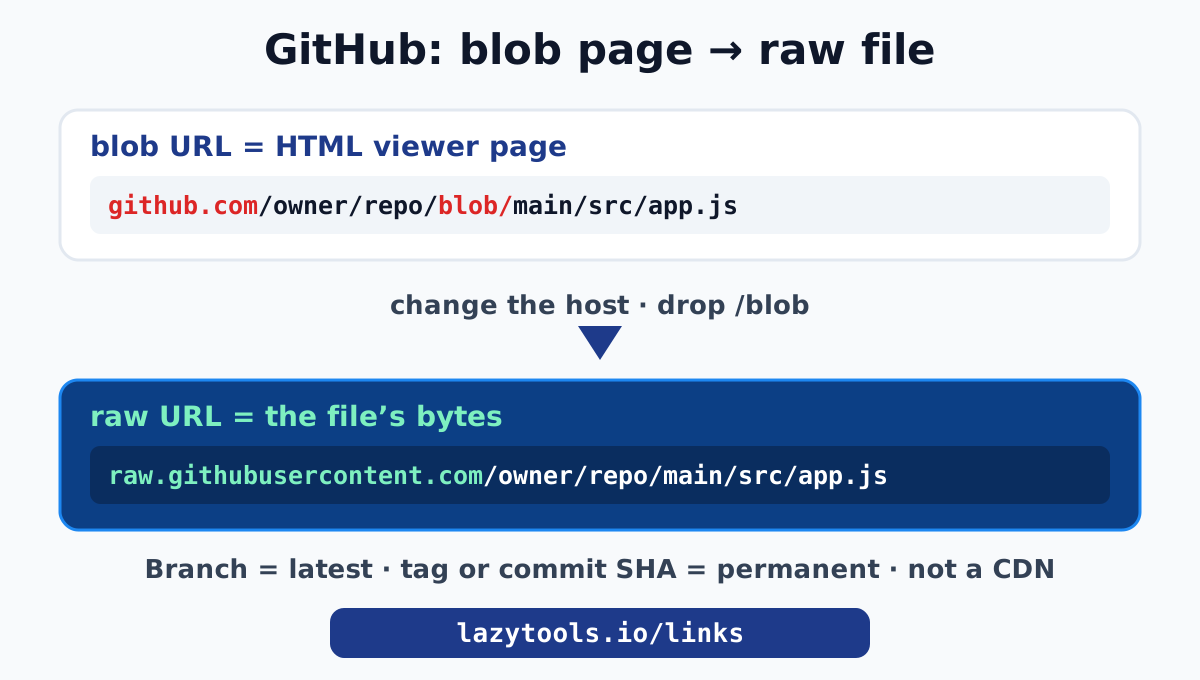
Blob vs raw: two URLs for the same file
Open any file on GitHub and look at the address bar:
https://github.com/octocat/Hello-World/blob/main/README.mdThat blob URL is a web page. GitHub renders the file inside its interface: the file tree on the left, syntax highlighting, line numbers you can link to, a commit history, Edit and Raw buttons. It is built for a human reading code in a browser.
The same file also exists as pure content at a different host:
https://raw.githubusercontent.com/octocat/Hello-World/main/README.mdNotice two differences: the host is raw.githubusercontent.com (not github.com), and the /blob segment is gone. What comes back is just the Markdown text of the README, served as plain content with no page around it. This is the link behind GitHub’s own Raw button, and it is what every “download this file from GitHub” or “fetch this config from a script” use case actually needs.
github.com/.../blob/... | raw.githubusercontent.com/... | |
|---|---|---|
| What it returns | an HTML page (the viewer) | the file’s raw bytes |
Has /blob in the path | yes | no |
| Good for | reading code in a browser | downloading, fetching, embedding |
| Content type | text/html | the file’s real type (or text/plain) |
How the conversion works
Turning a blob URL into a raw URL is a precise rewrite:
- Change the host from
github.comtoraw.githubusercontent.com. - Remove the
/blobsegment. - Keep everything else, the
owner,repo,branch(or tag or commit SHA) and the full filepath, exactly as is.
So:
github.com/octocat/Hello-World/blob/main/src/app.js
                 ↓  (host change + drop /blob)
raw.githubusercontent.com/octocat/Hello-World/main/src/app.js
It is a mechanical transform, which is why the GitHub Raw Link Generator can do it reliably with a single regular expression, entirely in your browser. Paste the blob URL, copy the raw URL. Links that are already on raw.githubusercontent.com are passed straight through unchanged, and folder or repository-root links are rejected with a clear message, because only individual files have a raw form.
Branches, tags and the “latest vs frozen” trap
The segment after the repo name in a raw URL is a git ref, a branch name, a tag, or a commit SHA. Which one you use decides whether the link is a moving target or a permanent record, and this is the most important thing to understand about raw links.
- Branch name (
main,develop): the link always returns the current commit on that branch. Push a change and every raw link against that branch now serves the new content. Great for “always the latest” use, dangerous if you needed the file as it was. - Tag (
v1.2.0): the link returns the file as it existed at that release. Stable as long as the tag is not moved. - Commit SHA (
a1b2c3d...): the link returns the file at exactly that commit, forever. This is a true permalink.
GitHub has a built-in shortcut for the permanent version: on any file page, press the y key and GitHub rewrites the URL to pin it to the current commit SHA. Convert that pinned blob URL and you get an immutable raw link. This matters for anything you reference in documentation, a paper, a dependency, or an install script, where you do not want the content to change out from under you.
| Ref in the URL | Behaviour | Use when |
|---|---|---|
branch (main) | serves latest commit, changes over time | you want current content |
tag (v2.1.0) | serves the released version | you want a specific release |
| commit SHA | serves that exact snapshot, permanent | you need an immutable permalink |
raw.githubusercontent.com is not a CDN
This is the single biggest misuse of raw links, so it deserves its own warning. The raw host is rate-limited and GitHub is explicit that it is not a content delivery network. It exists to serve file content for reasonable, scattered use: a script fetching a config, a reader downloading an example, an image in a README. It is not built to serve assets to a production website under real traffic.
If you hot-link an image or a JavaScript file from raw.githubusercontent.com on a live site, expect:
- throttling once traffic rises,
- no edge caching, so every request travels to GitHub,
- a content type of
text/plainfor many files (GitHub intentionally does not serve raw files with their “real” executable content types in all cases), which can stop browsers treating them as you expect, - and the content silently changing if the URL tracks a branch.
Serving files properly
When you genuinely need to serve an open-source file to the public, use infrastructure built for it:
- GitHub Pages publishes a repo as a real static site with proper hosting.
- jsDelivr is a free, fast CDN that can serve public GitHub files directly. A GitHub file maps to a jsDelivr URL like
cdn.jsdelivr.net/gh/user/repo@version/path. It adds edge caching, correct content types, and the ability to pin a@version, everything the raw host lacks. jsDelivr documents the mapping on its GitHub CDN page.
The rule of thumb: raw links for development, downloads and documentation; a CDN for anything production.
Private repositories
raw.githubusercontent.com only serves public files without authentication. A private repo’s raw URL returns a 404 unless the request carries a valid access token. That is by design, and it is why the GitHub Raw Link Generator never asks for or handles tokens: a client-side convenience tool should not be in the business of touching your credentials. If you need to pull a file from a private repo, use the GitHub API or the gh CLI with proper authentication, not a public raw link.
Why raw links 404 (and how to fix it)
A raw link that returns “404: Not Found” almost always has one of these causes:
- Wrong branch name. The default branch might be
master, notmain, or vice versa. The raw URL has no fallback, so the ref must be exact. - A typo in the path. Raw paths are case-sensitive and must match the repository exactly, including folder names.
- You linked a folder or the repo root. Only individual files have a raw form. A directory has no single set of bytes to serve.
- The file was moved, renamed, or deleted on that ref. The branch moved on; the old path no longer exists there. A commit-SHA permalink avoids this.
- The repo is private. See above; public-only without a token.
The generator catches the structural cases (folder links, non-file URLs, non-GitHub hosts) before you ever hit a 404, telling you the link cannot be raw-linked and why.
Gists, releases and repository archives
The blob to raw rewrite covers files in a normal repository, but GitHub has three more direct-link patterns worth knowing, because people reach for a raw link when one of these is actually the right tool.
Gist raw links. A GitHub Gist file has its own raw URL on gist.githubusercontent.com. On the gist page, each file has a Raw button that points at a URL including a commit-specific hash. As with repo files, a gist raw URL that contains a revision hash is pinned to that revision; the bare “latest” raw link follows the gist as it changes.
Release asset downloads. When a project attaches binaries to a GitHub Release, those are not repository files and have no raw.githubusercontent.com URL. They live at a predictable download path:
https://github.com/owner/repo/releases/download/TAG/asset-name.zipThat is the correct, stable link for distributing a compiled binary, an installer or a packaged asset, and it does not share the raw host’s rate limits in the same way. Use it instead of trying to raw-link a checked-in binary.
Whole-repo archives. To download an entire repository as a zip or tarball, GitHub serves archives from codeload.github.com, which is what the green “Download ZIP” button uses:
https://github.com/owner/repo/archive/refs/heads/main.zip
https://github.com/owner/repo/archive/refs/tags/v1.2.0.tar.gz
So the full picture: raw links for individual source files, release-download links for attached binaries, and archive links for the whole repo.
Content types, caching and Git LFS
A few behaviours of the raw host surprise people and are worth understanding before you depend on it:
- Content type. GitHub often serves raw files as
text/plain(with a nosniff header) rather than their “real” executable types. This is a deliberate security measure so that a malicious file in a repo cannot be served as live HTML or JavaScript that a browser would execute from GitHub’s domain. The practical effect: a browser may show an HTML file from the raw host as text rather than rendering it, which is another reason the raw host is not a substitute for real hosting. - Caching. Raw responses carry a short cache lifetime (on the order of a few minutes), so an edit on a branch can take a little while to appear through the raw URL even though the commit landed immediately. If you need instant propagation or long-lived caching with correct types, a CDN like jsDelivr is the better front end.
- Git LFS files. Files stored in Git Large File Storage do not serve their real contents through
raw.githubusercontent.com; a raw link to an LFS-tracked file returns the small pointer file, not the asset. Download LFS assets through the GitHub interface, the API, or a release instead.
jsDelivr in practice
Because it comes up so often, here is the concrete mapping from a raw GitHub file to a jsDelivr CDN URL:
raw.githubusercontent.com/user/repo/v1.2.0/dist/app.js
                     ↓
cdn.jsdelivr.net/gh/user/repo@v1.2.0/dist/app.js
jsDelivr adds global edge caching, correct content types, optional minification, and a pinnable @version (a branch, tag or commit SHA). Pinning to a tag or SHA is strongly recommended for production so the asset cannot change under you, the same “frozen version” principle as a commit-SHA raw link. jsDelivr documents the full GitHub mapping on its GitHub CDN page. This is the single best answer to “I want to serve an open-source file to the public”: keep the file in GitHub, serve it through jsDelivr, and never point production traffic at the raw host.
Common uses for a raw link
| Task | Why raw |
|---|---|
curl or wget a config, script or dataset | raw returns the file, not a web page |
| A one-line installer (`curl … | bash`) |
fetch() a JSON file from a demo | parses the content directly, no HTML to strip |
| Reference an exact file version in docs | a SHA permalink never drifts |
| Show an example image in a README | light, in-repo image use the raw host handles fine |
Fetching a raw file from the command line and from code
Because the raw URL returns the file and nothing else, it drops straight into the tools that expect file content. A few patterns you will reach for constantly:
# download a file
curl -O https://raw.githubusercontent.com/owner/repo/main/config.yml

# pipe a file somewhere
curl -s https://raw.githubusercontent.com/owner/repo/v1.0/schema.json | jq .

# wget equivalent
wget https://raw.githubusercontent.com/owner/repo/main/data.csv
// fetch and parse JSON in a browser or Node script
const data = await fetch(
"https://raw.githubusercontent.com/owner/repo/main/data.json"
).then((r) => r.json());Two reminders when you automate this. First, pin the URL to a tag or commit SHA if the script must be reproducible, otherwise a push to the branch changes what your script downloads tomorrow. Second, respect the rate limits: a build that fetches the same raw file thousands of times will get throttled, and the fix is to cache it or serve it through jsDelivr. The famous curl ... | bash installer pattern works precisely because the raw URL hands the shell a script’s exact bytes, but you should always read a script before piping it to a shell.
GitHub Pages vs raw vs jsDelivr
When people ask “how do I link a file from GitHub?” they usually have one of three different needs. Matching the need to the right mechanism avoids almost every problem in this article:
| Need | Use | Why |
|---|---|---|
| Read a file in the browser with highlighting | github.com/.../blob/... | the viewer is the point |
| Download or fetch a file in a script or doc | raw.githubusercontent.com/... | returns the file’s bytes |
| Serve a file to a real website or app | jsDelivr (cdn.jsdelivr.net/gh/...) or GitHub Pages | CDN caching, correct types, scale |
| Distribute a compiled binary | release download URL | stable, built for assets |
| Ship a whole project as a static site | GitHub Pages | real hosting on your repo |
The raw host sits in the middle: perfect for the development and documentation use cases, wrong for production serving. Knowing which column you are in tells you which link to build.
Summary
A GitHub raw link is just the file without the website around it: change the host to raw.githubusercontent.com, drop /blob, keep the rest. Choose your git ref deliberately, a branch tracks the latest, a tag or commit SHA freezes a version, and press y on GitHub to get an instant permalink. Above all, remember the raw host is rate-limited and not a CDN; reach for GitHub Pages or jsDelivr when you need to serve files to real traffic.
Build raw links the quick, private way with the GitHub Raw Link Generator, part of the Links and Sharing toolkit. For the cloud-drive equivalents, see How to create a Google Drive direct download link and Dropbox direct download links.
GitHub documents the Raw button and permalinks in Viewing and understanding files and Getting permanent links to files.
Frequently asked questions
How do I get a raw GitHub link?
Open the file on GitHub and click the Raw button in the top-right of the file view, which takes you to its raw.githubusercontent.com URL. Or paste the normal github.com/.../blob/... URL into the LazyTools GitHub Raw Link Generator and it rebuilds the raw link in your browser. Both give the same direct-content URL.
What is the difference between github.com and raw.githubusercontent.com?
github.com/owner/repo/blob/branch/path is an HTML page: GitHub's file viewer with line numbers, syntax highlighting and buttons wrapped around the file. raw.githubusercontent.com/owner/repo/branch/path is just the file's bytes, served as plain content. Use github.com to read a file in the browser; use the raw host to download it, fetch it from a script, or point an img or script tag at it.
Is raw.githubusercontent.com a CDN I can use for my website?
No. GitHub rate-limits the raw host and states it is not a content delivery network, so it is wrong for serving assets to a production site. For that, use GitHub Pages or a real CDN. jsDelivr can serve public GitHub files through a proper CDN at cdn.jsdelivr.net/gh/user/repo@version/path, which is the robust option for open-source assets.
Does a raw link always show the latest version of the file?
If the URL contains a branch name like main, yes: it returns the current commit on that branch, so the content changes as the branch moves. To freeze a specific version, use a link built against a tag or a commit SHA instead of a branch name. On GitHub you can press 'y' on a file page to rewrite the URL to a permanent commit SHA.
Does the GitHub raw link generator work for private repositories?
No. raw.githubusercontent.com only serves files from public repositories without authentication. A private-repo raw URL requires an access token, and this client-side tool deliberately never handles tokens, so it only converts public file links.
Why does my raw link 404 when the file clearly exists?
Most often the branch name in the URL is wrong (for example, main versus master), the path has a typo, or you linked a folder or the repo root rather than a specific file. Raw links only resolve to individual files on a real branch, tag or commit. Links already pointing at raw.githubusercontent.com are passed through unchanged by the generator.
Is the link I paste sent to a server?
No. The generator parses the owner, repo, branch and path out of the blob URL and rebuilds the raw URL with JavaScript in your browser. Nothing is uploaded; it works offline because it is only rewriting text.