
how-to
How to Create a Google Drive Direct Download Link
By Uttam Regmi · Published 2026-10-07 · Updated 2026-10-07 · 12 min read · Fact-checked, sources cited
To make a Google Drive link download directly, replace the share URL with Google’s own download endpoint: https://drive.google.com/uc?export=download&id=FILE_ID. The FILE_ID is the long string of characters in your share link (the part after /d/ or id=). Clicking the rebuilt link starts the download immediately instead of opening Drive’s preview page. The only requirement is that the file is shared as “Anyone with the link”. You can build the URL by hand from the steps below, or paste any Drive, Docs, Sheets or Slides link into the Google Drive Direct Download Link Generator, which does it in your browser without a sign-in and without uploading anything.
Why a normal Google Drive link does not download
When you click Share in Google Drive and copy the link, you get something like this:
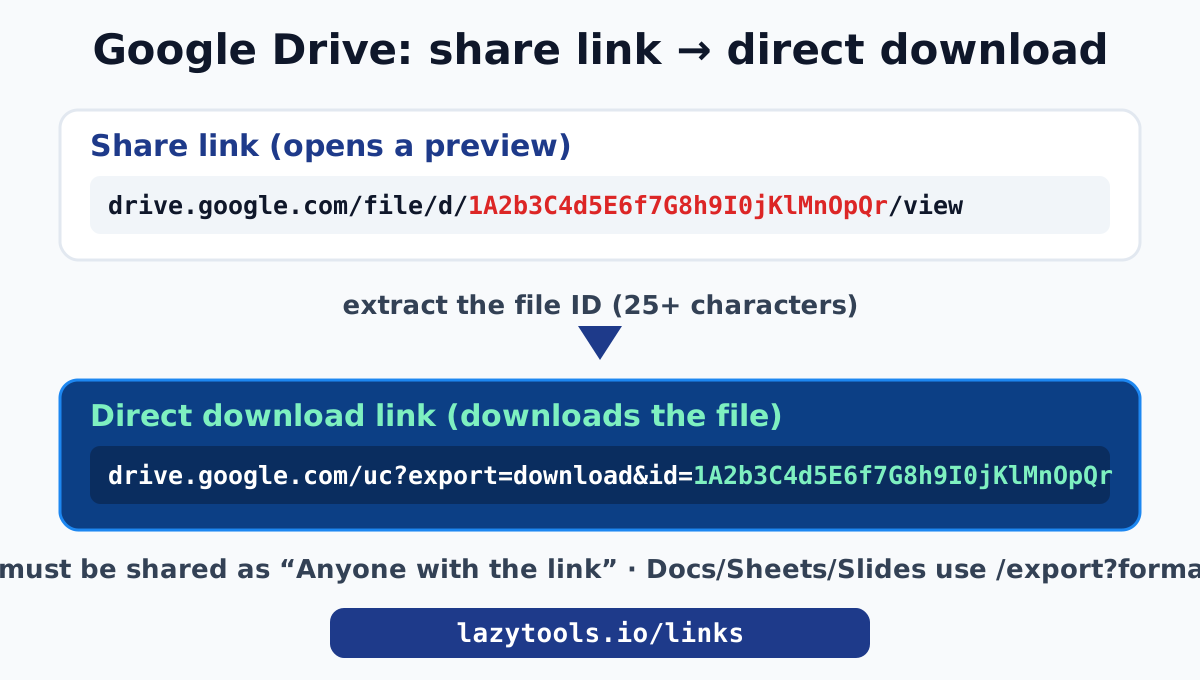
https://drive.google.com/file/d/1A2b3C4d5E6f7G8h9I0jKlMnOpQrStUvW/view?usp=sharingClicking that link does not download the file. It opens Drive’s preview page: a web viewer with the file name, a toolbar, a download button in the corner and (for images and PDFs) a rendered preview. That is the right behaviour when you want someone to look at a file, but it is friction when you want them to simply get the file. They have to find and click the download button, and some file types show “No preview available” first.
The preview page exists because drive.google.com/file/d/.../view is an HTML page, not the file. Google wraps every shared item in a viewer. To skip the viewer and deliver the raw bytes, you point at a different Google endpoint, one built for downloading rather than viewing.
What a direct download link looks like
Google exposes a download endpoint that takes the file ID as a query parameter:
https://drive.google.com/uc?export=download&id=FILE_IDThe pieces:
| Part | Meaning |
|---|---|
drive.google.com/uc | Google’s “user content” endpoint that serves file bytes |
export=download | tells Google to send the file as an attachment, not a preview |
id=FILE_ID | the specific file to serve |
This is the same endpoint Google itself uses behind the scenes. It is a long-standing convenience rather than a formally contracted API, which means it is reliable but could change if Google reworks Drive. For everyday sharing, downloads and prototypes it works exactly as you would expect.
Step by step: build the link by hand
You do not need any tool to do this. You need the file ID.
1. Open the file’s share link
In Drive, right-click the file, choose Share, make sure access is set correctly (see the permissions section below), then Copy link. You now have a /file/d/.../view URL on your clipboard.
2. Find the file ID
The file ID is the long run of letters, numbers, hyphens and underscores, usually 28 to 44 characters. Its position depends on the link style:
| Link style | Where the ID sits |
|---|---|
drive.google.com/file/d/FILE_ID/view | between /d/ and /view |
drive.google.com/open?id=FILE_ID | after id= |
drive.google.com/uc?id=FILE_ID&export=... | after id= |
docs.google.com/.../d/FILE_ID/edit | between /d/ and /edit (Docs/Sheets/Slides) |
In the example above, the ID is 1A2b3C4d5E6f7G8h9I0jKlMnOpQrStUvW.
3. Drop the ID into the download URL
Assemble:
https://drive.google.com/uc?export=download&id=1A2b3C4d5E6f7G8h9I0jKlMnOpQrStUvWThat is your direct download link. Paste it in a fresh browser tab to test it: it should begin downloading the file rather than showing a preview.
The faster way
Copying IDs out of URLs by hand is fiddly and easy to get wrong (grab one character too few and the link silently fails). The Google Drive Direct Download Link Generator does the parsing for you: paste any Drive, Docs, Sheets or Slides share link and it extracts the ID and prints the ready-to-copy download URL, plus the correct export formats for Google’s editor files. Because it runs entirely in your browser, the link you paste is never sent to a server, which matters when the URL points at something you have not published yet.
Google Docs, Sheets and Slides use a different endpoint
Native Google editor files (Docs, Sheets, Slides) are not stored as ordinary files, so the uc?export=download endpoint does not apply to them. Instead they have an export endpoint that converts the live document into a chosen format on the fly:
| File type | Direct export URL | Formats |
|---|---|---|
| Google Sheets | docs.google.com/spreadsheets/d/FILE_ID/export?format=xlsx | xlsx, csv, pdf, ods, tsv |
| Google Docs | docs.google.com/document/d/FILE_ID/export?format=docx | docx, pdf, txt, odt, rtf, html |
| Google Slides | docs.google.com/presentation/d/FILE_ID/export?format=pptx | pptx, pdf |
Swap the format= value for the type you want. A Sheet exported as csv downloads comma-separated data; the same Sheet as pdf downloads a printable PDF; as xlsx it downloads an Excel workbook. These are the exact URLs behind File, then Download inside each editor, so they always produce the current version of the document.
This opens up a second, more powerful use: a Sheets csv export URL can be fetched by a script, a dashboard or a no-code tool to pull live data straight out of a spreadsheet. We cover that workflow in depth in Export Google Sheets, Docs and Slides by URL.
Sharing permissions are the part people get wrong
The single most common reason a “direct link” does not work is nothing to do with the URL. It is the file’s sharing setting. Google enforces permissions on the download and export endpoints identically to the preview page. A perfectly formed download link to a private file will still send the visitor to a sign-in and “request access” screen.
To make a file downloadable by anyone with the link:
- In Drive, right-click the file and choose Share.
- Under General access, change Restricted to Anyone with the link.
- Leave the role as Viewer (Viewer is enough to download; Editor is not required and gives away far more).
- Copy link and build your direct URL from it.
A few related gotchas:
- Shared folders do not always cascade the way you expect. A file can inherit “Anyone with the link” from its parent folder, but if you later move it out, it loses that access and the direct link breaks.
- Organisation policies can block public sharing. On a Google Workspace account, an admin may prevent “Anyone with the link” entirely. In that case there is no public direct link to be had, by design.
- “Anyone with the link” is not secret. The link is unguessable, but anyone it reaches can download the file. Do not use it for anything genuinely sensitive.
The large-file virus-scan page
For files above roughly 100 MB, Google cannot virus-scan the download in advance, so it shows an interstitial page that reads something like “Google Drive can’t scan this file for viruses” with a Download anyway button. This surprises people the first time, but it is expected behaviour from Google, not a sign that your link is wrong. The download proceeds normally once the visitor clicks through.
If you are automating downloads of large files, this confirmation step is why a plain uc?export=download link may return the HTML of the warning page instead of the file bytes. Handling that programmatically (following the confirmation token) is beyond a simple link, and it is a good signal that for heavy or automated distribution you want proper file hosting rather than Drive.
When you should not use a Drive direct link
Direct links are brilliant for convenience. They are not infrastructure. Reach for a different approach when:
- You are serving assets to a production website. Drive is not a CDN. Hot-linking images or scripts from Drive to a live site will be slow and may get rate-limited. Use real hosting, a CDN, or GitHub raw links through a CDN like jsDelivr for open-source assets.
- You need an immutable URL. A Drive link always serves the current file; replace the file and every link changes with it. That is usually a feature, but if you need a frozen version, export it and host the exact bytes somewhere stable.
- The content is sensitive. “Anyone with the link” trades security for convenience. For confidential files, keep access restricted and accept the sign-in step.
Compare: preview link vs direct link vs embed
| Goal | Use this | Result |
|---|---|---|
| Let someone view the file in Drive | the normal /view share link | opens Drive’s web viewer |
| Make the file download on click | uc?export=download&id=FILE_ID | browser downloads the file |
| Pull a Sheet’s data into a script | /export?format=csv | returns raw CSV |
| Show a PDF of a live Doc | /export?format=pdf | returns current PDF |
| Hot-link a small image | lh3.googleusercontent.com/d/FILE_ID | serves image bytes (rate-limited) |
The forced-copy link trick
There is a close cousin of the direct download link that is worth knowing, because people often reach for a download link when what they actually want is for a recipient to get their own editable copy of a template. For Google editor files, you can turn any /edit link into a forced-copy link by swapping the last path segment for copy:
From: https://docs.google.com/spreadsheets/d/FILE_ID/edit
To:   https://docs.google.com/spreadsheets/d/FILE_ID/copy
Opening the copy link shows the recipient a “Make a copy” dialog and drops a duplicate into their own Drive, leaving your original untouched. This is the right pattern for distributing a budget template, a resume skeleton, a planner or a worksheet: everyone edits their own copy, nobody can scribble on your master, and you never have to manage permissions for a crowd. The same swap works for Docs (/document/d/ID/copy) and Slides (/presentation/d/ID/copy).
Compare the three intents so you pick the right link:
| You want the recipient to | Use | Path ending |
|---|---|---|
| View the live document | share link | /edit or /view |
| Download the current file | export link | /export?format=... |
| Get their own editable duplicate | forced-copy link | /copy |
Downloading a whole Drive folder
A single-file ID is what the download endpoint understands; a folder does not have a direct “download” URL in the same way. When someone opens a shared folder and clicks Download, Google zips the folder on its servers and sends the archive, but that zip is generated through Drive’s interface, not a stable uc?export=download link you can hand out.
Practical consequences:
- To let people grab everything, share the folder as “Anyone with the link” and tell them to use the Download button; Google assembles the zip.
- For a reliable, linkable archive, it is often cleaner to zip the files yourself and share that single zip as a normal file, which then does get a proper direct download link. You can bundle files into a zip locally, without uploading, with the in-browser zip tool and the walkthrough in Zip and unzip files in your browser.
- Very large folder zips can fail or time out in Drive’s interface; a self-made zip sidesteps that too.
Embedding a Drive file in a web page
Direct links and embeds are related but not identical. If you want a file to appear inside a page rather than download, Google provides a preview-embed URL for editor files and PDFs:
https://drive.google.com/file/d/FILE_ID/previewDropped into an <iframe>, that renders Drive’s viewer (PDF pages, a document, a video player) inside your page. For a live Google Doc as an always-current PDF, the /export?format=pdf link is better, since it returns the document itself and can be embedded or linked directly.
For images specifically, the lh3.googleusercontent.com/d/FILE_ID host serves the raw image bytes and can be used in an <img> tag for light use. As the generator’s notes warn, treat it as a convenience: it can be rate-limited or change, and Google Drive is not an image CDN. For anything on a real website, host images properly or use a CDN, exactly the same caution that applies to GitHub raw links and Dropbox hot-links.
How it behaves on mobile and in apps
A direct download link is just a URL, so it works anywhere a URL works, but the experience differs by platform:
- Desktop browsers download the file to the default downloads folder, as expected.
- Mobile browsers usually download too, though some hand the file to a viewer app instead depending on the type and the OS.
- Inside the Google Drive app, a Drive link may open in the app rather than downloading; that is the app intercepting its own domain, not a problem with the link.
- In chat apps that generate link previews, the preview may be limited because the endpoint returns a file rather than an HTML page with preview tags. The link still works when clicked.
If you need predictable “always downloads” behaviour across every platform, a self-hosted file on a plain web server is the only fully reliable option; Drive links are a convenience layered on a product designed around its own apps.
Troubleshooting a link that will not download
| Symptom | Likely cause | Fix |
|---|---|---|
| Opens a preview, no download | you shared the /view link, not the uc?export=download one | rebuild with the download endpoint |
| Asks visitors to sign in / request access | file is still private | set sharing to “Anyone with the link” (Viewer) |
| “Google Drive can’t scan this file” page | file is large (~100 MB+) | expected; the visitor clicks “Download anyway” |
| Works for you, not for others | you are signed in and have access; they do not | check General access, not just your own view |
| Link broke after a while | file moved out of a shared folder, deleted, or re-shared | re-share and rebuild the link |
| Sheet downloads the wrong tab | no gid on the CSV export | add &gid=TAB_GID (details) |
Most “the link does not work” reports come down to the first two rows: the wrong endpoint, or private sharing. Both are quick to confirm.
Do it privately in your browser
Building a Google Drive direct download link is really just two moves: pull the file ID out of the share URL, and drop it into Google’s download or export endpoint. The catch that trips most people is sharing, not syntax: the link only works if the file is set to “Anyone with the link”.
The Google Drive Direct Download Link Generator handles the parsing for every Drive, Docs, Sheets and Slides link style, shows you the correct export formats, and gives you a one-click copy. Crucially, it does the whole transform locally with JavaScript, so the URL you paste, which often points at something private or unreleased, never leaves your machine. For the data-pull use case, read Export Google Sheets, Docs and Slides by URL; to strip the tracking junk platforms add to shared links, see the URL tracking parameter cleaner guide. All of them live in the Links and Sharing toolkit.
Google’s own instructions for downloading and exporting files are in the Google Drive Help Center.
Frequently asked questions
How do I make a Google Drive link download directly?
Replace the share URL with Google's download endpoint: https://drive.google.com/uc?export=download&id=FILE_ID, where FILE_ID is the long string from your share link. Clicking that link starts the download instead of opening Drive's preview page. The file's sharing must be set to 'Anyone with the link'. The LazyTools Google Drive Direct Download Link Generator builds this URL for you in the browser.
Where is the file ID in a Google Drive link?
It is the 25+ character string of letters, numbers, hyphens and underscores in the URL. In a link like drive.google.com/file/d/1A2b3C4d.../view, the ID sits between /d/ and /view. In an older open?id= link it follows id=. Everything else in the link is decoration.
Why does my Google Drive direct link ask people to sign in?
Because the file is still private. Google enforces sharing permissions on the download endpoint exactly like it does on the preview page. Open the file in Drive, choose Share, set General access to 'Anyone with the link' as Viewer, and the direct link will work for anyone without a sign-in.
What is the 'Google Drive can't scan this file for viruses' page?
For large files (roughly 100 MB and up) Google shows an interstitial page saying it cannot scan the file for viruses, with a 'Download anyway' button. That is Google's own page, not a broken link. The download completes once the visitor confirms.
Can I use a direct link to embed a Drive image on a web page?
You can hot-link small images for low traffic using the lh3.googleusercontent.com host, but Google Drive is not a content delivery network and may rate-limit or change that host. For a real website, host images properly. Use direct links for quick shares, prototypes and downloads.
Is my file or link uploaded when I use the generator?
No. The LazyTools generator reads the file ID out of the pasted URL with JavaScript in your browser and rebuilds the download link locally. Neither the link nor the file is sent to LazyTools or anyone else. It even works offline.
Do direct download links expire?
The link itself does not expire as long as the file exists and stays shared with 'Anyone with the link'. If the owner deletes the file, changes its sharing, or moves it out of a shared folder, the direct link stops working, the same as the normal share link would.