
explainer
How to Add and Remove VAT (Without Getting It Wrong)
By Uttam Regmi · Published 2026-07-27 · Updated 2026-07-27 · 4 min read · Fact-checked, sources cited
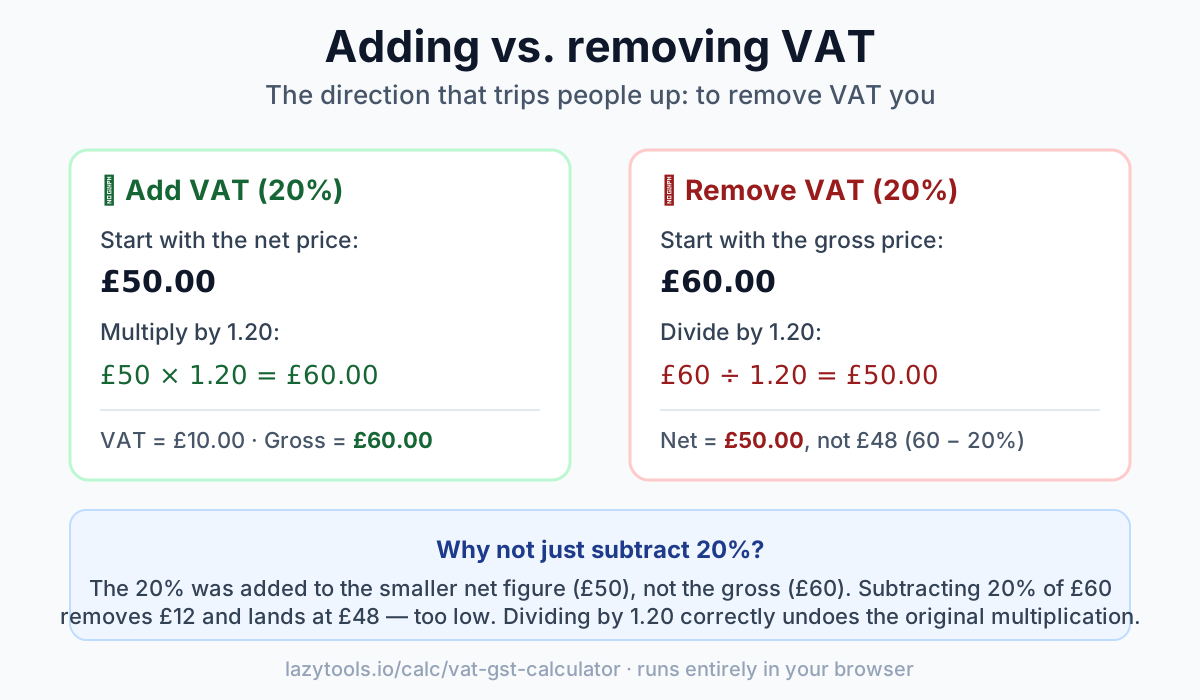
To add VAT, multiply the price (excluding VAT) by 1 plus the rate as a decimal. To remove VAT, divide the price (including VAT) by that same figure. You divide, you do not subtract the percentage. At a 20% rate, £50 excluding VAT becomes £50 × 1.20 = £60 including VAT; and £60 including VAT is £60 ÷ 1.20 = £50 excluding VAT. Subtracting 20% from £60 gives £48, which is wrong, and that single mistake is behind most VAT errors.
Adding VAT to a net price
If you have a price before tax (the net or ex-VAT price) and want the total a customer pays (the gross or inc-VAT price), multiply by 1 plus the rate:
gross = net × (1 + rate ÷ 100)
At 20%, that’s net × 1.20. The VAT itself is the net price times the rate:
VAT = net × (rate ÷ 100)
Example: a product priced at £200 excluding VAT, at 20%: VAT = £200 × 0.20 = £40, and the gross price = £200 × 1.20 = £240.
Removing VAT from a gross price
This is the one people get wrong. If you have the VAT-inclusive price and want the net price (or the VAT contained in it), you divide by 1 plus the rate:
net = gross ÷ (1 + rate ÷ 100)
At 20%, that’s gross ÷ 1.20. The VAT contained in the price is then the gross minus the net:
VAT = gross − net
Example: a receipt total of £240 including 20% VAT: net = £240 ÷ 1.20 = £200, so the VAT was £40.
Why you divide instead of subtracting 20%
The instinct is to take 20% off the gross price. That’s wrong because the 20% was originally added to the smaller net figure, not the larger gross figure.
Walk it through with £60 including 20% VAT:
- Subtracting 20% of £60 removes £12 → £48. Too low.
- The real net is £50, because £50 × 1.20 = £60. The VAT is £10, which is 20% of £50, but only 16.67% of £60.
So to strip VAT from a gross price you divide by 1.20 (or multiply by 0.8333), never subtract 0.20. This is why a “reverse VAT” calculation is a distinct operation from adding it.
| You have | You want | Do this (20%) |
|---|---|---|
| Net (ex-VAT) | Gross (inc-VAT) | × 1.20 |
| Net (ex-VAT) | VAT amount | × 0.20 |
| Gross (inc-VAT) | Net (ex-VAT) | ÷ 1.20 |
| Gross (inc-VAT) | VAT amount | − (gross ÷ 1.20) |
VAT and GST rates around the world
VAT (value-added tax) and GST (goods and services tax) are the same kind of tax, a percentage added at the point of sale, just under different names and rates. The arithmetic above works for any of them; only the rate changes.
| Country | Name | Standard rate |
|---|---|---|
| United Kingdom | VAT | 20% |
| Germany | VAT (MwSt) | 19% |
| France | VAT (TVA) | 20% |
| Ireland | VAT | 23% |
| Australia | GST | 10% |
| New Zealand | GST | 15% |
| India | GST | commonly 18% |
| Singapore | GST | 9% |
These are standard rates; many countries apply reduced or zero rates to categories like food, books, children’s goods and medicine. Rates also change over time. Treat this table as a starting point and confirm the current official rate for your country and product before relying on a figure, for authoritative rates see your national tax authority (e.g. HMRC in the UK or the European Commission VAT rates database).
Calculate it instantly
The VAT / GST calculator does both directions at any rate: enter a price, pick “add” or “remove”, and it returns the net, the VAT, and the gross. It runs entirely in your browser, your figures are never uploaded, and works for VAT, GST, or any percentage sales tax.
Related: the percentage guide covers the reverse-percentage arithmetic behind removing VAT, and markup vs margin explains the related pricing maths.
Frequently asked questions
How do I add VAT to a price?
Multiply the net (ex-VAT) price by 1 plus the rate as a decimal. At a 20% rate, multiply by 1.20, so £50 excluding VAT becomes £50 x 1.20 = £60 including VAT.
How do I remove VAT from a gross price?
Divide the VAT-inclusive price by 1 plus the rate. You divide, you do not subtract the percentage. At 20%, £60 including VAT is £60 / 1.20 = £50 excluding VAT.
Why can't I just subtract 20% to remove VAT?
Because the 20% was originally added to the smaller net figure, not the larger gross figure. Subtracting 20% of £60 removes £12 (giving £48), but the real net is £50, the £10 of VAT is 20% of £50 yet only 16.67% of the £60 gross.
How do I work out the VAT amount contained in a price?
When adding, the VAT is the net price times the rate (net x 0.20 at 20%). When removing, it is the gross minus the recovered net, for example £240 / 1.20 = £200, so the VAT was £240 - £200 = £40.
Is GST calculated the same way as VAT?
Yes. VAT and GST work identically as a percentage-based tax on the net price, only the name and the rate differ by country. The same add (multiply) and remove (divide) formulas apply.
Which VAT rate should I use in the calculation?
Use the current official rate for your country and product category, since rates and reduced-rate categories change over time. This guide's worked examples use 20%, but always confirm the applicable rate before relying on a figure.